Scheduled Defrag Disabled for SSD, but what about 2nd HD?

Mauser GDog

New member
Local time
11:13 PM
Messages
7
Hello Win7 forums.
I have my OS installed on a Kingston 64gb SSD, and have disabled scheduled defrags in my Administrative Tools.

I have a second mechanical drive installed for storage and non-vital applications, and can't seem to defrag this drive. I select Disk Defrag for that drive but nothing happens.

My questions is, with Disk Defrag Disabled to care for my SSD, how do I manually defrag my second HD? Or even better, is there a way to turn on scheduled defrag for the mechanical HD only?

Thank you, MGD
 

My Computer My Computer

At a glance

Win 7 Home Premium 64bit
OS
Win 7 Home Premium 64bit
Hello Win7 forums.
I have my OS installed on a Kingston 64gb SSD, and have disabled scheduled defrags in my Administrative Tools.

I have a second mechanical drive installed for storage and non-vital applications, and can't seem to defrag this drive. I select Disk Defrag for that drive but nothing happens.

My questions is, with Disk Defrag Disabled to care for my SSD, how do I manually defrag my second HD? Or even better, is there a way to turn on scheduled defrag for the mechanical HD only?

Thank you, MGD

Welcome to Seven Forums Mauser GDog. How did you disable schuduled defrags? You can delete the default task which is for C: and create a new task with the same perameters to defrag the 2nd drive (D:?). A Guy
 

My Computer My Computer

At a glance

Windows 10 Home x64INTEL Core i5-750 Quad-Core 3.37GHzHyperX Fury Black Series 8GB (2 x 4GB) 1866MhzEVGA GeForce GTX 750 Superclocked 1GB 128-Bit...
Computer type
PC/Desktop
OS
Windows 10 Home x64
CPU
INTEL Core i5-750 Quad-Core 3.37GHz
Motherboard
ASUS P7P55D
Memory
HyperX Fury Black Series 8GB (2 x 4GB) 1866Mhz
Graphics Card(s)
EVGA GeForce GTX 750 Superclocked 1GB 128-Bit GDDR5
Monitor(s) Displays
LG 32MA68HY 32" IPS
Screen Resolution
1920 x 1080
Hard Drives
Samsung 840 Evo 120GB, SEAGATE 500GB Barracuda® 7200.12, SATA 3 Gb/s, 7200 RPM, 16MB cache
PSU
ANTEC TruePower New TP-550, 80 PLUS, 550W
Case
ANTEC Three Hundred Illusion
Cooling
COOLER MASTER Hyper 212 Plus, 4 x 120mm 1 x 140mm Noctua's
Internet Speed
85 + Mbps
Antivirus
Avast
Browser
Vivaldi
I disabled it via:
Control Panel - Admin Tools - Task Scheduler - Microsoft - Windows - Defrag: set to disabled.

Will see about creating a new task for my 2nd Drive right now, thanks for the suggestion, will report back.
 

My Computer My Computer

At a glance

Win 7 Home Premium 64bit
OS
Win 7 Home Premium 64bit
The defrag task is entered as:
Action: Start a Program
Details: %windir%\system32\defrag.exe -c
I can edit the action, and it lists "-c" as "add arguments". I assume the C is for my SSD Drive which is named C.

I am hesitant to try and create a task for my SATA (F:) Drive, this is all new to me.
Wonder if I could simply make a new task with:
Action: Start a Program
Details: %windir%\system32\defrag.exe -f

I doubt it will work, seems like I need to browse to the drive I want to defrag, will keep playing with it.
 

My Computer My Computer

At a glance

Win 7 Home Premium 64bit
OS
Win 7 Home Premium 64bit
The defrag task is entered as:
Action: Start a Program
Details: %windir%\system32\defrag.exe -c
I can edit the action, and it lists "-c" as "add arguments". I assume the C is for my SSD Drive which is named C.

I am hesitant to try and create a task for my SATA (F:) Drive, this is all new to me.
Wonder if I could simply make a new task with:
Action: Start a Program
Details: %windir%\system32\defrag.exe -f

I doubt it will work, seems like I need to browse to the drive I want to defrag, will keep playing with it.

Yes, starting a new task was what I suggested. I believe -c is an arguement, not C:

I believe it would be

%windir%\system32\defrag.exe F: (assuming 2nd drive is F: )

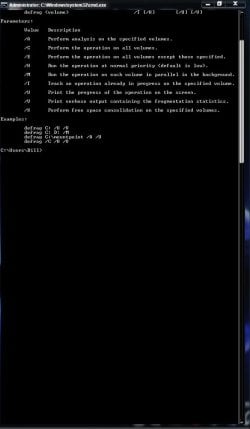
To see all the arguements

Start> Type cmd in search and click on cmd.exe in results above> In command prompt type

defrag.exe /?

This is what you will get

Arguements.jpg

A Guy
 

My Computer My Computer

At a glance

Windows 10 Home x64INTEL Core i5-750 Quad-Core 3.37GHzHyperX Fury Black Series 8GB (2 x 4GB) 1866MhzEVGA GeForce GTX 750 Superclocked 1GB 128-Bit...
Computer type
PC/Desktop
OS
Windows 10 Home x64
CPU
INTEL Core i5-750 Quad-Core 3.37GHz
Motherboard
ASUS P7P55D
Memory
HyperX Fury Black Series 8GB (2 x 4GB) 1866Mhz
Graphics Card(s)
EVGA GeForce GTX 750 Superclocked 1GB 128-Bit GDDR5
Monitor(s) Displays
LG 32MA68HY 32" IPS
Screen Resolution
1920 x 1080
Hard Drives
Samsung 840 Evo 120GB, SEAGATE 500GB Barracuda® 7200.12, SATA 3 Gb/s, 7200 RPM, 16MB cache
PSU
ANTEC TruePower New TP-550, 80 PLUS, 550W
Case
ANTEC Three Hundred Illusion
Cooling
COOLER MASTER Hyper 212 Plus, 4 x 120mm 1 x 140mm Noctua's
Internet Speed
85 + Mbps
Antivirus
Avast
Browser
Vivaldi
Oh nice, thanks.
Looking through the list of arguments I see what needs to be done.
Getting into unknown territory here, but it's interesting.

Thanks for your help Guy.
MGD
 

My Computer My Computer

At a glance

Win 7 Home Premium 64bit
OS
Win 7 Home Premium 64bit
I would reenable the scheduled defrag in the task scheduler and then just deselect the C: drive from the list in the defrager itself.
BTW, when I installed my OCZ SSD drive, Windows & automatically removed the SSD (C:) from the defrag schedule list.
 

My Computer My Computer

At a glance

Windows 10 Pro x64, Windows 8.1 Pro x64, Wind...INTEL i9-7920X LGA 206664 GB (4 X 16 GB) G-Skill V Series DDR4 3200 ...EVGA GTX 1060 SC 3 GB
Computer type
PC/Desktop
Computer Manufacturer/Model Number
Custom Built
OS
Windows 10 Pro x64, Windows 8.1 Pro x64, Windows 7 Ultimate x64 SP1,
CPU
INTEL i9-7920X LGA 2066
Motherboard
Gigabyte X299-WU8 F3
Memory
64 GB (4 X 16 GB) G-Skill V Series DDR4 3200 Quad Channel
Graphics Card(s)
EVGA GTX 1060 SC 3 GB
Sound Card
Realtek Onboard ALC1220
Monitor(s) Displays
2 x Samsung S27E310
Screen Resolution
1920x1080
Hard Drives
Samsung 2 x 970 EVO Plus 500 GB NVMe
1 x 6TB WD 6003FZBX SATA
1 x 6TB WD 60EFRX SATA
12 x 3TB WD 30EFRX SATA
PSU
Seasonic X-1050
Case
Thermaltake Armor+
Cooling
Corsair H80i V2 Liquid AOI Cooler
Keyboard
Logitech G510s
Mouse
Logitech MX Master 2S
Internet Speed
200 Mb/s
Antivirus
ESET NOD32 13.1
Browser
EDGE (Dev, Canary, Beta), Chrome
Other Info
ASUS RT-AC68U router
Malwarebytes 4.0.4
You can defrag your second drive manually the same way you've always done it. Using the built-in defragger, which should be in your Start Menu, or by going to the Properties of the drive, under Tools, and choosing the defragger.
 

My Computer My Computer

At a glance

Windows 7 Ultimate x64 SP1Intel Core i7-260012 GB Patriot Extreme DDR3-1333Nvidia GTX 470
OS
Windows 7 Ultimate x64 SP1
CPU
Intel Core i7-2600
Motherboard
Gigabyte GA-P67A-UD3P-B3
Memory
12 GB Patriot Extreme DDR3-1333
Graphics Card(s)
Nvidia GTX 470
Monitor(s) Displays
Dell UltraSharp 2209WA
Hard Drives
OCZ Agility3 240 GB, WD5001AALS, WD7501AALS
PSU
OCZ ModStream 700W
Case
CoolerMaster HAF 912 Advanced
Cooling
CoolerMaster Hyper 212 Plus
You can defrag your second drive manually the same way you've always done it. Using the built-in defragger, which should be in your Start Menu, or by going to the Properties of the drive, under Tools, and choosing the defragger.

In my OP I mentioned that I can't seem to manually defrag it, which is why I am here.
 

My Computer My Computer

At a glance

Win 7 Home Premium 64bit
OS
Win 7 Home Premium 64bit
I would reenable the scheduled defrag in the task scheduler and then just deselect the C: drive from the list in the defrager itself.
BTW, when I installed my OCZ SSD drive, Windows & automatically removed the SSD (C:) from the defrag schedule list.

Promising, let me see if that works for my setup. Thanks!
 

My Computer My Computer

At a glance

Win 7 Home Premium 64bit
OS
Win 7 Home Premium 64bit
Ok, here was my mistake. When I setup my system after I built it, I used a SSD tweaking guide to configure my SSD drive I have my OS installed on.

In Admin tools - Scheduled Tasks - Disk Defrag - I had it disabled, which I switched to enabled. (I will go back and disable it because I want to do it manually.)
In Services - Disk Defrag - I had it set to disabled. After I switch this to 'manual' I am able to select my 2nd HD and go tools - defrag and defrag as normal.

Sorry for the confusion, too many changes made and forgotten!

MGD
 

My Computer My Computer

At a glance

Win 7 Home Premium 64bit
OS
Win 7 Home Premium 64bit
But you learned something ;)

A Guy
 

My Computer My Computer

At a glance

Windows 10 Home x64INTEL Core i5-750 Quad-Core 3.37GHzHyperX Fury Black Series 8GB (2 x 4GB) 1866MhzEVGA GeForce GTX 750 Superclocked 1GB 128-Bit...
Computer type
PC/Desktop
OS
Windows 10 Home x64
CPU
INTEL Core i5-750 Quad-Core 3.37GHz
Motherboard
ASUS P7P55D
Memory
HyperX Fury Black Series 8GB (2 x 4GB) 1866Mhz
Graphics Card(s)
EVGA GeForce GTX 750 Superclocked 1GB 128-Bit GDDR5
Monitor(s) Displays
LG 32MA68HY 32" IPS
Screen Resolution
1920 x 1080
Hard Drives
Samsung 840 Evo 120GB, SEAGATE 500GB Barracuda® 7200.12, SATA 3 Gb/s, 7200 RPM, 16MB cache
PSU
ANTEC TruePower New TP-550, 80 PLUS, 550W
Case
ANTEC Three Hundred Illusion
Cooling
COOLER MASTER Hyper 212 Plus, 4 x 120mm 1 x 140mm Noctua's
Internet Speed
85 + Mbps
Antivirus
Avast
Browser
Vivaldi
Back
Top