Scheduled Tasks

deanie44

New member
Member
Local time
6:48 PM
Messages
66
Location
West Haven, CT
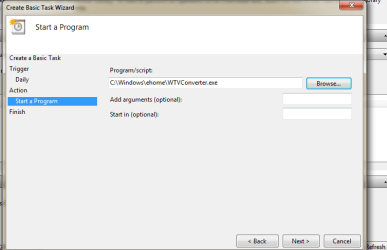
Good Morning everyone. I hope everyone's Thanksgiving was pleasant and safe. I am trying to create a task to run Wtvwatcher at a specific time. Unfortunately it is not working. I have searched several forums and blogs and I still cannot do it correctly. When the scheduler asks for a program I type--C\Windows\ehome\Converter.exe.
When I look at the scheduled task it looks like this: Any help would be appreciated. deanie44:cry:
 

Attachments

  • SCHEDULED TASKS.PNG
    SCHEDULED TASKS.PNG
    18.1 KB · Views: 27

My Computer

Computer Manufacturer/Model Number
INSPIRON 560MT
OS
windows 7 X64
CPU
Intel(R) Pentium(4) CPU 3.06 GHz
Memory
4 GB OF RAM
Sound Card
REALTEK HD AUDIO
Monitor(s) Displays
Dell Generic Monitor and Vizio E320VL LCD TV
Screen Resolution
1280 X 720
Hard Drives
1 TB SATA II HARDDRIVE
Keyboard
Dell generic keyboard
Internet Speed
16 Mbp
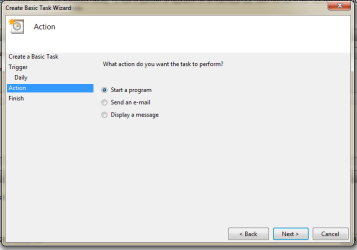
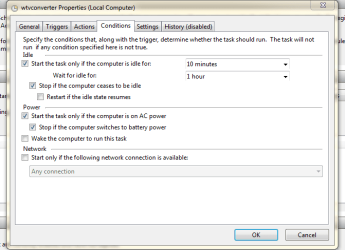
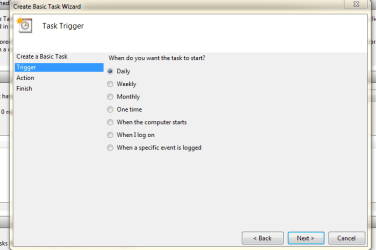
Can you give us a screen shot of the Triggers, Actions and Conditions please.

Regards,
JDobbsy1987
 

My Computer

Computer type
PC/Desktop
Computer Manufacturer/Model Number
Self Built
OS
Windows 8.1 Pro x64
CPU
Intel Core i5-2500K @ 3.30GHz - S1155
Motherboard
Asus P8P67 LE Rev3, Intel P67, S115
Memory
8GB Corsair DDR3 XMS3, PC3-12800
Graphics Card(s)
NVIDIA GeForce GTX 650
Sound Card
On-Board
Monitor(s) Displays
3 x 24" {Extended Display}
Screen Resolution
1920 x 1080
Hard Drives
300GB Seagate Barracuda 7200
PSU
550W Coolermaster GX550
Case
Silverstone Precision PS04B
Cooling
Stock
Keyboard
Logitech K120
Mouse
World of Warcraft Cataclysm MMO Gaming Mouse
Internet Speed
80 MB
Antivirus
MSE / Windows Defender
Browser
Chrome
Hi JDobbsy1987. Thank you for answering my post. Here are the files you requested. I hope you or someone else can help me. deanie44
 

Attachments

  • ACTIONS.PNG
    ACTIONS.PNG
    11.6 KB · Views: 13
  • CONDITIONS.PNG
    CONDITIONS.PNG
    16.7 KB · Views: 10
  • START A PROGRAM.PNG
    START A PROGRAM.PNG
    13.8 KB · Views: 11
  • TRIGGER.PNG
    TRIGGER.PNG
    12.3 KB · Views: 6

My Computer

Computer Manufacturer/Model Number
INSPIRON 560MT
OS
windows 7 X64
CPU
Intel(R) Pentium(4) CPU 3.06 GHz
Memory
4 GB OF RAM
Sound Card
REALTEK HD AUDIO
Monitor(s) Displays
Dell Generic Monitor and Vizio E320VL LCD TV
Screen Resolution
1280 X 720
Hard Drives
1 TB SATA II HARDDRIVE
Keyboard
Dell generic keyboard
Internet Speed
16 Mbp
try chaing the Program/Script to:
Code:
C:\Program Files\DVRSoft\WTV to MPEG2\WTV2Mpeg.exe
 

My Computer

Computer type
PC/Desktop
Computer Manufacturer/Model Number
Self Built
OS
Windows 8.1 Pro x64
CPU
Intel Core i5-2500K @ 3.30GHz - S1155
Motherboard
Asus P8P67 LE Rev3, Intel P67, S115
Memory
8GB Corsair DDR3 XMS3, PC3-12800
Graphics Card(s)
NVIDIA GeForce GTX 650
Sound Card
On-Board
Monitor(s) Displays
3 x 24" {Extended Display}
Screen Resolution
1920 x 1080
Hard Drives
300GB Seagate Barracuda 7200
PSU
550W Coolermaster GX550
Case
Silverstone Precision PS04B
Cooling
Stock
Keyboard
Logitech K120
Mouse
World of Warcraft Cataclysm MMO Gaming Mouse
Internet Speed
80 MB
Antivirus
MSE / Windows Defender
Browser
Chrome
Does just running converter.exe automatically remove the commercials from all shows on your pc or something? I feel like there should be more command line arguments to it than that.

Open a command prompt and just type in the "C:\Windows\ehome\Converter.exe" command and hit enter. Whatever you see happen (or not) is what is happening when that task is run.

Additionally, if it runs daily, as you tell it to, you only have it enabled to run when a user is logged on, so you would have to be logged on to the computer at that time every day for this to run. I'd change that to run whether anyone is logged on or not, especially if your pc is configured to have a screensaver with a prompt to log-on every time it comes back from it.
 

My Computer

OS
XP / Win7 x64 Pro
CPU
Intel Quad-Core Q9450 @ 3.2GHz
Motherboard
Asus P5-E
Memory
2x2GB GSkill DDR2
Graphics Card(s)
NVIDIA GeForce 8600 GTS (EVGA)
Monitor(s) Displays
Dell 2408WFP
Screen Resolution
1920x1200
Back
Top