
Scrambled folder names, New Install

bullfights

New member
Power User
Local time
8:07 PM
Messages
154
Hey there, have my EX's computer with me and just got finished installing Win 7 32bit over another win7, so it created the windows.old folder.

My question pertains to some folders that look like gibberish, scrambled letters as though they were encrypted, or as I have seen before like a virus that has that type of naming. Her old install was full of junk and virus', I couldnt get it solved and really didnt want to spend alot of time doing so, even after she sadi the do a clean install. I instead did a fresh install over the old OS.

I have attached an image of what her folders look like in the C drive, and this is after a fresh install like noted above, and having all updates installed, has Office 2007 installed, plus advanced system care, silverlight, mosbackup, FF7, IE9, and thats it.

I did run a malware check but found nothing

I am hoping someone has an answer, could I delete them of should I just re-install but clean, save the windows.old somewhere?

Thanks
Gerry
 

Attachments
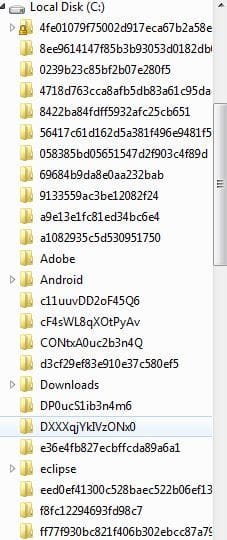
  • Capture-scrambled folders.JPG
    Capture-scrambled folders.JPG
    35.7 KB · Views: 15

My Computer

Computer Manufacturer/Model Number
Self built
OS
W764 & W764
CPU
AMD Phenom II X4 810 2.6ghz & AMD|PH II X6 1055T 2.8G AM3 RT
Motherboard
Asus M4A79T Deluxe & ASUS| M4A88TD-V EVO/USB3 880G
Memory
6.0 gb & 16.0 gb (64bit)
Graphics Card(s)
GForce 9800 GTX 512gb & Sapphire HD6870
Sound Card
Integrated
Monitor(s) Displays
1 32" LG 1080 TV
Screen Resolution
1920x1080
Hard Drives
(Phenom X4)
WD 10K 74 GB 3.0gb/s
WD 320 GB
2 X WD 7200 1TB 3.0gb/s
-External HDs-
3 X WD 1 TB 3.0gb/s

(Phenom X6)
WD 10K 300 GB 3.0gb/s
WD 1TB 6.0 gbs
-External HDs-
WD 1 TB 6.0gb/s thru eSATA
WD 1 TB 6.0gb/s thre USB 3.0
PSU
Corsair 750 W & CoolerMaster 700W
Case
CM690 & CM690
Cooling
Both CM690 have 7 120mm Fans
Keyboard
stock USB
Mouse
logitech wireless
Internet Speed
cable
Other Info
I do alot of Video and DVD burning
These might just be temporary setup folders left behind from installing various software - I've seen this on occasion before, and they were always safe to delete.
You didn't say what's inside the folders... also, since your intention was to wipe out all the infections and start clean, why did you perform an in-place reinstall over the old OS?
 

My Computer

Computer type
PC/Desktop
Computer Manufacturer/Model Number
Custom-built
OS
Windows 7 Professional SP1 32-bit
CPU
Intel Core 2 Duo E6600 2.4GHz
Motherboard
Asus PL5D2
Memory
4GB DDR2-667 (4x1GB in dual-channel config)
Graphics Card(s)
nVidia GeForce 9800 GT
Sound Card
Creative X-Fi XtremeMusic
Monitor(s) Displays
Acer P236H
Screen Resolution
1920x1200 (DVI)
Hard Drives
OCZ SSD Vertex Plus 60GB SATA (Firmware 3.55), 64MB cache
Hitachi HD321KJ SATA, 320GB, 7200rpm, 16MB cache
PSU
Antec TruePower 2.0
Case
Cooler Master Centurion
Cooling
Too many fans
Keyboard
Standard
Mouse
Microsoft wireless optical mouse
Internet Speed
AT&T U-verse (18mbit/sec)
Antivirus
Microsoft Security Essentials
Browser
Firefox
Other Info
Other devices:
Compaq CQ-60 laptop
Google Nexus 7 (2012) tablet
Nvidia SHIELD tablet (US/LTE)
Hardkernel ODROID-XU single-board computer (Samsung Exynos 5420)
These might just be temporary setup folders left behind from installing various software - I've seen this on occasion before, and they were always safe to delete.

Ok thought about that, temp folders will delete. though.....

You didn't say what's inside the folders... also, since your intention was to wipe out all the infections and start clean, why did you perform an in-place reinstall over the old OS?

Yes all are empty....well I was hoping to save what important info she had, that I might have missed during back up. I backed up all her docs, music, photos, videos etc on a separate drive from her user folder, but I was wondering whether there was anything left and opted to keep an old build just in case there WAS something I forgot.

Could have been the wrong thing to do? Wondering now if I should re-install but with clean install.....although it does seem to be clear of bugs, MSE found some in the windows.old folder and promptly deleted. I will run more scans before I give it back.

Thanks for the input.
Gerry
 

My Computer

Computer Manufacturer/Model Number
Self built
OS
W764 & W764
CPU
AMD Phenom II X4 810 2.6ghz & AMD|PH II X6 1055T 2.8G AM3 RT
Motherboard
Asus M4A79T Deluxe & ASUS| M4A88TD-V EVO/USB3 880G
Memory
6.0 gb & 16.0 gb (64bit)
Graphics Card(s)
GForce 9800 GTX 512gb & Sapphire HD6870
Sound Card
Integrated
Monitor(s) Displays
1 32" LG 1080 TV
Screen Resolution
1920x1080
Hard Drives
(Phenom X4)
WD 10K 74 GB 3.0gb/s
WD 320 GB
2 X WD 7200 1TB 3.0gb/s
-External HDs-
3 X WD 1 TB 3.0gb/s

(Phenom X6)
WD 10K 300 GB 3.0gb/s
WD 1TB 6.0 gbs
-External HDs-
WD 1 TB 6.0gb/s thru eSATA
WD 1 TB 6.0gb/s thre USB 3.0
PSU
Corsair 750 W & CoolerMaster 700W
Case
CM690 & CM690
Cooling
Both CM690 have 7 120mm Fans
Keyboard
stock USB
Mouse
logitech wireless
Internet Speed
cable
Other Info
I do alot of Video and DVD burning
The only real way to be sure you are rid of a virus is to run 'clean all' from diskpart. Tutoural. Also, all user files documents-pictures-downloads- music) should be located in C:/users. Backup that folder and it should cover any personal files.
 

My Computers

System One System Two

  • Computer type
    PC/Desktop
    Computer Manufacturer/Model Number
    ALWAYS UNDER CONSTRUCTION
    OS
    Windows 11 Pro
    CPU
    Ryzen 9 5900X
    Motherboard
    Asus X570 Crosshair Viii Hero
    Memory
    32GB G Skill DDR4-3600
    Graphics Card(s)
    EVGA RTX 3080 FTW 3 Ultra
    Sound Card
    On Board/Sennheiser PC37X Headset
    Monitor(s) Displays
    3 X Asus 27"
    Screen Resolution
    2560x1440
    Hard Drives
    2 X 1 TB NVME drives
    PSU
    EVGA 850
    Case
    Phanteks Eclipse P400A
    Cooling
    EVGA 280 AIO
    Keyboard
    Logitech G510s/ Logitech G13
    Mouse
    Logitech G502
    Internet Speed
    24/1
    Antivirus
    ESET/MBAM Pro/SAS Pro
    Browser
    Chrome/ Firefox/ Edge
  • Computer type
    Laptop
    System Manufacturer/Model Number
    Dell 16 Plus
    OS
    Windows 11 Pro
    CPU
    Intel Ultra 9 288V
    Memory
    32 GB LPDDR5X 8533
    Monitor(s) Displays
    16" Mini-LED HDR600 Touch 90 Hz
    Screen Resolution
    2560X1600
    Hard Drives
    1 TB NVME
hmm good to know for future installs, thanks.

I ended up moving the windows.old folder to an external drive in case its needed. Then did a clean install.

Thanks for all the help.

Gerry
 

My Computer

Computer Manufacturer/Model Number
Self built
OS
W764 & W764
CPU
AMD Phenom II X4 810 2.6ghz & AMD|PH II X6 1055T 2.8G AM3 RT
Motherboard
Asus M4A79T Deluxe & ASUS| M4A88TD-V EVO/USB3 880G
Memory
6.0 gb & 16.0 gb (64bit)
Graphics Card(s)
GForce 9800 GTX 512gb & Sapphire HD6870
Sound Card
Integrated
Monitor(s) Displays
1 32" LG 1080 TV
Screen Resolution
1920x1080
Hard Drives
(Phenom X4)
WD 10K 74 GB 3.0gb/s
WD 320 GB
2 X WD 7200 1TB 3.0gb/s
-External HDs-
3 X WD 1 TB 3.0gb/s

(Phenom X6)
WD 10K 300 GB 3.0gb/s
WD 1TB 6.0 gbs
-External HDs-
WD 1 TB 6.0gb/s thru eSATA
WD 1 TB 6.0gb/s thre USB 3.0
PSU
Corsair 750 W & CoolerMaster 700W
Case
CM690 & CM690
Cooling
Both CM690 have 7 120mm Fans
Keyboard
stock USB
Mouse
logitech wireless
Internet Speed
cable
Other Info
I do alot of Video and DVD burning
We're glad you got it workng like you want it. Good luck with it.
 

My Computers

System One System Two

  • Computer type
    PC/Desktop
    Computer Manufacturer/Model Number
    ALWAYS UNDER CONSTRUCTION
    OS
    Windows 11 Pro
    CPU
    Ryzen 9 5900X
    Motherboard
    Asus X570 Crosshair Viii Hero
    Memory
    32GB G Skill DDR4-3600
    Graphics Card(s)
    EVGA RTX 3080 FTW 3 Ultra
    Sound Card
    On Board/Sennheiser PC37X Headset
    Monitor(s) Displays
    3 X Asus 27"
    Screen Resolution
    2560x1440
    Hard Drives
    2 X 1 TB NVME drives
    PSU
    EVGA 850
    Case
    Phanteks Eclipse P400A
    Cooling
    EVGA 280 AIO
    Keyboard
    Logitech G510s/ Logitech G13
    Mouse
    Logitech G502
    Internet Speed
    24/1
    Antivirus
    ESET/MBAM Pro/SAS Pro
    Browser
    Chrome/ Firefox/ Edge
  • Computer type
    Laptop
    System Manufacturer/Model Number
    Dell 16 Plus
    OS
    Windows 11 Pro
    CPU
    Intel Ultra 9 288V
    Memory
    32 GB LPDDR5X 8533
    Monitor(s) Displays
    16" Mini-LED HDR600 Touch 90 Hz
    Screen Resolution
    2560X1600
    Hard Drives
    1 TB NVME
Back
Top