screen capture and changing rez

waynester

New member
Local time
4:36 PM
Messages
4
samsung 26" monitor/tv 1920 x 1080
win 7 64 pro, nvida 230 w1.5mb mem
connected via hdmi

Maybe i have overlooked the answer, but here is my problem.
I have tried , faststone, snag-it, picpick,screenshotcapture programs and all give me same results.
When i "click" for screen shot, the screen rez changes to giant size and all i can see of screen is @ 1/4 top left of original screen with no way to view other 3/4 of screen.
 

My Computer

Computer Manufacturer/Model Number
HP Elite (HPE-150F)
OS
win 7 pro x64
CPU
Intel Core i7-860 2.8GHz
Memory
8GB DDR3
Graphics Card(s)
1.5GB Nvidia GeForce GT230
Monitor(s) Displays
Samsung 26" HD monitor/tv
Screen Resolution
1920 x 1080
Last edited by a moderator:

My Computer

Computer Manufacturer/Model Number
D3f's Customs
OS
Win 7 Ultimate SP1 x64
CPU
Intel Pentium Dual Core E5300 OC'd @ 3GHz
Motherboard
Asus P5G41-M LE
Memory
Kingston 2x2GB DDR2-800 Dual Channel SDRAM
Graphics Card(s)
Integrated Intel GMA X4500
Sound Card
Realtek 5.1 HD Audio (ALC887)
Monitor(s) Displays
LG Flatron W1943S @ 60Hz
Screen Resolution
1360 x 768
Hard Drives
Internal - WD Caviar Blue 500GB, External - WD My Passport Essential 500GB
PSU
Headway 450w PSU
Case
Pixxo Slim Black mATX Case
Cooling
Stock Cpu Fan, 1 x Top Case Fan
Keyboard
Logitech K120
Mouse
Logitech LS1 Laser Mouse
Internet Speed
17.66Mb/s Down, 0.82Mb/s Up
Other Info
Creative SBS A300 2.1 Speaker System, LG GH22NS50 22x Internal Super-Multi DVD-RW, 2Wire 5012NV Wireless Modem Router
I have used all those programs and don't have those problems,,, so, it has to be something you are not doing right, or another problem.

Or, try D3fton3z suggestions. But you shouldn't have to.
 

My Computer

Computer Manufacturer/Model Number
Self Built
OS
Win 7 Ultimate 32bit
CPU
C2D E6600 2.4Ghz
Motherboard
Intel D965WH
Memory
4G Kingston KHX5400D2
Graphics Card(s)
EVGA GTX 570 HD SC (012-P3-1573-KR)
Sound Card
On-Board
Monitor(s) Displays
Samsung 226BW
Screen Resolution
1680 x 1050
Hard Drives
2 x 250 Seagate Barracuda
2 x 500 Seagate Barracuda (Raid1)
PSU
Corsair TX750W
Case
In-Win C589
Cooling
Stock Intel Cooling
If TS decides to use my method and still experiencing problems with the resolution.
Try this. Press "PrintScreen" on your keyboard. Open up Windows Paint, don't paste it 1st. On the top left hand panel, click on "Resize". Click on "Pixels". Adjust it to your screen resolution. Click Ok. Now paste "CTRL+V" the screenshot you just took into Paint.

Hope this helps. :)
 

My Computer

Computer Manufacturer/Model Number
D3f's Customs
OS
Win 7 Ultimate SP1 x64
CPU
Intel Pentium Dual Core E5300 OC'd @ 3GHz
Motherboard
Asus P5G41-M LE
Memory
Kingston 2x2GB DDR2-800 Dual Channel SDRAM
Graphics Card(s)
Integrated Intel GMA X4500
Sound Card
Realtek 5.1 HD Audio (ALC887)
Monitor(s) Displays
LG Flatron W1943S @ 60Hz
Screen Resolution
1360 x 768
Hard Drives
Internal - WD Caviar Blue 500GB, External - WD My Passport Essential 500GB
PSU
Headway 450w PSU
Case
Pixxo Slim Black mATX Case
Cooling
Stock Cpu Fan, 1 x Top Case Fan
Keyboard
Logitech K120
Mouse
Logitech LS1 Laser Mouse
Internet Speed
17.66Mb/s Down, 0.82Mb/s Up
Other Info
Creative SBS A300 2.1 Speaker System, LG GH22NS50 22x Internal Super-Multi DVD-RW, 2Wire 5012NV Wireless Modem Router
thank you for your suggestions, D3ftOn3Z and Tepid. with no changes on my part , picpick (which is similar to snag it) has started to work properly. Faststone and photoscape still change rez or "zoom" in to the upper left part of screen when you try to enter capture mode.
 

My Computer

Computer Manufacturer/Model Number
HP Elite (HPE-150F)
OS
win 7 pro x64
CPU
Intel Core i7-860 2.8GHz
Memory
8GB DDR3
Graphics Card(s)
1.5GB Nvidia GeForce GT230
Monitor(s) Displays
Samsung 26" HD monitor/tv
Screen Resolution
1920 x 1080
here is an example of "full screen"capture using faststone, it only captures the top left 1097x617 of screen.
2010-02-06_223225.png
 

My Computer

Computer Manufacturer/Model Number
HP Elite (HPE-150F)
OS
win 7 pro x64
CPU
Intel Core i7-860 2.8GHz
Memory
8GB DDR3
Graphics Card(s)
1.5GB Nvidia GeForce GT230
Monitor(s) Displays
Samsung 26" HD monitor/tv
Screen Resolution
1920 x 1080
Have you tried to refresh / change your monitor settings ??

Sounds like to me that as i use to have something like that happen when switching to certain games. Then after wards.. It would do and act like that on certain things and programs. Like do it automatically by itself like i was switching to a game (not really switch to actual game but just the way the view or monitor acted meaning) Everything would go WAY large, like mouse pointer and such etc..

I refreshed, and/or switched those back and forth. Then it would clear that issue up. or hit the auto button and have it clear it up for the time being then refresh/reset them. It would be fine up until i had opened whatever it was that made it start acting up like that again... Then i would have to go threw the same process again to clear it up from doing that again. Then i noticed what the main program corporate was. Then got rid of it or stopped using it ever again. Whatever the program or folder was. (cant remember that) It was just a random thing and /or program or folder making it do it
 

My Computer

Computer Manufacturer/Model Number
HP's, Dell's
OS
Win-7HP, VistaHP, XP
CPU
AMD Athlon II 240 dual-core processor 5050E 2,6 GHz
Memory
6GB
Graphics Card(s)
1GB NVIDIA GeForce GT 220 [DVI, HDMI, VGA adapter]
Sound Card
Asus Xonar Essence STX
Monitor(s) Displays
HP 2159m 21.5-inch 16:9 Full LCD HD Widescreen
Screen Resolution
1920x1080
Hard Drives
500GB 7200 rpm SATA 3Gb/s hard drive
Seagate EHD 250gb
Seagate EHD 1T
Internet Speed
16mb
Also might want to go into device manager and update you Nvida driver.

Know how to do that from there ??
 

My Computer

Computer Manufacturer/Model Number
HP's, Dell's
OS
Win-7HP, VistaHP, XP
CPU
AMD Athlon II 240 dual-core processor 5050E 2,6 GHz
Memory
6GB
Graphics Card(s)
1GB NVIDIA GeForce GT 220 [DVI, HDMI, VGA adapter]
Sound Card
Asus Xonar Essence STX
Monitor(s) Displays
HP 2159m 21.5-inch 16:9 Full LCD HD Widescreen
Screen Resolution
1920x1080
Hard Drives
500GB 7200 rpm SATA 3Gb/s hard drive
Seagate EHD 250gb
Seagate EHD 1T
Internet Speed
16mb
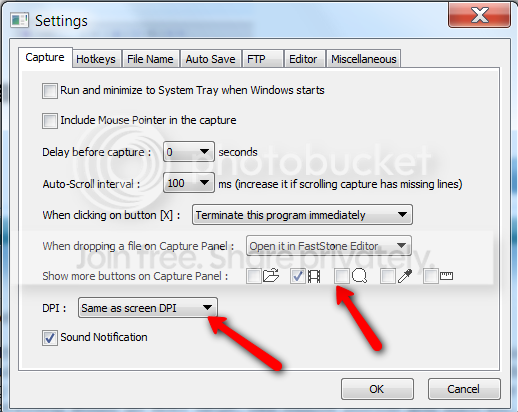
Check these 2 places in FSC settings:

2010-02-06_2357.png
 

My Computer

Computer Manufacturer/Model Number
HP, Dell, Gateway, Toshiba - 4 laptops and 2 desktops
OS
Vista, Windows7, Mint Mate, Zorin, Windows 8
CPU
from 1.6GHz Duo to i7
Monitor(s) Displays
2x HP w2207
Hard Drives
5x HDD, 7x SSD, 12x Externals
Keyboard
with trackball - no mices
Mouse
Trackball mice
Internet Speed
DSL 6000
Last edited by a moderator:

My Computer

Computer Manufacturer/Model Number
HP's, Dell's
OS
Win-7HP, VistaHP, XP
CPU
AMD Athlon II 240 dual-core processor 5050E 2,6 GHz
Memory
6GB
Graphics Card(s)
1GB NVIDIA GeForce GT 220 [DVI, HDMI, VGA adapter]
Sound Card
Asus Xonar Essence STX
Monitor(s) Displays
HP 2159m 21.5-inch 16:9 Full LCD HD Widescreen
Screen Resolution
1920x1080
Hard Drives
500GB 7200 rpm SATA 3Gb/s hard drive
Seagate EHD 250gb
Seagate EHD 1T
Internet Speed
16mb
This system is only a few weeks old , though i do have a few driver updates available already.
For now i'll just use the ms snip it tool and the free PicPick program (like a snag-it lite).
But i still wonder why the picpick works correctly and the others still change screen rez
 

My Computer

Computer Manufacturer/Model Number
HP Elite (HPE-150F)
OS
win 7 pro x64
CPU
Intel Core i7-860 2.8GHz
Memory
8GB DDR3
Graphics Card(s)
1.5GB Nvidia GeForce GT230
Monitor(s) Displays
Samsung 26" HD monitor/tv
Screen Resolution
1920 x 1080
what is wrong with snipping tool?
 

My Computer

Computer Manufacturer/Model Number
HP dv6519tx
OS
Windows 7 Ultimate x64
CPU
1.80 GHz Intel Core 2 Duo processor T7100
Memory
3 gig ddr2
Graphics Card(s)
NVIDIA GeForce 8400M GS
Sound Card
Realtek High Definition Audio
Monitor(s) Displays
15.4” WXGA High Definition BrightView Widescreen
Screen Resolution
1280 x 800
Hard Drives
Hitachi 320 GB (5400 rpm)
PSU
90 W AC Power Adapter
Cooling
Kitchen plate under the lappy
Keyboard
101 key compatible
Mouse
Touch Pad with On/Off button and dedicated vertical Scroll
Internet Speed
Three Wireless internet prepaid using E160G USB dongle
Snip tool is fine. But missing many features that FastStone and others provide.
 

My Computer

Computer Manufacturer/Model Number
Self Built
OS
Win 7 Ultimate 32bit
CPU
C2D E6600 2.4Ghz
Motherboard
Intel D965WH
Memory
4G Kingston KHX5400D2
Graphics Card(s)
EVGA GTX 570 HD SC (012-P3-1573-KR)
Sound Card
On-Board
Monitor(s) Displays
Samsung 226BW
Screen Resolution
1680 x 1050
Hard Drives
2 x 250 Seagate Barracuda
2 x 500 Seagate Barracuda (Raid1)
PSU
Corsair TX750W
Case
In-Win C589
Cooling
Stock Intel Cooling
and again i ask whats wrong with snipping tool, what possible features could be lacking from an app that simply needs to copy an image from the screen to allow others to see. And more to the point, I have never had any weird screen resolution problems using the native windows app.
 

My Computer

Computer Manufacturer/Model Number
HP dv6519tx
OS
Windows 7 Ultimate x64
CPU
1.80 GHz Intel Core 2 Duo processor T7100
Memory
3 gig ddr2
Graphics Card(s)
NVIDIA GeForce 8400M GS
Sound Card
Realtek High Definition Audio
Monitor(s) Displays
15.4” WXGA High Definition BrightView Widescreen
Screen Resolution
1280 x 800
Hard Drives
Hitachi 320 GB (5400 rpm)
PSU
90 W AC Power Adapter
Cooling
Kitchen plate under the lappy
Keyboard
101 key compatible
Mouse
Touch Pad with On/Off button and dedicated vertical Scroll
Internet Speed
Three Wireless internet prepaid using E160G USB dongle
and again i ask whats wrong with snipping tool, what possible features could be lacking from an app that simply needs to copy an image from the screen to allow others to see. And more to the point, I have never had any weird screen resolution problems using the native windows app.

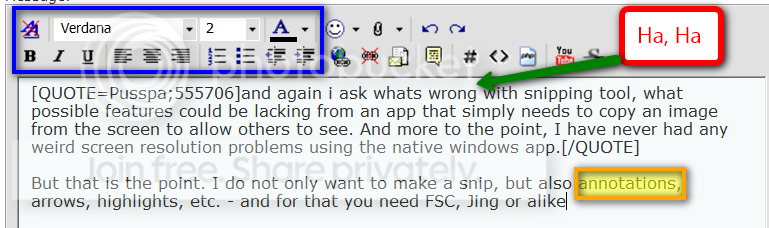
But that is the point. I do not only want to make a snip, but also annotations, arrows, highlights, etc. - and for that you need FSC, Jing or alike.

2010-02-07_2004.png
 

My Computer

Computer Manufacturer/Model Number
HP, Dell, Gateway, Toshiba - 4 laptops and 2 desktops
OS
Vista, Windows7, Mint Mate, Zorin, Windows 8
CPU
from 1.6GHz Duo to i7
Monitor(s) Displays
2x HP w2207
Hard Drives
5x HDD, 7x SSD, 12x Externals
Keyboard
with trackball - no mices
Mouse
Trackball mice
Internet Speed
DSL 6000
Snip is fine for most people who just need to do a simple screen shot or 2 from time to time.
I have nothing against Snipping Tool, works fantastic.

But, as seen in WHS post,, there is more to screen shooting than just a screen shot if needed.

Lets say you want to take a series of screen shots. With a proper screen shot tool you can set a destination folder and naming scheme and just take several shots in sequence without having to save each one individually. Can save a ton of time.
 

My Computer

Computer Manufacturer/Model Number
Self Built
OS
Win 7 Ultimate 32bit
CPU
C2D E6600 2.4Ghz
Motherboard
Intel D965WH
Memory
4G Kingston KHX5400D2
Graphics Card(s)
EVGA GTX 570 HD SC (012-P3-1573-KR)
Sound Card
On-Board
Monitor(s) Displays
Samsung 226BW
Screen Resolution
1680 x 1050
Hard Drives
2 x 250 Seagate Barracuda
2 x 500 Seagate Barracuda (Raid1)
PSU
Corsair TX750W
Case
In-Win C589
Cooling
Stock Intel Cooling
my apologies, I am not worthy. I guess in my simple needs (and ability to use paint or photoshop), I forget that there is a need for 3rd party additions to win7!
 

My Computer

Computer Manufacturer/Model Number
HP dv6519tx
OS
Windows 7 Ultimate x64
CPU
1.80 GHz Intel Core 2 Duo processor T7100
Memory
3 gig ddr2
Graphics Card(s)
NVIDIA GeForce 8400M GS
Sound Card
Realtek High Definition Audio
Monitor(s) Displays
15.4” WXGA High Definition BrightView Widescreen
Screen Resolution
1280 x 800
Hard Drives
Hitachi 320 GB (5400 rpm)
PSU
90 W AC Power Adapter
Cooling
Kitchen plate under the lappy
Keyboard
101 key compatible
Mouse
Touch Pad with On/Off button and dedicated vertical Scroll
Internet Speed
Three Wireless internet prepaid using E160G USB dongle
Yes,, in certain situations. There is. Trust me,, I feel the same way about Firewalls.
Windows is perfectly good firewall and very powerful if you start tweaking it. but.....
 

My Computer

Computer Manufacturer/Model Number
Self Built
OS
Win 7 Ultimate 32bit
CPU
C2D E6600 2.4Ghz
Motherboard
Intel D965WH
Memory
4G Kingston KHX5400D2
Graphics Card(s)
EVGA GTX 570 HD SC (012-P3-1573-KR)
Sound Card
On-Board
Monitor(s) Displays
Samsung 226BW
Screen Resolution
1680 x 1050
Hard Drives
2 x 250 Seagate Barracuda
2 x 500 Seagate Barracuda (Raid1)
PSU
Corsair TX750W
Case
In-Win C589
Cooling
Stock Intel Cooling
Pusspa, no need to aplogize. Take this little picture tutorial as an example. It was easy to do with FSC (could have used Jing as well). The next best way would have been more complicated and more work.
 

My Computer

Computer Manufacturer/Model Number
HP, Dell, Gateway, Toshiba - 4 laptops and 2 desktops
OS
Vista, Windows7, Mint Mate, Zorin, Windows 8
CPU
from 1.6GHz Duo to i7
Monitor(s) Displays
2x HP w2207
Hard Drives
5x HDD, 7x SSD, 12x Externals
Keyboard
with trackball - no mices
Mouse
Trackball mice
Internet Speed
DSL 6000
Back
Top