
You are using an out of date browser. It may not display this or other websites correctly.
You should upgrade or use an alternative browser.
You should upgrade or use an alternative browser.
Screen capture
- Thread starter Cluent
- Start date

The "Print Screen" button? o.o
My Computer
- Computer type
- PC/Desktop
- Computer Manufacturer/Model Number
- Alienware Aurora ALX R4
- OS
- Windows 10 Pro (x64)
- CPU
- Intel Core i7-3930K (3.2GHz - 4.5GHz)
- Motherboard
- Alienware Aurora-R4 x79
- Memory
- 4x Samsung 4GB PC3-12800 DDR3 (16GB 1600MHz)
- Graphics Card(s)
- Nvidia Geforce GTX 690
- Sound Card
- SteelSeries Siberia Elite
- Monitor(s) Displays
- Dell UltraSharp U3011
- Screen Resolution
- 2560x1600
- Hard Drives
- Samsung 850 Pro 256 GB, Seagate 1TB Desktop Hybrid HDD, 2x Western Digital 4TB Green HDD
- PSU
- 875W Some Dell PSU <.<
- Case
- Alienware Aurora ALX
- Cooling
- Custom Liquid Cooling (EK CPU & GPU blocks) dual EK 480RAD
- Keyboard
- Logitech G710+ Mechanical
- Mouse
- Logitech G700s
- Internet Speed
- Verizon Fios (50 mbps average)
- Other Info
- Server: Intel NUC D54250WYK: i5-4250U, 16GB, 256 GB mSATA, Windows Server 2012 R2

hello Cluent,
You could use Paint for this.
http://www.sevenforums.com/tutorials/9717-screenshot-paint.html
You could use Paint for this.
http://www.sevenforums.com/tutorials/9717-screenshot-paint.html
My Computer
- Computer type
- PC/Desktop
- Computer Manufacturer/Model Number
- Self built custom
- OS
- 64-bit Windows 11 Pro for Workstations
- CPU
- Intel i7-8700K OC'd to 5 GHz
- Motherboard
- ASUS ROG Maximus XI Formula Z390
- Memory
- 64 GB (4x16GB) G.SKILL TridentZ RGB DDR4 3600 MHz
- Graphics Card(s)
- ASUS ROG-STRIX-GTX1080TI-O11G-GAMING
- Sound Card
- Integrated
- Monitor(s) Displays
- 2 x Samsung Odyssey G7 27"
- Screen Resolution
- 2560x1440
- Hard Drives
- 1TB Samsung 990 PRO M.2,
4TB Samsung 990 PRO PRO M.2,
TerraMaster F8 SSD Plus NAS
- PSU
- Seasonic Prime Titanium 850W
- Case
- Thermaltake Core P3
- Cooling
- Corsair Hydro H115i
- Keyboard
- Logitech wireless K800
- Mouse
- Logitech MX Master 4
- Internet Speed
- 2 Gb/s Download and 100 Mb/s Upload
- Antivirus
- Malwarebyte Anti-Malware Premium
- Browser
- Google Chrome
- Other Info
- Logitech Z625 speaker system,
Logitech BRIO 4K Pro webcam,
HP Color LaserJet Pro MFP M477fdn,
APC SMART-UPS RT 1000 XL - SURT1000XLI,
Galaxy S23 Plus phone
I like Irfanview - small, fast and free.
Ctrl-Print Screen and Alt-Prt Scn do the window capture, but Irfanview is exceptionally simple for paste-crop-copy-resize-resample functions.
Ctrl-Print Screen and Alt-Prt Scn do the window capture, but Irfanview is exceptionally simple for paste-crop-copy-resize-resample functions.
My Computer
- Computer type
- PC/Desktop
- Computer Manufacturer/Model Number
- Custom
- OS
- 7 x64 Ultimate
- CPU
- AMD Ryzen 5
- Motherboard
- Gigabyte GA-AB350-Gaming
- Memory
- 16GB DDR4
- Graphics Card(s)
- Radeon R7 360
- Monitor(s) Displays
- 2 x Dell U2518D
- Screen Resolution
- 2560x1440 2560x1440
- Hard Drives
- WD 500GB x2
Samsung SSD 128MB (OS)
XPG SX8200 Pro M.2 2280 1TB
- PSU
- Antec 500
- Cooling
- Hyper 212 EVO
- Keyboard
- Logitech cordless K800
- Mouse
- Logitech M510
- Antivirus
- Avira

juandiego
New member
Hi, cluent.
I'm not an expert but I've heard of Screenshot captor very well and this latest release is just from yesterday.
I also used to use MWsnap in my old XP laptop.
I'm not an expert but I've heard of Screenshot captor very well and this latest release is just from yesterday.
I also used to use MWsnap in my old XP laptop.
My Computer
- Computer Manufacturer/Model Number
- Acer Extensa 5635ZG
- OS
- Windows 7 Professional 32-bits
- CPU
- Intel Pentium Dual Core T4200 · 2.0 GHz · 800 MHz FSB
- Motherboard
- Acer BA50-MV
- Memory
- 4096 MB DDR3 Dual Channel · Samsung
- Graphics Card(s)
- NVIDIA GeForce G105M Turbo Cache
- Sound Card
- Conexant High Definition Audio
- Screen Resolution
- 1366x768
- Hard Drives
- WDC WD5000BEVT-22ZAT0 ATA Device · 500 GB
- Cooling
- If it's too hot, I use to blow hard
- Internet Speed
- 6 MB (my ISP says. Yeah, right)

Frostmourne
New member
- Local time
- 7:20 AM
- Messages
- 2,685
Type snip into the start menu and use the snipping tool.
My Computer
- Computer Manufacturer/Model Number
- Sony Vaio Z46GDU
- OS
- Windows 7 Ultimate x86-64
- CPU
- [email protected] 1066MHz FSB
- Motherboard
- Sony branded
- Memory
- 6GB DDR3 1066MHz
- Graphics Card(s)
- 9300M GS 256MB Dedicated (Speed) + Intel4500MHD (Stamina)
- Sound Card
- Realtek HD Audio
- Monitor(s) Displays
- 13.1' WXGA
- Screen Resolution
- 1600x900
- Hard Drives
- 320GB 7200RPM w/ 16MB cache
- Internet Speed
- 1MB/s

MacGyvr
Banned
The built in Snipping Tool mentioned by Frostmourne ROCKS!
My Computer
- Computer Manufacturer/Model Number
- Custom
- OS
- Windows 7 Ultimate RTM (Technet)
- CPU
- 3.00 gigahertz Intel Core2 Duo E8400
- Motherboard
- ASUSTeK Computer INC. P5K/EPU Rev 1.xx
- Memory
- 4GB
- Graphics Card(s)
- ATI Radeon X1950 Pro
- Sound Card
- Built in HD Audio
- Monitor(s) Displays
- 22" Gateway LCD
- Screen Resolution
- 1920 x 1200
- Hard Drives
- ST3160023A [Hard drive] (160.04 GB) -- drive 0, rev 8.01, ST3500630AS [Hard drive] (500.11 GB) -- drive 2, rev 3.AAK
ST3500630AS [Hard drive] (500.11 GB) -- drive 1, rev 3.AAK
- Keyboard
- Logitech G11
- Mouse
- Microsoft Wireless Laser Mouse 5000
- Internet Speed
- 13.44 Mbps
Frostmourne
New member
- Local time
- 7:20 AM
- Messages
- 2,685
It seems to be forgotten occasionally with Problem Steps Recorder.
My Computer
- Computer Manufacturer/Model Number
- Sony Vaio Z46GDU
- OS
- Windows 7 Ultimate x86-64
- CPU
- [email protected] 1066MHz FSB
- Motherboard
- Sony branded
- Memory
- 6GB DDR3 1066MHz
- Graphics Card(s)
- 9300M GS 256MB Dedicated (Speed) + Intel4500MHD (Stamina)
- Sound Card
- Realtek HD Audio
- Monitor(s) Displays
- 13.1' WXGA
- Screen Resolution
- 1600x900
- Hard Drives
- 320GB 7200RPM w/ 16MB cache
- Internet Speed
- 1MB/s


PSR is indeed handy!!
However, i like to use Snagit 9.1.3, it's a very good tool.
However, i like to use Snagit 9.1.3, it's a very good tool.
My Computer
- Computer Manufacturer/Model Number
- HP Touchsmart IQ771.uk
- OS
- Windows 7 Ultimate x64
- CPU
- AMD Turion(tm) 64 X2 Mobile Technology TL-56
- Motherboard
- ASUS Pheonix
- Memory
- 3GB Nanya PC2-6400 DDR2-SDRAM SO-DIM (400MHz)
- Graphics Card(s)
- NVIDIA GeForce Go 7600 256MB GDDR3 SDRAM
- Sound Card
- High Definition Intergrated NVIDIA MCP51
- Monitor(s) Displays
- 46" Sony Bravia HDTV
- Screen Resolution
- 1600x1200
- Hard Drives
- 1.5TB Samsug
320GB Seagate ST3320820AS - SATA 3Gb/s 8MB
500GB Maxtor Basics STM305003EHD301-RK
- Internet Speed
- ↓6.32 Mb/s ↑0.35 Mb/s ↔26ms
- Other Info
- BIOS - American Megatrends Inc. 5.07
Ethernet Port - NVIDIA nForce 10/100/1000 Mbps
DVD Drive - TSSTcorp DVDR/RW TS-T632L

The built in Windows snipping tool is great and free. But I like a shareware ($19.95) program called FastStone Capture. For me, it has been the easiest to use, (very intuitive), and at the same time very full featured.
"FastStone Capture is a powerful, lightweight, yet full-featured screen capture tool that allows you to easily capture and annotate anything on the screen including windows, objects, menus, full screen, rectangular/freehand regions and even scrolling windows/web pages. You can choose to send captures to editor, file, clipboard, printer, email, Word/PowerPoint document or upload them to your website. Editing tools include annotating (texts, arrowed lines, highlights), resizing, cropping, sharpening, watermarking, applying edge effects and many more. It also allows you to record screen activities and sound into highly compressed video files. Other features include global hotkeys, automatic filename generation, support for external editors, a color picker, a screen magnifier and a screen ruler.
FastStone Capture saves files in BMP, GIF, JPEG, PCX, PNG, TGA, TIFF and PDF formats."
"FastStone Capture is a powerful, lightweight, yet full-featured screen capture tool that allows you to easily capture and annotate anything on the screen including windows, objects, menus, full screen, rectangular/freehand regions and even scrolling windows/web pages. You can choose to send captures to editor, file, clipboard, printer, email, Word/PowerPoint document or upload them to your website. Editing tools include annotating (texts, arrowed lines, highlights), resizing, cropping, sharpening, watermarking, applying edge effects and many more. It also allows you to record screen activities and sound into highly compressed video files. Other features include global hotkeys, automatic filename generation, support for external editors, a color picker, a screen magnifier and a screen ruler.
FastStone Capture saves files in BMP, GIF, JPEG, PCX, PNG, TGA, TIFF and PDF formats."
My Computer
- Computer Manufacturer/Model Number
- HP DV8t quad
- OS
- Windows 7 Ultimate x64 (Retail)
- CPU
- i7-Q 720
- Motherboard
- Motherboard Chipset Intel Ibex Peak-M PM55, Intel Lynnfield
- Memory
- 6 GB
- Graphics Card(s)
- nVidia GeForce GT 230M (1GB)
- Sound Card
- IDT High Definition Audio CODEC
- Monitor(s) Displays
- 18.4 inch HP Infinity FHD (Samsung 184HT03-001)
- Screen Resolution
- 1920 x 1080
- Hard Drives
- Hitachi 500GB 7200 rpm (x2)
Seagate FreeAgent 1.5 TB External USB (x2)
Thermaltake BlacX eSATA/USB 2.0 3.5/2.5 HD dock
- Cooling
- Zalman NC-2000 notebook cooling pad
- Keyboard
- laptop
- Mouse
- Logitech VX Revolution
- Other Info
- Backup Unit: Lenovo T61p

My Computer
- Computer type
- Laptop
- Computer Manufacturer/Model Number
- HP ENVY 17-1150eg
- OS
- Windows 10 Pro x64 EN-GB
- CPU
- 1.6 GHz Intel Core i7-720QM Processor
- Memory
- 6 GB
- Graphics Card(s)
- ATI Mobility Radeon HD 5850 Graphics
- Sound Card
- Beats sound system with integrated subwoofer
- Monitor(s) Displays
- 17" laptop display, 22" LED and 32" Full HD TV through HDMI
- Screen Resolution
- 1600*900 (1), 1920*1080 (2&3)
- Hard Drives
- Internal: 2 x 500 GB SATA Hard Disk Drive 7200 rpm
External: 2TB for backups, 3TB USB3 network drive for media
- Cooling
- As Envy runs a bit warm, I have it on a Cooler Master pad
- Keyboard
- Logitech diNovo Media Desktop Laser (bluetooth)
- Mouse
- Logitech Performance Mouse MX
- Internet Speed
- 50/10 Mbps VDSL
- Antivirus
- Windows Defender 4.3.9431.0
- Browser
- Maxthon 3.5.2., IE11
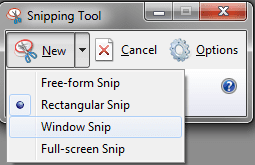
I have not found any reasons to use anything else than the built-in Snipping Tool. You can copy parts of the screen, also freehand, a certain window or full screen.
Kari
The only reason i ended up caving in to buying a more functional piece of kit was because the built in snip tool is extremely basic, you can't even add text to a snip!!
Snagit has the functionality i need (and more) when i'm writing guides or upping a screenshot to SF. I'm sure people who write guides here will agree that Windows built in tool really isn't up to scratch.
My Computer
- Computer Manufacturer/Model Number
- HP Touchsmart IQ771.uk
- OS
- Windows 7 Ultimate x64
- CPU
- AMD Turion(tm) 64 X2 Mobile Technology TL-56
- Motherboard
- ASUS Pheonix
- Memory
- 3GB Nanya PC2-6400 DDR2-SDRAM SO-DIM (400MHz)
- Graphics Card(s)
- NVIDIA GeForce Go 7600 256MB GDDR3 SDRAM
- Sound Card
- High Definition Intergrated NVIDIA MCP51
- Monitor(s) Displays
- 46" Sony Bravia HDTV
- Screen Resolution
- 1600x1200
- Hard Drives
- 1.5TB Samsug
320GB Seagate ST3320820AS - SATA 3Gb/s 8MB
500GB Maxtor Basics STM305003EHD301-RK
- Internet Speed
- ↓6.32 Mb/s ↑0.35 Mb/s ↔26ms
- Other Info
- BIOS - American Megatrends Inc. 5.07
Ethernet Port - NVIDIA nForce 10/100/1000 Mbps
DVD Drive - TSSTcorp DVDR/RW TS-T632L
True, Snipping Tool is very basic. For me it works. Snipping tool works seamless with clipboard; I have Photoshop normally almost always open so I just paste the snip and edit / add text and so on.I have not found any reasons to use anything else than the built-in Snipping Tool. You can copy parts of the screen, also freehand, a certain window or full screen.
Kari
The only reason i ended up caving in to buying a more functional piece of kit was because the built in snip tool is extremely basic, you can't even add text to a snip!!
Snagit has the functionality i need (and more) when i'm writing guides or upping a screenshot to SF. I'm sure people who write guides here will agree that Windows built in tool really isn't up to scratch.
Try how practical it is: Make a snip, don't save it. Open Paint, press CTRL+V and your snip is ready to be edited.
Kari
My Computer
- Computer type
- Laptop
- Computer Manufacturer/Model Number
- HP ENVY 17-1150eg
- OS
- Windows 10 Pro x64 EN-GB
- CPU
- 1.6 GHz Intel Core i7-720QM Processor
- Memory
- 6 GB
- Graphics Card(s)
- ATI Mobility Radeon HD 5850 Graphics
- Sound Card
- Beats sound system with integrated subwoofer
- Monitor(s) Displays
- 17" laptop display, 22" LED and 32" Full HD TV through HDMI
- Screen Resolution
- 1600*900 (1), 1920*1080 (2&3)
- Hard Drives
- Internal: 2 x 500 GB SATA Hard Disk Drive 7200 rpm
External: 2TB for backups, 3TB USB3 network drive for media
- Cooling
- As Envy runs a bit warm, I have it on a Cooler Master pad
- Keyboard
- Logitech diNovo Media Desktop Laser (bluetooth)
- Mouse
- Logitech Performance Mouse MX
- Internet Speed
- 50/10 Mbps VDSL
- Antivirus
- Windows Defender 4.3.9431.0
- Browser
- Maxthon 3.5.2., IE11
juandiego
New member
I fully agree, rsvr85.The only reason i ended up caving in to buying a more functional piece of kit was because the built in snip tool is extremely basic, you can't even add text to a snip!!
At least Snipping tool should provide a quick option to directly export the capture to paint if a further edition is required. To accomplish this procedure you have to copy it, to open paint and to paste it there. Not a big deal but it's the typical annoying thing that leads you to consider other software capable to do both tasks. A frequent procedure, by the way.
My Computer
- Computer Manufacturer/Model Number
- Acer Extensa 5635ZG
- OS
- Windows 7 Professional 32-bits
- CPU
- Intel Pentium Dual Core T4200 · 2.0 GHz · 800 MHz FSB
- Motherboard
- Acer BA50-MV
- Memory
- 4096 MB DDR3 Dual Channel · Samsung
- Graphics Card(s)
- NVIDIA GeForce G105M Turbo Cache
- Sound Card
- Conexant High Definition Audio
- Screen Resolution
- 1366x768
- Hard Drives
- WDC WD5000BEVT-22ZAT0 ATA Device · 500 GB
- Cooling
- If it's too hot, I use to blow hard
- Internet Speed
- 6 MB (my ISP says. Yeah, right)
I used to use it all the time but hated the fact that i had to use 2 programs to be able to edit the image, snagit does all of it. Adds stamps, shapes, text, supports sending to X,Y,Z etc. etc. etc. The built in snip tool is a good basic tool for basic needs.
My Computer
- Computer Manufacturer/Model Number
- HP Touchsmart IQ771.uk
- OS
- Windows 7 Ultimate x64
- CPU
- AMD Turion(tm) 64 X2 Mobile Technology TL-56
- Motherboard
- ASUS Pheonix
- Memory
- 3GB Nanya PC2-6400 DDR2-SDRAM SO-DIM (400MHz)
- Graphics Card(s)
- NVIDIA GeForce Go 7600 256MB GDDR3 SDRAM
- Sound Card
- High Definition Intergrated NVIDIA MCP51
- Monitor(s) Displays
- 46" Sony Bravia HDTV
- Screen Resolution
- 1600x1200
- Hard Drives
- 1.5TB Samsug
320GB Seagate ST3320820AS - SATA 3Gb/s 8MB
500GB Maxtor Basics STM305003EHD301-RK
- Internet Speed
- ↓6.32 Mb/s ↑0.35 Mb/s ↔26ms
- Other Info
- BIOS - American Megatrends Inc. 5.07
Ethernet Port - NVIDIA nForce 10/100/1000 Mbps
DVD Drive - TSSTcorp DVDR/RW TS-T632L
No, you don't have to copy it. When you make a snip it is directly placed in the clipboard. To edit a snip with Paint is really that easy: make a snip, press CTRL+V in Paint and it's there. You don't even have to save the snip before pasting it to any application.I fully agree, rsvr85.The only reason i ended up caving in to buying a more functional piece of kit was because the built in snip tool is extremely basic, you can't even add text to a snip!!
At least Snipping tool should provide a quick option to directly export the capture to paint if a further edition is required. To accomplish this procedure you have to copy it, to open paint and to paste it there. Not a big deal but it's the typical annoying thing that leads you to consider other software capable to do both tasks. A frequent procedure, by the way.
Kari
Kari
My Computer
- Computer type
- Laptop
- Computer Manufacturer/Model Number
- HP ENVY 17-1150eg
- OS
- Windows 10 Pro x64 EN-GB
- CPU
- 1.6 GHz Intel Core i7-720QM Processor
- Memory
- 6 GB
- Graphics Card(s)
- ATI Mobility Radeon HD 5850 Graphics
- Sound Card
- Beats sound system with integrated subwoofer
- Monitor(s) Displays
- 17" laptop display, 22" LED and 32" Full HD TV through HDMI
- Screen Resolution
- 1600*900 (1), 1920*1080 (2&3)
- Hard Drives
- Internal: 2 x 500 GB SATA Hard Disk Drive 7200 rpm
External: 2TB for backups, 3TB USB3 network drive for media
- Cooling
- As Envy runs a bit warm, I have it on a Cooler Master pad
- Keyboard
- Logitech diNovo Media Desktop Laser (bluetooth)
- Mouse
- Logitech Performance Mouse MX
- Internet Speed
- 50/10 Mbps VDSL
- Antivirus
- Windows Defender 4.3.9431.0
- Browser
- Maxthon 3.5.2., IE11
I'd say they all give the same.
My Computer
- Computer Manufacturer/Model Number
- HP Touchsmart IQ771.uk
- OS
- Windows 7 Ultimate x64
- CPU
- AMD Turion(tm) 64 X2 Mobile Technology TL-56
- Motherboard
- ASUS Pheonix
- Memory
- 3GB Nanya PC2-6400 DDR2-SDRAM SO-DIM (400MHz)
- Graphics Card(s)
- NVIDIA GeForce Go 7600 256MB GDDR3 SDRAM
- Sound Card
- High Definition Intergrated NVIDIA MCP51
- Monitor(s) Displays
- 46" Sony Bravia HDTV
- Screen Resolution
- 1600x1200
- Hard Drives
- 1.5TB Samsug
320GB Seagate ST3320820AS - SATA 3Gb/s 8MB
500GB Maxtor Basics STM305003EHD301-RK
- Internet Speed
- ↓6.32 Mb/s ↑0.35 Mb/s ↔26ms
- Other Info
- BIOS - American Megatrends Inc. 5.07
Ethernet Port - NVIDIA nForce 10/100/1000 Mbps
DVD Drive - TSSTcorp DVDR/RW TS-T632L
Yeah, at least Prin Screen and Sinpping Tool are WYSIWYG, you get what you see.
My Computer
- Computer type
- Laptop
- Computer Manufacturer/Model Number
- HP ENVY 17-1150eg
- OS
- Windows 10 Pro x64 EN-GB
- CPU
- 1.6 GHz Intel Core i7-720QM Processor
- Memory
- 6 GB
- Graphics Card(s)
- ATI Mobility Radeon HD 5850 Graphics
- Sound Card
- Beats sound system with integrated subwoofer
- Monitor(s) Displays
- 17" laptop display, 22" LED and 32" Full HD TV through HDMI
- Screen Resolution
- 1600*900 (1), 1920*1080 (2&3)
- Hard Drives
- Internal: 2 x 500 GB SATA Hard Disk Drive 7200 rpm
External: 2TB for backups, 3TB USB3 network drive for media
- Cooling
- As Envy runs a bit warm, I have it on a Cooler Master pad
- Keyboard
- Logitech diNovo Media Desktop Laser (bluetooth)
- Mouse
- Logitech Performance Mouse MX
- Internet Speed
- 50/10 Mbps VDSL
- Antivirus
- Windows Defender 4.3.9431.0
- Browser
- Maxthon 3.5.2., IE11