This old BIostar MCP6 PB M2+ has developed a problem in Windows7 of screen flicker. No flicker shows in POST. Additionally just asking for a restart corrects the problem. I am using the BIOS option of the
base optimal start mode.
Recently I changed out memory and replaced with a single DDR2 Crucial branded 1066 memory
stick.
Processor is AMD Athlon x2 3.6 GHz
A Crucial SSD is the boot device.
The CRT monitor is old but is in good shape. Just now I tried a deguaze using the
panel button, then powered up again but no change. Resolution is 1024 x 768 setting
in Win7
The flicker seems to activate with the USB wireless mouse
The problem seems to be one of conflict or interrupts which is then then resolved by that restart.
Are there BIOS settings to review to solve this? Is the faster memory stick an issue?
The Biostar board uses its onboard NVidia graphics.
- when the flicker occurs, had you considered unplugging the wireless dongle?
- why did you change the memory stick? Faster stick could be a issue if it requires more volts, however I would not necessarily expect that kind of fault to develop.
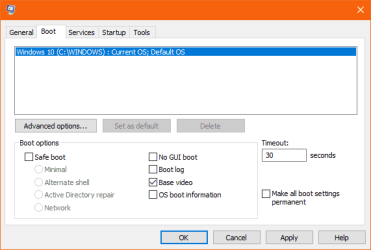
- had you tried the Base Video boot option?
My Computer
At a glance
Windows 7 x64, Vista x64, 8.1 smartphoneIntel E8400 65W 64-bitDDR2 2 x 2GB, 1GB x 2XFX Radeon HD5750
Computer type
PC/Desktop
OS
Windows 7 x64, Vista x64, 8.1 smartphone
CPU
Intel E8400 65W 64-bit
Motherboard
Gigabyte EP45-UD3LR
Memory
DDR2 2 x 2GB, 1GB x 2
Graphics Card(s)
XFX Radeon HD5750
Sound Card
AMD High Definition Audio; Realtek High Definition Audio
Hello and thanks for answering. This old machine is for my primitive video editing and recoding.
I have tried to squeeze a bit more performance out of it with an upgraded mem stick since they are a good bargain and 1066 is withing the recommended margin for the Biostar. For the performance increase I could live with these restarts. HoweverI will try base video.
Is Base Video just the minimum reolution or some other setting? Could it be one of those Windows personalization enhancements like Aero?
One ajustment I made in the metrics screen was to give some added border to the desktop icons in horizontal and vertical. I can't image how that affects much.
Base Video uses the standard Microsoft video driver, to boot the computer, instead of using the vga driver installed for the graphics chip. It will therefore show if there is any fault with the installed vga driver.
My Computer
At a glance
Windows 7 x64, Vista x64, 8.1 smartphoneIntel E8400 65W 64-bitDDR2 2 x 2GB, 1GB x 2XFX Radeon HD5750
Computer type
PC/Desktop
OS
Windows 7 x64, Vista x64, 8.1 smartphone
CPU
Intel E8400 65W 64-bit
Motherboard
Gigabyte EP45-UD3LR
Memory
DDR2 2 x 2GB, 1GB x 2
Graphics Card(s)
XFX Radeon HD5750
Sound Card
AMD High Definition Audio; Realtek High Definition Audio
Is that a selection in Device Manager?
I have run the NVidia driver install from the Biostar setup disk on this old machine, but cannot recall doing anything else.
The selection is available from msconfig, under the Boot tab. Or, you can select Enable Low Resolution Video from the Advanced Boot Options at startup.
-- Did you try and remove the wireless mouse dongle when the flicker occurs? I wondered if that resolves it, that was all.
My Computer
At a glance
Windows 7 x64, Vista x64, 8.1 smartphoneIntel E8400 65W 64-bitDDR2 2 x 2GB, 1GB x 2XFX Radeon HD5750
Computer type
PC/Desktop
OS
Windows 7 x64, Vista x64, 8.1 smartphone
CPU
Intel E8400 65W 64-bit
Motherboard
Gigabyte EP45-UD3LR
Memory
DDR2 2 x 2GB, 1GB x 2
Graphics Card(s)
XFX Radeon HD5750
Sound Card
AMD High Definition Audio; Realtek High Definition Audio
On the mouse. It is wireless and signals just a USB extension cord. I had one wired and one wireless mouse on this rig. I will try the wired mouse only.
And will look at the MSConfig as you say.
I wonder what caused what amounts to a 'flare up' problem where none existed.
Full disclosure is I was fooling around with overclocking things from a guide I have. I got some extra juice from that (Frames per second to speed up the routine) but my resulting media had fits and starts in playback. Literallly stop then catch up to regular playback. Then I reset everything to the BIOS default.
I disconnected the USB mouse wire. Am using an old Wyse wired mouse. At this bootup the flick or screen 'scramble' looks like one of those degause effects and is activated by a mouse gesture. While this is going on I am loading MSConfig.
Well I may not have followed what you said well enough since I did not see the option. A screen shot would help but I'll try again. While on the Biostar I saw the option to restore but that did nothing.
I also changed out the SSD for a HDD backup I have. No change.
Going back to try the Advanced tab ot whatever again but I didn't see the right options in it....
No finding it. To get to the Enable Low Resolution Video, is F8 the key to get to startup? I haven't
done any of this lately and it never gets any easier. I saw your help link.
But it's the nature of the sudden appearance of the problem. I may revert the memory to see
if that is a problem but will hold off on it. Why does the soft restart eliminate the problem? That seems to say the CPU is still OK.
I disconnected the USB mouse wire. Am using an old Wyse wired mouse. At this bootup the flick or screen 'scramble' looks like one of those degause effects and is activated by a mouse gesture. While this is going on I am loading MSConfig.
Well I may not have followed what you said well enough since I did not see the option. A screen shot would help but I'll try again. While on the Biostar I saw the option to restore but that did nothing.
I also changed out the SSD for a HDD backup I have. No change.
Going back to try the Advanced tab ot whatever again but I didn't see the right options in it....
No finding it. To get to the Enable Low Resolution Video, is F8 the key to get to startup? I haven't
done any of this lately and it never gets any easier. I saw your help link.
But it's the nature of the sudden appearance of the problem. I may revert the memory to see
if that is a problem but will hold off on it. Why does the soft restart eliminate the problem? That seems to say the CPU is still OK.
Yes I am a fool and missed the base video box to check.
In between replies, I reset the CMOS and attempted to do the capacitator drain as well (hold down the
restart button with the jumper set to close position.
After another cold restart the flicker is gone. But I surely need some belt and suspenders cure for this.
I'll rerun the Biostar driver disk including the video.
One thin about the CMOS reset: I see the date is still ok as current. I usually would see a date change needed. I did not pull the power plug on the power supply. Is that the difference?
I'll go ahead and run the driver disk on this SSD boot drive. You've been patient with me as usual while
I'm getting bent out of shape.
More as the driver install is completed. Is there any NVidia driver for GeForce 6150SE that is an update
and improvement? I think I have one on a cd from times back.