
Screen freeze

webplodder

New member
Local time
1:49 PM
Messages
51
Hello.

Just now my screen suddenly froze and nothing worked so I did a re-boot and now it seems to be ok but what concerns me is that I have already had to perform four factory restores after my screen froze and fear it might happen once again.

I have checked my disc for errors and also done a memory check but nothing shows up. I'm running Windows7 Home Premium Edition on a desk top PC which is only a couple of months old.

Any suggestions very welcome.

Thank you.
 

My Computer

Computer Manufacturer/Model Number
ESP DESK TOP XB3051Q
OS
Windows 7
CPU
Intel Core 2 Quad Q8300
Motherboard
FOXCONN G31MX SERIES (SOCKET 775)
Memory
2.0 GB RAM SINGLE-CHANNEL DDR2@399MHz 6-6-6-18
Graphics Card(s)
GeForce 8400 GS
Sound Card
REALTEX HIGH DEFINITION
Monitor(s) Displays
F22 on NVIDIA GeForce 8400 GS 1280 x 720 pixels
Screen Resolution
1280 x 720 pixels
Hard Drives
488.39 GB WESTERN DIGITAL WDC WD 5000AAKS-22VIAO ATA DEVICE (IDE) 39 deg. C
Keyboard
STANDARD PS/2 KEYBOARD
Mouse
B.C.L. 3D OPTICAL MOUSE 5v 100ma
Internet Speed
DOWNSTREAM: 8 Kbps, UPSTREAM 440 Kbps
Your system spec would help. Does the screen freeze at the same place, ie at a certain point on boot up or on a certain program? Do you run a lot of programs at the same time.? Is there any evidence of your PC overheating?
 

My Computer

Computer type
PC/Desktop
OS
Microsoft Windows 7 Home Premium 64-bit 7601 Multiprocessor Free Service Pack 1
CPU
Intel(R) Core(TM) i7-3770 CPU @ 3.40GHz
Motherboard
ASUSTeK COMPUTER INC. P8H77-M
Memory
8.00 GB
Graphics Card(s)
Intel(R) HD Graphics 4000
Sound Card
On Board
Monitor(s) Displays
Dell 24"
Screen Resolution
1920 x 1080
Hard Drives
(1) INTEL SSDSC2CT180A3 ATA Device (2) ST500DM002-1BD142 ATA Device (3) WDC WD3200AAKS-75L9A0 ATA Device (4) Generic- Compact Flash USB Device (5) Generic- MS/MS-Pro USB Device (6) Generic- SD/MMC USB Device (7) Generic- SM/xD-Picture USB
PSU
500w Corsair
Case
Cooler Master
Cooling
3 Fans
Keyboard
Logitech MK300
Mouse
Logitech WOM
Internet Speed
75Mb
Antivirus
Norton 360
Browser
Firefox, Opera, IE
Your system spec would help. Does the screen freeze at the same place, ie at a certain point on boot up or on a certain program? Do you run a lot of programs at the same time.? Is there any evidence of your PC overheating?


No mitchell, my screen froze 'out of the blue' not at any obvious point. This time it froze when I attempted to start up Windows Explorer, there were no other programs running at the time. I'm not aware that my PC is overheating.
 

My Computer

Computer Manufacturer/Model Number
ESP DESK TOP XB3051Q
OS
Windows 7
CPU
Intel Core 2 Quad Q8300
Motherboard
FOXCONN G31MX SERIES (SOCKET 775)
Memory
2.0 GB RAM SINGLE-CHANNEL DDR2@399MHz 6-6-6-18
Graphics Card(s)
GeForce 8400 GS
Sound Card
REALTEX HIGH DEFINITION
Monitor(s) Displays
F22 on NVIDIA GeForce 8400 GS 1280 x 720 pixels
Screen Resolution
1280 x 720 pixels
Hard Drives
488.39 GB WESTERN DIGITAL WDC WD 5000AAKS-22VIAO ATA DEVICE (IDE) 39 deg. C
Keyboard
STANDARD PS/2 KEYBOARD
Mouse
B.C.L. 3D OPTICAL MOUSE 5v 100ma
Internet Speed
DOWNSTREAM: 8 Kbps, UPSTREAM 440 Kbps
Your system spec would help. Does the screen freeze at the same place, ie at a certain point on boot up or on a certain program? Do you run a lot of programs at the same time.? Is there any evidence of your PC overheating?


No mitchell, my screen froze 'out of the blue' not at any obvious point. This time it froze when I attempted to start up Windows Explorer, there were no other programs running at the time. I'm not aware that my PC is overheating.

Be welcome.
As mitchell65 said: "Your system spec would help" us to help you! Any doubt about your system spec, download Speccy and update your profile:
Speccy - Download

Let us know the results.

"PLEASE REP ANYONE WHO HELPS YOU"
 

My Computer

Computer Manufacturer/Model Number
WALLONN7 / LIN BLACK SERIES II
OS
Windows 7 Ultimate x64 SP1
CPU
AMD PHENOM II X6 1090T 3.2GHz
Motherboard
GIGABYTE GA-890FXA-UD7
Memory
8GB G.SKILL RIPJAWS - F3-10666CL7D
Graphics Card(s)
SAPPHIRE ATI RADEON HD 5870 VAPOR X OC
Sound Card
REALTEK DOLBY HOME THEATER
Monitor(s) Displays
LED LG W2486L
Screen Resolution
1080p
Hard Drives
SEAGATE 1TB -ST31000528AS - AHCI MODE - AS SATA
PSU
ZALMAN ZM1000-HP 1000W
Case
THERMALTAKE XASER VI VG4000SWA
Cooling
140MM x3 / 120MM x1 AIR COOLING - THERMALTAKE
Keyboard
MICROSOFT DIGITAL MEDIA KEYBOARD 3000 - USB
Mouse
MICROSOFT BASIC OPTICAL MOUSE 2.0 - USB
Internet Speed
600KBPS
Other Info
MICROSOFT XBOX 360 CONTROLLER
Screen Freeze

Your system spec would help. Does the screen freeze at the same place, ie at a certain point on boot up or on a certain program? Do you run a lot of programs at the same time.? Is there any evidence of your PC overheating?


No mitchell, my screen froze 'out of the blue' not at any obvious point. This time it froze when I attempted to start up Windows Explorer, there were no other programs running at the time. I'm not aware that my PC is overheating.

Be welcome.
As mitchell65 said: "Your system spec would help" us to help you! Any doubt about your system spec, download Speccy and update your profile: Speccy - Download

Let us know the results.

"PLEASE REP ANYONE WHO HELPS YOU"


OK, just filled in my system spec, however I am now in safe mode since my screen froze twice while in screen spec and could not boot-up as normal.
 

My Computer

Computer Manufacturer/Model Number
ESP DESK TOP XB3051Q
OS
Windows 7
CPU
Intel Core 2 Quad Q8300
Motherboard
FOXCONN G31MX SERIES (SOCKET 775)
Memory
2.0 GB RAM SINGLE-CHANNEL DDR2@399MHz 6-6-6-18
Graphics Card(s)
GeForce 8400 GS
Sound Card
REALTEX HIGH DEFINITION
Monitor(s) Displays
F22 on NVIDIA GeForce 8400 GS 1280 x 720 pixels
Screen Resolution
1280 x 720 pixels
Hard Drives
488.39 GB WESTERN DIGITAL WDC WD 5000AAKS-22VIAO ATA DEVICE (IDE) 39 deg. C
Keyboard
STANDARD PS/2 KEYBOARD
Mouse
B.C.L. 3D OPTICAL MOUSE 5v 100ma
Internet Speed
DOWNSTREAM: 8 Kbps, UPSTREAM 440 Kbps
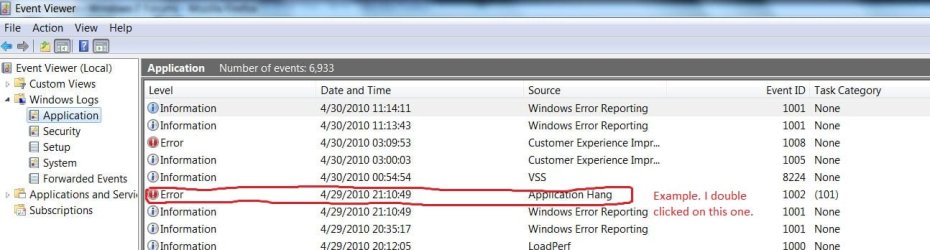
Have checked your event logs? If so, what do they indicate? I had this same issue early on and it was graphics card related.
 

My Computer

Computer Manufacturer/Model Number
Home built
OS
Windows 7 Ultimate 32 bit
CPU
Intel(R) Pentium(R) 4 CPU 3.00GHz
Motherboard
ASUS P4P800-VM Motherboard Chipset: Intel 865G + ICH5
Memory
2.50 GB RAM
Graphics Card(s)
NVIDIA GeForce 7600 GS
Sound Card
SoundMax Integrated Digital Audio (Chip)
Monitor(s) Displays
ViewSonic VX 1962 wm
Screen Resolution
1680 X 1050
Hard Drives
Seagate Barracuda 7200.10 80 GB
ST380215A ATA Device 18.6 GB
Western Digital "My Book" external hard drive 750 GB
Cooling
Fan based
Keyboard
Microsoft Comfort Curve Keyboard 2000 v10 USB
Mouse
Logitec optic USB
Internet Speed
3.01 Mb/s download 0.64 Mb/s upload
Have checked your event logs? If so, what do they indicate? I had this same issue early on and it was graphics card related.

How do I do that Carl?
 

My Computer

Computer Manufacturer/Model Number
ESP DESK TOP XB3051Q
OS
Windows 7
CPU
Intel Core 2 Quad Q8300
Motherboard
FOXCONN G31MX SERIES (SOCKET 775)
Memory
2.0 GB RAM SINGLE-CHANNEL DDR2@399MHz 6-6-6-18
Graphics Card(s)
GeForce 8400 GS
Sound Card
REALTEX HIGH DEFINITION
Monitor(s) Displays
F22 on NVIDIA GeForce 8400 GS 1280 x 720 pixels
Screen Resolution
1280 x 720 pixels
Hard Drives
488.39 GB WESTERN DIGITAL WDC WD 5000AAKS-22VIAO ATA DEVICE (IDE) 39 deg. C
Keyboard
STANDARD PS/2 KEYBOARD
Mouse
B.C.L. 3D OPTICAL MOUSE 5v 100ma
Internet Speed
DOWNSTREAM: 8 Kbps, UPSTREAM 440 Kbps
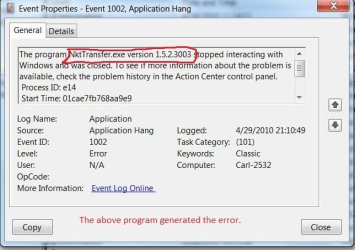
Have checked your event logs? If so, what do they indicate? I had this same issue early on and it was graphics card related.

How do I do that Carl?
We will start with the easiest first. Click Start and enter "reliability" (without the quotes) in the search box. At the top of the results, select View reliability history. This will generate a reliability report. Look for red circles with x's in them and yellow triangles. You lick click on each of these and see what they indicate.
 

My Computer

Computer Manufacturer/Model Number
Home built
OS
Windows 7 Ultimate 32 bit
CPU
Intel(R) Pentium(R) 4 CPU 3.00GHz
Motherboard
ASUS P4P800-VM Motherboard Chipset: Intel 865G + ICH5
Memory
2.50 GB RAM
Graphics Card(s)
NVIDIA GeForce 7600 GS
Sound Card
SoundMax Integrated Digital Audio (Chip)
Monitor(s) Displays
ViewSonic VX 1962 wm
Screen Resolution
1680 X 1050
Hard Drives
Seagate Barracuda 7200.10 80 GB
ST380215A ATA Device 18.6 GB
Western Digital "My Book" external hard drive 750 GB
Cooling
Fan based
Keyboard
Microsoft Comfort Curve Keyboard 2000 v10 USB
Mouse
Logitec optic USB
Internet Speed
3.01 Mb/s download 0.64 Mb/s upload
I got the following:

HelperClassNamenetwork adapterEventDescriptionNetwork adapter Local Area Connection driver information: Description . . . . . . . . . . : Realtek PCIe GBE Family Controller Manufacturer . . . . . . . . . : Realtek Provider . . . . . . . . . . . : Microsoft Version . . . . . . . . . . . : 7.2.1127.2008 Inf File Name . . . . . . . . . : C:\windows\INF\netrtx64.inf Inf File Date . . . . . . . . . : 13 July 2009 20:37:30 Section Name . . . . . . . . . : RTL8168D.ndi Hardware ID . . . . . . . . . . : pci\ven_10ec&dev_8168&rev_03 Instance Status Flags . . . . . : 0x180200a Device Manager Status Code . . : 0 IfType . . . . . . . . . . . . : 6 Physical Media Type . . . . . . : 14 EventVerbosity0
 

My Computer

Computer Manufacturer/Model Number
ESP DESK TOP XB3051Q
OS
Windows 7
CPU
Intel Core 2 Quad Q8300
Motherboard
FOXCONN G31MX SERIES (SOCKET 775)
Memory
2.0 GB RAM SINGLE-CHANNEL DDR2@399MHz 6-6-6-18
Graphics Card(s)
GeForce 8400 GS
Sound Card
REALTEX HIGH DEFINITION
Monitor(s) Displays
F22 on NVIDIA GeForce 8400 GS 1280 x 720 pixels
Screen Resolution
1280 x 720 pixels
Hard Drives
488.39 GB WESTERN DIGITAL WDC WD 5000AAKS-22VIAO ATA DEVICE (IDE) 39 deg. C
Keyboard
STANDARD PS/2 KEYBOARD
Mouse
B.C.L. 3D OPTICAL MOUSE 5v 100ma
Internet Speed
DOWNSTREAM: 8 Kbps, UPSTREAM 440 Kbps
Have checked your event logs? If so, what do they indicate? I had this same issue early on and it was graphics card related.

How do I do that Carl?
We will start with the easiest first. Click Start and enter "reliability" (without the quotes) in the search box. At the top of the results, select View reliability history. This will generate a reliability report. Look for red circles with x's in them and yellow triangles. You lick click on each of these and see what they indicate.


Carl, I cannot see any circles or yellow triangles at all. It all seems clear. Is that good?
 

My Computer

Computer Manufacturer/Model Number
ESP DESK TOP XB3051Q
OS
Windows 7
CPU
Intel Core 2 Quad Q8300
Motherboard
FOXCONN G31MX SERIES (SOCKET 775)
Memory
2.0 GB RAM SINGLE-CHANNEL DDR2@399MHz 6-6-6-18
Graphics Card(s)
GeForce 8400 GS
Sound Card
REALTEX HIGH DEFINITION
Monitor(s) Displays
F22 on NVIDIA GeForce 8400 GS 1280 x 720 pixels
Screen Resolution
1280 x 720 pixels
Hard Drives
488.39 GB WESTERN DIGITAL WDC WD 5000AAKS-22VIAO ATA DEVICE (IDE) 39 deg. C
Keyboard
STANDARD PS/2 KEYBOARD
Mouse
B.C.L. 3D OPTICAL MOUSE 5v 100ma
Internet Speed
DOWNSTREAM: 8 Kbps, UPSTREAM 440 Kbps
The next step is to click on start and type event viewer in the search box. At the top, select Event viewer. In the left hand pane, select Applications and then System. Look through these for red circles and triangles. You can double click on an event to get more details about that event.

Here is a sample from my application log.
 

Attachments

  • Capture.JPG
    Capture.JPG
    74.5 KB · Views: 9
  • Capture1.JPG
    Capture1.JPG
    51.5 KB · Views: 6

My Computer

Computer Manufacturer/Model Number
Home built
OS
Windows 7 Ultimate 32 bit
CPU
Intel(R) Pentium(R) 4 CPU 3.00GHz
Motherboard
ASUS P4P800-VM Motherboard Chipset: Intel 865G + ICH5
Memory
2.50 GB RAM
Graphics Card(s)
NVIDIA GeForce 7600 GS
Sound Card
SoundMax Integrated Digital Audio (Chip)
Monitor(s) Displays
ViewSonic VX 1962 wm
Screen Resolution
1680 X 1050
Hard Drives
Seagate Barracuda 7200.10 80 GB
ST380215A ATA Device 18.6 GB
Western Digital "My Book" external hard drive 750 GB
Cooling
Fan based
Keyboard
Microsoft Comfort Curve Keyboard 2000 v10 USB
Mouse
Logitec optic USB
Internet Speed
3.01 Mb/s download 0.64 Mb/s upload
Carl, I cannot see any circles or yellow triangles at all. It all seems clear. Is that good?

Yes and no. It means no problems were picked up by the reliability index; but you still have a problem. Try the event viewer.
 

My Computer

Computer Manufacturer/Model Number
Home built
OS
Windows 7 Ultimate 32 bit
CPU
Intel(R) Pentium(R) 4 CPU 3.00GHz
Motherboard
ASUS P4P800-VM Motherboard Chipset: Intel 865G + ICH5
Memory
2.50 GB RAM
Graphics Card(s)
NVIDIA GeForce 7600 GS
Sound Card
SoundMax Integrated Digital Audio (Chip)
Monitor(s) Displays
ViewSonic VX 1962 wm
Screen Resolution
1680 X 1050
Hard Drives
Seagate Barracuda 7200.10 80 GB
ST380215A ATA Device 18.6 GB
Western Digital "My Book" external hard drive 750 GB
Cooling
Fan based
Keyboard
Microsoft Comfort Curve Keyboard 2000 v10 USB
Mouse
Logitec optic USB
Internet Speed
3.01 Mb/s download 0.64 Mb/s upload

My Computer

Computer Manufacturer/Model Number
Home built
OS
Windows 7 Ultimate 32 bit
CPU
Intel(R) Pentium(R) 4 CPU 3.00GHz
Motherboard
ASUS P4P800-VM Motherboard Chipset: Intel 865G + ICH5
Memory
2.50 GB RAM
Graphics Card(s)
NVIDIA GeForce 7600 GS
Sound Card
SoundMax Integrated Digital Audio (Chip)
Monitor(s) Displays
ViewSonic VX 1962 wm
Screen Resolution
1680 X 1050
Hard Drives
Seagate Barracuda 7200.10 80 GB
ST380215A ATA Device 18.6 GB
Western Digital "My Book" external hard drive 750 GB
Cooling
Fan based
Keyboard
Microsoft Comfort Curve Keyboard 2000 v10 USB
Mouse
Logitec optic USB
Internet Speed
3.01 Mb/s download 0.64 Mb/s upload
The next step is to click on start and type event viewer in the search box. At the top, select Event viewer. In the left hand pane, select Applications and then System. Look through these for red circles and triangles. You can double click on an event to get more details about that event.

Here is a sample from my application log.

Carl, I have found many red circles for today. Which ones do I look at?
 

My Computer

Computer Manufacturer/Model Number
ESP DESK TOP XB3051Q
OS
Windows 7
CPU
Intel Core 2 Quad Q8300
Motherboard
FOXCONN G31MX SERIES (SOCKET 775)
Memory
2.0 GB RAM SINGLE-CHANNEL DDR2@399MHz 6-6-6-18
Graphics Card(s)
GeForce 8400 GS
Sound Card
REALTEX HIGH DEFINITION
Monitor(s) Displays
F22 on NVIDIA GeForce 8400 GS 1280 x 720 pixels
Screen Resolution
1280 x 720 pixels
Hard Drives
488.39 GB WESTERN DIGITAL WDC WD 5000AAKS-22VIAO ATA DEVICE (IDE) 39 deg. C
Keyboard
STANDARD PS/2 KEYBOARD
Mouse
B.C.L. 3D OPTICAL MOUSE 5v 100ma
Internet Speed
DOWNSTREAM: 8 Kbps, UPSTREAM 440 Kbps
Look at each one. They may all be the same problem or they may indicate different and/or related problems.
 

My Computer

Computer Manufacturer/Model Number
Home built
OS
Windows 7 Ultimate 32 bit
CPU
Intel(R) Pentium(R) 4 CPU 3.00GHz
Motherboard
ASUS P4P800-VM Motherboard Chipset: Intel 865G + ICH5
Memory
2.50 GB RAM
Graphics Card(s)
NVIDIA GeForce 7600 GS
Sound Card
SoundMax Integrated Digital Audio (Chip)
Monitor(s) Displays
ViewSonic VX 1962 wm
Screen Resolution
1680 X 1050
Hard Drives
Seagate Barracuda 7200.10 80 GB
ST380215A ATA Device 18.6 GB
Western Digital "My Book" external hard drive 750 GB
Cooling
Fan based
Keyboard
Microsoft Comfort Curve Keyboard 2000 v10 USB
Mouse
Logitec optic USB
Internet Speed
3.01 Mb/s download 0.64 Mb/s upload
Webplodder, I am going to be off line for a few hours. I have some things I have to do. I will be back this evening. Someone else may pick this up and I hope they do. If not, I will "see" you this evening.
 

My Computer

Computer Manufacturer/Model Number
Home built
OS
Windows 7 Ultimate 32 bit
CPU
Intel(R) Pentium(R) 4 CPU 3.00GHz
Motherboard
ASUS P4P800-VM Motherboard Chipset: Intel 865G + ICH5
Memory
2.50 GB RAM
Graphics Card(s)
NVIDIA GeForce 7600 GS
Sound Card
SoundMax Integrated Digital Audio (Chip)
Monitor(s) Displays
ViewSonic VX 1962 wm
Screen Resolution
1680 X 1050
Hard Drives
Seagate Barracuda 7200.10 80 GB
ST380215A ATA Device 18.6 GB
Western Digital "My Book" external hard drive 750 GB
Cooling
Fan based
Keyboard
Microsoft Comfort Curve Keyboard 2000 v10 USB
Mouse
Logitec optic USB
Internet Speed
3.01 Mb/s download 0.64 Mb/s upload
Webplodder, I am going to be off line for a few hours. I have some things I have to do. I will be back this evening. Someone else may pick this up and I hope they do. If not, I will "see" you this evening.


OK, thanks for you help Carl.
 

My Computer

Computer Manufacturer/Model Number
ESP DESK TOP XB3051Q
OS
Windows 7
CPU
Intel Core 2 Quad Q8300
Motherboard
FOXCONN G31MX SERIES (SOCKET 775)
Memory
2.0 GB RAM SINGLE-CHANNEL DDR2@399MHz 6-6-6-18
Graphics Card(s)
GeForce 8400 GS
Sound Card
REALTEX HIGH DEFINITION
Monitor(s) Displays
F22 on NVIDIA GeForce 8400 GS 1280 x 720 pixels
Screen Resolution
1280 x 720 pixels
Hard Drives
488.39 GB WESTERN DIGITAL WDC WD 5000AAKS-22VIAO ATA DEVICE (IDE) 39 deg. C
Keyboard
STANDARD PS/2 KEYBOARD
Mouse
B.C.L. 3D OPTICAL MOUSE 5v 100ma
Internet Speed
DOWNSTREAM: 8 Kbps, UPSTREAM 440 Kbps
I have asked others to step in and help you. I apologize for having to leave.
 

My Computer

Computer Manufacturer/Model Number
Home built
OS
Windows 7 Ultimate 32 bit
CPU
Intel(R) Pentium(R) 4 CPU 3.00GHz
Motherboard
ASUS P4P800-VM Motherboard Chipset: Intel 865G + ICH5
Memory
2.50 GB RAM
Graphics Card(s)
NVIDIA GeForce 7600 GS
Sound Card
SoundMax Integrated Digital Audio (Chip)
Monitor(s) Displays
ViewSonic VX 1962 wm
Screen Resolution
1680 X 1050
Hard Drives
Seagate Barracuda 7200.10 80 GB
ST380215A ATA Device 18.6 GB
Western Digital "My Book" external hard drive 750 GB
Cooling
Fan based
Keyboard
Microsoft Comfort Curve Keyboard 2000 v10 USB
Mouse
Logitec optic USB
Internet Speed
3.01 Mb/s download 0.64 Mb/s upload
Webplodder, I am going to be off line for a few hours. I have some things I have to do. I will be back this evening. Someone else may pick this up and I hope they do. If not, I will "see" you this evening.


OK, thanks for you help Carl.

Were any of the red items related to your video card?
Does everything look fine in Device Manager?

I would bet its a video issue... just a thought: There are many manufacturers making Nvidia cards, who made your GeForce 8400 GS ??? What driver are you currently running for it, and where did you get it?
 

My Computer

Computer Manufacturer/Model Number
Homebrew PC - "Alpha_Dawg"
OS
Windows 7 Ultimate 64 bit Steve Ballmer Signature Edition
CPU
Intel Core 2 Quad - Q9550 - 2.83GHz stock - OC'd to 3.6GHz
Motherboard
Gigabyte EP45-UD3P
Memory
4GB DDR2 800MHz (PC6400) OCZ Reaper
Graphics Card(s)
Nvidia GE Force 8800 GTS
Sound Card
Asus Xonar DX
Monitor(s) Displays
Samsung SyncMaster 2333HD
Screen Resolution
1920 x 1080
Hard Drives
WD Caviar Black 750GB - 7200RPM - 32MB cache
WD Caviar Green 1.5TB - 5400RPM - 64MB cache
WD Caviar Green 2.0TB - 5400RPM - 64MB cache
PSU
PC Power & Cooling Silencer 750
Case
Gigabyte 3D Aurora
Cooling
Case is Air - 5ea. 120mm fans (mix of Arctic and Xigmatec)
Keyboard
MS Natural Wireless KB
Mouse
MS Wireless Mouse
Internet Speed
50 mbps down/5 mbps up
Other Info
AVerMedia - AVerTVHD G2 Dual Tuner Card
I found these instructions on MS TechNet (same errors):

this issue may occur if third party program or device driver affects the network connection.

To troubleshoot this issue, please perform the following steps:

First, please download the network card driver from manufactuer's website.


Reinstall driver

==============
1. Click the Start Button, type "devmgmt.msc" (without quotation marks) in the Start Search box and press Enter.
2. Double click to expand "Network adaptors".
3. Right click your network card and click Uninstall.
4. Check "Delete driver software for this device" check box, click OK.
5. Restart the computer

If Windows 7 will not install built-in drivers, please install the downloaded one.

If it does not work, please test it in Clean Boot mode.
 

My Computer

Computer type
PC/Desktop
Computer Manufacturer/Model Number
Bruce ... somewhere in his 40's
OS
Windows 7 Ultimate 32bit SP1
CPU
Intel(R) Core(TM)2 Quad CPU @ 2.40GHz, 2400 MHz
Motherboard
INTEL/D975XBX2
Memory
4 GB
Graphics Card(s)
ATI Radeon HD 2600 Pro
Monitor(s) Displays
Samsung SyncMaster 914v
Screen Resolution
1280 x 1024
Hard Drives
2/500GB each ... ST3500630AS ATA Device.
One is not connected
PSU
Rocketfish 700 W
Case
G.Skill Gigabyte Chassis
Keyboard
Standard PS/2 Keyboard
Mouse
Microsoft PS/2 Mouse
Internet Speed
DSL
Antivirus
Avira Internet Security
Browser
IE 11
Other Info
ATI HDMI Audio
Back
Top