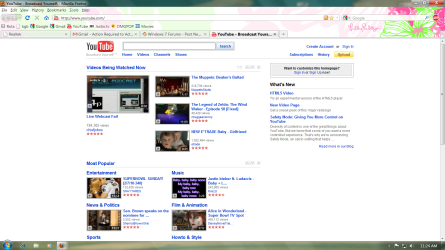
Screen is very Narrow

ToManyWindows

New member
Local time
7:07 AM
Messages
1
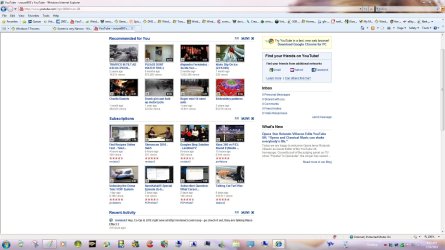
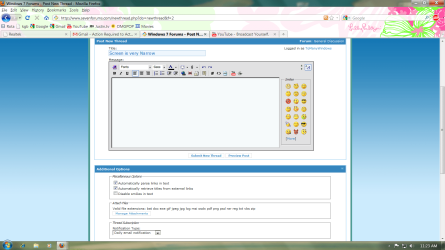
Does anyone know how I can fix this, it seems like screen just stays in the middle. I tried different resolutions but it makes the writing to blurry. It wasn't like this when I had XP. Does anyone know how I can make my screen fill out more.
 

Attachments
  • pic1.png
    pic1.png
    86.5 KB · Views: 40
  • pic2.png
    pic2.png
    132.7 KB · Views: 34

My Computer

OS
Windows 7
Welcome ToManyWindows,
Some web pages just don't display wide, For this forum you can choose a different skin at the bottom of the page.
 

Attachments

  • wide.jpg
    wide.jpg
    233.2 KB · Views: 29
  • wide 2.jpg
    wide 2.jpg
    194.1 KB · Views: 30

My Computer

Computer type
PC/Desktop
Computer Manufacturer/Model Number
Self Built
OS
Win 10 Pro x64
CPU
Intel I5-2500K @3.3GHz
Motherboard
Asrock P67 Extreme4
Memory
16GB G.Skill Ripjaws X (4x4GB)
Graphics Card(s)
EVGA GeForce 750 Ti SC 2GB
Sound Card
ASUS Xonar DG 5.1 Channels 24-bit 96KHz PCI Interface Sound
Monitor(s) Displays
auria eq2367
Screen Resolution
1920 x 1080
Hard Drives
250GB Samsung 850 EVO SSD
1TB WD Blue
1TB Hitachi
PSU
SeaSonic X 650W 80 Plus Gold
Case
Corsair Obsidian 750D
Cooling
Corsair H60, Three 140mm case fans
Keyboard
Logitech Wireless Keyboard K520
Mouse
Logitech Wireless Mouse M310
Internet Speed
Wave Broadband ~ 100 dn 5 up
Antivirus
Windows Defender, Malwarebytes Premium
Browser
Edge, IE11, Chrome
Other Info
Laptop specs: HP g7-1365dx /
CPU: AMD A6-3420M APU with Radeon(tm) HD Graphics /
RAM: Crucial 8Gb (2x4Gb) /
SSD: Crucial M4-CT128M4SSD2 ATA Device/ FW 000F /
GFX: AMD Radeon HD 6520G /
OS: Windows 10 Pro x64
Technology is changing so quickly and it is impossible for websites to accomodate everyone. The different websites are set up in the manner that it is believed that it will accomodate the most users. A screen that is not the most beneficial for your use is perfect for others. Bottom line, if you follow the pragmatic advice given above you will bo ok.
 

My Computer

Computer type
PC/Desktop
Computer Manufacturer/Model Number
Dell XPS 420
OS
Windows 10, Home Clean Install
CPU
Intel Core2 processsor Q8200(2.33Ghz 1333FSB) Quad Core Tech
Motherboard
Dell
Memory
6 gb
Graphics Card(s)
ATI Radeon 256MB HD3650
Sound Card
Intergrated 7.1 Channel Audio
Monitor(s) Displays
Dell SP2009W 20"
Hard Drives
640 GB Serial ATA Hard drive
Cooling
Fan
Keyboard
Dell USB Keyboard
Mouse
Dell Premium Optical USB
Internet Speed
DSL 2.85
I have found exactly the same problem - it is just a narrow band down the centre. I have search the net high and low but cannot find out how to make it show like XP. yes, I can zoom, BUT, I have my own site and can see that it distorts some of the words etc. on there by doing 150%, and 200% is off the screen! It was normal in XP, easy to read and filled most of the monitor. Please can you let us know how to alter this, I cannot belive I have upgraded and now struggle to read my webpages - when i use preview to check my work, i have to have it on the normal or it can sometimes not look the actual format. I would be soooooo grateful for a solution.
 

My Computer

Computer Manufacturer/Model Number
medion
OS
home premium 32 bit
CPU
dont know
Motherboard
dont know
Memory
dont know
Graphics Card(s)
nvidia
Sound Card
dont know
Monitor(s) Displays
incorporated
Hard Drives
dont know
PSU
dont know
Case
incorporated screen
Cooling
dont know
Back
Top