Screen keeps tearing

f23948

New member
Local time
9:38 AM
Messages
87
when i set the Windows 7 theme in Personalize, if i move the window, the screen is not tearing but when i set to Windows 7 Basic or Windows Classic theme, when i move the window, the screen keeps tearing, any suggestions?
 

My Computers

System One System Two

  • Computer type
    PC/Desktop
    Computer Manufacturer/Model Number
    PRO904059
    OS
    Linux Lite
    CPU
    Intel(R) Core(TM) i5-7300U CPU @ 2.60GHz 2.71 GHz
    Memory
    8.00 GB (7.87 GB usable)
    Hard Drives
    250 GB solid state drive
    Antivirus
    ESET Smart Security Premium
    Browser
    Firefox ESR
  • Computer type
    PC/Desktop
    System Manufacturer/Model Number
    Dell OptiPlex 9020
    OS
    Windows 10 Pro 21H2
    CPU
    Intel(R) Core(TM) i5-4590 CPU @ 3.30GHz
    Memory
    8.00 GB
    Graphics Card(s)
    Nvidia Quadro K620
    Browser
    Firefox ESR
I'm going to take a few pot-shots here. A possible driver issue, failing video card, or a resolution setting that doesn't play well with certain themes?

The Toshiba website would be a good place to start for the driver. Check to see what version you have installed vs. what they have available. To find your driver version:

Control Panel > System and Security > Under the System section, click Device Manager, expand Display Adapters, right-click what it lists for your graphics, select Properties, select the Driver tab.

If Toshiba has a newer driver, just download it and update it from an Administrator profile (use the steps above to get to the Driver tab).

Good Luck, keep us posted.
 

My Computer

Computer type
PC/Desktop
Computer Manufacturer/Model Number
Custom
OS
Microsoft Windows 7 Ultimate 32-bit 7601 Multiprocessor Free Service Pack 1
CPU
Pentium(R) Dual-Core CPU E6500 @ 2.93GHz
Motherboard
Gigabyte Technology Co., Ltd. EP45-UD3L
Memory
G.Skill 2.00 GB
Graphics Card(s)
NVIDIA GeForce 8400 GS
Sound Card
High Definition Audio Device
Screen Resolution
1680 x 1050 x 32 bits (4294967296 colors) @ 59 Hz
Hard Drives
(1) ST1500DL003-9VT16L ATA Device (2) WDC WD3200AAKS-00L9A0 ATA Device (3) WDC WD7501AALS-00J7B0 ATA Device
Antivirus
MSE, Avast 17.2
Browser
Firefox
i am using NVIDIA 8400 GS not Toshiba and i am using latest driver update and there's no latest driver update available
 

My Computers

System One System Two

  • Computer type
    PC/Desktop
    Computer Manufacturer/Model Number
    PRO904059
    OS
    Linux Lite
    CPU
    Intel(R) Core(TM) i5-7300U CPU @ 2.60GHz 2.71 GHz
    Memory
    8.00 GB (7.87 GB usable)
    Hard Drives
    250 GB solid state drive
    Antivirus
    ESET Smart Security Premium
    Browser
    Firefox ESR
  • Computer type
    PC/Desktop
    System Manufacturer/Model Number
    Dell OptiPlex 9020
    OS
    Windows 10 Pro 21H2
    CPU
    Intel(R) Core(TM) i5-4590 CPU @ 3.30GHz
    Memory
    8.00 GB
    Graphics Card(s)
    Nvidia Quadro K620
    Browser
    Firefox ESR
updated my system specs
 

My Computers

System One System Two

  • Computer type
    PC/Desktop
    Computer Manufacturer/Model Number
    PRO904059
    OS
    Linux Lite
    CPU
    Intel(R) Core(TM) i5-7300U CPU @ 2.60GHz 2.71 GHz
    Memory
    8.00 GB (7.87 GB usable)
    Hard Drives
    250 GB solid state drive
    Antivirus
    ESET Smart Security Premium
    Browser
    Firefox ESR
  • Computer type
    PC/Desktop
    System Manufacturer/Model Number
    Dell OptiPlex 9020
    OS
    Windows 10 Pro 21H2
    CPU
    Intel(R) Core(TM) i5-4590 CPU @ 3.30GHz
    Memory
    8.00 GB
    Graphics Card(s)
    Nvidia Quadro K620
    Browser
    Firefox ESR
NVIDIA GeForce 8400 GS*
 

My Computers

System One System Two

  • Computer type
    PC/Desktop
    Computer Manufacturer/Model Number
    PRO904059
    OS
    Linux Lite
    CPU
    Intel(R) Core(TM) i5-7300U CPU @ 2.60GHz 2.71 GHz
    Memory
    8.00 GB (7.87 GB usable)
    Hard Drives
    250 GB solid state drive
    Antivirus
    ESET Smart Security Premium
    Browser
    Firefox ESR
  • Computer type
    PC/Desktop
    System Manufacturer/Model Number
    Dell OptiPlex 9020
    OS
    Windows 10 Pro 21H2
    CPU
    Intel(R) Core(TM) i5-4590 CPU @ 3.30GHz
    Memory
    8.00 GB
    Graphics Card(s)
    Nvidia Quadro K620
    Browser
    Firefox ESR
Ok. The Nvidia website lists the latest driver version 335.23, released 3/10/14. If you have that version installed, it might be worthwhile to reinstall it (possible corruption).

Here's a link to the Nvidia driver download page:

http://www.geforce.com/drivers/results/73779

Good luck, keep us posted!
 

My Computer

Computer type
PC/Desktop
Computer Manufacturer/Model Number
Custom
OS
Microsoft Windows 7 Ultimate 32-bit 7601 Multiprocessor Free Service Pack 1
CPU
Pentium(R) Dual-Core CPU E6500 @ 2.93GHz
Motherboard
Gigabyte Technology Co., Ltd. EP45-UD3L
Memory
G.Skill 2.00 GB
Graphics Card(s)
NVIDIA GeForce 8400 GS
Sound Card
High Definition Audio Device
Screen Resolution
1680 x 1050 x 32 bits (4294967296 colors) @ 59 Hz
Hard Drives
(1) ST1500DL003-9VT16L ATA Device (2) WDC WD3200AAKS-00L9A0 ATA Device (3) WDC WD7501AALS-00J7B0 ATA Device
Antivirus
MSE, Avast 17.2
Browser
Firefox
no, you're wrong

http://www.geforce.com/drivers/results/112593

Untitled.png
 

My Computers

System One System Two

  • Computer type
    PC/Desktop
    Computer Manufacturer/Model Number
    PRO904059
    OS
    Linux Lite
    CPU
    Intel(R) Core(TM) i5-7300U CPU @ 2.60GHz 2.71 GHz
    Memory
    8.00 GB (7.87 GB usable)
    Hard Drives
    250 GB solid state drive
    Antivirus
    ESET Smart Security Premium
    Browser
    Firefox ESR
  • Computer type
    PC/Desktop
    System Manufacturer/Model Number
    Dell OptiPlex 9020
    OS
    Windows 10 Pro 21H2
    CPU
    Intel(R) Core(TM) i5-4590 CPU @ 3.30GHz
    Memory
    8.00 GB
    Graphics Card(s)
    Nvidia Quadro K620
    Browser
    Firefox ESR
NVIDIA GeForce 8400 GS*

First of all shut down the computer & remove the power lead from the wall outlet, so there is no power going to the computer.

You could try opening the computer, remove the screw holding in the Graphics Card, unclip the lock lever at the end of the card & remove the card. Check over the card & see if the fan under it is free & not full of dust if a fan is fitted. The check both rows of connections & then reinstall the card making sure it is well seated & the lock lever has clicked into place, replace the screw & see if it's any better.
 

My Computer

Computer type
PC/Desktop
Computer Manufacturer/Model Number
Self built using existing case
OS
Windows 7 Home Premium 64 bit sp1
CPU
Intel i5 3570 3.4Ghz Ivy Bridge SKT 1155 quad core
Motherboard
Gigabyte Z77-HD3 SKT 1155 2xSata 3, 4x USB 3.0
Memory
G-Skill Rip Jaws 16Gb (8x2) DDR3 -1600 PC3 12800 CL 10 red
Graphics Card(s)
Gigabyte NVIDIA GT610 1Gb DDR3 810/1200 PCI-E 2.0 Silent
Sound Card
NVIDIA High Definition & Realtech High Definition Audio
Monitor(s) Displays
2 x Philips 226V4L 16:9 aspect ratio
Screen Resolution
1920 x 1080 HD
Hard Drives
Samsung 840 Pro 256gb SSD, SATA 3.
Hitachi Touro Portable 1tb, USB 3.0 HDD used for image b/ups.
PSU
Corsair VS450
Case
Codeng
Cooling
PSU fan & CPU fan
Keyboard
Logitech
Mouse
Logitech Wireless trackball M570
Internet Speed
Wireless 3G. 3mg down & 550kb up.
Antivirus
Bitdefender Internet Security 2020
Browser
Opera (Current Version) & Firefox
Other Info
MS Office 2013 Pro. Davis weather station software. MGE Nova 600 avr UPS.
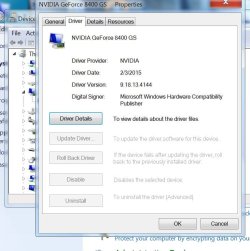
I'm at a loss, and apparently I have the same card in my own system. Looking at my own driver version, it's 9.18.13.4144. Released on 2/3/2015. The Nvidia site can't even detect what I have when I use their own java-enabled widget (I used IE11, java + FF 52 don't play well for me).

Going back to the Nvidia site, I performed another search selecting Drivers > All Nvidia drivers (instead of Geforce). That took me to this page:

http://www.nvidia.com/download/driverResults.aspx/112593/en-us

Version 342.01, released 12/14/2016. The 8400GS is listed in the Compatible Devices.

Ranger 4 did give some excellent advice, reseating the card is certainly something worthwhile to try. Nvidia renaming the drivers from 9.x.x to 300.xx is a complete mystery to me. f23948, I hope you can get it straightened out.
 

Attachments

  • 8400GS driver.jpg
    8400GS driver.jpg
    76.5 KB · Views: 15
Last edited:

My Computer

Computer type
PC/Desktop
Computer Manufacturer/Model Number
Custom
OS
Microsoft Windows 7 Ultimate 32-bit 7601 Multiprocessor Free Service Pack 1
CPU
Pentium(R) Dual-Core CPU E6500 @ 2.93GHz
Motherboard
Gigabyte Technology Co., Ltd. EP45-UD3L
Memory
G.Skill 2.00 GB
Graphics Card(s)
NVIDIA GeForce 8400 GS
Sound Card
High Definition Audio Device
Screen Resolution
1680 x 1050 x 32 bits (4294967296 colors) @ 59 Hz
Hard Drives
(1) ST1500DL003-9VT16L ATA Device (2) WDC WD3200AAKS-00L9A0 ATA Device (3) WDC WD7501AALS-00J7B0 ATA Device
Antivirus
MSE, Avast 17.2
Browser
Firefox
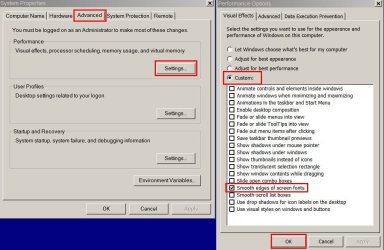
Start > Run

type sysdm.cpl press Enter.

Try these settings:

Performance Options.jpg

See if that makes any difference.
 

My Computer

Computer type
Laptop
Computer Manufacturer/Model Number
ASUS
OS
Microsoft Windows 7 Home Premium 64-bit 7601 Multiprocessor Free Service Pack 1
CPU
AMD C-60 APU with Radeon(tm) HD Graphics
Motherboard
ASUSTeK COMPUTER INC. X501U
Memory
4.00 GB
Graphics Card(s)
AMD Radeon HD 6290 Graphics
Sound Card
(1) AMD High Definition Audio Device (2) Realtek High Defi
Screen Resolution
1366 x 768 x 32 bits (4294967296 colors) @ 60 Hz
Hard Drives
Hitachi HTS545050A7E380 SATA Disk Device
Antivirus
Comodo CIS & FW, SecureAplus App Whitelisting, Threatfire
Browser
Cyberfox 64bit, Opera 64bit, Airfox
Other Info
Spy-The-Spy, HitmanPro.Alert, Norton Connect Safe, MJRegWatcher, BitDefender TrafficLight, Voodoo Shield, Zemana AntiMalware
Back
Top