Screen not refreshing properly

Webbiz

New member
Local time
4:38 PM
Messages
27
A strange problem has recently popped up that I thought was just a random event. However, it does this everyday.

I have two monitors on Windows 7 Ultimate.

I may move a window from on top of another window, and the image of the original window remains showing on the window it was on top off. The only way to get ride of it is to minimize the window and then bring it back up again.

Also, I may move a window across another window and it draws a whole series of the window across the one below it. Strange!

I don't know why this is happening. I shut down a bunch of apps running in the background but that doesn't seem to do anything.

I've even disabled my Antivir antivirus program. Still, moving my browser across another window is leaving traces of the browser window on the other window rather than refreshing after one window leaves the other.

Any ideas what may be doing this?

Thanks.
 

My Computer

Computer type
PC/Desktop
Computer Manufacturer/Model Number
VirtualBox
OS
Windows 7
CPU
Processor AMD Ryzen 7 3700X 8-Core Processor, 3593 Mhz, 8 Co
Motherboard
X570 AORUS ULTRA
Memory
64g
Graphics Card(s)
GeForce GTX 1050 Ti
Hard Drives
500gb, 500gb, 1T SSD's
PSU
800w
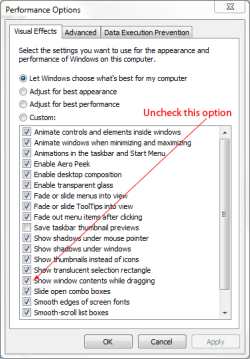
You might want to check your system options by going to:

Win Key+ Pause keyboard combo>Advanced System Settings>System Properties>Advanced Tab>Performance>Settings>Performance Options>Visual Effects Tab

DM.PNG
 

My Computer

Computer Manufacturer/Model Number
HP Pavilion Elite 495UK
OS
Windows 7 Ultimate SP1 64-Bit
CPU
Intel Core i7 870 @ 2.93GHz
Motherboard
MSI 2A9C (CPU1)
Memory
8Gb Dual-Channel DDR3 @ 664MHz
Graphics Card(s)
nVidia GeForce GTX 460 1024MB dedicated RAM
Sound Card
Realtek HD Audio
Monitor(s) Displays
HP2310i
Screen Resolution
1920 x 1080
Hard Drives
1x1954GB Hitachi HDS22020ALA 330 (RAID), 1x1954GB Hitachi External for backup and storage
PSU
460W
Case
HP Elite
Cooling
Air cooled
Keyboard
Logitech K750 solar-powered keyboard
Mouse
Logitech Wireless M180 mouse
Internet Speed
2Mb
Other Info
Pure Avanti Flow Internet Radio with iPod Dock, 64Gb iPod, HP USB Speakers, Sony MDR-V500 Headphones, Sony Vaio F-Series Laptop
Sounds like a video driver issue. It isn't normal behavior with that setting on OR off.
 

My Computer

Computer Manufacturer/Model Number
Custom
OS
Windows 7 Ultimate RTM (Technet)
CPU
3.00 gigahertz Intel Core2 Duo E8400
Motherboard
ASUSTeK Computer INC. P5K/EPU Rev 1.xx
Memory
4GB
Graphics Card(s)
ATI Radeon X1950 Pro
Sound Card
Built in HD Audio
Monitor(s) Displays
22" Gateway LCD
Screen Resolution
1920 x 1200
Hard Drives
ST3160023A [Hard drive] (160.04 GB) -- drive 0, rev 8.01, ST3500630AS [Hard drive] (500.11 GB) -- drive 2, rev 3.AAK
ST3500630AS [Hard drive] (500.11 GB) -- drive 1, rev 3.AAK
Keyboard
Logitech G11
Mouse
Microsoft Wireless Laser Mouse 5000
Internet Speed
13.44 Mbps
I did disable that option earlier, which rids me the problem because the window is just an outline when I move it now so it doesn't leave traces of itself anymore. But as MacGvr mentioned, it shouldn't matter.

This worked for months until recently. Something I may have installed and then uninstalled perhaps started the problem. I'm tempted to just reinstall a previously good backup, though I cringe at the thought of having to reinstall some stuff. Would be nice to know what is causing this.

Thanks.
 

My Computer

Computer type
PC/Desktop
Computer Manufacturer/Model Number
VirtualBox
OS
Windows 7
CPU
Processor AMD Ryzen 7 3700X 8-Core Processor, 3593 Mhz, 8 Co
Motherboard
X570 AORUS ULTRA
Memory
64g
Graphics Card(s)
GeForce GTX 1050 Ti
Hard Drives
500gb, 500gb, 1T SSD's
PSU
800w
You might want to consider MacGvyr's suggestion and try updating your video driver.
 

My Computer

Computer Manufacturer/Model Number
HP Pavilion Elite 495UK
OS
Windows 7 Ultimate SP1 64-Bit
CPU
Intel Core i7 870 @ 2.93GHz
Motherboard
MSI 2A9C (CPU1)
Memory
8Gb Dual-Channel DDR3 @ 664MHz
Graphics Card(s)
nVidia GeForce GTX 460 1024MB dedicated RAM
Sound Card
Realtek HD Audio
Monitor(s) Displays
HP2310i
Screen Resolution
1920 x 1080
Hard Drives
1x1954GB Hitachi HDS22020ALA 330 (RAID), 1x1954GB Hitachi External for backup and storage
PSU
460W
Case
HP Elite
Cooling
Air cooled
Keyboard
Logitech K750 solar-powered keyboard
Mouse
Logitech Wireless M180 mouse
Internet Speed
2Mb
Other Info
Pure Avanti Flow Internet Radio with iPod Dock, 64Gb iPod, HP USB Speakers, Sony MDR-V500 Headphones, Sony Vaio F-Series Laptop
Updated the drivers. It appears to be working again. Thx.
 

My Computer

Computer type
PC/Desktop
Computer Manufacturer/Model Number
VirtualBox
OS
Windows 7
CPU
Processor AMD Ryzen 7 3700X 8-Core Processor, 3593 Mhz, 8 Co
Motherboard
X570 AORUS ULTRA
Memory
64g
Graphics Card(s)
GeForce GTX 1050 Ti
Hard Drives
500gb, 500gb, 1T SSD's
PSU
800w
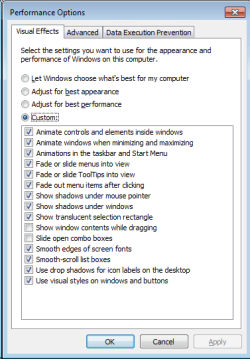
Thank you so much for the advice about Windows System Properties/Visual Effects options. It solved my problems with combo boxes not opening properly in all my programs (but worst in Excel and Word) so that when I wanted to select the type of file to open or save the list would not open. I simply turned off the slide combo boxes option and now it works fine.
 

Attachments

  • Screenshot 2015-08-24 17.02.27.png
    Screenshot 2015-08-24 17.02.27.png
    22 KB · Views: 8

My Computer

Computer type
Laptop
Computer Manufacturer/Model Number
Dell
OS
Windows 7 Ultimate x64
Back
Top