Screen recording with audio.

smkmuthu

New member
Local time
2:03 AM
Messages
2
Hi

I am using Windows 7 professional (Think Pad).

I usually attend webinars. I tried to record the same with webex record from my laptop.

I observed that the sound from speaker is not getting captured by laptop Mic.

Do I need to do some configuration to direct the speaker output to Mic ?

i did some googling and some understood that it is not possible to record audio output from speakers.

I need your suggesion..

Thx in advance.

Muthu
 

My Computer

Computer type
Laptop
Computer Manufacturer/Model Number
Lenovo
OS
64 bit Professional
Antivirus
NAV
Browser
Chrome
In most cases, you need to have the Stereo Mix (also called System Mixer) set as the Default Recording device. Then whatever is heard on the PC's speakers should be able to be recorded. (The Stereo Mix is also needed if you want to record streaming audio from the internet.

Go to the Control Panel/Hardware and Sound and finally the Sound Panel, Recording Section. If the Stereo Mix is listed, enable it and make it the Default Recording Device. If its not listed, RIGHT click in a blank area in that panel then Click to Show "Disabled" and "Disconnected" Devices. The Stereo Mix should now be listed and you can enable it and make it the default Recording Device.
 

Attachments

  • Recording Panel with Stereo Mix.JPG
    Recording Panel with Stereo Mix.JPG
    31.4 KB · Views: 8

My Computer

Computer type
PC/Desktop
Computer Manufacturer/Model Number
My Own Build
OS
Windows 10 64 bit
CPU
Intel i7 6700K
Motherboard
ASUS ROG Maximus VIII Hero
Memory
16GB Corsair Dominator
Graphics Card(s)
Intel CPU Graphics
Sound Card
RealTek
Monitor(s) Displays
27" Dell S2719dgf
Screen Resolution
2560X1440
Hard Drives
1 TB Samsung 850 EVO SSD for Win 10 Pro
500GB Samsung 850 EVO SSD for Win 10 Insider
2 TB drive for backup
PSU
EVGA Supernova 750G2
Case
BeQuiet Silent Base 600
Cooling
Deepcool Captain 120EX
Keyboard
Microsoft Wireless 2000
Mouse
Microsoft wireless
Internet Speed
100 MB/sec (Cable)
Antivirus
Microsoft Defender and Malwarebytes
Browser
Edge/Firefox
Other Info
Cakewalk (Sonar) by BandLab and Studio One 4.1 Pro recording studio software. MOTU 896Mk3 Hybrid recording interface, Frontier Tranzport wireless control unit, Behringer X-Touch Control Surface.
Five USB connected optical drives for CD Audio production using Nero BurningROM
Hi
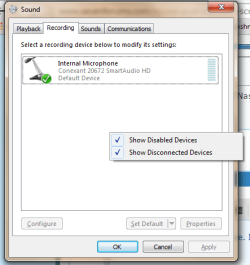
Thanks for your quick response. I tried doing the same. But i don't have disabled stereo mix. Please find the screen shot.

Thx
Muthu
 

Attachments

  • audio_mixer.png
    audio_mixer.png
    15.7 KB · Views: 6

My Computer

Computer type
Laptop
Computer Manufacturer/Model Number
Lenovo
OS
64 bit Professional
Antivirus
NAV
Browser
Chrome
You need the Stereo Mix to do what you want. Check Lenovo for a new driver.
 

My Computer

Computer type
PC/Desktop
Computer Manufacturer/Model Number
My Own Build
OS
Windows 10 64 bit
CPU
Intel i7 6700K
Motherboard
ASUS ROG Maximus VIII Hero
Memory
16GB Corsair Dominator
Graphics Card(s)
Intel CPU Graphics
Sound Card
RealTek
Monitor(s) Displays
27" Dell S2719dgf
Screen Resolution
2560X1440
Hard Drives
1 TB Samsung 850 EVO SSD for Win 10 Pro
500GB Samsung 850 EVO SSD for Win 10 Insider
2 TB drive for backup
PSU
EVGA Supernova 750G2
Case
BeQuiet Silent Base 600
Cooling
Deepcool Captain 120EX
Keyboard
Microsoft Wireless 2000
Mouse
Microsoft wireless
Internet Speed
100 MB/sec (Cable)
Antivirus
Microsoft Defender and Malwarebytes
Browser
Edge/Firefox
Other Info
Cakewalk (Sonar) by BandLab and Studio One 4.1 Pro recording studio software. MOTU 896Mk3 Hybrid recording interface, Frontier Tranzport wireless control unit, Behringer X-Touch Control Surface.
Five USB connected optical drives for CD Audio production using Nero BurningROM
Back
Top