Screen resolution in Virtual Box with Ubuntu

whs:
All you should have to do is grab the bottom-right corner of the window and drag it to the size you want. (just like any other window)
This is a VBox function, not Ubuntu's function.
VBox will automagically re-size the Ubuntu screen size to fit.
 

My Computer My Computer

Computer Manufacturer/Model Number
OEM - Me
OS
Windows 7 Home Premium x64
CPU
AMD Phenom II X6 1600T
Motherboard
GigaByte GZ-990FXA-UD3
Memory
16GB PC3-10700 (1342MHz)
Graphics Card(s)
ATI Radeon 5770 HD (x2) CrossFire
Sound Card
On-board RealTek chipset
Monitor(s) Displays
3x Hanns-G 1920x1080 Monitors
Screen Resolution
3x Hanns-G 1920x1080 Monitors
Hard Drives
Intel 25-V SSD 40GB: 218 MB/s AT: 0.1ms
Intel X-25M SSD 80GB: 230MB/s AT: 0.1ms
Seagate 750GB: 133 MB/s AT: 13ms (perpendicular storage)
Buffalo HD-PCTU3 1TB External drive
PSU
OCZ Stealth X Stream 750W
Case
Cheap (unknown)
Cooling
Stock
Keyboard
HP USB
Mouse
LogiTech USB
Internet Speed
1.5 Mbps - Slow - At the tail-end of a rural network
Other Info
Printer: Epson Stylus C-84
Scanner: HP 3500C Flatbed
DVD-RW: Plextor
DVD-ROM: Unknown
WEI: 7.4
whs:
All you should have to do is grab the bottom-right corner of the window and drag it to the size you want. (just like any other window)
This is a VBox function, not Ubuntu's function.
VBox will automagically re-size the Ubuntu screen size to fit.
Hmm, that sounds promising. I'll try all that later because I now have to leave for a bit.
 

My Computer My Computer

Computer Manufacturer/Model Number
HP, Dell, Gateway, Toshiba - 4 laptops and 2 desktops
OS
Vista, Windows7, Mint Mate, Zorin, Windows 8
CPU
from 1.6GHz Duo to i7
Monitor(s) Displays
2x HP w2207
Hard Drives
5x HDD, 7x SSD, 12x Externals
Keyboard
with trackball - no mices
Mouse
Trackball mice
Internet Speed
DSL 6000
Little interim report:

I have tried all proposals (except the Vi and Vim editor that Lemur proposed - need more study time). Nothing works. I can make a full screen (per Kari's post), but the Ubuntu screen stays 800x600 and the rest of the screen is black. I think that I need to get this Ubuntu resolution resolved (maybe with Lemur's Vim editor - once I understand that).

When I was running Win7 Beta in vBox, I had a much bigger resolution. That leads me to think that it is a Ubuntu problem - maybe a driver problem. But there are no Ubuntu drivers for my HP w2207. I keep plowing along at this time - until I give up - LOL.
 

My Computer My Computer

Computer Manufacturer/Model Number
HP, Dell, Gateway, Toshiba - 4 laptops and 2 desktops
OS
Vista, Windows7, Mint Mate, Zorin, Windows 8
CPU
from 1.6GHz Duo to i7
Monitor(s) Displays
2x HP w2207
Hard Drives
5x HDD, 7x SSD, 12x Externals
Keyboard
with trackball - no mices
Mouse
Trackball mice
Internet Speed
DSL 6000
Ok, Wolfgang. Let's try once more, if it's OK for you. The following applies when using Ubuntu 10.10 on a VirtualBox 3.12.12 virtual machine.

Earlier last night I created a new virtual machine installing Ubuntu to be able to test this. I have changed nothing in Ubuntu settings, this is how it should work out of the box.
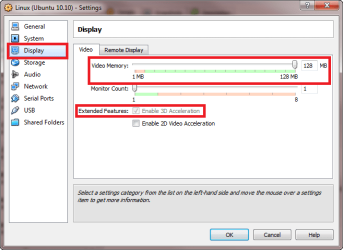
  • First, check from Ubuntu virtual machine's settings that you have assigned the maximum possible video memory to the virtual machine, and that 3D acceleration is enabled:
    .
    VB_GA_0.png
    .
  • Launch Ubuntu
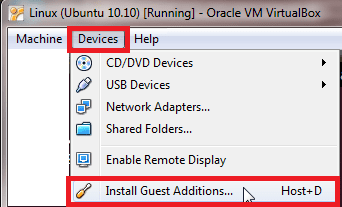
  • When Ubuntu vm is running, click Devices menu on VirtualBox' Explorer window, choose Install Guest Additions. Do this even if you are sure GA is already installed, no harm in reinstalling:
    .
    VB_GA_1.png
    .
  • This attach the GA ISO as a DVD drive to Ubuntu vm. Right click the drive symbol on desktop and choose Open with autorun prompt, or open your home folder from Ubuntu's Places menu, click VBADDITIONS drive symbol to open the drive, and click Open autorun prompt:
    .
    VB_GA_2.png
    .
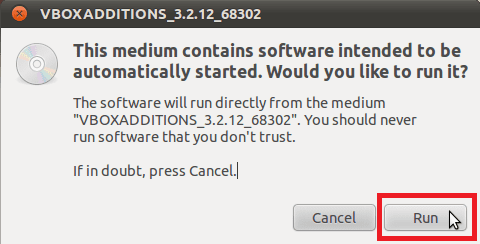
  • This opens a dialog to confirm you want to run the setup:
    .
    VB_GA_3.png
    .
  • Next a dialog appears asking you to provide the root (administrator) password. By default it is the same as your user password:
    .
    VB_GA_4.png
    .
  • You can now see Guest Additions being installed. If GA was already installed, setup first uninstalls and then reinstalls. When installation is done, you are asked to press Return to close the window:
    .
    VB_GA_5.png
    .
  • Reboot Ubuntu
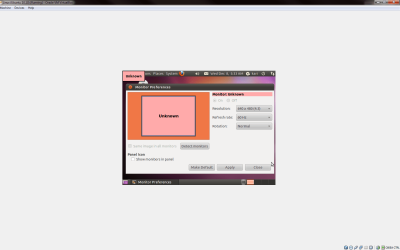
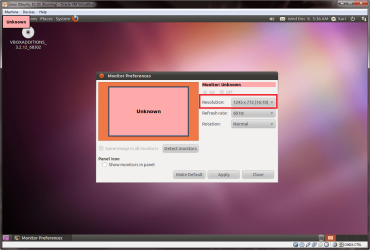
  • Now you can see all possible resolutions:
    .
    VB_GA_6.png
    .
  • If you change resolution from here (Ubuntu > System > Preferences > Monitors), only the resolution of Ubuntu is changed but Windows Explorer window for VirtualBox vm stays as it was, causing a not so nice looking experience. For instance, here I have chosen 640 * 480 resolution in Ubuntu when Windows Explorer window is full screen:
    .
    VB_GA_7.png
    .
  • Clicking restore button on Windows Explorer window instead, or resizing this Explorer window in Windows, Ubuntu automatically changes resolution to that of the Explorer window (minus Explorer's menu bar and status bar):
    .
    VB_GA_8.png
Conclusion: after installing GA on a VirtualBox vm running on Windows 7, change the resolution of ANY virtual machine, Linux, Solaris or Windows, by resizing the Windows Explorer window. Do not use native resolution settings on OS installed on vm.

Kari
 

My Computer My Computer

Computer type
Laptop
Computer Manufacturer/Model Number
HP ENVY 17-1150eg
OS
Windows 10 Pro x64 EN-GB
CPU
1.6 GHz Intel Core i7-720QM Processor
Memory
6 GB
Graphics Card(s)
ATI Mobility Radeon HD 5850 Graphics
Sound Card
Beats sound system with integrated subwoofer
Monitor(s) Displays
17" laptop display, 22" LED and 32" Full HD TV through HDMI
Screen Resolution
1600*900 (1), 1920*1080 (2&3)
Hard Drives
Internal: 2 x 500 GB SATA Hard Disk Drive 7200 rpm
External: 2TB for backups, 3TB USB3 network drive for media
Cooling
As Envy runs a bit warm, I have it on a Cooler Master pad
Keyboard
Logitech diNovo Media Desktop Laser (bluetooth)
Mouse
Logitech Performance Mouse MX
Internet Speed
50/10 Mbps VDSL
Antivirus
Windows Defender 4.3.9431.0
Browser
Maxthon 3.5.2., IE11
Kari, thank you very much taking the time for such a detailed tutorial. Good news is that I did exactly what you have done. Bad news is that it did not change anything. I will give it a rest for a while and work with the little window.
What puzzles me is that I had a much larger resolution when I was running Win7 Beta. I wonder whether it is a driver problem in Ubuntu.
 

My Computer My Computer

Computer Manufacturer/Model Number
HP, Dell, Gateway, Toshiba - 4 laptops and 2 desktops
OS
Vista, Windows7, Mint Mate, Zorin, Windows 8
CPU
from 1.6GHz Duo to i7
Monitor(s) Displays
2x HP w2207
Hard Drives
5x HDD, 7x SSD, 12x Externals
Keyboard
with trackball - no mices
Mouse
Trackball mice
Internet Speed
DSL 6000
Do you have the latest, both Ubuntu and VirtualBox. The procedure I followed works with all defaults with Ubuntu 10.10 and VBox 3.12.12. I have now tested on two desktops and a laptop. One DT and LT running Seven Enterprise, second DT Seven Ultimate.

Kari
 

My Computer My Computer

Computer type
Laptop
Computer Manufacturer/Model Number
HP ENVY 17-1150eg
OS
Windows 10 Pro x64 EN-GB
CPU
1.6 GHz Intel Core i7-720QM Processor
Memory
6 GB
Graphics Card(s)
ATI Mobility Radeon HD 5850 Graphics
Sound Card
Beats sound system with integrated subwoofer
Monitor(s) Displays
17" laptop display, 22" LED and 32" Full HD TV through HDMI
Screen Resolution
1600*900 (1), 1920*1080 (2&3)
Hard Drives
Internal: 2 x 500 GB SATA Hard Disk Drive 7200 rpm
External: 2TB for backups, 3TB USB3 network drive for media
Cooling
As Envy runs a bit warm, I have it on a Cooler Master pad
Keyboard
Logitech diNovo Media Desktop Laser (bluetooth)
Mouse
Logitech Performance Mouse MX
Internet Speed
50/10 Mbps VDSL
Antivirus
Windows Defender 4.3.9431.0
Browser
Maxthon 3.5.2., IE11
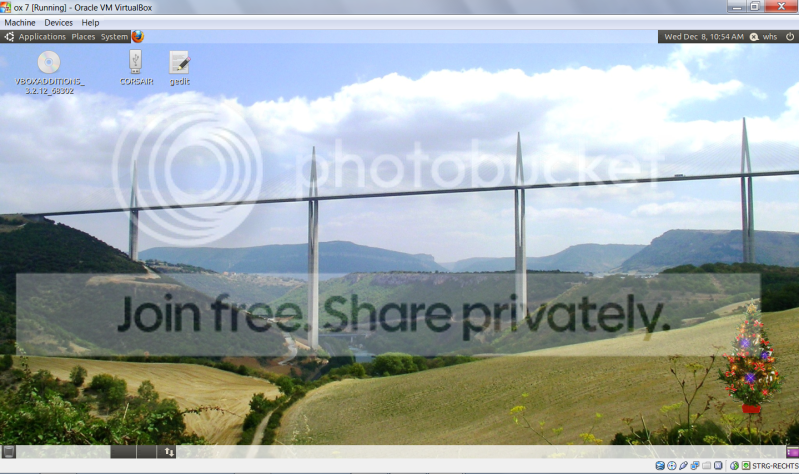
Good News - Just discovered that when I maximize the Win7 window, the Ubuntu screen will follow and become full size - who would have thunk. Again thanks to everybody helping me. It is fun to discover another OS. I am starting to get the hang of it.

Look at this beautiful screen:

2010-12-08_105454.png
 

My Computer My Computer

Computer Manufacturer/Model Number
HP, Dell, Gateway, Toshiba - 4 laptops and 2 desktops
OS
Vista, Windows7, Mint Mate, Zorin, Windows 8
CPU
from 1.6GHz Duo to i7
Monitor(s) Displays
2x HP w2207
Hard Drives
5x HDD, 7x SSD, 12x Externals
Keyboard
with trackball - no mices
Mouse
Trackball mice
Internet Speed
DSL 6000
YES!

Just to please us, what happens now when you restore the Explorer window, or drag the window handles?
 

My Computer My Computer

Computer type
Laptop
Computer Manufacturer/Model Number
HP ENVY 17-1150eg
OS
Windows 10 Pro x64 EN-GB
CPU
1.6 GHz Intel Core i7-720QM Processor
Memory
6 GB
Graphics Card(s)
ATI Mobility Radeon HD 5850 Graphics
Sound Card
Beats sound system with integrated subwoofer
Monitor(s) Displays
17" laptop display, 22" LED and 32" Full HD TV through HDMI
Screen Resolution
1600*900 (1), 1920*1080 (2&3)
Hard Drives
Internal: 2 x 500 GB SATA Hard Disk Drive 7200 rpm
External: 2TB for backups, 3TB USB3 network drive for media
Cooling
As Envy runs a bit warm, I have it on a Cooler Master pad
Keyboard
Logitech diNovo Media Desktop Laser (bluetooth)
Mouse
Logitech Performance Mouse MX
Internet Speed
50/10 Mbps VDSL
Antivirus
Windows Defender 4.3.9431.0
Browser
Maxthon 3.5.2., IE11
Kari, it stays full screen (always according to the Explorer drag size). And even when I restart Ubuntu, it comes back as full screen.
Another advantage I discovered is that the cursor need not be captured with a click anymore. It captures automatically when i am on the corresponding window. So I can work simultaneously in Ubuntu and Win7 without switching the cursor. And my tweaked Vista sidebar as well as the Win7 taskbar stays up. My Win7 Rocket Dock is also fully functional. So I have access to both systems at the same time.

The whole excercise is really a test for the Windows8 Beta which I first plan to run in vBox. And at the same time I learn a bit of Ubuntu - amazing how much one can learn in just a few days. I even ventured into Ubunto Command Prompt - which thay call "Terminal".
 

My Computer My Computer

Computer Manufacturer/Model Number
HP, Dell, Gateway, Toshiba - 4 laptops and 2 desktops
OS
Vista, Windows7, Mint Mate, Zorin, Windows 8
CPU
from 1.6GHz Duo to i7
Monitor(s) Displays
2x HP w2207
Hard Drives
5x HDD, 7x SSD, 12x Externals
Keyboard
with trackball - no mices
Mouse
Trackball mice
Internet Speed
DSL 6000
Wolfgang, sooner than you can think of you sudo apt-get install this and bzip2 -dc that, compiling Linux kernel to better work for you, joining a Linux forum to offer your assistance. ;)

Mouse integration, as well as cross OS copy & paste which you should also have now, are integrated parts of VirtualBox Guest Additions not available without GA, so the question is fully answered: you have successfully installed the Guest Additions.

Have fun with Ubuntu. When you have played with it a bit more, try another distro. My favorite is OpenSUSE 11.3.

Kari

EDIT: A wonderful site for VirtualBox users, lots of free or almost free virtual disk images with pre-installed OS's, inclusive all possible Linux distros: http://virtualboximages.com/
 

My Computer My Computer

Computer type
Laptop
Computer Manufacturer/Model Number
HP ENVY 17-1150eg
OS
Windows 10 Pro x64 EN-GB
CPU
1.6 GHz Intel Core i7-720QM Processor
Memory
6 GB
Graphics Card(s)
ATI Mobility Radeon HD 5850 Graphics
Sound Card
Beats sound system with integrated subwoofer
Monitor(s) Displays
17" laptop display, 22" LED and 32" Full HD TV through HDMI
Screen Resolution
1600*900 (1), 1920*1080 (2&3)
Hard Drives
Internal: 2 x 500 GB SATA Hard Disk Drive 7200 rpm
External: 2TB for backups, 3TB USB3 network drive for media
Cooling
As Envy runs a bit warm, I have it on a Cooler Master pad
Keyboard
Logitech diNovo Media Desktop Laser (bluetooth)
Mouse
Logitech Performance Mouse MX
Internet Speed
50/10 Mbps VDSL
Antivirus
Windows Defender 4.3.9431.0
Browser
Maxthon 3.5.2., IE11
Kari, Thanks for all your hints and tips. I am also using Fedora at times that I run off a stick. But that is not the same thing. I have heard a lot of good things about Linux Mint. Did you ever try that and what do you think about it?
 

My Computer My Computer

Computer Manufacturer/Model Number
HP, Dell, Gateway, Toshiba - 4 laptops and 2 desktops
OS
Vista, Windows7, Mint Mate, Zorin, Windows 8
CPU
from 1.6GHz Duo to i7
Monitor(s) Displays
2x HP w2207
Hard Drives
5x HDD, 7x SSD, 12x Externals
Keyboard
with trackball - no mices
Mouse
Trackball mice
Internet Speed
DSL 6000
Notice please, this is my personal, subjective opinion based on A) my own experience, B) what I have learned from Linux community and C) the opinions of close friends and colleagues.

Ubuntu is considered as Beginner's Linux. It is finetuned to be as close to Windows as possible. There's basically no need to use terminal or compile anything, if your computer usage is let's say on average level (media streaming and playing, gaming, internet, email etc.).

Linux Mint is not a big leap from Ubuntu, but at least similar to that of from Seven Home Basic to Professional. Fedora, Mandriva and similar also belong to this category. Maintaining the system takes a bit more, you have more possibilities to do things in different ways.

Jumping from this middle class to the top Enterprise level there's IMO only one serious choice, Novell OpenSUSE. The latest version is 11.3. Novel OpenSUSE is free to test, but basically it is a commercial product which you have to buy. An OpenSUSE without Novel elements and features is freely available around the net.

Out of curiosity, I have to mention gOS 3.11 Gadgets, a.k.a. Good OS. It is the simpliest of all Linux distros to install, designed as the First OS, where Out of the Box experience is said to be so easy gOS suits those who have never even used computers before. I do not fully agree, but gOS is easy and most certainly worth to see and try.

As you have already started to prepare yourself to virtual Windows 8, I would recommend you test installing Windows 7 on both VirtualBox and Virtual PC to see the difference. As you certainly know, the free 90 day trial version of Seven Enterprise is still available as downloadable ISO on Windows 7 Enterprise | Trial, Evaluation, Test, Download. TechNet membership not needed. You can download one ISO and install and activate it simultaneously on several virtual machine's, so it suits perfectly for practising virtual computing.

Kari
 
Last edited:

My Computer My Computer

Computer type
Laptop
Computer Manufacturer/Model Number
HP ENVY 17-1150eg
OS
Windows 10 Pro x64 EN-GB
CPU
1.6 GHz Intel Core i7-720QM Processor
Memory
6 GB
Graphics Card(s)
ATI Mobility Radeon HD 5850 Graphics
Sound Card
Beats sound system with integrated subwoofer
Monitor(s) Displays
17" laptop display, 22" LED and 32" Full HD TV through HDMI
Screen Resolution
1600*900 (1), 1920*1080 (2&3)
Hard Drives
Internal: 2 x 500 GB SATA Hard Disk Drive 7200 rpm
External: 2TB for backups, 3TB USB3 network drive for media
Cooling
As Envy runs a bit warm, I have it on a Cooler Master pad
Keyboard
Logitech diNovo Media Desktop Laser (bluetooth)
Mouse
Logitech Performance Mouse MX
Internet Speed
50/10 Mbps VDSL
Antivirus
Windows Defender 4.3.9431.0
Browser
Maxthon 3.5.2., IE11
  • Like
Reactions: whs
Kari, that is a BIG program you are lining out. It will keep me busy for the rest of my Florida stay - LÖL. Thank you.
Btw: I did use Virtual PC a while back but liked vBox better. I even wrote a tutorial about Virtual PC - that was the good old times.

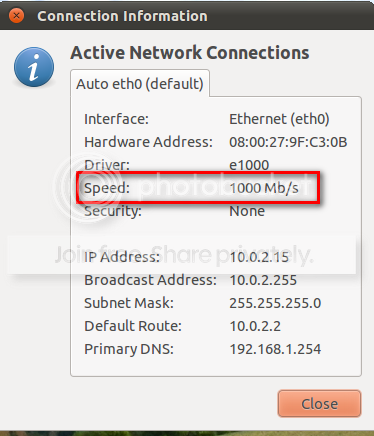
Another question, is that what I should expect as Internet speed?

2010-12-08_124444.png
 

My Computer My Computer

Computer Manufacturer/Model Number
HP, Dell, Gateway, Toshiba - 4 laptops and 2 desktops
OS
Vista, Windows7, Mint Mate, Zorin, Windows 8
CPU
from 1.6GHz Duo to i7
Monitor(s) Displays
2x HP w2207
Hard Drives
5x HDD, 7x SSD, 12x Externals
Keyboard
with trackball - no mices
Mouse
Trackball mice
Internet Speed
DSL 6000
Back
Top