Screen resolution problem (1024x768)

Nentin

New member
Local time
10:25 PM
Messages
3
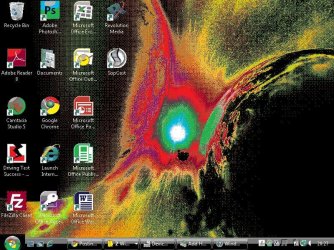
Well i recently installed windows 7 proffesional and had 1 problem with my screen resolution. After the instalation, my desketop resolution (1024x768) was looking like this :cry: .....
problem1z.jpg

And when i lower the resolution (640x480), the entire computer desktop ,icons were huge without the bad graphics.

Any ideas on how i can fix this problem :confused: ?
 

My Computer

OS
Windows 7 Professional
Right click on an empty space on your desktop and go to view where you can make icons small, medium or large.

Welcome to 7 forums and check out our great tutorials.
THW
 

My Computer

Computer Manufacturer/Model Number
HP M9077c
OS
Windows 7 Home Premium 64bit
CPU
Intel(R)Core(TM)2 quad [email protected] 2.39GHz
Motherboard
ASUSeK
Memory
6GB DDR2 6400
Graphics Card(s)
GeForce 8500/512MB
Sound Card
Realtek High Def Audio
Monitor(s) Displays
HP w2408 LCD 24" widescreen
Screen Resolution
1920x1200
Cooling
6 pack of Bud
Keyboard
MS wireless Inteli
Mouse
MS wireless Inteli
What is the graphics card model number?
 

My Computer

OS
Windows 7 Home Premium 64-bit
Where can i find this card model number if you don't mind ?
 

My Computer

OS
Windows 7 Professional
Well i recently installed windows 7 proffesional and had 1 problem with my screen resolution. After the instalation, my desketop resolution (1024x768) was looking like this :cry: .....
View attachment 178294

And when i lower the resolution (640x480), the entire computer desktop ,icons were huge without the bad graphics.

Any ideas on how i can fix this problem :confused: ?

What size is your monitor or screen if a laptop?

640x480 is pretty low resolution, have you tried updating your graphics card driver?

Have a look at this too,

http://www.sevenforums.com/tutorials/255-screen-resolution-display-settings.html

Filling in your http://www.sevenforums.com/tutorials/180324-system-info-see-your-system-specs.html will help a lot.
 

My Computer

Computer type
PC/Desktop
Computer Manufacturer/Model Number
Self Built
OS
Win 10 Pro x64
CPU
Intel I5-2500K @3.3GHz
Motherboard
Asrock P67 Extreme4
Memory
16GB G.Skill Ripjaws X (4x4GB)
Graphics Card(s)
EVGA GeForce 750 Ti SC 2GB
Sound Card
ASUS Xonar DG 5.1 Channels 24-bit 96KHz PCI Interface Sound
Monitor(s) Displays
auria eq2367
Screen Resolution
1920 x 1080
Hard Drives
250GB Samsung 850 EVO SSD
1TB WD Blue
1TB Hitachi
PSU
SeaSonic X 650W 80 Plus Gold
Case
Corsair Obsidian 750D
Cooling
Corsair H60, Three 140mm case fans
Keyboard
Logitech Wireless Keyboard K520
Mouse
Logitech Wireless Mouse M310
Internet Speed
Wave Broadband ~ 100 dn 5 up
Antivirus
Windows Defender, Malwarebytes Premium
Browser
Edge, IE11, Chrome
Other Info
Laptop specs: HP g7-1365dx /
CPU: AMD A6-3420M APU with Radeon(tm) HD Graphics /
RAM: Crucial 8Gb (2x4Gb) /
SSD: Crucial M4-CT128M4SSD2 ATA Device/ FW 000F /
GFX: AMD Radeon HD 6520G /
OS: Windows 10 Pro x64
Well i tried everything and nothing seems to work. I have the correct resolution to fit my screen but, it still shows the fuzzy dis-colored graphics on my screen.
 

My Computer

OS
Windows 7 Professional
Well i tried everything and nothing seems to work. I have the correct resolution to fit my screen but, it still shows the fuzzy dis-colored graphics on my screen.

Nentin,
Fill in your system specs and be sure to let us know what kind of graphics card your computer has.
Maybe all you need to do is update the card!
 

My Computer

Computer Manufacturer/Model Number
HP M9077c
OS
Windows 7 Home Premium 64bit
CPU
Intel(R)Core(TM)2 quad [email protected] 2.39GHz
Motherboard
ASUSeK
Memory
6GB DDR2 6400
Graphics Card(s)
GeForce 8500/512MB
Sound Card
Realtek High Def Audio
Monitor(s) Displays
HP w2408 LCD 24" widescreen
Screen Resolution
1920x1200
Cooling
6 pack of Bud
Keyboard
MS wireless Inteli
Mouse
MS wireless Inteli
Screen resolution problem.

hello i have the same problem as Nentin. My screen resolution appear to has a problem.The problem happened once ( before 2 days) when i turned on my laptop and after a while ( 10 mins) it was ok,it fixed by it's shelf,but it happened again last night and until now it's still like that, even if i tuned off my laptop for 10 hours..Have you got any ideas what's the problem and what do i need to do???thanks a lot :)

P.S. I am using Windows 7 and my graphic card version is 8.672.1.2000.
 

My Computer

OS
Windows 7 Ultimate x64
Back
Top