screen resolution

greendaykiz

New member
Local time
11:32 AM
Messages
1
I dont know a lot about computers so I'm sorry if i get some of this wrong. Basically, I recently installed w7 on my Dell Dimension 3000 and im having problems with my screen resolution. I can only change my screen resolution to a set number of combinations, meaning that i can only have my usual 1024x768 resolution with 256 colour, not 16-bit or higher which i used to have with xp. my choices are:

1024x768, 256 colour
800x600, 256 colour
640x480, 256 colour
640x480, high colour (16-bit)
640x480, 16 colour

is my limited choice of options due to my graphics card or my drivers, and what do I need to do to fix it?
 

My Computer

OS
Windows 7
I dont know a lot about computers so I'm sorry if i get some of this wrong. Basically, I recently installed w7 on my Dell Dimension 3000 and im having problems with my screen resolution. I can only change my screen resolution to a set number of combinations, meaning that i can only have my usual 1024x768 resolution with 256 colour, not 16-bit or higher which i used to have with xp. my choices are:

1024x768, 256 colour
800x600, 256 colour
640x480, 256 colour
640x480, high colour (16-bit)
640x480, 16 colour

is my limited choice of options due to my graphics card or my drivers, and what do I need to do to fix it?

Probably. Any chance you can tell us what video card? WIn 7 uses more video resources than XP, but there are ways to minimize their use.

Ken
 

My Computer

Computer Manufacturer/Model Number
HP Pavillion dv-7 1005 Tx
OS
Win 8 Release candidate 8400
CPU
[email protected]
Memory
4 gigs
Graphics Card(s)
Nvidia 9600M
Sound Card
HD built-in
Monitor(s) Displays
17" Wxga
Screen Resolution
1440x900
Cooling
none
Internet Speed
45Mb down 5Mb up

My Computer

Computer Manufacturer/Model Number
Compaq Desktop
OS
Windows 7 Ultimate x64
CPU
AMD Sempron Dual Core
Memory
3GB
Graphics Card(s)
NVIDIA GeForce 6150SE nForce 430
Screen Resolution
1024x768
Hard Drives
150GB Sata
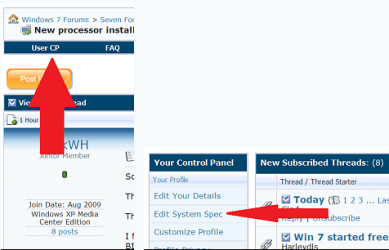
Welcome to SevnForums. It would help to have your full system specs filled in here
usercp 1.png
This way all a member has to do is click on My System Specs in the lower left hand corner to know them.

Here is a program to help with that if you need to Speccy - System Information - Free Download

Without looking up your system( thinking is it's a Desktop) if you have a separate monitor or LCD you may need to see if their is a driver (.inf file) and install it so your monitor appears in the device manager, this will allow Windows to see it and let you have access to it's full resolutions.

Drivers & Downloads=

As you can see if this is your model it stopped being supported under XP so any driver installs will have to be done via compatibility mode http://www.sevenforums.com/tutorials/316-compatibility-mode.html
Thanks. Fabe
 

My Computer

Computer Manufacturer/Model Number
Self Built
OS
Windows 7 ultimate 64 bit / XP Home sp3
CPU
intel Core 2 Duo E8400 3.0ghz
Motherboard
Asus P5ND bios 1401
Memory
8 gigs 1066 OCZ Fata1ty
Graphics Card(s)
EVGA GTX 580 Call of Duty Black Ops Edition
Sound Card
Creative Soundblaster Audigy 2zs
Monitor(s) Displays
Asus 24in LCD's 2MS X2
Screen Resolution
1920x1080p @60Hz
Hard Drives
WD Caviar 500 Black/ WD Caviar 200 Blue
PSU
OCZ 700W GameXtreme
Case
NZXT Apollo
Cooling
Corsair H50 CPU/120mm x3 /60mm x2 /Corsair Dominator Ram
Keyboard
Logitech Bluetooth Wireless MX5000
Mouse
Logitech Bluetooth Wireless MX1000
Internet Speed
Download 19.83 Upload 0.97
Other Info
Logitech Z2300 Speakers/ Bose Noise Cancelling Headphones/Avermedia PCI-e Hybrid TV Bravo/Epson NX415 all in one/ 4 Port Powered USB Hub/ LG 10x Bluray Burner /TSST Corp DVDRW External
Back
Top