Screen Resolution?

Magnette

New member
Local time
7:34 AM
Messages
10
Hey, I'm a newbie.

I have just upgraded my OS from Vista Home Premium to Windows 7.
My LCD screen is 1280x768. Everything worked well in Vista but then when I upgraded my OS, there was no 1280x768 option in the screen resolution.

Right now, I'm using the 1024x768 option but it's still messed up. The taskbar is so large.

Do you know any solution to this problem?

PS.
I have already tried clicking the 'advanced settings' on the screen resolution and also clicking "list all modes" in the adapter tab. and i haven't seen a 1280x768 option again.

also unchecked the "hide modes that this monitor cannot display" on the monitor tab, and the available option was 1280x1024.. it should be 1280x768.
 

My Computer

OS
Windows 7 Home Premium 32 Bit

My Computer

Computer type
PC/Desktop
Computer Manufacturer/Model Number
Dell XPS 420
OS
Windows 10, Home Clean Install
CPU
Intel Core2 processsor Q8200(2.33Ghz 1333FSB) Quad Core Tech
Motherboard
Dell
Memory
6 gb
Graphics Card(s)
ATI Radeon 256MB HD3650
Sound Card
Intergrated 7.1 Channel Audio
Monitor(s) Displays
Dell SP2009W 20"
Hard Drives
640 GB Serial ATA Hard drive
Cooling
Fan
Keyboard
Dell USB Keyboard
Mouse
Dell Premium Optical USB
Internet Speed
DSL 2.85
It couldn't go smaller D;
 

My Computer

OS
Windows 7 Home Premium 32 Bit
Go to search
type device manager
in device manager look for a yellow warning poster by graphics card
Make sure driver is up to date.
 

My Computer

Computer type
PC/Desktop
Computer Manufacturer/Model Number
Dell XPS 420
OS
Windows 10, Home Clean Install
CPU
Intel Core2 processsor Q8200(2.33Ghz 1333FSB) Quad Core Tech
Motherboard
Dell
Memory
6 gb
Graphics Card(s)
ATI Radeon 256MB HD3650
Sound Card
Intergrated 7.1 Channel Audio
Monitor(s) Displays
Dell SP2009W 20"
Hard Drives
640 GB Serial ATA Hard drive
Cooling
Fan
Keyboard
Dell USB Keyboard
Mouse
Dell Premium Optical USB
Internet Speed
DSL 2.85
I checked everything. And it told me that the driver for my device is up to date.

I'm hopeless :O
 

My Computer

OS
Windows 7 Home Premium 32 Bit
Check driver for monitor
How did you get Seven
Upgrade or clean install?
 

My Computer

Computer type
PC/Desktop
Computer Manufacturer/Model Number
Dell XPS 420
OS
Windows 10, Home Clean Install
CPU
Intel Core2 processsor Q8200(2.33Ghz 1333FSB) Quad Core Tech
Motherboard
Dell
Memory
6 gb
Graphics Card(s)
ATI Radeon 256MB HD3650
Sound Card
Intergrated 7.1 Channel Audio
Monitor(s) Displays
Dell SP2009W 20"
Hard Drives
640 GB Serial ATA Hard drive
Cooling
Fan
Keyboard
Dell USB Keyboard
Mouse
Dell Premium Optical USB
Internet Speed
DSL 2.85
Clean install.

My monitor driver is up to date. It is a Viewsonic VA1918WM Series.
 

My Computer

OS
Windows 7 Home Premium 32 Bit
Did you do a clean install (had to install programs again)
or upgrade install?
 

My Computer

Computer type
PC/Desktop
Computer Manufacturer/Model Number
Dell XPS 420
OS
Windows 10, Home Clean Install
CPU
Intel Core2 processsor Q8200(2.33Ghz 1333FSB) Quad Core Tech
Motherboard
Dell
Memory
6 gb
Graphics Card(s)
ATI Radeon 256MB HD3650
Sound Card
Intergrated 7.1 Channel Audio
Monitor(s) Displays
Dell SP2009W 20"
Hard Drives
640 GB Serial ATA Hard drive
Cooling
Fan
Keyboard
Dell USB Keyboard
Mouse
Dell Premium Optical USB
Internet Speed
DSL 2.85
Yes, I did a clean install.
All my files were lost, and i had to install all my programs again.
 

My Computer

OS
Windows 7 Home Premium 32 Bit
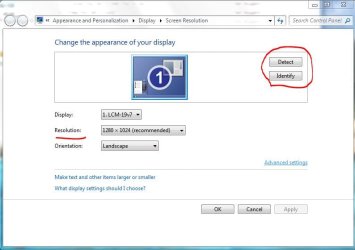
Make sure your computer recognized your screen/monitor correctly.
That's an issue I had to deal with since 98SE or XP :D
Then it will offer you the recommended resolution for that device and you can go from there.

Capture.JPG

-DG
 

My Computer

Computer Manufacturer/Model Number
HP m8000n
OS
Windows 7 Ultimate x86
CPU
DualCore AMD Athlon 64 X2, 2600 MHz 5200+
Motherboard
Asus M2N68-LA (Narra)
Memory
Samsung 2GB DDR2
Graphics Card(s)
Onboard NVIDIA GeForce 6150SE nForce 430
Sound Card
Onboard nVIDIA nForce 6100-430 (MCP61P)
Monitor(s) Displays
Westinghouse 19" LED
Screen Resolution
1280x1024
Hard Drives
SATA II Seagate Barracuda 500GB
USB II WD Elements 500GB
USB II WD My Book 1TB
USB II WD My Book 2TB
PSU
Stock (HP)
Case
Stock (HP)
Cooling
Stock
Keyboard
Logitech Classic KB 200
Mouse
Standard HP opticle USB mouse
Yeah, my computer recognized my monitor correctly.

It is this large
 

Attachments

  • large.png
    large.png
    230.9 KB · Views: 12

My Computer

OS
Windows 7 Home Premium 32 Bit
mmm..almost looks like mine (size wise) I don't consider that too large but to each his own.
You could always make the desktop icons smaller by scrolling the mose wheel while pressing the CTRL key
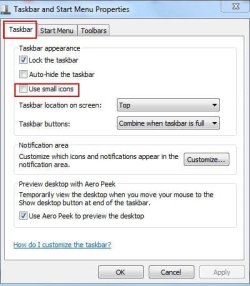
and for the taskbar (which is by default larger than the one from XP) you could switch it to small icons
that should bring you back to the 8px smaller taskbar used by Vista ;)

(Just right click on any blank space on the Taskbar, and then select Properties from context menu. On the “Task Bar and Start Menu Properties” dialog, go to “Taskbar” tab, and then tick or check the checkbox for “Use small icons” option.)

-DG
 

My Computer

Computer Manufacturer/Model Number
HP m8000n
OS
Windows 7 Ultimate x86
CPU
DualCore AMD Athlon 64 X2, 2600 MHz 5200+
Motherboard
Asus M2N68-LA (Narra)
Memory
Samsung 2GB DDR2
Graphics Card(s)
Onboard NVIDIA GeForce 6150SE nForce 430
Sound Card
Onboard nVIDIA nForce 6100-430 (MCP61P)
Monitor(s) Displays
Westinghouse 19" LED
Screen Resolution
1280x1024
Hard Drives
SATA II Seagate Barracuda 500GB
USB II WD Elements 500GB
USB II WD My Book 1TB
USB II WD My Book 2TB
PSU
Stock (HP)
Case
Stock (HP)
Cooling
Stock
Keyboard
Logitech Classic KB 200
Mouse
Standard HP opticle USB mouse
Have to agree with Dg, that screen looks fine.
 

My Computer

Computer type
PC/Desktop
Computer Manufacturer/Model Number
Dell XPS 420
OS
Windows 10, Home Clean Install
CPU
Intel Core2 processsor Q8200(2.33Ghz 1333FSB) Quad Core Tech
Motherboard
Dell
Memory
6 gb
Graphics Card(s)
ATI Radeon 256MB HD3650
Sound Card
Intergrated 7.1 Channel Audio
Monitor(s) Displays
Dell SP2009W 20"
Hard Drives
640 GB Serial ATA Hard drive
Cooling
Fan
Keyboard
Dell USB Keyboard
Mouse
Dell Premium Optical USB
Internet Speed
DSL 2.85
What video card and did you install/update it with the Windows 7 driver?
 

My Computer

Computer type
PC/Desktop
Computer Manufacturer/Model Number
Me
OS
Win 7 Ultimate x64
CPU
FX-8350 @ 4.6 GHz so far
Motherboard
Asus M5A97 EVO
Memory
ADATA XPG V1 Series Black 8GB DDR3 1600
Graphics Card(s)
Sapphire R9 270x Dual-X
Sound Card
Xonar DGX w/ Corsair Vengence 1300
Monitor(s) Displays
Acer S232HL Abid
Screen Resolution
1920x1080
Hard Drives
120 GB OCZ Vertex 3
500 GB Seagate 7200.12
PSU
Antec Earthwatts 650W Green
Case
Antec Three Hundred
Cooling
Cooler Master 212 EVO
Keyboard
Logitech G510
Mouse
Logitech G500s
Internet Speed
35000/3000
@Stormy: I'm sorry?

Thanks for all your help.
I thought this was no normal.

But is it okay for the screen resolution to be 1024*768 instead of 1280*768?
 

My Computer

OS
Windows 7 Home Premium 32 Bit
If you would rather have the icons smaller in the taskbar,

Right click the start orb :orb:
Choose Properties

In the Taskbar TAB, click the "Use Small Icons" box and click apply.

Your screen shot looks normal and it is different than Xp or vista.
I prefer the larger icons myself, but not everyone does.

The issue with the resolution may simply be due to your graphics card drivers, as already suggested.
Look in the device manager under 'Display Adapters"
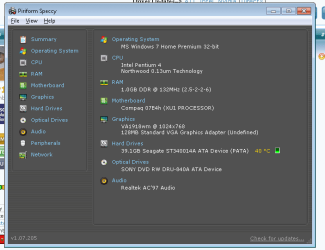
See what it has your GPU listed as. If it simply says "Standard VGA adapter", you need find the correct drivers.
 

Attachments

  • Capture.JPG
    Capture.JPG
    29.9 KB · Views: 2

My Computer

Computer Manufacturer/Model Number
Custom (Self Build)
OS
Windows 7 Home Premium 64bit
CPU
Intel Core i7 2700k
Motherboard
eVGA P67 SLI
Memory
8GB Mushkin Redline Ridgebacks @1866
Graphics Card(s)
EVGA GTX570 SC
Sound Card
XiFi Titanium HD
Monitor(s) Displays
LG W2453V
Screen Resolution
1920x1080
Hard Drives
Intel 320 80GB -- Intel X25-V 40GB --WD Black 1TB x2 -- WD Blue 640GB
PSU
Seasonic x750
Case
Corsair 600T SE White
Cooling
eVGA Superclocked CPU Cooler
Keyboard
Saitek Cyborg
Antivirus
Kaspersky
Browser
IE
Other Info
LG BD/DVD
I looked, and it said Standard VGA adapter.
Do you know how to find the correct driver?
 

My Computer

OS
Windows 7 Home Premium 32 Bit
Then you need to update the driver for your Graphics.

We would need to know more information about your system, other than just the OS, to be more specific about where to get them and which ones you need.

Do you know if you have a Dedicated Graphics Card or if the graphics are integrated into the chipset?
 

My Computer

Computer Manufacturer/Model Number
Custom (Self Build)
OS
Windows 7 Home Premium 64bit
CPU
Intel Core i7 2700k
Motherboard
eVGA P67 SLI
Memory
8GB Mushkin Redline Ridgebacks @1866
Graphics Card(s)
EVGA GTX570 SC
Sound Card
XiFi Titanium HD
Monitor(s) Displays
LG W2453V
Screen Resolution
1920x1080
Hard Drives
Intel 320 80GB -- Intel X25-V 40GB --WD Black 1TB x2 -- WD Blue 640GB
PSU
Seasonic x750
Case
Corsair 600T SE White
Cooling
eVGA Superclocked CPU Cooler
Keyboard
Saitek Cyborg
Antivirus
Kaspersky
Browser
IE
Other Info
LG BD/DVD

My Computer

Computer type
PC/Desktop
Computer Manufacturer/Model Number
Me
OS
Win 7 Ultimate x64
CPU
FX-8350 @ 4.6 GHz so far
Motherboard
Asus M5A97 EVO
Memory
ADATA XPG V1 Series Black 8GB DDR3 1600
Graphics Card(s)
Sapphire R9 270x Dual-X
Sound Card
Xonar DGX w/ Corsair Vengence 1300
Monitor(s) Displays
Acer S232HL Abid
Screen Resolution
1920x1080
Hard Drives
120 GB OCZ Vertex 3
500 GB Seagate 7200.12
PSU
Antec Earthwatts 650W Green
Case
Antec Three Hundred
Cooling
Cooler Master 212 EVO
Keyboard
Logitech G510
Mouse
Logitech G500s
Internet Speed
35000/3000
I did what you told me to do, and here's the result.
 

Attachments

  • sj.png
    sj.png
    15.4 KB · Views: 13

My Computer

OS
Windows 7 Home Premium 32 Bit
Back
Top