
You are using an out of date browser. It may not display this or other websites correctly.
You should upgrade or use an alternative browser.
You should upgrade or use an alternative browser.
Screen Resolution...
- Thread starter 7tech
- Start date

Welcome!
Sounds like you do not have good drivers installed. Go into Device Manager, right-click on your graphics card, and select Update Driver.
Hope this helps,
~JK
Sounds like you do not have good drivers installed. Go into Device Manager, right-click on your graphics card, and select Update Driver.
Hope this helps,
~JK
My Computer
- Computer Manufacturer/Model Number
- Custom
- OS
- Windows 7 Professional x64
- CPU
- Intel i7 2600K OC'd @ 4620 MHz
- Motherboard
- Asus P8Z68-V Pro
- Memory
- 16GB GSkill Sniper 2133 Mhz (4x4GB)
- Graphics Card(s)
- EVGA GeForce GTX 480 SuperClocked+
- Sound Card
- Realtek High Definition Audio
- Monitor(s) Displays
- 2x Acer S273HLbmii 27"
- Screen Resolution
- 2 x 1920x1080
- Hard Drives
- 64GB Crucial M4 SSD
Storage: Hitachi 1TB 5400RPM, Samsung 1.5TB 5400RPM
- PSU
- Corsair HW Series 750w (modular)
- Case
- Cooler Master HAF 932 Advanced Blue Edition
- Cooling
- CM Hyper 212+ CPU cooler, 3x 230mm + 1x 140mm case fans
- Keyboard
- Logitech MK320 (wireless)
- Mouse
- Logitech MK320 (wireless)
- Internet Speed
- 30 Mb/s : 2 Mb/s
If I knew your graphics card, I could find a driver online for you. Download Speccy, and let me know what card you have.
Thanks!
~JK
Thanks!
~JK
My Computer
- Computer Manufacturer/Model Number
- Custom
- OS
- Windows 7 Professional x64
- CPU
- Intel i7 2600K OC'd @ 4620 MHz
- Motherboard
- Asus P8Z68-V Pro
- Memory
- 16GB GSkill Sniper 2133 Mhz (4x4GB)
- Graphics Card(s)
- EVGA GeForce GTX 480 SuperClocked+
- Sound Card
- Realtek High Definition Audio
- Monitor(s) Displays
- 2x Acer S273HLbmii 27"
- Screen Resolution
- 2 x 1920x1080
- Hard Drives
- 64GB Crucial M4 SSD
Storage: Hitachi 1TB 5400RPM, Samsung 1.5TB 5400RPM
- PSU
- Corsair HW Series 750w (modular)
- Case
- Cooler Master HAF 932 Advanced Blue Edition
- Cooling
- CM Hyper 212+ CPU cooler, 3x 230mm + 1x 140mm case fans
- Keyboard
- Logitech MK320 (wireless)
- Mouse
- Logitech MK320 (wireless)
- Internet Speed
- 30 Mb/s : 2 Mb/s
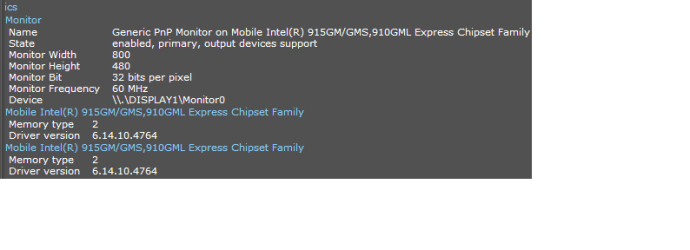
On second thought, try updating your chipset drivers.
My Computer
- Computer Manufacturer/Model Number
- Custom
- OS
- Windows 7 Professional x64
- CPU
- Intel i7 2600K OC'd @ 4620 MHz
- Motherboard
- Asus P8Z68-V Pro
- Memory
- 16GB GSkill Sniper 2133 Mhz (4x4GB)
- Graphics Card(s)
- EVGA GeForce GTX 480 SuperClocked+
- Sound Card
- Realtek High Definition Audio
- Monitor(s) Displays
- 2x Acer S273HLbmii 27"
- Screen Resolution
- 2 x 1920x1080
- Hard Drives
- 64GB Crucial M4 SSD
Storage: Hitachi 1TB 5400RPM, Samsung 1.5TB 5400RPM
- PSU
- Corsair HW Series 750w (modular)
- Case
- Cooler Master HAF 932 Advanced Blue Edition
- Cooling
- CM Hyper 212+ CPU cooler, 3x 230mm + 1x 140mm case fans
- Keyboard
- Logitech MK320 (wireless)
- Mouse
- Logitech MK320 (wireless)
- Internet Speed
- 30 Mb/s : 2 Mb/s

Frostmourne
New member
- Local time
- 12:46 AM
- Messages
- 2,685
Hello,
One slight problem....
I can not find the Chipset in the device manager...
How do i update them now?
Thanks
Download the right chipset driver as listed by the screenshot you posted. Run the .exe and reboot.
My Computer
- Computer Manufacturer/Model Number
- Sony Vaio Z46GDU
- OS
- Windows 7 Ultimate x86-64
- CPU
- [email protected] 1066MHz FSB
- Motherboard
- Sony branded
- Memory
- 6GB DDR3 1066MHz
- Graphics Card(s)
- 9300M GS 256MB Dedicated (Speed) + Intel4500MHD (Stamina)
- Sound Card
- Realtek HD Audio
- Monitor(s) Displays
- 13.1' WXGA
- Screen Resolution
- 1600x900
- Hard Drives
- 320GB 7200RPM w/ 16MB cache
- Internet Speed
- 1MB/s