Solved Screen saver and rest

widgetwilk

New member
Local time
4:40 PM
Messages
22
Location
Norfolk UK
How do I get my Win 7 to go to screen saver and go to 'rest'

it use to and then I had to touch mouse or keyboard and it would jump to life, now it just stays on the desktop picture and does not 'rest'

I have the setting for screensaver set to 5 mins, but nothing happens.
 

My Computer

Computer Manufacturer/Model Number
HP TouchSmart 520
OS
Win 7 Home Premium 32bit
Hi widgetwilk. Do you have wireless keyboard, mouse installed. If yes, remove them and see if you are able to go to screensaver. If yes, check for batteries in both mouse and keyboard and plug them back.
Also, check for any software installed in your PC that might stop the screensaver to come up.
Keep us posted.
 

My Computer

Computer type
PC/Desktop
Computer Manufacturer/Model Number
Custom Bulid/Self made
OS
Windows 11 x64
CPU
i5 2500K @ 3.3 GHz
Motherboard
ASUS P8 Z77 V pro
Memory
16 GB DDR 3 @ 1600Mhz
Graphics Card(s)
MSI 1050TI 4GB OC version
Sound Card
On Board (Realtek HD audio)
Monitor(s) Displays
Samsung 22" LCD
Screen Resolution
1920*1080
Hard Drives
Seagate 1 TB, WD 1TB, Seagate 2 TB ( I use a lot of space)
PSU
coolermaster 750 W
Case
Coolermaster HAF912
Cooling
Coolermaster hyper 212 EVO
Keyboard
Samsung
Mouse
Dell Wireless
Internet Speed
Wireless 50 Mbps
Antivirus
AVG 2016 Internet Security
Browser
Google Chrome
Hi archer, batteries in both are ok,
I find this odd because it has been alright up to 2 days ago, have not downloaded anything, have no installed anything,
so why all of a sudden does it appear that the screen saver and 'hibernation' has stop,
when the computer is left it just stays on the desktop screen,
 

My Computer

Computer Manufacturer/Model Number
HP TouchSmart 520
OS
Win 7 Home Premium 32bit
check your "Power Options" in Control Panel. Check for Plan settings and see if you have selected "Never sleep" in there. You can manage how the computer will behave.:geek:
 

My Computer

Computer type
PC/Desktop
Computer Manufacturer/Model Number
Custom Bulid/Self made
OS
Windows 11 x64
CPU
i5 2500K @ 3.3 GHz
Motherboard
ASUS P8 Z77 V pro
Memory
16 GB DDR 3 @ 1600Mhz
Graphics Card(s)
MSI 1050TI 4GB OC version
Sound Card
On Board (Realtek HD audio)
Monitor(s) Displays
Samsung 22" LCD
Screen Resolution
1920*1080
Hard Drives
Seagate 1 TB, WD 1TB, Seagate 2 TB ( I use a lot of space)
PSU
coolermaster 750 W
Case
Coolermaster HAF912
Cooling
Coolermaster hyper 212 EVO
Keyboard
Samsung
Mouse
Dell Wireless
Internet Speed
Wireless 50 Mbps
Antivirus
AVG 2016 Internet Security
Browser
Google Chrome
This is a screen shot of my settings, have never changed them.
 

Attachments

  • Clipboard012.jpg
    Clipboard012.jpg
    23.8 KB · Views: 1

My Computer

Computer Manufacturer/Model Number
HP TouchSmart 520
OS
Win 7 Home Premium 32bit
Kindly plug out both the wireless keyboard and mouse and then check if you are able to get into screensaver
 

My Computer

Computer type
PC/Desktop
Computer Manufacturer/Model Number
Custom Bulid/Self made
OS
Windows 11 x64
CPU
i5 2500K @ 3.3 GHz
Motherboard
ASUS P8 Z77 V pro
Memory
16 GB DDR 3 @ 1600Mhz
Graphics Card(s)
MSI 1050TI 4GB OC version
Sound Card
On Board (Realtek HD audio)
Monitor(s) Displays
Samsung 22" LCD
Screen Resolution
1920*1080
Hard Drives
Seagate 1 TB, WD 1TB, Seagate 2 TB ( I use a lot of space)
PSU
coolermaster 750 W
Case
Coolermaster HAF912
Cooling
Coolermaster hyper 212 EVO
Keyboard
Samsung
Mouse
Dell Wireless
Internet Speed
Wireless 50 Mbps
Antivirus
AVG 2016 Internet Security
Browser
Google Chrome
Kindly plug out both the wireless keyboard and mouse and then check if you are able to get into screensaver
Er, how can I get anything without a mouse or keyboard,
or do you mean unplug each and see if screen saver comes on?
 

My Computer

Computer Manufacturer/Model Number
HP TouchSmart 520
OS
Win 7 Home Premium 32bit
Kindly plug out both the wireless keyboard and mouse and then check if you are able to get into screensaver
Er, how can I get anything without a mouse or keyboard,
or do you mean unplug each and see if screen saver comes on?

That's so stupid of me, I am asking you to unplug wireless devices...:D

sorry for that. Turn them off for sometime and check if the screensaver comes on.
 

My Computer

Computer type
PC/Desktop
Computer Manufacturer/Model Number
Custom Bulid/Self made
OS
Windows 11 x64
CPU
i5 2500K @ 3.3 GHz
Motherboard
ASUS P8 Z77 V pro
Memory
16 GB DDR 3 @ 1600Mhz
Graphics Card(s)
MSI 1050TI 4GB OC version
Sound Card
On Board (Realtek HD audio)
Monitor(s) Displays
Samsung 22" LCD
Screen Resolution
1920*1080
Hard Drives
Seagate 1 TB, WD 1TB, Seagate 2 TB ( I use a lot of space)
PSU
coolermaster 750 W
Case
Coolermaster HAF912
Cooling
Coolermaster hyper 212 EVO
Keyboard
Samsung
Mouse
Dell Wireless
Internet Speed
Wireless 50 Mbps
Antivirus
AVG 2016 Internet Security
Browser
Google Chrome
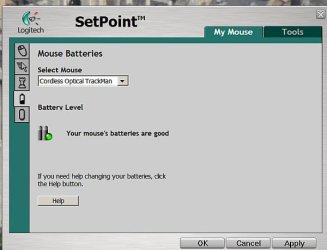
Un-plugged mouse and screen saver came on, yep pee,
now what,
plugged back in and will see if it has solved it, if not you will tell me to do something with the 'mouse'
batteries are ok in it,
 

My Computer

Computer Manufacturer/Model Number
HP TouchSmart 520
OS
Win 7 Home Premium 32bit
OK, the mouse is the problem, screen saver did not come on,
now what?? just off shopping, shan't be long,
thanks for all your help
 

Attachments

  • mouse.jpg
    mouse.jpg
    25.9 KB · Views: 1

My Computer

Computer Manufacturer/Model Number
HP TouchSmart 520
OS
Win 7 Home Premium 32bit
Glad the cause of the issue is found. Try to update the software for wireless mouse (Setpoint) and check if the issue persist. If not, completely uninstall the software and check if the screensaver comes on or not.
 

My Computer

Computer type
PC/Desktop
Computer Manufacturer/Model Number
Custom Bulid/Self made
OS
Windows 11 x64
CPU
i5 2500K @ 3.3 GHz
Motherboard
ASUS P8 Z77 V pro
Memory
16 GB DDR 3 @ 1600Mhz
Graphics Card(s)
MSI 1050TI 4GB OC version
Sound Card
On Board (Realtek HD audio)
Monitor(s) Displays
Samsung 22" LCD
Screen Resolution
1920*1080
Hard Drives
Seagate 1 TB, WD 1TB, Seagate 2 TB ( I use a lot of space)
PSU
coolermaster 750 W
Case
Coolermaster HAF912
Cooling
Coolermaster hyper 212 EVO
Keyboard
Samsung
Mouse
Dell Wireless
Internet Speed
Wireless 50 Mbps
Antivirus
AVG 2016 Internet Security
Browser
Google Chrome
You are brilliant, went to web site, downloaded lasted software, and the screen saver now works, left it and all the other things work, now closes down as it use to,
Would never had thought it could be the mouse,
thank you so much for your help.
 

My Computer

Computer Manufacturer/Model Number
HP TouchSmart 520
OS
Win 7 Home Premium 32bit
Glad to hear that the issue is solved now.

You can mark this thread as solved.
 

My Computer

Computer type
PC/Desktop
Computer Manufacturer/Model Number
Custom Bulid/Self made
OS
Windows 11 x64
CPU
i5 2500K @ 3.3 GHz
Motherboard
ASUS P8 Z77 V pro
Memory
16 GB DDR 3 @ 1600Mhz
Graphics Card(s)
MSI 1050TI 4GB OC version
Sound Card
On Board (Realtek HD audio)
Monitor(s) Displays
Samsung 22" LCD
Screen Resolution
1920*1080
Hard Drives
Seagate 1 TB, WD 1TB, Seagate 2 TB ( I use a lot of space)
PSU
coolermaster 750 W
Case
Coolermaster HAF912
Cooling
Coolermaster hyper 212 EVO
Keyboard
Samsung
Mouse
Dell Wireless
Internet Speed
Wireless 50 Mbps
Antivirus
AVG 2016 Internet Security
Browser
Google Chrome
Will do, thanks again
 

My Computer

Computer Manufacturer/Model Number
HP TouchSmart 520
OS
Win 7 Home Premium 32bit
You are most welcome
 

My Computer

Computer type
PC/Desktop
Computer Manufacturer/Model Number
Custom Bulid/Self made
OS
Windows 11 x64
CPU
i5 2500K @ 3.3 GHz
Motherboard
ASUS P8 Z77 V pro
Memory
16 GB DDR 3 @ 1600Mhz
Graphics Card(s)
MSI 1050TI 4GB OC version
Sound Card
On Board (Realtek HD audio)
Monitor(s) Displays
Samsung 22" LCD
Screen Resolution
1920*1080
Hard Drives
Seagate 1 TB, WD 1TB, Seagate 2 TB ( I use a lot of space)
PSU
coolermaster 750 W
Case
Coolermaster HAF912
Cooling
Coolermaster hyper 212 EVO
Keyboard
Samsung
Mouse
Dell Wireless
Internet Speed
Wireless 50 Mbps
Antivirus
AVG 2016 Internet Security
Browser
Google Chrome
Back
Top