Screen Saver no longer operational? - Win 7 64

tbcam88

New member
Local time
1:41 AM
Messages
21
My screen saver isn't coming on as normal... I've tried unplugging USB mouse in case the laser is keeping the screen awake but this makes no difference.

I've had a look at task manager but can't see anything obvious that would be causing this kind of behaviour (video playback software, full screen programs etc.)

Any ideas?


Thanks.
 

Attachments

  • Untitled.png
    Untitled.png
    6.7 KB · Views: 30

My Computer My Computer

Computer type
PC/Desktop
OS
Windows 7 Ultimate x64
Hi tbcam, as you mentioned that you removed the USB mouse and checked the background S/W. Try removing all the peripherals one by one and check if the screensaver comes up.

Remove the mouse and keyboard. Uninstall the drivers for both. Plug them back in, let Windows install the driver and then check again for screensaver. If newer drivers are available for K/B and mouse install that and check.

Keep us posted.
 

My Computer My Computer

Computer type
PC/Desktop
Computer Manufacturer/Model Number
Custom Bulid/Self made
OS
Windows 11 x64
CPU
i5 2500K @ 3.3 GHz
Motherboard
ASUS P8 Z77 V pro
Memory
16 GB DDR 3 @ 1600Mhz
Graphics Card(s)
MSI 1050TI 4GB OC version
Sound Card
On Board (Realtek HD audio)
Monitor(s) Displays
Samsung 22" LCD
Screen Resolution
1920*1080
Hard Drives
Seagate 1 TB, WD 1TB, Seagate 2 TB ( I use a lot of space)
PSU
coolermaster 750 W
Case
Coolermaster HAF912
Cooling
Coolermaster hyper 212 EVO
Keyboard
Samsung
Mouse
Dell Wireless
Internet Speed
Wireless 50 Mbps
Antivirus
AVG 2016 Internet Security
Browser
Google Chrome
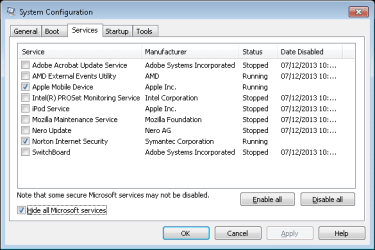
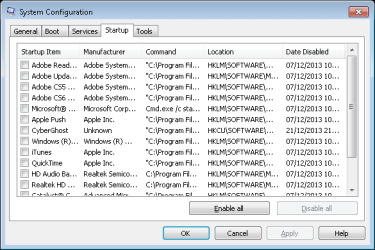
I've tried removing all USB devices. The problem persists. I'm convinced it's a process to blame. Something obscure that is silently keeping the system active one way or another.

Here are my processes upon system start-up. Is there anything here that looks suspect in your opinion?

Cheers.
 

Attachments

  • Untitled.png
    Untitled.png
    15.3 KB · Views: 3

My Computer My Computer

Computer type
PC/Desktop
OS
Windows 7 Ultimate x64
My thoughts; Utorrent.exe 38880k
 

My Computer My Computer

Computer type
PC/Desktop
Computer Manufacturer/Model Number
Home made Desktop
OS
Windows 10 Pro. 64/ version 1709 Windows 7 Pro/64
CPU
Intel i7-6800K @ 4.3
Motherboard
ASUS X-99 Deluxe II
Memory
Corsair Platinum 16 gig @2400
Graphics Card(s)
EVGA GTX 1070 OC
Monitor(s) Displays
Asus 27" LED LCD/VE278Q
Screen Resolution
1920-1080 or 1280-720 HDMI
Hard Drives
INTEL SSD 730-240 Gb Sata 3.0/
PSU
EVGA Platium 1200W
Case
Phanteks Luxe Tempered Glass 8 fans/ one radiator
Cooling
XSPC/ Water Cooled CPU
Keyboard
Das 4 Professional
Mouse
Logitech M705/MX Anywhere 2-S
Internet Speed
100 mbits
Antivirus
Microsoft Security Essentials/ Malwarebytes Premium 3.0/ SAS
Browser
I.E. 11 default/Firefox/ ISP Time Warner Cable/Spectrum
Other Info
LG BluRay Burner/
Sound system-KLipsch-THX/
Icy Dock ssd Hot Swap bays.

My Computer My Computer

Computer type
PC/Desktop
Computer Manufacturer/Model Number
Custom Bulid/Self made
OS
Windows 11 x64
CPU
i5 2500K @ 3.3 GHz
Motherboard
ASUS P8 Z77 V pro
Memory
16 GB DDR 3 @ 1600Mhz
Graphics Card(s)
MSI 1050TI 4GB OC version
Sound Card
On Board (Realtek HD audio)
Monitor(s) Displays
Samsung 22" LCD
Screen Resolution
1920*1080
Hard Drives
Seagate 1 TB, WD 1TB, Seagate 2 TB ( I use a lot of space)
PSU
coolermaster 750 W
Case
Coolermaster HAF912
Cooling
Coolermaster hyper 212 EVO
Keyboard
Samsung
Mouse
Dell Wireless
Internet Speed
Wireless 50 Mbps
Antivirus
AVG 2016 Internet Security
Browser
Google Chrome
I've since closed uTorrent and tried uninstalling/deleting Microsoft KB and mouse detection drivers. Still no luck. :(
 

My Computer My Computer

Computer type
PC/Desktop
OS
Windows 7 Ultimate x64

My Computer My Computer

Computer type
PC/Desktop
Computer Manufacturer/Model Number
Custom Build
OS
Windows 8.1
CPU
Intel i5 3750k OC'd 4.0Ghz
Motherboard
P8Z77-V LX3
Memory
16GB Vengence Corsair
Graphics Card(s)
GTX 770 OC 2GB Windforce
Sound Card
C-Media 7.1 Surround Card
Monitor(s) Displays
Asus 3D 23" & BenQ 24" & LG 19"
Screen Resolution
1920*1080, 1920*1080, 1440*900
Hard Drives
Crucial 512GB SSD
WD 1.5 TB
WD 500Gb
PSU
850MW Silverstone
Case
inWin DragonRider
Cooling
4 * 140mm LED Akasa, One 140mm Fan Akasa
Keyboard
Corsair k95
Mouse
R.A.T 7 Contagion
Internet Speed
152 Mb Fiber Optic
Antivirus
ESET Nod32
Browser
Waterfox x64 / Chrome x64
Other Info
Freenas / Plex Media server
Q6600
6Gb DDR3
6TB ZFS Raid
500W PSu
2 x Intel NIC's
Might it have anything to do with your power plan?

http://www.sevenforums.com/tutorials/778-power-plan-settings-change.html

Check there and see if that changes anything :D

No joy, I'm afraid. This is getting to be a major pain in the @rse!

There are countless threads on the subject but none of the fixes seem to apply in my case.

So far I've:

Reinstalled ATI drivers
Installed MS IntelliPoint software
Tested in Safe Mode
Tested with all USB connections removed
Uninstalled/Reinstalled HID KB/Mouse drivers via Device Manager

Nothing seems to have any effect. I've encountered this problem previously, then one day things suddenly returned to normal. It wasn't long before the problem returned, however.

Almost certainly a driver problem I reckon.

It seems pretty pointless contacting MS about the problem... They'll simply refer me to the "Answers" community site where I'll be given the same procedure(s) listed on the other threads mentioned previously.

Don't think MS are interested in helping unless you're willing to pay for their specialist Technical Support tbh. :rolleyes:
 

My Computer My Computer

Computer type
PC/Desktop
OS
Windows 7 Ultimate x64

My Computer My Computer

Computer type
PC/Desktop
OS
Windows 10 Home x64
CPU
INTEL Core i5-750 Quad-Core 3.37GHz
Motherboard
ASUS P7P55D
Memory
HyperX Fury Black Series 8GB (2 x 4GB) 1866Mhz
Graphics Card(s)
EVGA GeForce GTX 750 Superclocked 1GB 128-Bit GDDR5
Monitor(s) Displays
LG 32MA68HY 32" IPS
Screen Resolution
1920 x 1080
Hard Drives
Samsung 840 Evo 120GB, SEAGATE 500GB Barracuda® 7200.12, SATA 3 Gb/s, 7200 RPM, 16MB cache
PSU
ANTEC TruePower New TP-550, 80 PLUS, 550W
Case
ANTEC Three Hundred Illusion
Cooling
COOLER MASTER Hyper 212 Plus, 4 x 120mm 1 x 140mm Noctua's
Internet Speed
85 + Mbps
Antivirus
Avast
Browser
Vivaldi
Back
Top