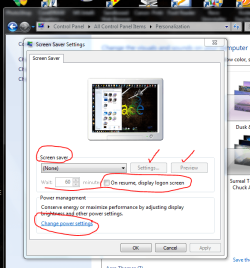
screen saver question

StickMaker

New member
Local time
11:59 PM
Messages
82
Hello, group,
My screensaver runs fine BUT when I come back to the 'puter and move the mouse, one of two things happens:
1. the screen goes black and won't come back or
2. the screens come back for a second, and then all goes black.
Either way, it seems I have to press the ON/OFF button 2 or 3 times and then log in again.
Can you please tell me how to set it properly?
 

My Computer

OS
Windows 7
screens.PNG

Go here for adjustments and settings.
Welcome to 7 Forum!
 

My Computer

Computer Manufacturer/Model Number
HP M9077c
OS
Windows 7 Home Premium 64bit
CPU
Intel(R)Core(TM)2 quad [email protected] 2.39GHz
Motherboard
ASUSeK
Memory
6GB DDR2 6400
Graphics Card(s)
GeForce 8500/512MB
Sound Card
Realtek High Def Audio
Monitor(s) Displays
HP w2408 LCD 24" widescreen
Screen Resolution
1920x1200
Cooling
6 pack of Bud
Keyboard
MS wireless Inteli
Mouse
MS wireless Inteli
Thanks; been there, done that; like I say the screensaver comes on FINE but it is getting back to "work" that is the problem.
 

My Computer

OS
Windows 7
Which screensaver are you using, StickMaker?
 

My Computer

Computer Manufacturer/Model Number
Toshiba L355D
OS
Windows 7 Ultimate x64 SP1
CPU
Core2 Duo
Motherboard
Intel
Memory
4 GB
Graphics Card(s)
GM965 on-board
Sound Card
RealTek on-board
Monitor(s) Displays
19"+17"(laptop)
Screen Resolution
1440x900 (x 2)
Hard Drives
500GB Ext. 200GB Internal
PSU
N/A
Case
N/A
Cooling
N/A
Just got back to you.....

Maybe it is the screensaver software you are using!
Try one of the screensavers that came with Win 7 and see if it still does it! IMHO
 

My Computer

Computer Manufacturer/Model Number
HP M9077c
OS
Windows 7 Home Premium 64bit
CPU
Intel(R)Core(TM)2 quad [email protected] 2.39GHz
Motherboard
ASUSeK
Memory
6GB DDR2 6400
Graphics Card(s)
GeForce 8500/512MB
Sound Card
Realtek High Def Audio
Monitor(s) Displays
HP w2408 LCD 24" widescreen
Screen Resolution
1920x1200
Cooling
6 pack of Bud
Keyboard
MS wireless Inteli
Mouse
MS wireless Inteli
I'm using the one that is part of Win7. I have it set to use MY own photos in a folder with sub-folders.
 

My Computer

OS
Windows 7
Speculative, but are you running the latest drivers for your graphics card? Are they Windows drivers or manufacturer's drivers? If windows drivers, better to run the mfg's drivers for video cards.

James
 

My Computer

OS
Win7U 64 RTM
CPU
Q9550
Motherboard
GA-EP45-UD3R
Memory
8GB Gskill
Graphics Card(s)
ASUS|EAH4850/HTDI/1GD3/A
Sound Card
xfi Plat
Monitor(s) Displays
Dell 2405fpw
Screen Resolution
1920x1200
Hard Drives
Seagate & WD sata Drives
PSU
Antec
Case
Antec
Keyboard
MS Natural Ergonomic 4000
Mouse
Logitech MX610 USB Cordless
James, now you are over my head........... sorry......... no idea..........
 

My Computer

OS
Windows 7
Stick, I agree with the driver sugestion. You can go into your Device Manager and find your video adapter select it then right click and choose propeties and try updating it that way. I also think that the setting for the screen saver could also get you some progress. Did you try selecting the password login after resuming? that may be a temporary fix that worth a try. Good luck to you :D
 

My Computer

Computer Manufacturer/Model Number
Gateway GT5692
OS
Windows 7 Ulti. x64
CPU
AMD Phenom 8450 triple-core 2.10 ghz
Memory
4GB
Graphics Card(s)
ATI Radion HD 3200
Monitor(s) Displays
Gateway FPD1775W
Screen Resolution
1280x720
Hard Drives
465.6613 Gibibytes
Back
Top