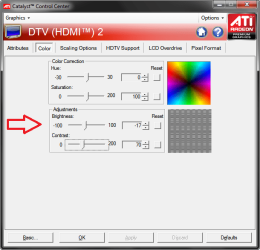
To me that means it could be a hardware problem, or maybe a problem with your Windows video driver.
Look in Windows Device Manager,
- Check if your video device/driver has any errors
- Is it using the default Windows driver, or a specific driver from the PC Manufacturer
This tutorial by Brink may help with Device Drivers:
Uninstall Device and Device Driver
You have to fill in your SF System Specs for anyone here to help you find drivers.
At a minimum add your Gateway desktop model to the SF specs ...
http://www.sevenforums.com/tutorials/180324-system-info-see-your-system-specs.html
Things I would do if i had your problem:
- Uninstall/Reinstall/Update the Windows video driver
- Try a different connection type such as VGA/HDMI/DVI, etc.
- Try a different Graphics device such as built in IGP vs. a GPU graphics Card.
- Try a Linux boot CD/USB and see if i have the same problem.
I don't know how good/comfortable you are with opening a PC, Hardware changes, and what options you have ... ?
I don't know if you have an IGP and GPU and can try different hardware graphics devices ?
I don't know if you can borrow a GPU for testing, and install/use it ?
I don't know how you would like trying a different OS such as a Linux boot CD ?
If you can boot from a Linux CD/USB and have the same problem, it sounds like a hardware issue to me ...
Sorry for my long-winded reply, but this is what i would try ...



 now you see what we're dealing with)
 , but this has been going on for a load of months (but not back since we bought the computer brand new a few of years ago) We were hoping a lightning strike or something a little less would help, but now we're tired of having problems reading downloaded documents.