Screen turns black when playing games

rachaelsoda

New member
Local time
6:16 PM
Messages
7
For the past few months I've had this problem where my monitors will turn black when I'm playing a game. It happens anywhere from 10 minutes to an hour into game play.

There is no sound playing when this happens. My computer will completely lock-up and there is no way for me to alt-tab or open task manage or anything. I am forced to hold down the power button and wait for my computer to shut down.

This has happened to me in CoD4, Oblivion, and Operation Flashpoint: Dragon Rising.

It probably will happen in almost any game, but those are the only games I've been playing recently.

My drivers are up to date.

I don't really know which specs are helpful in situation so I'll just kind of list what seems important:

Windows 7 Ultimate 64-bit
GeForce 9600 GT
nForce 750i SLI
Intel(R) Core(TM)2 CPU 4300 @1.80GHz
2048MB RAM
DirectX 11

Thanks for taking the time to read this,
Rachael
 

My Computer

OS
Windows 7
Your specs are not high enough for the latest games, but I would start by going through the drivers guide in my sig, then running chkdsk and memtest86+. Post the results. Also check the temps with HWInfo32. Install the chipset first.
 

My Computer

Computer Manufacturer/Model Number
Sony Vaio Z46GDU
OS
Windows 7 Ultimate x86-64
CPU
[email protected] 1066MHz FSB
Motherboard
Sony branded
Memory
6GB DDR3 1066MHz
Graphics Card(s)
9300M GS 256MB Dedicated (Speed) + Intel4500MHD (Stamina)
Sound Card
Realtek HD Audio
Monitor(s) Displays
13.1' WXGA
Screen Resolution
1600x900
Hard Drives
320GB 7200RPM w/ 16MB cache
Internet Speed
1MB/s
Your specs are not high enough for the latest games.

My specs are more than adequate to run all of the games that I play. Everything runs at a good frame rate on the highest settings. Oblivion isn't a new game and it happens on there.

I do plan to buy a new processor this week, but regardless that couldn't be what is causing the issue. It wouldn't play the games in the highest settings with a good frame rate and then just lock-up if it was my processor.

I would start by going through the drivers guide in my sig, then running chkdsk and memtest86+. Post the results. Also check the temps with HWInfo32. Install the chipset first.
Alright, hang on.
 

My Computer

OS
Windows 7
A 1.8GHz CPU would choke Flashpoint, unless you run @ 800x600. Those specs are not high enough for 1080p gaming.
 

My Computer

Computer Manufacturer/Model Number
Sony Vaio Z46GDU
OS
Windows 7 Ultimate x86-64
CPU
[email protected] 1066MHz FSB
Motherboard
Sony branded
Memory
6GB DDR3 1066MHz
Graphics Card(s)
9300M GS 256MB Dedicated (Speed) + Intel4500MHD (Stamina)
Sound Card
Realtek HD Audio
Monitor(s) Displays
13.1' WXGA
Screen Resolution
1600x900
Hard Drives
320GB 7200RPM w/ 16MB cache
Internet Speed
1MB/s
A 1.8GHz CPU would choke Flashpoint, unless you run @ 800x600. Those specs are not high enough for 1080p gaming.

I use dual monitors at 1360 x 768.
I understand what you're saying, but it just isn't the case. This black screens area new problem for me and I've always been able to run new games on the highest settings without any problems.


How do I run memtest86+? I've got the ISO mounted. Do I just need to reboot and it will boot through the mounted image?

I ran chkdsk, but when it was complete it closed itself. (I don't know what that is supposed to do.. Like, was I supposed to be able to copy and paste results, or is it basically a clean-up?)
 

My Computer

OS
Windows 7
A 1.8GHz CPU would choke Flashpoint, unless you run @ 800x600. Those specs are not high enough for 1080p gaming.

I understand what you're saying, but it just isn't the case. This black screens area new problem for me and I've always been able to run new games on the highest settings without any problems.


How do I run memtest86+? I've got the ISO mounted. Do I just need to reboot and it will boot through the mounted image?

I ran chkdsk, but when it was complete it closed itself. (I don't know what that is supposed to do.. Like, was I supposed to be able to copy and paste results, or is it basically a clean-up?)

You really should tick both boxes for chkdsk, then reboot and wait. As for memtest86+, burn it to cd and boot from the disk.
 

My Computer

Computer Manufacturer/Model Number
Sony Vaio Z46GDU
OS
Windows 7 Ultimate x86-64
CPU
[email protected] 1066MHz FSB
Motherboard
Sony branded
Memory
6GB DDR3 1066MHz
Graphics Card(s)
9300M GS 256MB Dedicated (Speed) + Intel4500MHD (Stamina)
Sound Card
Realtek HD Audio
Monitor(s) Displays
13.1' WXGA
Screen Resolution
1600x900
Hard Drives
320GB 7200RPM w/ 16MB cache
Internet Speed
1MB/s
A 1.8GHz CPU would choke Flashpoint, unless you run @ 800x600. Those specs are not high enough for 1080p gaming.

I understand what you're saying, but it just isn't the case. This black screens area new problem for me and I've always been able to run new games on the highest settings without any problems.


How do I run memtest86+? I've got the ISO mounted. Do I just need to reboot and it will boot through the mounted image?

I ran chkdsk, but when it was complete it closed itself. (I don't know what that is supposed to do.. Like, was I supposed to be able to copy and paste results, or is it basically a clean-up?)

You really should tick both boxes for chkdsk, then reboot and wait. As for memtest86+, burn it to cd and boot from the disk.

Tick what boxes? I just searched for chkdsk and then ran chkdsk.exe

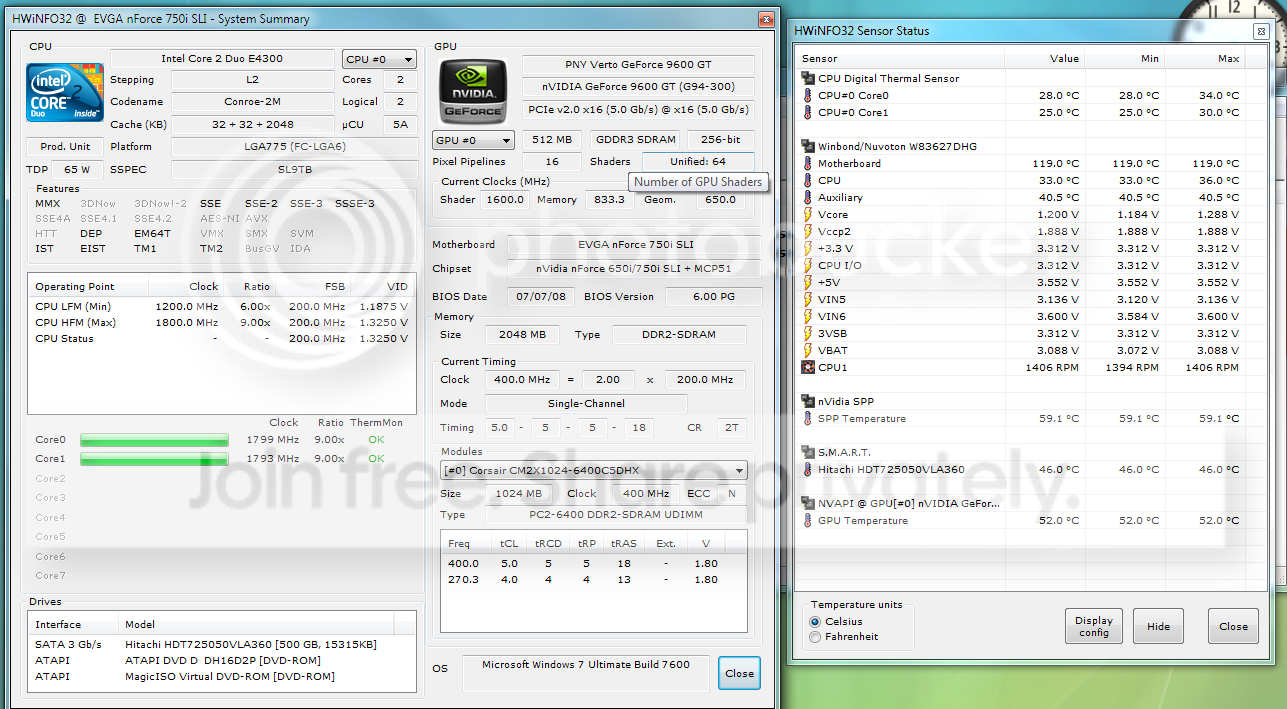
I don't know which information you want to know from HwiNFO32, so here's a screen shot:
temps.png


edit: rebooting now, be right back.
 

My Computer

OS
Windows 7
That HDD is a bit hot - its getting close to 50 degrees. I'd also put in a few more fans - that motherboard number is definitely off. As for chkdsk, right click your hard disk, select properties, tools tab, chekc for errors, tick both boxes, reboot and wait for the results. This looks like heat though.
 

My Computer

Computer Manufacturer/Model Number
Sony Vaio Z46GDU
OS
Windows 7 Ultimate x86-64
CPU
[email protected] 1066MHz FSB
Motherboard
Sony branded
Memory
6GB DDR3 1066MHz
Graphics Card(s)
9300M GS 256MB Dedicated (Speed) + Intel4500MHD (Stamina)
Sound Card
Realtek HD Audio
Monitor(s) Displays
13.1' WXGA
Screen Resolution
1600x900
Hard Drives
320GB 7200RPM w/ 16MB cache
Internet Speed
1MB/s
That HDD is a bit hot - its getting close to 50 degrees. I'd also put in a few more fans - that motherboard number is definitely off. As for chkdsk, right click your hard disk, select properties, tools tab, chekc for errors, tick both boxes, reboot and wait for the results. This looks like heat though.

The motherboard number is wrong. I opened the side of my computer (butterfly doors), and the air inside is cool. My computer always blows cool air out and usually makes my foot cold, so I'm 99% the program is wrong. Also, all the numbers listed in the program are changed constantly, but the mother board number isn't changed, which also leads me to think it's a problem with the program.

I have temp limits set in my BIOS so my PC would beep and shut down if my motherboard was anywhere near that temp.

I can't boot from that disk. I went into my BIOS and set the boot order so CD-ROM is first, but it still refused to boot from the disk. I'm doing the chkdsk thing now.
 

My Computer

OS
Windows 7
That HDD is a bit hot - its getting close to 50 degrees. I'd also put in a few more fans - that motherboard number is definitely off. As for chkdsk, right click your hard disk, select properties, tools tab, chekc for errors, tick both boxes, reboot and wait for the results. This looks like heat though.

The motherboard number is wrong. I opened the side of my computer (butterfly doors), and the air inside is cool. My computer always blows cool air out and usually makes my foot cold, so I'm 99% the program is wrong. Also, all the numbers listed in the program are changed constantly, but the mother board number isn't changed, which also leads me to think it's a problem with the program.

I have temp limits set in my BIOS so my PC would beep and shut down if my motherboard was anywhere near that temp.

I can't boot from that disk. I went into my BIOS and set the boot order so CD-ROM is first, but it still refused to boot from the disk. I'm doing the chkdsk thing now.

Did you burn the .iso properly?
 

My Computer

Computer Manufacturer/Model Number
Sony Vaio Z46GDU
OS
Windows 7 Ultimate x86-64
CPU
[email protected] 1066MHz FSB
Motherboard
Sony branded
Memory
6GB DDR3 1066MHz
Graphics Card(s)
9300M GS 256MB Dedicated (Speed) + Intel4500MHD (Stamina)
Sound Card
Realtek HD Audio
Monitor(s) Displays
13.1' WXGA
Screen Resolution
1600x900
Hard Drives
320GB 7200RPM w/ 16MB cache
Internet Speed
1MB/s
"Burn"?... I just mounted the image and rebooted. I don't have a CD-ROM burner on my pc.
 

My Computer

OS
Windows 7
Then the test cannot be run. Why would you have a 7 PC with no burner? Next reseat the CPU and apply fresh TIM, smear it in a thin layer all over the heatspreader. You'll have to clean the cpu and heatsink first. That being done, add another fan to the case and update all your drivers, especially the nvidia chipset.
 

My Computer

Computer Manufacturer/Model Number
Sony Vaio Z46GDU
OS
Windows 7 Ultimate x86-64
CPU
[email protected] 1066MHz FSB
Motherboard
Sony branded
Memory
6GB DDR3 1066MHz
Graphics Card(s)
9300M GS 256MB Dedicated (Speed) + Intel4500MHD (Stamina)
Sound Card
Realtek HD Audio
Monitor(s) Displays
13.1' WXGA
Screen Resolution
1600x900
Hard Drives
320GB 7200RPM w/ 16MB cache
Internet Speed
1MB/s
It's a home built computer and at the time I didn't see any significance in having a burner because I had never needed to use one in the past. I'm not going to buy a new fan because I can't afford to upgrade anything. My boyfriend will be buying the new CPU and also my computer is always blowing cold air out the side so I don't think that has anything to do with why my game is crashing. Also, My drivers are already up to date.

I'm not going to reseat the current CPU simply because it's going to be replaced this week anyway. I still disagree that the CPU would be the cause to the problem because it wouldn't make sense, niether would overheating. If it were over heating then it would beep and shut down, but when my screens go black the PC is still on, it's just unresponsive.

I ran chkdsk the way you said and it took a very long time. I got tired of waiting so I watched tv for an embarassibg amount of time and when I came back into my room my pc was on desktop and there was no information for me to copy and paste here.
 

My Computer

OS
Windows 7
I Need Help Too =(

The same thing is happening with me!!!! i have more than enough spec's to play all the games i play (CS:S, TF2, all that kind of stuff) i have 8 GB ram win 7 pro 64 bit intel dual core 2.8 GHz processor, NVIDIA GeForce GT 220.


I can't play any of my games please help!!
 

My Computer

OS
Windows 7 Professinal 32 bit
Back
Top