Screen/Visual Issues

jdixon

New member
Local time
1:51 AM
Messages
6
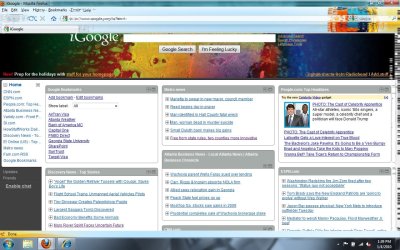
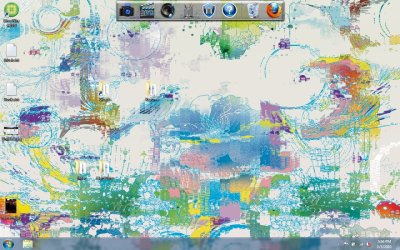
I'm not sure where to post this. I updated to Windows 7 a few days ago and since then, the screen has been doing weird things. It gets distorted for no apparent reason and sometimes fixes itself. I've attached 2 examples. It usually affects the title bar but also affects the entire screen sometimes. If I minimize the window, it usually improves it but nothing makes it go away completely.
 

Attachments
  • Untitled2.jpg
    Untitled2.jpg
    260.9 KB · Views: 25
  • Untitled3.jpg
    Untitled3.jpg
    172.7 KB · Views: 28

My Computer

Computer Manufacturer/Model Number
Dell Studio 1537
OS
Windows 7 Home Premium 32-bit (6.1, Build 7600)
CPU
Intel Core 2 Duo T5800 @ 2.00 GHz (2 CPUs)
Memory
3072MB RAM
Graphics Card(s)
Mobile Intel 4 Series Express Chipset Family
1. Please fill in your system specs
2. Did you update all your drivers? This is definitely a graphics issue. Update the GPU drivers from the manufacturer's website.
 

My Computer

Computer type
Laptop
Computer Manufacturer/Model Number
Custom
OS
Windows 7 Home Premium x64
CPU
Intel Core i5 2500K
Motherboard
MSI MS-7750
Memory
8GB DDR3
Graphics Card(s)
nVidia GeForce GTX650 Ti BOOST
Sound Card
Realtek
Monitor(s) Displays
21' Philips
Screen Resolution
Full HD
Hard Drives
1TB
PSU
500W
I'm a novice and I couldn't figure out where to find that information. I posted what I could find. I apologize for that!

How do I find out information about my graphics driver? I don't even know where to look to see who the manufacturer is to even update in the first place.

I really appreciate your patience with an amateur like me.
 

My Computer

Computer Manufacturer/Model Number
Dell Studio 1537
OS
Windows 7 Home Premium 32-bit (6.1, Build 7600)
CPU
Intel Core 2 Duo T5800 @ 2.00 GHz (2 CPUs)
Memory
3072MB RAM
Graphics Card(s)
Mobile Intel 4 Series Express Chipset Family
The easy way to find it would be

Go To Start > Under search type in dxdiag. You should find informations on there

Hope this helps
 

My Computer

Computer Manufacturer/Model Number
Samsung NP550P5C-S02IN
OS
Windows 7 Ultimate - 64-bit | Windows 8 Pro - 64-bit
CPU
Intel® Core™ i7 Processor 3,610QM (2.30Hz, 6MB L3 Cach
Memory
8 GB
Graphics Card(s)
NVIDIA® GeForce® GT 650M 2GB Graphics, Optimus™ techno
Sound Card
SoundAlive™ JBL 3 Speakers (With sub-Woofer)
Monitor(s) Displays
39.62cm (15.6) SuperBright 300nit HD+ LED Display
Screen Resolution
1,600 x 900, Anti-Reflective
Hard Drives
1TB S-ATA II Hard Drive (5,400RPM)
How do I find out information about my graphics driver? I don't even know where to look to see who the manufacturer is to even update in the first place.
So I guess you didn't even use Windows Update to acquire at least the generic drivers. Using Windows Update is very important for your system, and you should be even more encouraged to use it because it is a lot easier to handle now than in it was in XP.
 

My Computer

Computer type
Laptop
Computer Manufacturer/Model Number
Custom
OS
Windows 7 Home Premium x64
CPU
Intel Core i5 2500K
Motherboard
MSI MS-7750
Memory
8GB DDR3
Graphics Card(s)
nVidia GeForce GTX650 Ti BOOST
Sound Card
Realtek
Monitor(s) Displays
21' Philips
Screen Resolution
Full HD
Hard Drives
1TB
PSU
500W
Thanks for the tip. I had no idea I was supposed to run Windows Update. I ran it, and one of the updates I installed was for the graphics driver. I installed it and rebooted. My screen is still doing the same thing. [I've updated some of my system info]. Does anyone have any suggestions?

I used the dxdiag search to get the system info. On the graphics tab, it gives this information about the graphics card (hardware info is in my system info):

Main Driver: igdumdx32.dll,igd10umd32.dll,igd10u
Version: 8.15.10.1872
Date: 8/13/2009 9:41:28 PM (this was after I updated the driver - not sure if that matters)

Any help is greatly appreciated!
 

My Computer

Computer Manufacturer/Model Number
Dell Studio 1537
OS
Windows 7 Home Premium 32-bit (6.1, Build 7600)
CPU
Intel Core 2 Duo T5800 @ 2.00 GHz (2 CPUs)
Memory
3072MB RAM
Graphics Card(s)
Mobile Intel 4 Series Express Chipset Family
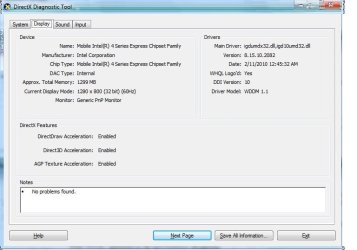
I have the exact same issues...here is my driver info...notice the window distortions.
 

Attachments

  • driver_info_with_distortion.jpeg
    driver_info_with_distortion.jpeg
    44 KB · Views: 17

My Computer

Computer Manufacturer/Model Number
HP Elitebook 2730p
OS
Windows 7 Pro 32-bit
Please help. I just upgraded my RAM memory to 4Gb and installed windows 7 x64 Ultimate. I downloaded the appropriate drivers for my PC configuration but some problems appeared! If i play game after some time the graphic is messed up, and lately that happens at the very beginning of the game, and that happens with every game(Pro Evolution Soccer 2010, Avatar,NFS Undercover). Even my desktop goes crazy. Is the problem with my graphic card (even though is rather new and passes every stability and benchmark test and works perfectly under Windows XP x86)or is the problem windows 7 x64 or is there any other problem? I tried installing the drivers I got with my graphic card, older and newer versions and nothing seems to solve the problem.
My PC is: AMD Athlon II x2 215 Regor Core 2,7Ghz 2MB cache
4gb DDR2 RAM 800Mhz
Gigabyte S- Series M52L-S3P
MSI ATI Radeon RX3850 T2D512E OC edition
 

My Computer

Computer Manufacturer/Model Number
Windows 7 x64 RTM Build 7600
OS
Windows 7 x64 Ultimate
CPU
AMD Athlon II X2 215
Motherboard
Gigabyte S-series M52L-S3P
Memory
4Gb Apacer (2x2) 800Mhz
Graphics Card(s)
MSI ATI Radeon RX3850 T2D512E OC edition
Sound Card
Integrated
Monitor(s) Displays
LG L1919S
Screen Resolution
1280x1024
Hard Drives
Western Digital Caviar AALS 640Gb 32Mb
PSU
Silverstone Essential 500W 80+
Case
Vito
Cooling
Cooler Master
Keyboard
A4Tech X7
Mouse
A4Tech X7
Internet Speed
1Mbit
Back
Top