i only upgraded the core components not the graphics card/ PSW
ok so after a clean install of windows 7 ultimate. i installed all updates and hotfixes as well.
I installed a screensaver that is 32bit the system can run 64bit as well. i set the screen saver under "screensavers" to run after 1 min. it never executes. I have it set in power settings to turn off display after 20mins never does. I can however put it in sleep and hibernation mode manually no problem but scheduled times dont work. what to do. Biostar said to download latest chipset driver already did, did not work. i have the latest nvidia card drivers installed as well.
Last edited by a moderator:
My Computer
Computer type
PC/Desktop
Computer Manufacturer/Model Number
Custom Built
OS
Windows 7 pro 64 bit
CPU
AMD FX 8370
Motherboard
MSI Gaming board 970 series
Memory
G.SKILL Ripjaws Series 16GB (4 x 4GB) DDR3 SDRAM DDR3
Graphics Card(s)
MSI Geforce GTx 66ti
Sound Card
onboard real tek
Monitor(s) Displays
Acer 22in
Screen Resolution
2048 tops
Hard Drives
SSD 120gig hyper X kingston - 4 other hard drives for storage
Just to make sure, these settings are for how many minutes to wait while your computer is sitting idle without any activity by you before the action (ex: screens saver) is started.
Is your computer sitting idle?
Last edited:
My Computer
Computer type
PC/Desktop
Computer Manufacturer/Model Number
Self built custom
OS
64-bit Windows 11 Pro for Workstations
CPU
Intel i7-8700K OC'd to 5 GHz
Motherboard
ASUS ROG Maximus XI Formula Z390
Memory
64 GB (4x16GB) G.SKILL TridentZ RGB DDR4 3600 MHz
Graphics Card(s)
ASUS ROG-STRIX-GTX1080TI-O11G-GAMING
Sound Card
Integrated
Monitor(s) Displays
2 x Samsung Odyssey G7 27"
Screen Resolution
2560x1440
Hard Drives
1TB Samsung 990 PRO M.2,
4TB Samsung 990 PRO PRO M.2,
TerraMaster F8 SSD Plus NAS
PSU
Seasonic Prime Titanium 850W
Case
Thermaltake Core P3
Cooling
Corsair Hydro H115i
Keyboard
Logitech wireless K800
Mouse
Logitech MX Master 4
Internet Speed
2 Gb/s Download and 100 Mb/s Upload
Antivirus
Malwarebyte Anti-Malware Premium
Browser
Google Chrome
Other Info
Logitech Z625 speaker system,
Logitech BRIO 4K Pro webcam,
HP Color LaserJet Pro MFP M477fdn,
APC SMART-UPS RT 1000 XL - SURT1000XLI,
Galaxy S23 Plus phone
yes it is sitting idle nothing going on. i do run Deskscapes on the desktop from wincustomize i dont think that is the issue because it worked before i redid the OS.
My Computer
Computer type
PC/Desktop
Computer Manufacturer/Model Number
Custom Built
OS
Windows 7 pro 64 bit
CPU
AMD FX 8370
Motherboard
MSI Gaming board 970 series
Memory
G.SKILL Ripjaws Series 16GB (4 x 4GB) DDR3 SDRAM DDR3
Graphics Card(s)
MSI Geforce GTx 66ti
Sound Card
onboard real tek
Monitor(s) Displays
Acer 22in
Screen Resolution
2048 tops
Hard Drives
SSD 120gig hyper X kingston - 4 other hard drives for storage
Does the screen saver work of you ask it to preview? be sure not to knock the mouse or anything or it will cancel immediately
I suspect of it does not run when you request a preview then there is something wrong with the installation, if it does run then we can maybe look deeper into the settings
Im sure Brink will find you a solution ether way.... hes the main man round here
Good question ripbox. Does the screen saver preview work?
Have you tried using another screen saver included in Windows 7 to see if it may be a issue with the one you installed?
It sounds like something is running in the background that may be preventing your computer from being idle. As a test, close any program that is running prior to letting the computer set idle to see if one of them may be a cause.
My Computer
Computer type
PC/Desktop
Computer Manufacturer/Model Number
Self built custom
OS
64-bit Windows 11 Pro for Workstations
CPU
Intel i7-8700K OC'd to 5 GHz
Motherboard
ASUS ROG Maximus XI Formula Z390
Memory
64 GB (4x16GB) G.SKILL TridentZ RGB DDR4 3600 MHz
Graphics Card(s)
ASUS ROG-STRIX-GTX1080TI-O11G-GAMING
Sound Card
Integrated
Monitor(s) Displays
2 x Samsung Odyssey G7 27"
Screen Resolution
2560x1440
Hard Drives
1TB Samsung 990 PRO M.2,
4TB Samsung 990 PRO PRO M.2,
TerraMaster F8 SSD Plus NAS
PSU
Seasonic Prime Titanium 850W
Case
Thermaltake Core P3
Cooling
Corsair Hydro H115i
Keyboard
Logitech wireless K800
Mouse
Logitech MX Master 4
Internet Speed
2 Gb/s Download and 100 Mb/s Upload
Antivirus
Malwarebyte Anti-Malware Premium
Browser
Google Chrome
Other Info
Logitech Z625 speaker system,
Logitech BRIO 4K Pro webcam,
HP Color LaserJet Pro MFP M477fdn,
APC SMART-UPS RT 1000 XL - SURT1000XLI,
Galaxy S23 Plus phone
i put it on a windows 7 screensaver bubbles one and still nothing i set the time for 1 min. i put the display settings to turn off the monitor for 5 mins nothgin works what could be prventing this from occuring. is there some kind of tool that we can use to find out.
Last edited by a moderator:
My Computer
Computer type
PC/Desktop
Computer Manufacturer/Model Number
Custom Built
OS
Windows 7 pro 64 bit
CPU
AMD FX 8370
Motherboard
MSI Gaming board 970 series
Memory
G.SKILL Ripjaws Series 16GB (4 x 4GB) DDR3 SDRAM DDR3
Graphics Card(s)
MSI Geforce GTx 66ti
Sound Card
onboard real tek
Monitor(s) Displays
Acer 22in
Screen Resolution
2048 tops
Hard Drives
SSD 120gig hyper X kingston - 4 other hard drives for storage
ok i reinstalled Windows 7 again and again it is not working. Screensaver does not work power settings do not work. this has to be a bug with Windblows.
My Computer
Computer type
PC/Desktop
Computer Manufacturer/Model Number
Custom Built
OS
Windows 7 pro 64 bit
CPU
AMD FX 8370
Motherboard
MSI Gaming board 970 series
Memory
G.SKILL Ripjaws Series 16GB (4 x 4GB) DDR3 SDRAM DDR3
Graphics Card(s)
MSI Geforce GTx 66ti
Sound Card
onboard real tek
Monitor(s) Displays
Acer 22in
Screen Resolution
2048 tops
Hard Drives
SSD 120gig hyper X kingston - 4 other hard drives for storage
i have a Acer 24in conencted to the EVGA geforce 8800gts via digital dvi cable. no issues with that. no mostly windows installs all the drivers. only things not installed are ehternet controller and some others that i would use off the CD that came with the motherboard. i was trying to get to Biostars site i can get to there site but when i select my MB the page times out and cant get to it.
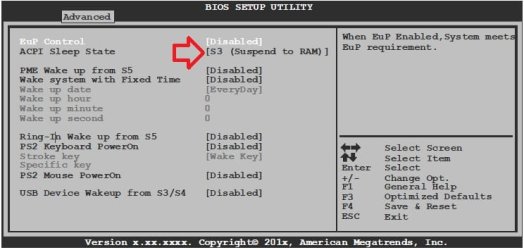
i put the bios to either S1 or S3 i get the same thing for either.
i also updated the Bios to the newest version of this board. same issue. i dont have a wireless mouse either like some other posts are saying. i have a usb Mouse and keyboard. after doing some research im going to try a couple of things to see if it fixes the issue. if you can come up with anything at all that would be helpful.
Last edited by a moderator:
My Computer
Computer type
PC/Desktop
Computer Manufacturer/Model Number
Custom Built
OS
Windows 7 pro 64 bit
CPU
AMD FX 8370
Motherboard
MSI Gaming board 970 series
Memory
G.SKILL Ripjaws Series 16GB (4 x 4GB) DDR3 SDRAM DDR3
Graphics Card(s)
MSI Geforce GTx 66ti
Sound Card
onboard real tek
Monitor(s) Displays
Acer 22in
Screen Resolution
2048 tops
Hard Drives
SSD 120gig hyper X kingston - 4 other hard drives for storage
ok i went home and checked it out. i unplugged the usb mouse, KB and gamestop xbox 360 controller. it worked. i plugged back in my wolf king gamer KB, Screensaver works and power works. plugged in the mouse Windows sees it again and the screensaver works and power options. well when i plug in the gamestop xbox 360 controller windows sees it in Device manager but the green led light on the X is not lit up and mmm the screensaver is not working again well either the controller or the mouse was the culprit.
My Computer
Computer type
PC/Desktop
Computer Manufacturer/Model Number
Custom Built
OS
Windows 7 pro 64 bit
CPU
AMD FX 8370
Motherboard
MSI Gaming board 970 series
Memory
G.SKILL Ripjaws Series 16GB (4 x 4GB) DDR3 SDRAM DDR3
Graphics Card(s)
MSI Geforce GTx 66ti
Sound Card
onboard real tek
Monitor(s) Displays
Acer 22in
Screen Resolution
2048 tops
Hard Drives
SSD 120gig hyper X kingston - 4 other hard drives for storage
It would be a issue with the mouse drivers instead. If the mouse has drivers, try uninstalling and reinstalling them, or checking for a new driver version that may have sorted this issue.
If that doesn't help, then you would need to contact the mouse manufacturer's support site to report this issue and see if they may already know of a solution.
My Computer
Computer type
PC/Desktop
Computer Manufacturer/Model Number
Self built custom
OS
64-bit Windows 11 Pro for Workstations
CPU
Intel i7-8700K OC'd to 5 GHz
Motherboard
ASUS ROG Maximus XI Formula Z390
Memory
64 GB (4x16GB) G.SKILL TridentZ RGB DDR4 3600 MHz
Graphics Card(s)
ASUS ROG-STRIX-GTX1080TI-O11G-GAMING
Sound Card
Integrated
Monitor(s) Displays
2 x Samsung Odyssey G7 27"
Screen Resolution
2560x1440
Hard Drives
1TB Samsung 990 PRO M.2,
4TB Samsung 990 PRO PRO M.2,
TerraMaster F8 SSD Plus NAS
PSU
Seasonic Prime Titanium 850W
Case
Thermaltake Core P3
Cooling
Corsair Hydro H115i
Keyboard
Logitech wireless K800
Mouse
Logitech MX Master 4
Internet Speed
2 Gb/s Download and 100 Mb/s Upload
Antivirus
Malwarebyte Anti-Malware Premium
Browser
Google Chrome
Other Info
Logitech Z625 speaker system,
Logitech BRIO 4K Pro webcam,
HP Color LaserJet Pro MFP M477fdn,
APC SMART-UPS RT 1000 XL - SURT1000XLI,
Galaxy S23 Plus phone