Screensaver help

cobra872

New member
Local time
9:10 PM
Messages
3
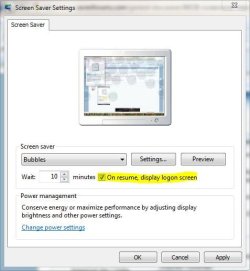
I use the bubbles screensaver for my computer and have the "on resume, display logon screen" unchecked.

For me, when the display turns off after the screensaver (and also when the computer goes to sleep afterwards), it goes back to my desktop screen. I'd like it so that when I hit a key during the screensaver, it will go back to my desktop, and if I hit a key when the display finally turns off, it will go go to my logon screen.

I could have sworn it worked like this before, but not now I suppose.

Now that I think about it, in XP it switched users automatically when the display turned off...

Any way to fix this?
 

My Computer

OS
Windows 7
Well, I don't know about the display turning off one, but to disable locking the screen after resuming,

Go To Start
Type Power Options
Open it
On the Sidebar it will say "Require a password on wakeup"
Click it
Click "Change settings that are currently unavailable"
Accept UAC
Click "Don't require a password"
Then Click "Save Changes"
Then Exit
 

My Computer

Computer Manufacturer/Model Number
Toshiba
OS
Windows 7 Home Premium x64
CPU
AMD
Memory
4 GB
Graphics Card(s)
ATI Radeon Intergrated Graphics
Sound Card
Realtek
Screen Resolution
1366 X 768
Hard Drives
223 GB HDD
I use the bubbles screensaver for my computer and have the "on resume, display logon screen" unchecked.

For me, when the display turns off after the screensaver (and also when the computer goes to sleep afterwards), it goes back to my desktop screen. I'd like it so that when I hit a key during the screensaver, it will go back to my desktop, and if I hit a key when the display finally turns off, it will go go to my logon screen.

I could have sworn it worked like this before, but not now I suppose.

Now that I think about it, in XP it switched users automatically when the display turned off...

Any way to fix this?

Make sure this box is checked to get the logon screen.
 

Attachments

  • log.JPG
    log.JPG
    34.7 KB · Views: 2

My Computer

Computer type
PC/Desktop
Computer Manufacturer/Model Number
Self Built
OS
Win 10 Pro x64
CPU
Intel I5-2500K @3.3GHz
Motherboard
Asrock P67 Extreme4
Memory
16GB G.Skill Ripjaws X (4x4GB)
Graphics Card(s)
EVGA GeForce 750 Ti SC 2GB
Sound Card
ASUS Xonar DG 5.1 Channels 24-bit 96KHz PCI Interface Sound
Monitor(s) Displays
auria eq2367
Screen Resolution
1920 x 1080
Hard Drives
250GB Samsung 850 EVO SSD
1TB WD Blue
1TB Hitachi
PSU
SeaSonic X 650W 80 Plus Gold
Case
Corsair Obsidian 750D
Cooling
Corsair H60, Three 140mm case fans
Keyboard
Logitech Wireless Keyboard K520
Mouse
Logitech Wireless Mouse M310
Internet Speed
Wave Broadband ~ 100 dn 5 up
Antivirus
Windows Defender, Malwarebytes Premium
Browser
Edge, IE11, Chrome
Other Info
Laptop specs: HP g7-1365dx /
CPU: AMD A6-3420M APU with Radeon(tm) HD Graphics /
RAM: Crucial 8Gb (2x4Gb) /
SSD: Crucial M4-CT128M4SSD2 ATA Device/ FW 000F /
GFX: AMD Radeon HD 6520G /
OS: Windows 10 Pro x64
I experimented with the power saving options, but it never would work the way I wanted it to. I can only adjust the password prompt settings for when the computer goes to sleep.

I just find it to be more convenient for me if I could move my mouse to stop the screensaver. Then if the display gets turned off due to inactivity, it would show the password prompt screen after I hit a key or move my mouse.

And checking that box doesn't help me either.

There should be a way to make this work..
 

My Computer

OS
Windows 7

My Computer

Computer type
PC/Desktop
Computer Manufacturer/Model Number
Self Built
OS
Win 10 Pro x64
CPU
Intel I5-2500K @3.3GHz
Motherboard
Asrock P67 Extreme4
Memory
16GB G.Skill Ripjaws X (4x4GB)
Graphics Card(s)
EVGA GeForce 750 Ti SC 2GB
Sound Card
ASUS Xonar DG 5.1 Channels 24-bit 96KHz PCI Interface Sound
Monitor(s) Displays
auria eq2367
Screen Resolution
1920 x 1080
Hard Drives
250GB Samsung 850 EVO SSD
1TB WD Blue
1TB Hitachi
PSU
SeaSonic X 650W 80 Plus Gold
Case
Corsair Obsidian 750D
Cooling
Corsair H60, Three 140mm case fans
Keyboard
Logitech Wireless Keyboard K520
Mouse
Logitech Wireless Mouse M310
Internet Speed
Wave Broadband ~ 100 dn 5 up
Antivirus
Windows Defender, Malwarebytes Premium
Browser
Edge, IE11, Chrome
Other Info
Laptop specs: HP g7-1365dx /
CPU: AMD A6-3420M APU with Radeon(tm) HD Graphics /
RAM: Crucial 8Gb (2x4Gb) /
SSD: Crucial M4-CT128M4SSD2 ATA Device/ FW 000F /
GFX: AMD Radeon HD 6520G /
OS: Windows 10 Pro x64
Screensaver is as outmoded as the CRT screens they protected from burn-in.

By disabling it your sleep will work better, and you can enjoy that fantastic Win7 slideshow with some of the greatest pictures ever taken.

You can download all 12 Win7 national edition's backgrounds (120) for a slideshow that will knock your and your friend's socks off: 120 Original Windows 7 High Resolution Scenery Regional Wallpapers Free Download My Digital Life

Enjoy backgrounds! Your screen is pre-saved.
 
Ok, I think I got it sorted out. I have my display turning off at the same time the computer goes to sleep. And I have the "Require a password on wakeup" setting turned on. It doesn't respond as fast as if only the display were to be turned off, but it all works out.

Thanks guys.
 

My Computer

OS
Windows 7
You're Welcome, Glad you got it sorted out. :D
 

My Computer

Computer type
PC/Desktop
Computer Manufacturer/Model Number
Self Built
OS
Win 10 Pro x64
CPU
Intel I5-2500K @3.3GHz
Motherboard
Asrock P67 Extreme4
Memory
16GB G.Skill Ripjaws X (4x4GB)
Graphics Card(s)
EVGA GeForce 750 Ti SC 2GB
Sound Card
ASUS Xonar DG 5.1 Channels 24-bit 96KHz PCI Interface Sound
Monitor(s) Displays
auria eq2367
Screen Resolution
1920 x 1080
Hard Drives
250GB Samsung 850 EVO SSD
1TB WD Blue
1TB Hitachi
PSU
SeaSonic X 650W 80 Plus Gold
Case
Corsair Obsidian 750D
Cooling
Corsair H60, Three 140mm case fans
Keyboard
Logitech Wireless Keyboard K520
Mouse
Logitech Wireless Mouse M310
Internet Speed
Wave Broadband ~ 100 dn 5 up
Antivirus
Windows Defender, Malwarebytes Premium
Browser
Edge, IE11, Chrome
Other Info
Laptop specs: HP g7-1365dx /
CPU: AMD A6-3420M APU with Radeon(tm) HD Graphics /
RAM: Crucial 8Gb (2x4Gb) /
SSD: Crucial M4-CT128M4SSD2 ATA Device/ FW 000F /
GFX: AMD Radeon HD 6520G /
OS: Windows 10 Pro x64
Back
Top