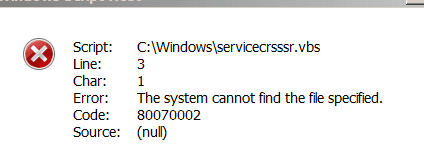
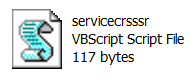
The servicecrsss.vbs does not belong to Windows system files this could be malware infection. You can delete this file by opening Command Prompt as administrator and execute following command:
Code:
Del /f /a /q C:\Windows\servicecrsss.vbs
After deleting this file scan your computer for malware infections with MalwareBytes.
The servicecrsss.vbs does not belong to Windows system files this could be malware infection. You can delete this file by opening Command Prompt as administrator and execute following command:
Code:
Del /f /a /q C:\Windows\servicecrsss.vbs
After deleting this file scan your computer for malware infections with MalwareBytes.[/QUOTE]
Did as you suggested but at command prompt it said "file not found"
Soooo.....I took a punt and in the run command I typed in C:\Windows\servicecrsssr and this popped up so I deleted it :sarc:
Ran MBAM and nothing came up and did an Avast boot scan and also nothing.
After re-boot walahh, it has disappeared
Thanks for your valuable input mates!!
Attachments
Capture 1.PNG
4.9 KB
· Views: 16
My Computer
Computer type
PC/Desktop
Computer Manufacturer/Model Number
Self built
OS
Windows 7 home premium 64bit
CPU
intel Core i7 4790 3.6Ghz
Motherboard
Gigabyte H97-D3H
Memory
16Gb G.Skill Sniper
Graphics Card(s)
Nvidia GTX 760
Sound Card
Realtek ALC1150 115dB SNR HD Audio
Monitor(s) Displays
LG 32" TV as monitor
Screen Resolution
1920 x 1080
Hard Drives
Samsung 840 PRO series SATA3 256Gb SSD.
Western Digital Black SATA3 -1Tb.
Western Digital external HDD-1TB.
Pioneer DVD-RW.
PSU
Antec HCG 620w
Case
Thermaltake A41
Cooling
Stock fans x 3. After market Arctic Freezer i11 cpu cooler
Keyboard
Logitech M520r wireless
Mouse
Logitech M310t wireless
Internet Speed
Fair to middlin'
Antivirus
Avast free
Browser
Firefox
Other Info
MBAM Pro
SuperAntiSpyware free edition
AdwCleaner
Ccleaner
Revo uninstaller Pro
Just as an afterthought, could it be that the file didn't show up at command prompt because the script is actually C:\Windows\servicecrsssr.vbs? Note the R on the end
Del /f /a /q C:\Windows\servicecrsss.vbs
My Computer
Computer type
PC/Desktop
Computer Manufacturer/Model Number
Self built
OS
Windows 7 home premium 64bit
CPU
intel Core i7 4790 3.6Ghz
Motherboard
Gigabyte H97-D3H
Memory
16Gb G.Skill Sniper
Graphics Card(s)
Nvidia GTX 760
Sound Card
Realtek ALC1150 115dB SNR HD Audio
Monitor(s) Displays
LG 32" TV as monitor
Screen Resolution
1920 x 1080
Hard Drives
Samsung 840 PRO series SATA3 256Gb SSD.
Western Digital Black SATA3 -1Tb.
Western Digital external HDD-1TB.
Pioneer DVD-RW.
PSU
Antec HCG 620w
Case
Thermaltake A41
Cooling
Stock fans x 3. After market Arctic Freezer i11 cpu cooler
Keyboard
Logitech M520r wireless
Mouse
Logitech M310t wireless
Internet Speed
Fair to middlin'
Antivirus
Avast free
Browser
Firefox
Other Info
MBAM Pro
SuperAntiSpyware free edition
AdwCleaner
Ccleaner
Revo uninstaller Pro
Just as an afterthought, could it be that the file didn't show up at command prompt because the script is actually C:\Windows\servicecrsssr.vbs? Note the R on the end
The error message said that the system couldn't find the file. So it is not surprising that it told him "file not found" when he tried to delete it.
I did a search on "what is servicecrsssr.vbs" and a whole lot of people said that it is malware. So it is a good thing that the system couldn't find the file.
My Computer
Computer type
PC/Desktop
Computer Manufacturer/Model Number
Dell
OS
Linux Mint 18.2 xfce 64-bit (VMWare host) / Windows 8.1 Pro 32-bit (VMWare guest)
CPU
Haswell
Memory
4 GB
Monitor(s) Displays
Acer 23"
Screen Resolution
1920 x 1080
Hard Drives
Two hard drives, 1TB each: One for Linux, one for my data.
Keyboard
IBM Model M
Antivirus
Sophos (Linux), Trend Micro (Windows)
Browser
Firefox, Opera
Other Info
I use Samba to share my data drive with the other computers at my house and with my guest session in VMWare Workstation Player.