SD Card corrupted, any good software out there to recover my files?

SteveH66

New member
Local time
6:25 PM
Messages
26
Hi all, I was using an SD card in the built-in SD card slot on my laptop to store data files. Something happened that corrupted the SD card. Windows 7 still recognizes the SD card and I can see the files on the card, but I can't even copy the files off of it to save them, so that I can reformat the SD card to use it again. What would be the best approach to take for recovering these files? Are there any good user friendly programs out there, preferably free or open source, that I could use to try to recover these files? They are not vital files but they are important to me and I would like to recover them. Didn't know what was the best forum to use to post this in, so I chose General Discussion. :) Thanks, Steve
 

My Computer My Computer

At a glance

Windows 7 Home Premium 64 bit
Computer Manufacturer/Model Number
Acer Aspire 5733Z-4851
OS
Windows 7 Home Premium 64 bit
Hello,
The folks that make CCleaner also have a recovery program called Recurva which I've had some success with in similar situations.
You might give it a look.
Regards-
 

My Computer My Computer

At a glance

Triple Boot - Win 10 x64Pro + Win 7 x64 Ultim...AMD FX 8370ePatriot 32GB Viper III DDR3 2133Sapphire Radeon VAPOR-X R9 290X 8GB + Asus 58...
Computer type
PC/Desktop
Computer Manufacturer/Model Number
Home Build - Acuarius
OS
Triple Boot - Win 10 x64Pro + Win 7 x64 Ultimate + WinXP-mce x1
CPU
AMD FX 8370e
Motherboard
AsRock Fx990 Extreme 9
Memory
Patriot 32GB Viper III DDR3 2133
Graphics Card(s)
Sapphire Radeon VAPOR-X R9 290X 8GB + Asus 5870 [V2]
Sound Card
Realtek ALC 898
Monitor(s) Displays
LCD 1) ASUS PB287Q - LCD 2) HP 2304 - LCD 3) Asus VW266H
Screen Resolution
1) 4k - 2) 1920 x 1200 - 3) 1920 x 1200
Hard Drives
- System C: - 128GB Corsair Force GT SSD
- System D: - 128GB Crucial C-300 SSD
- Seagate 3 TB x2 Hitachi SATA 3 [6Gb/s]

- MediaSonic HF2-SU3S2
- 5 TB backup
PSU
CoolerMaster Silent Pro Gold 1000
Case
Cosmos - Cooler Master 1000
Cooling
CoolerMaster 240M Liquid
Keyboard
Logitec MK-700
Mouse
Logitec MK-700
Internet Speed
DSL - ~ 15 Mb
Antivirus
F-Secure
Browser
Chrome / Opera / EI9
Other Info
I miss my C-64...1541 5 1/4 DD ... and my A-500...
Thank you for your post, I downloaded and tried Recurva. It scanned the SD card, which is drive E on my system. It just found a bunch of .cache files and I switched to Advanced Mode, and clicked for it to scan drive E. It popped up a warning box, and the box says - Failed to scan the following drives: E: Unable to determine file system type. So, it would seem that something corrupted the file system on the SD card. Is there some type of software out there that can be used to recover the file system, and then recover the files? Thank you
 

My Computer My Computer

At a glance

Windows 7 Home Premium 64 bit
Computer Manufacturer/Model Number
Acer Aspire 5733Z-4851
OS
Windows 7 Home Premium 64 bit
Hello,
Have you tried running the Check Disk function? Try a right click on the drive > properties > Tools > Error check.
You may loose a file or two, but hopefully you'll get the bulk of them back.
Regards-
 

My Computer My Computer

At a glance

Triple Boot - Win 10 x64Pro + Win 7 x64 Ultim...AMD FX 8370ePatriot 32GB Viper III DDR3 2133Sapphire Radeon VAPOR-X R9 290X 8GB + Asus 58...
Computer type
PC/Desktop
Computer Manufacturer/Model Number
Home Build - Acuarius
OS
Triple Boot - Win 10 x64Pro + Win 7 x64 Ultimate + WinXP-mce x1
CPU
AMD FX 8370e
Motherboard
AsRock Fx990 Extreme 9
Memory
Patriot 32GB Viper III DDR3 2133
Graphics Card(s)
Sapphire Radeon VAPOR-X R9 290X 8GB + Asus 5870 [V2]
Sound Card
Realtek ALC 898
Monitor(s) Displays
LCD 1) ASUS PB287Q - LCD 2) HP 2304 - LCD 3) Asus VW266H
Screen Resolution
1) 4k - 2) 1920 x 1200 - 3) 1920 x 1200
Hard Drives
- System C: - 128GB Corsair Force GT SSD
- System D: - 128GB Crucial C-300 SSD
- Seagate 3 TB x2 Hitachi SATA 3 [6Gb/s]

- MediaSonic HF2-SU3S2
- 5 TB backup
PSU
CoolerMaster Silent Pro Gold 1000
Case
Cosmos - Cooler Master 1000
Cooling
CoolerMaster 240M Liquid
Keyboard
Logitec MK-700
Mouse
Logitec MK-700
Internet Speed
DSL - ~ 15 Mb
Antivirus
F-Secure
Browser
Chrome / Opera / EI9
Other Info
I miss my C-64...1541 5 1/4 DD ... and my A-500...
JohnPC I tried what you suggested, with Windows Explorer running as Admin so I don't think that lack of privilege was the problem. I clicked on Check now button under Error-checking and when the pop-up dialog came up for the error check I clicked OK. It didn't run the scan, the dialog box just disappeared. Thanks for the suggestion. But I think I am going to need something that goes a little more in-depth, into rebuilding a file system or whatever. Recurva said that the file system was corrupted or unrecognizable or something like that. Any ideas? Anyone?
 

My Computer My Computer

At a glance

Windows 7 Home Premium 64 bit
Computer Manufacturer/Model Number
Acer Aspire 5733Z-4851
OS
Windows 7 Home Premium 64 bit
Please post a screenshot of Windows Disk Managenent with only your SD Card plugged in.
 

My Computer My Computer

At a glance

Windows 7 Home Premium 32 bit
OS
Windows 7 Home Premium 32 bit
Sorry Jumanji, what is Windows Disk Management? Do you mean Windows Explorer, or is that another program? Thanks
 

My Computer My Computer

At a glance

Windows 7 Home Premium 64 bit
Computer Manufacturer/Model Number
Acer Aspire 5733Z-4851
OS
Windows 7 Home Premium 64 bit
But I think I am going to need something that goes a little more in-depth, into rebuilding a file system or whatever.

Hello-
The action of running Chkdsk does rebuild corrupted file structures and allows other programs, such as Recurva, to be able to read the disk. If it can't fix it, well...then its probably toast.

CHKDSK (short for "check disk") is a system tool in DOS, OS/2 and Windows. It verifies the file system integrity of a volume and fixes logical file system errors. It is similar to the fsck command in Unix.
CHKDSK - Wikipedia, the free encyclopedia​
Regards-
 

My Computer My Computer

At a glance

Triple Boot - Win 10 x64Pro + Win 7 x64 Ultim...AMD FX 8370ePatriot 32GB Viper III DDR3 2133Sapphire Radeon VAPOR-X R9 290X 8GB + Asus 58...
Computer type
PC/Desktop
Computer Manufacturer/Model Number
Home Build - Acuarius
OS
Triple Boot - Win 10 x64Pro + Win 7 x64 Ultimate + WinXP-mce x1
CPU
AMD FX 8370e
Motherboard
AsRock Fx990 Extreme 9
Memory
Patriot 32GB Viper III DDR3 2133
Graphics Card(s)
Sapphire Radeon VAPOR-X R9 290X 8GB + Asus 5870 [V2]
Sound Card
Realtek ALC 898
Monitor(s) Displays
LCD 1) ASUS PB287Q - LCD 2) HP 2304 - LCD 3) Asus VW266H
Screen Resolution
1) 4k - 2) 1920 x 1200 - 3) 1920 x 1200
Hard Drives
- System C: - 128GB Corsair Force GT SSD
- System D: - 128GB Crucial C-300 SSD
- Seagate 3 TB x2 Hitachi SATA 3 [6Gb/s]

- MediaSonic HF2-SU3S2
- 5 TB backup
PSU
CoolerMaster Silent Pro Gold 1000
Case
Cosmos - Cooler Master 1000
Cooling
CoolerMaster 240M Liquid
Keyboard
Logitec MK-700
Mouse
Logitec MK-700
Internet Speed
DSL - ~ 15 Mb
Antivirus
F-Secure
Browser
Chrome / Opera / EI9
Other Info
I miss my C-64...1541 5 1/4 DD ... and my A-500...
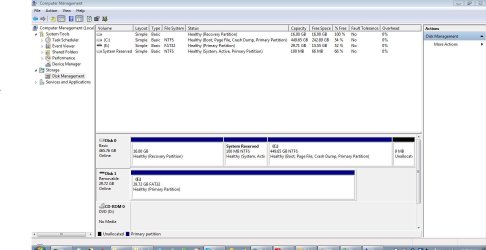
OK, couldn't get it to show just the SD card, but it is the only removable disc in the system, it's Drive E: in the screen cap. Say's it's a healthy disk, but files are corrupted and such. Screen cap is attached
 

Attachments

  • Capture.JPG
    Capture.JPG
    90 KB · Views: 5

My Computer My Computer

At a glance

Windows 7 Home Premium 64 bit
Computer Manufacturer/Model Number
Acer Aspire 5733Z-4851
OS
Windows 7 Home Premium 64 bit
JohnPC, it can read it, and so can the system, but some files are corrupted
 

My Computer My Computer

At a glance

Windows 7 Home Premium 64 bit
Computer Manufacturer/Model Number
Acer Aspire 5733Z-4851
OS
Windows 7 Home Premium 64 bit
Everything seems to be absolutely fine on Windows Disk management.

You just said you are unable to copy the files. What exactly happens when you try to copy the file? If you get any error message what exactly is that?
 

My Computer My Computer

At a glance

Windows 7 Home Premium 32 bit
OS
Windows 7 Home Premium 32 bit
It starts to copy them to the C: drive into the directory I made to copy them off into, starts counting up the size of the copy operation, and then partway into the operation the copy window just disappears and the destination directory is empty. Also, some of the files can be accessed, the others are corrupted. I get a message that the application can't read the file or the file is corrupted.
 

My Computer My Computer

At a glance

Windows 7 Home Premium 64 bit
Computer Manufacturer/Model Number
Acer Aspire 5733Z-4851
OS
Windows 7 Home Premium 64 bit
OK, this is indeed a strange problem which I hadn't come across before.

But considering the clue that the file system has been damaged, we have to try some data recovery program that can rebuild the file from its signature and file format attributes. With this in mind, I would recommend that you try data recovery with PhotoRec.

Go to the topic "Recovery:" in my thread http://www.sevenforums.com/software/193467-guide-using-photorec-recovery-software.html

( Do not format your SD Card. In the experiment I did. I formatted just to prove that even after formatting PhotoRec can recover the data. You need not format.)

I would recommend copying the data to another external drive or flash drive to be safe (rather than to your system drive). And that drive should be plugged in before you run PhotoRec for it to see it.
 

My Computer My Computer

At a glance

Windows 7 Home Premium 32 bit
OS
Windows 7 Home Premium 32 bit
OK jumanji, I ran photoRec following the steps in your guide you linked to. No files were recovered. A cap of it is attached.
 

Attachments

  • Capture2.JPG
    Capture2.JPG
    32 KB · Views: 0

My Computer My Computer

At a glance

Windows 7 Home Premium 64 bit
Computer Manufacturer/Model Number
Acer Aspire 5733Z-4851
OS
Windows 7 Home Premium 64 bit
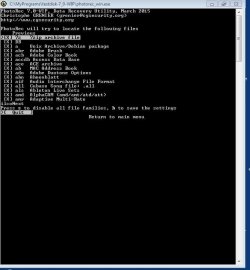
Can you please post the screenshot of the third Window showing the file formats selected? You should select the file formats you want to recover. If in doubt select all formats.

The file formats you selected should have an X in it.

I just want to make sure you did the right thing.
 

My Computer My Computer

At a glance

Windows 7 Home Premium 32 bit
OS
Windows 7 Home Premium 32 bit
Here's the screenshot, all the file types are selected with the x in the [ ] as you can see. Except db3 or whatever that had the warning that it gives false positives. I don't have any of those files anyway as far as a know, I don't have DBase on this system.
 

Attachments

  • Capture3.JPG
    Capture3.JPG
    45.3 KB · Views: 1

My Computer My Computer

At a glance

Windows 7 Home Premium 64 bit
Computer Manufacturer/Model Number
Acer Aspire 5733Z-4851
OS
Windows 7 Home Premium 64 bit
OK, one last time , repeat but now press s to deselect all file formats and then select only a few file formats you know you have on that SD Card, press b to save the settings and proceed.

( Pressing the down arrow will highlight each successive file format. When you reach the end of the page and highlight "next", a new page with more file formats will appear for you to make the selection. What file formats do you have on that card? Select only those, press b to save settings and proceed)

I still can't believe that PhotoRec is not copying any files.
 

My Computer My Computer

At a glance

Windows 7 Home Premium 32 bit
OS
Windows 7 Home Premium 32 bit
It is saying that no files were saved to cygdrive/c/sdcard or something like that. What is cygdrive and where would I find it? Or is something not correct in the setup of photoRec software? Screen cap attached

P.S. I have found a recup_dir in a couple of places, one of them had files but they were just text files and in them wasn't text it was text and a bunch of other characters (AASCII characters?) all mixed together
 

Attachments

  • Capture4.JPG
    Capture4.JPG
    34 KB · Views: 0

My Computer My Computer

At a glance

Windows 7 Home Premium 64 bit
Computer Manufacturer/Model Number
Acer Aspire 5733Z-4851
OS
Windows 7 Home Premium 64 bit
To avoid all this confusion only I had recommended "I would recommend copying the data to another external drive or flash drive to be safe (rather than to your system drive). And that drive should be plugged in before you run PhotoRec for it to see it." (post#14).But you paid no heed.

Please connect another external drive to copy the data. Run Photorec and you should see your system drive, the SD card and the external drive in Photorec.

Follow the procedure indicated in my guide. Deselect all file formats shown and select only the file formats in the SD Card which you want to copy and press b to save the settings and proceed further.. In the tenth Window you have to select your destination where to copy - in your case the external drive - and then press C (Shift+C) and copying to the external drive will start.

Note: My system drive apart from C: had other partitions D, E, F, G.and H and so I did not connect any external drive and chose a Work Area folder on H as my destination to which to copy.You do not have any other partition and hence an external drive is recommended.
 

My Computer My Computer

At a glance

Windows 7 Home Premium 32 bit
OS
Windows 7 Home Premium 32 bit
Back
Top