SD Card Reader error upon insertion of card

shutchens

New member
Local time
9:51 AM
Messages
2
Whenever I insert a SD card I get the following error:

This file does not have a program associated with it for performing this action. Please install a program or, if one is already installed, create an association in the Default Programs Control Panel.

I have tried associating the SD to give a pop up for the list of programs, such as Window Live Gallery, Kodak Easy Share, or Wal-mart Photo Manager. And the same error continues to occur.

This is happening on a:
Toshiba L505 running Windows 7, Home Premium
Intel Pentium T4400 Processor
3 Gig DDR3 memory
320 Gig HD.

There is ample HD space, there are no devices showing to have any issues on the device manager.

I can go through explorer and see the card reader and open it and see the pictures. Just the error comes up and never gives option to view or download the pictures.

Any assistance is appreciated
 

My Computer My Computer

Computer Manufacturer/Model Number
Toshiba Satellite L505
OS
Windows 7 64-Bit
CPU
Intel Pentium T4400
Motherboard
Toshiba
Memory
3gig ddr3
Graphics Card(s)
Mobile Intel
Hard Drives
320Gig
Welcome to Seven Forums shutchens. You say "I have tried associating the SD to give a pop up for the list of programs, such as Window Live Gallery, Kodak Easy Share, or Wal-mart Photo Manager." Did this seem to be successful? If you right click on the disk in explorer and choose open with, does it give you the correct choices? If so, can you choose to always use that choice? I'm bumping this to the top, but also seeking more info. A Guy
 

My Computer My Computer

Computer type
PC/Desktop
OS
Windows 10 Home x64
CPU
INTEL Core i5-750 Quad-Core 3.37GHz
Motherboard
ASUS P7P55D
Memory
HyperX Fury Black Series 8GB (2 x 4GB) 1866Mhz
Graphics Card(s)
EVGA GeForce GTX 750 Superclocked 1GB 128-Bit GDDR5
Monitor(s) Displays
LG 32MA68HY 32" IPS
Screen Resolution
1920 x 1080
Hard Drives
Samsung 840 Evo 120GB, SEAGATE 500GB Barracuda® 7200.12, SATA 3 Gb/s, 7200 RPM, 16MB cache
PSU
ANTEC TruePower New TP-550, 80 PLUS, 550W
Case
ANTEC Three Hundred Illusion
Cooling
COOLER MASTER Hyper 212 Plus, 4 x 120mm 1 x 140mm Noctua's
Internet Speed
85 + Mbps
Antivirus
Avast
Browser
Vivaldi
It will open with that option but it does not "stick" to that option. Each time I insert a card into the reader I am getting the same error that there is no program associated to the files.

Thanks!
 

My Computer My Computer

Computer Manufacturer/Model Number
Toshiba Satellite L505
OS
Windows 7 64-Bit
CPU
Intel Pentium T4400
Motherboard
Toshiba
Memory
3gig ddr3
Graphics Card(s)
Mobile Intel
Hard Drives
320Gig
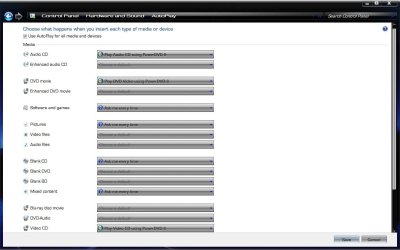
This may be worth a try.

Start> Control Panel> Hardware and Sound> Autoplay> Change default settings for media or devices

Autoplay.jpg

See if the card reader shows as a device. If not, you can try resetting defaults in lower left corner. A Guy
 

My Computer My Computer

Computer type
PC/Desktop
OS
Windows 10 Home x64
CPU
INTEL Core i5-750 Quad-Core 3.37GHz
Motherboard
ASUS P7P55D
Memory
HyperX Fury Black Series 8GB (2 x 4GB) 1866Mhz
Graphics Card(s)
EVGA GeForce GTX 750 Superclocked 1GB 128-Bit GDDR5
Monitor(s) Displays
LG 32MA68HY 32" IPS
Screen Resolution
1920 x 1080
Hard Drives
Samsung 840 Evo 120GB, SEAGATE 500GB Barracuda® 7200.12, SATA 3 Gb/s, 7200 RPM, 16MB cache
PSU
ANTEC TruePower New TP-550, 80 PLUS, 550W
Case
ANTEC Three Hundred Illusion
Cooling
COOLER MASTER Hyper 212 Plus, 4 x 120mm 1 x 140mm Noctua's
Internet Speed
85 + Mbps
Antivirus
Avast
Browser
Vivaldi
Just a thought...
If you have an autorun.inf file in the root directory of the sd card, can you open it using notepad, copy the contents and paste back the results here?
 

My Computer My Computer

OS
XP Pro/Vista Ultimate (64)/Windows 7 Ultimate Signature Edition(64)
CPU
Core 2 Duo E8500 @ stock
Motherboard
Gigabyte EP45-UD3R
Memory
8Gb (4 X 2Gb) Corsair Dominator 1066Mhz DDR2
Graphics Card(s)
XFX ATI Radeon 4870 1Gb
Sound Card
Onboard 7.1
Monitor(s) Displays
BenQ E2200Hd, Asus VW161D, HP L1506
Screen Resolution
1920 X 1080
Hard Drives
Seagate 7200.12 500Gb
2 X Hitachi 1Tb
PSU
CoolerMaster 650 EPD
Case
Thermaltake
Cooling
2 X Noctua 120mm's, Stock Intel
Keyboard
Logitech
Mouse
Logitech
Back
Top