SD cards stopped working

Dick H

New member
Member
VIP
Local time
10:13 PM
Messages
102
My PC has recognized my SD cards OK, but it suddenly stopped. The cards all work fine via an external USB card reader.
Device Manager says it has the latest drivers. I don't know what else to check.
 

My Computer

OS
Windows 7 Home Premium

My Computer

Computer Manufacturer/Model Number
Self Built
OS
Windows 7 ultimate 64 bit / XP Home sp3
CPU
intel Core 2 Duo E8400 3.0ghz
Motherboard
Asus P5ND bios 1401
Memory
8 gigs 1066 OCZ Fata1ty
Graphics Card(s)
EVGA GTX 580 Call of Duty Black Ops Edition
Sound Card
Creative Soundblaster Audigy 2zs
Monitor(s) Displays
Asus 24in LCD's 2MS X2
Screen Resolution
1920x1080p @60Hz
Hard Drives
WD Caviar 500 Black/ WD Caviar 200 Blue
PSU
OCZ 700W GameXtreme
Case
NZXT Apollo
Cooling
Corsair H50 CPU/120mm x3 /60mm x2 /Corsair Dominator Ram
Keyboard
Logitech Bluetooth Wireless MX5000
Mouse
Logitech Bluetooth Wireless MX1000
Internet Speed
Download 19.83 Upload 0.97
Other Info
Logitech Z2300 Speakers/ Bose Noise Cancelling Headphones/Avermedia PCI-e Hybrid TV Bravo/Epson NX415 all in one/ 4 Port Powered USB Hub/ LG 10x Bluray Burner /TSST Corp DVDRW External
Welcome to Seven Forums.
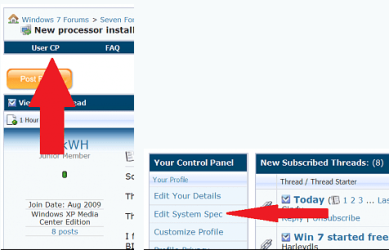
Could we get you to fill-in all your system specs here?
View attachment 183838

It will help us help you.
Also if you don't know them you can use one of these programs to help.
http://www.piriform.com/speccy/download
http://majorgeeks.com/HWiNFO_d279.html
Thanks Fabe

I have this forums System Info. program on my desktop. When I open it there are 10 items with various details. What, exactly, do you want?

Here's a screen shot. http://dickh.zenfolio.com/img/s11/v37/p452043369-3.jpg
 

My Computer

OS
Windows 7 Home Premium
Welcome to Seven Forums.
Could we get you to fill-in all your system specs here?
View attachment 183838

It will help us help you.
Also if you don't know them you can use one of these programs to help.
http://www.piriform.com/speccy/download
http://majorgeeks.com/HWiNFO_d279.html
Thanks Fabe

I have this forums System Info. program on my desktop. When I open it there are 10 items with various details. What, exactly, do you want?

Here's a screen shot. http://dickh.zenfolio.com/img/s11/v37/p452043369-3.jpg

If you click on the lower right "edit system specs" it will take you right to your user control panel so you can copy the info for all to see.

Step 5 of this tutorial http://www.sevenforums.com/tutorials/180324-system-info-see-your-system-specs.html
explains how to do this.

p452043369-3.jpg
 

My Computer

Computer type
PC/Desktop
Computer Manufacturer/Model Number
Self Built
OS
Win 10 Pro x64
CPU
Intel I5-2500K @3.3GHz
Motherboard
Asrock P67 Extreme4
Memory
16GB G.Skill Ripjaws X (4x4GB)
Graphics Card(s)
EVGA GeForce 750 Ti SC 2GB
Sound Card
ASUS Xonar DG 5.1 Channels 24-bit 96KHz PCI Interface Sound
Monitor(s) Displays
auria eq2367
Screen Resolution
1920 x 1080
Hard Drives
250GB Samsung 850 EVO SSD
1TB WD Blue
1TB Hitachi
PSU
SeaSonic X 650W 80 Plus Gold
Case
Corsair Obsidian 750D
Cooling
Corsair H60, Three 140mm case fans
Keyboard
Logitech Wireless Keyboard K520
Mouse
Logitech Wireless Mouse M310
Internet Speed
Wave Broadband ~ 100 dn 5 up
Antivirus
Windows Defender, Malwarebytes Premium
Browser
Edge, IE11, Chrome
Other Info
Laptop specs: HP g7-1365dx /
CPU: AMD A6-3420M APU with Radeon(tm) HD Graphics /
RAM: Crucial 8Gb (2x4Gb) /
SSD: Crucial M4-CT128M4SSD2 ATA Device/ FW 000F /
GFX: AMD Radeon HD 6520G /
OS: Windows 10 Pro x64
My PC has recognized my SD cards OK, but it suddenly stopped. The cards all work fine via an external USB card reader.
Device Manager says it has the latest drivers. I don't know what else to check.

From the screenshot, I can infer that it is a eMachines PC.

And I have a nasty feeling that one or more pins/tongues in the socket that make contact with the SD card's fingers may have been bent or broken. One cannot see it since these lie deep in the card slot. Well, its just my guess.

Since it appears to be a branded machine, you may contact emachines service/support with your problem. If indeed the socket is faulty, they may be able to replace it.
 

My Computer

OS
Windows 7 Home Premium 32 bit
My PC has recognized my SD cards OK, but it suddenly stopped. The cards all work fine via an external USB card reader.
Device Manager says it has the latest drivers. I don't know what else to check.

From the screenshot, I can infer that it is a eMachines PC.

And I have a nasty feeling that one or more pins/tongues in the socket that make contact with the SD card's fingers may have been bent or broken. One cannot see it since these lie deep in the card slot. Well, its just my guess.

Since it appears to be a branded machine, you may contact emachines service/support with your problem. If indeed the socket is faulty, they may be able to replace it.
Thanks. I suspected something like that. Since I do have an external USB reader, it's not worth the hassle. I'll just use that.
 

My Computer

OS
Windows 7 Home Premium
Back
Top