Seagate HD not detected

3xotic

New member
Local time
3:40 AM
Messages
8
I have been trying to figure this out for two days now... I have a Seagate FreeAgent Desktop 500Gb external that I can not get my laptop to recognize in any way.
I have used this hard drive on many different computers with different OS's recently with no problems.
I have tried 4 different USB cables, checked all USB drives to make sure they are operating correctly, the HD is functioning normally, no strange sounds, not running hot, lighting up correctly, etc.
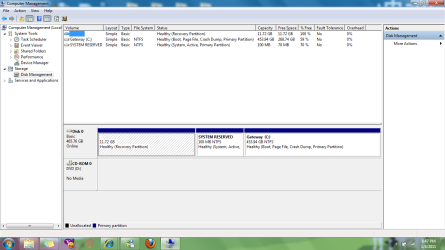
The computer does not react in any way when the HD is plugged in to the USB, nor does the HD show up in any way in My Computer, Computer Management, etc. It's like it just doesn't exist!
I know that the cords I've tried are good (they work for other items), I know that the HD worked perfectly fine on my friend's computer with XP a few days ago, but would not work on a different computer with XP a couple days before that (exact same problem, not detected in any way). I have not been able to test it on my bf's laptop running XP as we just moved and his power cord is currently MIA.
I am running 7 and am sure this is the problem... I just don't know how to resolve it without the HD being detected in SOME way!
I have been searching for solutions and tried many different ways of locating it on the computer, but will take any suggestions anyone has... I have a hard time believing this HD is broken when it hasn't given me any other signs of a problem...
 

My Computer

Computer Manufacturer/Model Number
Gateway NV5378u
OS
Windows 7 Home Premium x64
CPU
AMD Athlon(tm) II Dual-Core M300 2.00GHz
Memory
4096MB Dual-Channel DDR2 667MHz sDRAM Support
Graphics Card(s)
ATI Radeon HD 4200 and AMD M880G
Monitor(s) Displays
15.6" HD Widescreen Ultrabright™ LED-backlit
Screen Resolution
1366 x 768 resolution, 16:9 aspect ratio
Hard Drives
500GB 5400RPM SATA
Hi,

Im using the same drive on Windows 7 Ultimate without any problem, so I don't think the issue is Windows 7.

I'm not sure from your post whether you have done this, but have you tried other USB ports on the computer? Or is that what you meant by "checked all USB drives"?

Regards,
Golden
 

My Computer

Computer type
PC/Desktop
Computer Manufacturer/Model Number
Golden Mk. I.4
OS
Windows 10 Pro x64 ; Xubuntu x64
CPU
Intel i7 860 @ 2.80 GHz O/C'ed to 4.0GHz
Motherboard
Gigabyte P55A-UD3R Rev.1. Award BIOS F13
Memory
16GB Corsair Vengance DDR3 @ 661 MHz Dual Channel (9-9-9-24)
Graphics Card(s)
EVGA NVidia GTX 560 1024MB
Sound Card
Realtek Integrated
Monitor(s) Displays
Dual Samsung SyncMaster 2494HS
Screen Resolution
1920*1080 and 1920*1080
Hard Drives
1*Samsung 840 EVO 120GB SSD;
1*OCZ Vertex 2 60GB SSD;
2*Samsung F3 SpinPoint 1TB in RAID0;
1*Samsung F1 SpinPoint 1TB;
2*Western Digital 1TB External USB 3.0
1*Western Digital 500GB External USB 3.0
1*Seagate 500GB External USB 2.0
PSU
Thermaltake ToughPower QFan 750W
Case
Thermaltake Element S VK60001W2Z
Cooling
Corsair H60 Water Cooling, 2*230mm and 2*80mm case fans
Keyboard
Logitech G110
Mouse
Logitech MX518
I'm not sure from your post whether you have done this, but have you tied other USB ports on the computer? Or is that what you meant by "checked all USB drives"?

Yeah, sorry for the crude terminology... :) I most certainly meant ports. All 4 are functioning perfectly fine.
 

My Computer

Computer Manufacturer/Model Number
Gateway NV5378u
OS
Windows 7 Home Premium x64
CPU
AMD Athlon(tm) II Dual-Core M300 2.00GHz
Memory
4096MB Dual-Channel DDR2 667MHz sDRAM Support
Graphics Card(s)
ATI Radeon HD 4200 and AMD M880G
Monitor(s) Displays
15.6" HD Widescreen Ultrabright™ LED-backlit
Screen Resolution
1366 x 768 resolution, 16:9 aspect ratio
Hard Drives
500GB 5400RPM SATA
Hi,

Ok. I know you said that Computer Management doesn't see the disk, but please try these steps:

1. Click Start Orb, and in the search box type computer management
2. When the Computer Management Console starts, click on Disk Management
3. Post an image of what you see - it should look similar to the image below
 

Attachments

  • Capture.PNG
    Capture.PNG
    47.2 KB · Views: 139

My Computer

Computer type
PC/Desktop
Computer Manufacturer/Model Number
Golden Mk. I.4
OS
Windows 10 Pro x64 ; Xubuntu x64
CPU
Intel i7 860 @ 2.80 GHz O/C'ed to 4.0GHz
Motherboard
Gigabyte P55A-UD3R Rev.1. Award BIOS F13
Memory
16GB Corsair Vengance DDR3 @ 661 MHz Dual Channel (9-9-9-24)
Graphics Card(s)
EVGA NVidia GTX 560 1024MB
Sound Card
Realtek Integrated
Monitor(s) Displays
Dual Samsung SyncMaster 2494HS
Screen Resolution
1920*1080 and 1920*1080
Hard Drives
1*Samsung 840 EVO 120GB SSD;
1*OCZ Vertex 2 60GB SSD;
2*Samsung F3 SpinPoint 1TB in RAID0;
1*Samsung F1 SpinPoint 1TB;
2*Western Digital 1TB External USB 3.0
1*Western Digital 500GB External USB 3.0
1*Seagate 500GB External USB 2.0
PSU
Thermaltake ToughPower QFan 750W
Case
Thermaltake Element S VK60001W2Z
Cooling
Corsair H60 Water Cooling, 2*230mm and 2*80mm case fans
Keyboard
Logitech G110
Mouse
Logitech MX518
You most likely have to assign a drive letter. We'll see after you posted what Golden requested.
 

My Computer

Computer Manufacturer/Model Number
HP, Dell, Gateway, Toshiba - 4 laptops and 2 desktops
OS
Vista, Windows7, Mint Mate, Zorin, Windows 8
CPU
from 1.6GHz Duo to i7
Monitor(s) Displays
2x HP w2207
Hard Drives
5x HDD, 7x SSD, 12x Externals
Keyboard
with trackball - no mices
Mouse
Trackball mice
Internet Speed
DSL 6000
Unfortunately this is how it appears both normally and with the HD attached.
 

Attachments

  • hd issue.png
    hd issue.png
    48.2 KB · Views: 80

My Computer

Computer Manufacturer/Model Number
Gateway NV5378u
OS
Windows 7 Home Premium x64
CPU
AMD Athlon(tm) II Dual-Core M300 2.00GHz
Memory
4096MB Dual-Channel DDR2 667MHz sDRAM Support
Graphics Card(s)
ATI Radeon HD 4200 and AMD M880G
Monitor(s) Displays
15.6" HD Widescreen Ultrabright™ LED-backlit
Screen Resolution
1366 x 768 resolution, 16:9 aspect ratio
Hard Drives
500GB 5400RPM SATA
It's an understandable question I suppose.
The power adapter appears to be powering up the HD the same as it always has, which is correctly. Unless something has happened outside of my knowledge between now and the last time it was successfully recognized (by a different computer), it is functioning.
I currently don't have any way to verify this until I get my bf's computer running correctly and can check to see if it recognizes the HD (of course we get the power cord located for it and discover that his former roommate used it a little too much on sites he hadn't ought to of, so now I'm dealing with some real nasty viruses on that end...
 

My Computer

Computer Manufacturer/Model Number
Gateway NV5378u
OS
Windows 7 Home Premium x64
CPU
AMD Athlon(tm) II Dual-Core M300 2.00GHz
Memory
4096MB Dual-Channel DDR2 667MHz sDRAM Support
Graphics Card(s)
ATI Radeon HD 4200 and AMD M880G
Monitor(s) Displays
15.6" HD Widescreen Ultrabright™ LED-backlit
Screen Resolution
1366 x 768 resolution, 16:9 aspect ratio
Hard Drives
500GB 5400RPM SATA
Hi,

I just want to check something please? I assume the mouse is connected via USB connection - is that correct?

I was wondering whether the USB legacy function in the BIOS was turned off, although I'm not sure that it matters much, but just wanted to close this off as a potential avenue.

If your mouse is connected via USB, then legacy USB in BIOS is turned on and we don't need to consider that further.

Something else we haven't? yet asked : have you tried other USB drives on this computer?

Regards,
Golden
 

My Computer

Computer type
PC/Desktop
Computer Manufacturer/Model Number
Golden Mk. I.4
OS
Windows 10 Pro x64 ; Xubuntu x64
CPU
Intel i7 860 @ 2.80 GHz O/C'ed to 4.0GHz
Motherboard
Gigabyte P55A-UD3R Rev.1. Award BIOS F13
Memory
16GB Corsair Vengance DDR3 @ 661 MHz Dual Channel (9-9-9-24)
Graphics Card(s)
EVGA NVidia GTX 560 1024MB
Sound Card
Realtek Integrated
Monitor(s) Displays
Dual Samsung SyncMaster 2494HS
Screen Resolution
1920*1080 and 1920*1080
Hard Drives
1*Samsung 840 EVO 120GB SSD;
1*OCZ Vertex 2 60GB SSD;
2*Samsung F3 SpinPoint 1TB in RAID0;
1*Samsung F1 SpinPoint 1TB;
2*Western Digital 1TB External USB 3.0
1*Western Digital 500GB External USB 3.0
1*Seagate 500GB External USB 2.0
PSU
Thermaltake ToughPower QFan 750W
Case
Thermaltake Element S VK60001W2Z
Cooling
Corsair H60 Water Cooling, 2*230mm and 2*80mm case fans
Keyboard
Logitech G110
Mouse
Logitech MX518
Actually, I use my touchpad mouse... usually not on an even enough or large enough workspace to use a USB mouse. However, I do know that support is turned on and I regularly use the ports for other items. I just used a flash drive on it this morning to transfer some files from my bf's computer in case I have to re-install XP for him. Also, that was the first thing I checked when I realized there was a problem, then I checked the USB cord.
 

My Computer

Computer Manufacturer/Model Number
Gateway NV5378u
OS
Windows 7 Home Premium x64
CPU
AMD Athlon(tm) II Dual-Core M300 2.00GHz
Memory
4096MB Dual-Channel DDR2 667MHz sDRAM Support
Graphics Card(s)
ATI Radeon HD 4200 and AMD M880G
Monitor(s) Displays
15.6" HD Widescreen Ultrabright™ LED-backlit
Screen Resolution
1366 x 768 resolution, 16:9 aspect ratio
Hard Drives
500GB 5400RPM SATA
Mmm OK. I'm a bit stumped by this......{thinking}

This USB drive : how many connectors does it have on the back of it?
 

My Computer

Computer type
PC/Desktop
Computer Manufacturer/Model Number
Golden Mk. I.4
OS
Windows 10 Pro x64 ; Xubuntu x64
CPU
Intel i7 860 @ 2.80 GHz O/C'ed to 4.0GHz
Motherboard
Gigabyte P55A-UD3R Rev.1. Award BIOS F13
Memory
16GB Corsair Vengance DDR3 @ 661 MHz Dual Channel (9-9-9-24)
Graphics Card(s)
EVGA NVidia GTX 560 1024MB
Sound Card
Realtek Integrated
Monitor(s) Displays
Dual Samsung SyncMaster 2494HS
Screen Resolution
1920*1080 and 1920*1080
Hard Drives
1*Samsung 840 EVO 120GB SSD;
1*OCZ Vertex 2 60GB SSD;
2*Samsung F3 SpinPoint 1TB in RAID0;
1*Samsung F1 SpinPoint 1TB;
2*Western Digital 1TB External USB 3.0
1*Western Digital 500GB External USB 3.0
1*Seagate 500GB External USB 2.0
PSU
Thermaltake ToughPower QFan 750W
Case
Thermaltake Element S VK60001W2Z
Cooling
Corsair H60 Water Cooling, 2*230mm and 2*80mm case fans
Keyboard
Logitech G110
Mouse
Logitech MX518
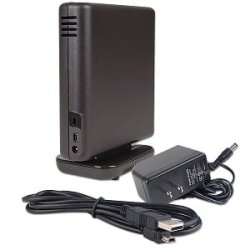
Connectors? As in places to put the cords? There is one place for USB and one for the power cord. This is what it looks like:
(There is a hole that nothing goes to as well, but literally, nothing goes there.)
 

Attachments

  • desktophd.jpg
    desktophd.jpg
    8.7 KB · Views: 215

My Computer

Computer Manufacturer/Model Number
Gateway NV5378u
OS
Windows 7 Home Premium x64
CPU
AMD Athlon(tm) II Dual-Core M300 2.00GHz
Memory
4096MB Dual-Channel DDR2 667MHz sDRAM Support
Graphics Card(s)
ATI Radeon HD 4200 and AMD M880G
Monitor(s) Displays
15.6" HD Widescreen Ultrabright™ LED-backlit
Screen Resolution
1366 x 768 resolution, 16:9 aspect ratio
Hard Drives
500GB 5400RPM SATA
Mmm OK. Its not the same as mine which is what I orignally thought.

Is there any chance you can get this plugged into another PC running Windows 7 and see if it picks it up?
 

My Computer

Computer type
PC/Desktop
Computer Manufacturer/Model Number
Golden Mk. I.4
OS
Windows 10 Pro x64 ; Xubuntu x64
CPU
Intel i7 860 @ 2.80 GHz O/C'ed to 4.0GHz
Motherboard
Gigabyte P55A-UD3R Rev.1. Award BIOS F13
Memory
16GB Corsair Vengance DDR3 @ 661 MHz Dual Channel (9-9-9-24)
Graphics Card(s)
EVGA NVidia GTX 560 1024MB
Sound Card
Realtek Integrated
Monitor(s) Displays
Dual Samsung SyncMaster 2494HS
Screen Resolution
1920*1080 and 1920*1080
Hard Drives
1*Samsung 840 EVO 120GB SSD;
1*OCZ Vertex 2 60GB SSD;
2*Samsung F3 SpinPoint 1TB in RAID0;
1*Samsung F1 SpinPoint 1TB;
2*Western Digital 1TB External USB 3.0
1*Western Digital 500GB External USB 3.0
1*Seagate 500GB External USB 2.0
PSU
Thermaltake ToughPower QFan 750W
Case
Thermaltake Element S VK60001W2Z
Cooling
Corsair H60 Water Cooling, 2*230mm and 2*80mm case fans
Keyboard
Logitech G110
Mouse
Logitech MX518
If I can find someone running 7... I'm in Iowa :) so on average the most common version of Windows is still XP. Might be able to find a Vista user or two amongst family/friends, but that's not much help either. I'll try to see if anyone has bought a new computer any time recently (that lives close enough for me to test this out) as most people don't upgrade an older computer when a new version comes out due to expenses.
I do know that I am supposed to have the drivers for it and that it is listed as a plug and play device by both Seagate and Microsoft. This is frustrating...
 

My Computer

Computer Manufacturer/Model Number
Gateway NV5378u
OS
Windows 7 Home Premium x64
CPU
AMD Athlon(tm) II Dual-Core M300 2.00GHz
Memory
4096MB Dual-Channel DDR2 667MHz sDRAM Support
Graphics Card(s)
ATI Radeon HD 4200 and AMD M880G
Monitor(s) Displays
15.6" HD Widescreen Ultrabright™ LED-backlit
Screen Resolution
1366 x 768 resolution, 16:9 aspect ratio
Hard Drives
500GB 5400RPM SATA
OK. Let me see if I can find some one with some more experience that can help us out - don't give up yet.
 

My Computer

Computer type
PC/Desktop
Computer Manufacturer/Model Number
Golden Mk. I.4
OS
Windows 10 Pro x64 ; Xubuntu x64
CPU
Intel i7 860 @ 2.80 GHz O/C'ed to 4.0GHz
Motherboard
Gigabyte P55A-UD3R Rev.1. Award BIOS F13
Memory
16GB Corsair Vengance DDR3 @ 661 MHz Dual Channel (9-9-9-24)
Graphics Card(s)
EVGA NVidia GTX 560 1024MB
Sound Card
Realtek Integrated
Monitor(s) Displays
Dual Samsung SyncMaster 2494HS
Screen Resolution
1920*1080 and 1920*1080
Hard Drives
1*Samsung 840 EVO 120GB SSD;
1*OCZ Vertex 2 60GB SSD;
2*Samsung F3 SpinPoint 1TB in RAID0;
1*Samsung F1 SpinPoint 1TB;
2*Western Digital 1TB External USB 3.0
1*Western Digital 500GB External USB 3.0
1*Seagate 500GB External USB 2.0
PSU
Thermaltake ToughPower QFan 750W
Case
Thermaltake Element S VK60001W2Z
Cooling
Corsair H60 Water Cooling, 2*230mm and 2*80mm case fans
Keyboard
Logitech G110
Mouse
Logitech MX518
Any help is much appreciated.
 

My Computer

Computer Manufacturer/Model Number
Gateway NV5378u
OS
Windows 7 Home Premium x64
CPU
AMD Athlon(tm) II Dual-Core M300 2.00GHz
Memory
4096MB Dual-Channel DDR2 667MHz sDRAM Support
Graphics Card(s)
ATI Radeon HD 4200 and AMD M880G
Monitor(s) Displays
15.6" HD Widescreen Ultrabright™ LED-backlit
Screen Resolution
1366 x 768 resolution, 16:9 aspect ratio
Hard Drives
500GB 5400RPM SATA
Hang in there - I've requested more experienced people to have a look at this. I'm sure we can get to the bottom of this one way or another.
 

My Computer

Computer type
PC/Desktop
Computer Manufacturer/Model Number
Golden Mk. I.4
OS
Windows 10 Pro x64 ; Xubuntu x64
CPU
Intel i7 860 @ 2.80 GHz O/C'ed to 4.0GHz
Motherboard
Gigabyte P55A-UD3R Rev.1. Award BIOS F13
Memory
16GB Corsair Vengance DDR3 @ 661 MHz Dual Channel (9-9-9-24)
Graphics Card(s)
EVGA NVidia GTX 560 1024MB
Sound Card
Realtek Integrated
Monitor(s) Displays
Dual Samsung SyncMaster 2494HS
Screen Resolution
1920*1080 and 1920*1080
Hard Drives
1*Samsung 840 EVO 120GB SSD;
1*OCZ Vertex 2 60GB SSD;
2*Samsung F3 SpinPoint 1TB in RAID0;
1*Samsung F1 SpinPoint 1TB;
2*Western Digital 1TB External USB 3.0
1*Western Digital 500GB External USB 3.0
1*Seagate 500GB External USB 2.0
PSU
Thermaltake ToughPower QFan 750W
Case
Thermaltake Element S VK60001W2Z
Cooling
Corsair H60 Water Cooling, 2*230mm and 2*80mm case fans
Keyboard
Logitech G110
Mouse
Logitech MX518
I suggest you see if the drive can be seen by a live boot CD.
Try
Partition Wizard Boot CD
Hirens Boot CD

Hirens boots into DOS, XP, and linux

All excellent to have in your toolbox anyway.
 

My Computer

Computer type
PC/Desktop
Computer Manufacturer/Model Number
Own build
OS
Windows 7x64 Home Premium SP1
CPU
Intel i7 2600k
Motherboard
ASUS P8Z68 Deluxe
Memory
G.Skill Ripjaws (DDR3-1600) 2x4GB
Graphics Card(s)
Nvidia GeForce GTS 450; Intel HD Graphics 3000(GT2+)
Monitor(s) Displays
Dell Ultrasharp IPS panel U2311H, Samsung SyncMaster P2350
Screen Resolution
1920x1080
Hard Drives
Samsung 850 Pro SSD 256GB, Samsung SSD 840 120GB, Seagates 1TB Barracuda ST31000528AS x2
PSU
Seasonic M12II 520W
Case
Lian Li Lancool PC-K60
Cooling
Case: 1x120mm, 3x140mm CPU: Hyper 212+
Keyboard
Logitech MK520 (wireless)
Mouse
Logitech MK520
Internet Speed
6-7 Mbps
Antivirus
Norton Security Premium, Malwarebytes on 2 (MSE on 3rd PC)
Browser
FireFox
Other Info
Audio: Logitech Z523 2.1
Back
Top