search bar on start menu

joezrt1

New member
Local time
1:07 AM
Messages
3
ive recently notice that when i do a search on the search bar it wont direct me to what im searching for.
for example when i do a search for device manager it will show me that no matches were found same goes for system or note pad or calculator.
it used to work now it doesnt can any one help?

changes made
recently reinstalled win 7 and all my required drivers but this does not work
 

My Computer

Computer Manufacturer/Model Number
hp
OS
win 7 ultimate 64x
Memory
4gb
Hard Drives
500gb 7200rpm seagate
Hi Joe,

You can try going back to your start menu default settings:

Right click on the task bar > select properties > click on the start menu tab and then click on customize. At the bottom there should be a button that says default settings, click that and it'll set the start menu back to default.

Let us know what happens!

Cheers,
Cassandra
Microsoft Windows Outreach
 

My Computer

Computer Manufacturer/Model Number
HP/p6207c
OS
Windows 7 Professional 64-bit
CPU
Pentium(R) Dual-Core CPU E5300 @260GHz
Sound Card
RealTek High Def Audio
Monitor(s) Displays
HP 2159m
Screen Resolution
1920 x 1080 x 60
Mouse
HP M/N: M-U0009-HP1
Internet Speed
Broadband
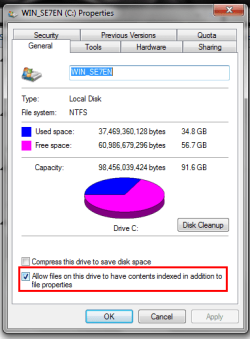
Is drive indexing turned off?
 

Attachments

  • Untitled.png
    Untitled.png
    15.5 KB · Views: 8

My Computer

Computer Manufacturer/Model Number
Toshiba Satellite A135S4487
OS
Windows 7 Ultimate (32-bit)
CPU
Intel Mobile Core 2 Duo T5500 @ 1.66 GHz
Motherboard
Intel i945GM Chipset
Memory
2.0GB Dual Channel DDR2 @ 266 MHz 4-4-4-12
Graphics Card(s)
Mobile Intel 945 Express Chipset Family
Sound Card
Realtek High Definition Audio
Monitor(s) Displays
Generic PnP Monitor, Samsung 46" LCD
Screen Resolution
1280 x 800, 1920 x 1080
Hard Drives
100GB Hitachi ATA Device (IDE)
120GB Western Digital USB
250GB External USB
Keyboard
Microsoft Wireless Comfort Keyboard 5000
Mouse
Microsoft Wireless Mouse 5000
Internet Speed
DSL
Hi Joe,

You can try going back to your start menu default settings:

Right click on the task bar > select properties > click on the start menu tab and then click on customize. At the bottom there should be a button that says default settings, click that and it'll set the start menu back to default.

Let us know what happens!

Cheers,
Cassandra
Microsoft Windows Outreach

cassie thank u for ur input that fixed it i remember i shut that off now totally forgot thanks all for ur input
 

My Computer

Computer Manufacturer/Model Number
hp
OS
win 7 ultimate 64x
Memory
4gb
Hard Drives
500gb 7200rpm seagate
Hi Joe,

You can try going back to your start menu default settings:

Right click on the task bar > select properties > click on the start menu tab and then click on customize. At the bottom there should be a button that says default settings, click that and it'll set the start menu back to default.

Let us know what happens!

Cheers,
Cassandra
Microsoft Windows Outreach

cassie thank u for ur input that fixed it i remember i shut that off now totally forgot thanks all for ur input

Okay. Which solution worked for you?
 

My Computer

Computer Manufacturer/Model Number
Toshiba Satellite A135S4487
OS
Windows 7 Ultimate (32-bit)
CPU
Intel Mobile Core 2 Duo T5500 @ 1.66 GHz
Motherboard
Intel i945GM Chipset
Memory
2.0GB Dual Channel DDR2 @ 266 MHz 4-4-4-12
Graphics Card(s)
Mobile Intel 945 Express Chipset Family
Sound Card
Realtek High Definition Audio
Monitor(s) Displays
Generic PnP Monitor, Samsung 46" LCD
Screen Resolution
1280 x 800, 1920 x 1080
Hard Drives
100GB Hitachi ATA Device (IDE)
120GB Western Digital USB
250GB External USB
Keyboard
Microsoft Wireless Comfort Keyboard 5000
Mouse
Microsoft Wireless Mouse 5000
Internet Speed
DSL
resetting the start menu back to default i had made my adjustment like i had before but made more changes than i had thought so its fix now thank u
 

My Computer

Computer Manufacturer/Model Number
hp
OS
win 7 ultimate 64x
Memory
4gb
Hard Drives
500gb 7200rpm seagate
Back
Top