Search bar wont doesn't work

t41

The Rover
Power User
VIP
Local time
10:39 AM
Messages
226
Location
south side of the sky
HI all,
my windows search bar is not working at all. It will show drives if i type in "c:" - it will show the folders in the drive, but anything else it says nothing found.
example typing in winver= nothing found. Even typing in just a letter= nothing found

However, when I log in as different user it works fine, so I assume there must be a folder that needs to be deleted or such. I spent an hour searching internet for answer, but nothing seemed to work so far. Reset indexing, etc.

Any one please help me, I mainly use everything search engine, but this is great for all windows items.

Thanks very much
 

My Computer My Computer

At a glance

windows7 7600 x86itel pentium 43.00 GBdiamond radion x1050
Computer Manufacturer/Model Number
dell optiplex - 2003
OS
windows7 7600 x86
CPU
itel pentium 4
Memory
3.00 GB
Graphics Card(s)
diamond radion x1050
Sound Card
SoundMax
Monitor(s) Displays
dell 2408wfp dell e172fp
Screen Resolution
1920 x 1200 1280 x 1024
Hard Drives
2 - 80 GB internals WD
1 - 01 TB ext
2 - 750 GB ext
1- 500 GB ext
all running on system no problems
Keyboard
old logitech cordless
Mouse
logitech wireless
Internet Speed
16 / 4
Other Info
networked into my sbs2003 server running sp1 still
it's a wonder I could even get windows 7 to connect to it
make sure windows search service set to automatic (delayed) and started...:cool:
 

My Computer My Computer

At a glance

windows 7 ultimate x64i7 9206gp dominatorati 4870
Computer Manufacturer/Model Number
custom built
OS
windows 7 ultimate x64
CPU
i7 920
Motherboard
asus p6t
Memory
6gp dominator
Graphics Card(s)
ati 4870
Sound Card
onboard
Monitor(s) Displays
samsung 2494hs
Screen Resolution
1080p
Hard Drives
1.5tp seagate
PSU
650wt coolermaster
Case
thermaltake m9
Cooling
Nectua c12p-se14
Keyboard
logitech wave pro
Mouse
logitech m110
Internet Speed
adsl 2+
it is set to automatic Delayed and is started as well - even restarted to no avail - thanks anyway
 

My Computer My Computer

At a glance

windows7 7600 x86itel pentium 43.00 GBdiamond radion x1050
Computer Manufacturer/Model Number
dell optiplex - 2003
OS
windows7 7600 x86
CPU
itel pentium 4
Memory
3.00 GB
Graphics Card(s)
diamond radion x1050
Sound Card
SoundMax
Monitor(s) Displays
dell 2408wfp dell e172fp
Screen Resolution
1920 x 1200 1280 x 1024
Hard Drives
2 - 80 GB internals WD
1 - 01 TB ext
2 - 750 GB ext
1- 500 GB ext
all running on system no problems
Keyboard
old logitech cordless
Mouse
logitech wireless
Internet Speed
16 / 4
Other Info
networked into my sbs2003 server running sp1 still
it's a wonder I could even get windows 7 to connect to it
HI all,
my windows search bar is not working at all. It will show drives if i type in "c:" - it will show the folders in the drive, but anything else it says nothing found.
example typing in winver= nothing found. Even typing in just a letter= nothing found

However, when I log in as different user it works fine, so I assume there must be a folder that needs to be deleted or such. I spent an hour searching internet for answer, but nothing seemed to work so far. Reset indexing, etc.

Any one please help me, I mainly use everything search engine, but this is great for all windows items.

Thanks very much

Try this, use windows easy transfer to transfer all your settings etc. Open a new account and tranfer everything to the new account. For any programs in the current users account, you can give yourself, in the new account, elevated priviledges. This should work. Windows will automatically transfer everything to a new user account when you try to close one, but I am afraid it would trasfer the corruption, also.
 

My Computer My Computer

At a glance

Windows 10, Home Clean InstallIntel Core2 processsor Q8200(2.33Ghz 1333FSB)...6 gbATI Radeon 256MB HD3650
Computer type
PC/Desktop
Computer Manufacturer/Model Number
Dell XPS 420
OS
Windows 10, Home Clean Install
CPU
Intel Core2 processsor Q8200(2.33Ghz 1333FSB) Quad Core Tech
Motherboard
Dell
Memory
6 gb
Graphics Card(s)
ATI Radeon 256MB HD3650
Sound Card
Intergrated 7.1 Channel Audio
Monitor(s) Displays
Dell SP2009W 20"
Hard Drives
640 GB Serial ATA Hard drive
Cooling
Fan
Keyboard
Dell USB Keyboard
Mouse
Dell Premium Optical USB
Internet Speed
DSL 2.85
i just got back into the office and actually need help in actually explaining to me exactly how to do this. I'm really not sure - embarrassing for someone who is labeled as knowledgeable. - lol

just also wonderin if i do a repair install if that wiull even fix it or am i just asking for trouble - WTF it's always something

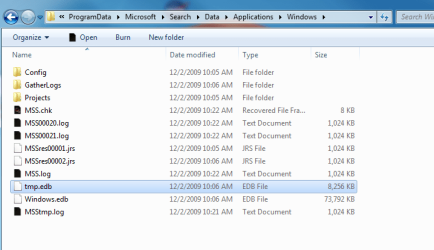
I tried brinks old solution for vista on this link - Index - Windows Search Service - Vista Forums but My folders are locked maybe since i am on a network, which i am the admin of, but i cant delete the old folders since they show as being locked and even after taking ownership they stilll wont deltete. I'n at a loss. Will do a repiar install if any one thinks that wuill work. etc....


@richc46 - i am not that savoty so can you explain how i move all my contents to a new account- please - thank you very much
nevermind i saw how it wokrs and that is not any better than a reinstall since i just did a reformat and reinstall 1 day ago. At that time i was having a problem of system not recognizing dvd drives and so on,
any way thanks man much appreciated.
 

Attachments

  • 1.PNG
    1.PNG
    16.7 KB · Views: 154
  • 2.PNG
    2.PNG
    19.3 KB · Views: 195
  • 3.PNG
    3.PNG
    4.3 KB · Views: 121
  • Capture.PNG
    Capture.PNG
    13.4 KB · Views: 110

My Computer My Computer

At a glance

windows7 7600 x86itel pentium 43.00 GBdiamond radion x1050
Computer Manufacturer/Model Number
dell optiplex - 2003
OS
windows7 7600 x86
CPU
itel pentium 4
Memory
3.00 GB
Graphics Card(s)
diamond radion x1050
Sound Card
SoundMax
Monitor(s) Displays
dell 2408wfp dell e172fp
Screen Resolution
1920 x 1200 1280 x 1024
Hard Drives
2 - 80 GB internals WD
1 - 01 TB ext
2 - 750 GB ext
1- 500 GB ext
all running on system no problems
Keyboard
old logitech cordless
Mouse
logitech wireless
Internet Speed
16 / 4
Other Info
networked into my sbs2003 server running sp1 still
it's a wonder I could even get windows 7 to connect to it
fixed - Too obvious it should have bit me in the ass!!! -

i know i come too late, and you already found a fix(kind of) to your problem.

i got similar problem, what i did to fix it was>
right click anywhere on the start menu > Properties > at "start menu" tab click at "Customize.." > go all the way down, look for "search other files and libraries" make sure it is checked.

that was it,

I did a repair install and everything :cry::cry:- what an IDIOT :o forgot I changed that when i set-up cause i use everything search engine - WTF - guess that wont happen again. lol


I am posting links to all fixes I found for this problem - as others are not as lucky as I was.
Windows 7 'Search programs and files' from Start menu broken

http://www.sevenforums.com/general-discussion/36076-need-help-start-search-box-broken-2.html

http://www.sevenforums.com/general-discussion/10734-search-start-menu-broken-post103060.html?highlight=start+search+broken#post107535


I believe that's it - :D
 
Last edited:

My Computer My Computer

At a glance

windows7 7600 x86itel pentium 43.00 GBdiamond radion x1050
Computer Manufacturer/Model Number
dell optiplex - 2003
OS
windows7 7600 x86
CPU
itel pentium 4
Memory
3.00 GB
Graphics Card(s)
diamond radion x1050
Sound Card
SoundMax
Monitor(s) Displays
dell 2408wfp dell e172fp
Screen Resolution
1920 x 1200 1280 x 1024
Hard Drives
2 - 80 GB internals WD
1 - 01 TB ext
2 - 750 GB ext
1- 500 GB ext
all running on system no problems
Keyboard
old logitech cordless
Mouse
logitech wireless
Internet Speed
16 / 4
Other Info
networked into my sbs2003 server running sp1 still
it's a wonder I could even get windows 7 to connect to it
Back
Top