Search bar ?

Mickmac

New member
Local time
12:20 PM
Messages
26
Hi,

I am not sure what it is called but there is a bar at the bottom of the screen, in Windows 7, and if you are looking for a word or phrase on a webpage it highlights those items. I don't seem to have it on my laptop, how do I get it to display and work ?

Thanks, Mickmac:cool:
 

My Computer

OS
Windows 7
hello can you take snapshot what do you means?? so i don't wrong to guide you.
 

My Computer

Computer Manufacturer/Model Number
built up
OS
windows 7
CPU
Phenom II AMD Dragon 3.5Ghz
Memory
DDR3 4GB
Graphics Card(s)
ATI Radeon 512Mb
Monitor(s) Displays
HP L1506
Screen Resolution
1152 x 864
Hard Drives
WDC 1 TB SATA-II Green Power
Keyboard
HP wireless keyboard
Mouse
HP Optic
Internet Speed
1GB

My Computer

Computer Manufacturer/Model Number
built up
OS
windows 7
CPU
Phenom II AMD Dragon 3.5Ghz
Memory
DDR3 4GB
Graphics Card(s)
ATI Radeon 512Mb
Monitor(s) Displays
HP L1506
Screen Resolution
1152 x 864
Hard Drives
WDC 1 TB SATA-II Green Power
Keyboard
HP wireless keyboard
Mouse
HP Optic
Internet Speed
1GB
Search

Hi RYO,

I checked my Windows Search and it it turned on. What I was referring to is a narrow bar which runs across the very bottom of the page, right above the Task Bar. In this bar you enter a word or phrase and if it is on the page it will be highlighted, in yellow I think. I thought I had it on my laptop when I first bought it about 6 months ago, but it is not there now. I don't know the name of this feature so I cannot do Google search for it.

Thanks, Mickmac
 

My Computer

OS
Windows 7
hm..i really not sure about your question..hope you can take screenshot and attach here, so i know what you're missing search bar. :o
 

My Computer

Computer Manufacturer/Model Number
built up
OS
windows 7
CPU
Phenom II AMD Dragon 3.5Ghz
Memory
DDR3 4GB
Graphics Card(s)
ATI Radeon 512Mb
Monitor(s) Displays
HP L1506
Screen Resolution
1152 x 864
Hard Drives
WDC 1 TB SATA-II Green Power
Keyboard
HP wireless keyboard
Mouse
HP Optic
Internet Speed
1GB

My Computer

Computer Manufacturer/Model Number
Micro-Star International/MS-7529
OS
Windows 7 Ultimate x32
CPU
DualCore Intel Pentium E2200, 2218 MHz (11 x 202)
Motherboard
MSI G31M3 V2 (MS-7529) (2 PCI, 1 PCI-E x16,2 DDR2 DIMM)
Memory
2 GB DDR2-800 DDR2 SDRAM
Graphics Card(s)
nVIDIA GeForce 9500GT 1GB
Sound Card
Realtek ALC888/1200 @ Intel 82801GB ICH7
Monitor(s) Displays
Samsung SyncMaster 2253BW (Digital) 22'' LCD
Screen Resolution
1680x1050
Hard Drives
SAMSUNG HD322IJ ATA Device (298 GB , IDE)
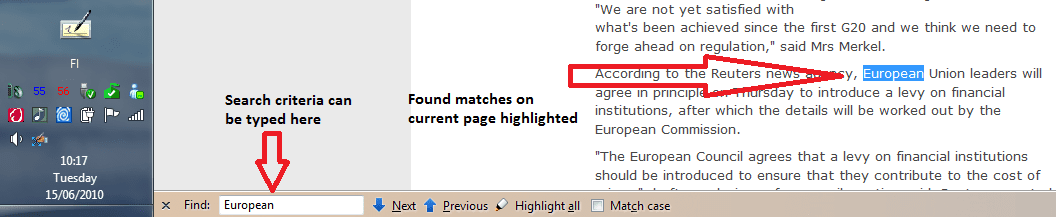
I think you are talking about browser's search bar, for instance in Firefox it is located at the bottom. When you type a search criteria, all matches are highlighted on current page.

This is a feature in your browser, not in Windows 7.

An example of Firefox search. Choosing Find in Edit menu opens the bar:

FF_search.png

Kari
 

My Computer

Computer type
Laptop
Computer Manufacturer/Model Number
HP ENVY 17-1150eg
OS
Windows 10 Pro x64 EN-GB
CPU
1.6 GHz Intel Core i7-720QM Processor
Memory
6 GB
Graphics Card(s)
ATI Mobility Radeon HD 5850 Graphics
Sound Card
Beats sound system with integrated subwoofer
Monitor(s) Displays
17" laptop display, 22" LED and 32" Full HD TV through HDMI
Screen Resolution
1600*900 (1), 1920*1080 (2&3)
Hard Drives
Internal: 2 x 500 GB SATA Hard Disk Drive 7200 rpm
External: 2TB for backups, 3TB USB3 network drive for media
Cooling
As Envy runs a bit warm, I have it on a Cooler Master pad
Keyboard
Logitech diNovo Media Desktop Laser (bluetooth)
Mouse
Logitech Performance Mouse MX
Internet Speed
50/10 Mbps VDSL
Antivirus
Windows Defender 4.3.9431.0
Browser
Maxthon 3.5.2., IE11
So, did you uninstaled some program during that period of six months?
 

My Computer

Computer Manufacturer/Model Number
Micro-Star International/MS-7529
OS
Windows 7 Ultimate x32
CPU
DualCore Intel Pentium E2200, 2218 MHz (11 x 202)
Motherboard
MSI G31M3 V2 (MS-7529) (2 PCI, 1 PCI-E x16,2 DDR2 DIMM)
Memory
2 GB DDR2-800 DDR2 SDRAM
Graphics Card(s)
nVIDIA GeForce 9500GT 1GB
Sound Card
Realtek ALC888/1200 @ Intel 82801GB ICH7
Monitor(s) Displays
Samsung SyncMaster 2253BW (Digital) 22'' LCD
Screen Resolution
1680x1050
Hard Drives
SAMSUNG HD322IJ ATA Device (298 GB , IDE)
sometime you must give detail information about your issue,i don't like to guess and guess..mickmac you can post your screen shot..and let us know about what's you're means. so we can help you step by step to solve it.
 

My Computer

Computer Manufacturer/Model Number
built up
OS
windows 7
CPU
Phenom II AMD Dragon 3.5Ghz
Memory
DDR3 4GB
Graphics Card(s)
ATI Radeon 512Mb
Monitor(s) Displays
HP L1506
Screen Resolution
1152 x 864
Hard Drives
WDC 1 TB SATA-II Green Power
Keyboard
HP wireless keyboard
Mouse
HP Optic
Internet Speed
1GB
I'm guessing he can't post a screenshot as the thing he's asking about is missing!
There's nothing to show.
 

My Computer

Computer Manufacturer/Model Number
Acer 7738G
OS
Windows 7 Home Premium X64 SP1
CPU
Intel Core2 duo T6600
Memory
4gb
Graphics Card(s)
Nvidia GeForce GT 1gb
Hard Drives
2 X 500 gb
Try <ctrl> F and it will appear.
 

My Computer

Computer Manufacturer/Model Number
HP dv6604nr
OS
Windows 7 Home Premium
CPU
AMD Athlon 64 X2 Dual-Core Processor TK-55, 1.8 Ghz
Memory
2 GB
Graphics Card(s)
Name NVIDIA GeForce 7150M / nForce 630M
Sound Card
Conexant High Definition SmartAudio HD2
Monitor(s) Displays
24 inch LCD 1920 x 1080
Screen Resolution
1280 x 800 x 59 hertz laptop display
Hard Drives
160GB Internal drive
500GB USB drive
Thanks all

you are right kenC, it's a bit hard to post a screenshot of something I don't have.
And thanks kari, I was not aware that was a Firefox feature, thought it was part of Windows 7. Thanks to everyone for your help, great forum for dummies like me,
Mickmac
 

My Computer

OS
Windows 7
Back
Top