So I have this issue. Whenever I try to find a Windows native application with the aid of the search box it won't find anything. It finds third-party applications but not Windows natives. For instances, it will find 'Skype' but won't find 'cmd' or 'update'.
Any idea why it happens?
Thanks!
PS: I SUSPECT that it is not including the System32 folder in the search but not absolutely sure if this is the cause of the problem. And, if it is I don't know how to fix it.
My Computer
At a glance
Windows 7 Professional 64bitIntel i5-33308GBOnboard
As a test, set your search settings to have Don't use the index when searching in file folders for system files checked to see if that may help. This way you don't have to worry about if the location is added to the index or if the index is up to date yet.
Brink, it solved partially the problem. Now it will find the app if I search from within the Windows Explorer. However it still will NOT find if I search from the searchbox at the start menu. And yes, I tried to click at 'See more results' link.
My Computer
At a glance
Windows 7 Professional 64bitIntel i5-33308GBOnboard
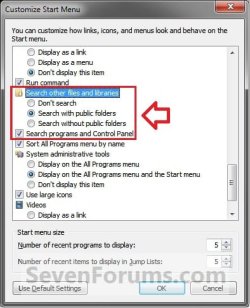
So far so good. Next, check to make sure that you have the same search settings for the Start menu set as in the blue note box in OPTION ONE of the tutorial below.
Ahhhhhh! Now it worked like a charm! Damn, why these options don't have enabled I never will understand! This issue has pissed me off for some time (actually since I migrated from XP to 7) but I was always postponing to resolve it.
Thank you very much for such BIG help Brink!
My Computer
At a glance
Windows 7 Professional 64bitIntel i5-33308GBOnboard