search in outlook 2010 won't display 2014 emails

blwstumpted

New member
Local time
12:41 AM
Messages
5
when using search in outlook 2010 for inbox, sent or delete, only emails from 2013 and earlier are found. I've used repair office 2010 and have re-indexed but still no 2014 emails are found. Solution?
 

My Computer My Computer

At a glance

windows 7 Home and Office 64 bit
Computer type
PC/Desktop
Computer Manufacturer/Model Number
HP
OS
windows 7 Home and Office 64 bit
Antivirus
macafee
Browser
explorer
Welcome to Seven Forums,

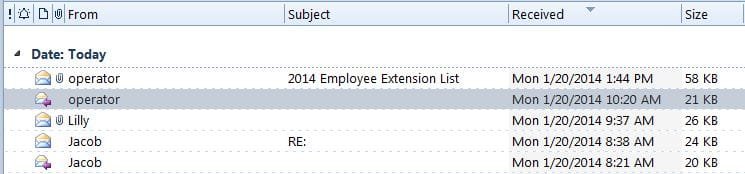
Are you able to see the 2014 in the Received Tab from your In/Sent/Deleted box?

You may also try removing your Email Profile then re-add it again?
Remove a profile - Outlook - Office.com
 

Attachments

  • 2014 emails.JPG
    2014 emails.JPG
    29.1 KB · Views: 2

My Computer My Computer

At a glance

Win7 & Win8 64bitIntel i5
Computer Manufacturer/Model Number
Lenovo Desktop/Samsung Laptop
OS
Win7 & Win8 64bit
CPU
Intel i5
Internet Speed
Charter-20 Mbps
Antivirus
Avast
Browser
FF, IE9 and Chrome
If you mean am I receiving 2014 emails, yes I am. BUT, this is more complicated than I first thought. I can search and find emails from today (1/20) & some from yesterday based on the time of day (a search on an account I tried had 4 emails on Monday 1/19 but only found the last one sent, then displayed 2013. 1/19 and earlier won't show at all, immediately pulls up 2013 for the particular search.
 

My Computer My Computer

At a glance

windows 7 Home and Office 64 bit
Computer type
PC/Desktop
Computer Manufacturer/Model Number
HP
OS
windows 7 Home and Office 64 bit
Antivirus
macafee
Browser
explorer
Have you tried removing your email profile as I've suggested?
 

My Computer My Computer

At a glance

Win7 & Win8 64bitIntel i5
Computer Manufacturer/Model Number
Lenovo Desktop/Samsung Laptop
OS
Win7 & Win8 64bit
CPU
Intel i5
Internet Speed
Charter-20 Mbps
Antivirus
Avast
Browser
FF, IE9 and Chrome
I have not. It shows "outlook" as the profile and clicking on properties, it lists all of my email addresses. If I delete then I have to reinstall my email addresses which accomplishes what exactly? I'm not that skilled, so I'm in uncharted waters!
 

My Computer My Computer

At a glance

windows 7 Home and Office 64 bit
Computer type
PC/Desktop
Computer Manufacturer/Model Number
HP
OS
windows 7 Home and Office 64 bit
Antivirus
macafee
Browser
explorer
Let's try a different tactic and not do the complicated one yet. ;)

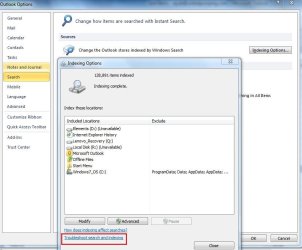
No. 1 Option - From your Outlook 2010 Click on File> Options> Search> Click Indexing Options> Click on Troubleshoot Search and Indexing.

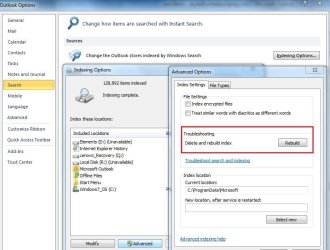
No. 2 Option - If that didn't work you may go for the Rebuild - Second image.

Close Microsoft Outlook then re-open it.

===============================
 

Attachments

  • Outlook 2010 - edit.JPG
    Outlook 2010 - edit.JPG
    59.5 KB · Views: 1
  • Outlook 2010 - search edit 2.JPG
    Outlook 2010 - search edit 2.JPG
    67.9 KB · Views: 1

My Computer My Computer

At a glance

Win7 & Win8 64bitIntel i5
Computer Manufacturer/Model Number
Lenovo Desktop/Samsung Laptop
OS
Win7 & Win8 64bit
CPU
Intel i5
Internet Speed
Charter-20 Mbps
Antivirus
Avast
Browser
FF, IE9 and Chrome
I had done the troubleshooting and index rebuild before with no luck. When you sent this last message I tried again. The troubleshoot does not find anything but alas, the indexing worked this time! Problem solved on this computer but my other computer with the same problem won't re-index after several tries. The problems started when I had an online computer tune-up performed. It did clear up a couple of issues so I've been reluctant to set my computer back to an earlier time. Any words of wisdom?
 

My Computer My Computer

At a glance

windows 7 Home and Office 64 bit
Computer type
PC/Desktop
Computer Manufacturer/Model Number
HP
OS
windows 7 Home and Office 64 bit
Antivirus
macafee
Browser
explorer
I had a similar problem in Outlook 2007.
I went to Tools - Options - search options
I unchecked one folder listed under indexing
I closed Outlook
I reopened outlook
I re-checked the folder under indexing
I closed and re-opened outlook
Indexing started in the background and successfully indexed the missing emails
 

My Computer My Computer

At a glance

Windows 7 Enterprise 64 bit
Computer type
PC/Desktop
OS
Windows 7 Enterprise 64 bit
The tune-up might have been the culprit or a coincidence. I'd do the System Restore, I think it'll be okay.
The problems started when I had an online computer tune-up performed. It did clear up a couple of issues so I've been reluctant to set my computer back to an earlier time. Any words of wisdom?
 

My Computer My Computer

At a glance

Win7 & Win8 64bitIntel i5
Computer Manufacturer/Model Number
Lenovo Desktop/Samsung Laptop
OS
Win7 & Win8 64bit
CPU
Intel i5
Internet Speed
Charter-20 Mbps
Antivirus
Avast
Browser
FF, IE9 and Chrome
Tried both your latest suggestion and the previous by MCOGAN - neither worked. Am goint to have to haul the computer into the shop for the "experts" to try and resolve. Thanks for the suggestions.
 

My Computer My Computer

At a glance

windows 7 Home and Office 64 bit
Computer type
PC/Desktop
Computer Manufacturer/Model Number
HP
OS
windows 7 Home and Office 64 bit
Antivirus
macafee
Browser
explorer
Back
Top