You are using an out of date browser. It may not display this or other websites correctly.
You should upgrade or use an
alternative browser.
Solved Search in windows explorer
Search in windows explorer does not work. Whatever I fill in in the box top right in the window, no search action takes place.
What to do?
- Computer Manufacturer/Model Number
- Asus
- OS
- Windows 7 Home premium 64 bits
- CPU
- AMD Athlon(tm) II x4 640 Processor
- Motherboard
- Asus
- Memory
- 4 GB
- Sound Card
- Realtek 1708 S
- Monitor(s) Displays
- LG
- Hard Drives
- 500 gb
3 Brain Cells
Guru
Gold Member
VIP
After you type in the box tick on computer and see what happens.
- Computer type
- PC/Desktop
- Computer Manufacturer/Model Number
- Home made Desktop
- OS
- Windows 10 Pro. 64/ version 1709 Windows 7 Pro/64
- CPU
- Intel i7-6800K @ 4.3
- Motherboard
- ASUS X-99 Deluxe II
- Memory
- Corsair Platinum 16 gig @2400
- Graphics Card(s)
- EVGA GTX 1070 OC
- Monitor(s) Displays
- Asus 27" LED LCD/VE278Q
- Screen Resolution
- 1920-1080 or 1280-720 HDMI
- Hard Drives
- INTEL SSD 730-240 Gb Sata 3.0/
- PSU
- EVGA Platium 1200W
- Case
- Phanteks Luxe Tempered Glass 8 fans/ one radiator
- Cooling
- XSPC/ Water Cooled CPU
- Keyboard
- Das 4 Professional
- Mouse
- Logitech M705/MX Anywhere 2-S
- Internet Speed
- 100 mbits
- Antivirus
- Microsoft Security Essentials/ Malwarebytes Premium 3.0/ SAS
- Browser
- I.E. 11 default/Firefox/ ISP Time Warner Cable/Spectrum
- Other Info
- LG BluRay Burner/
Sound system-KLipsch-THX/
Icy Dock ssd Hot Swap bays.
New member
Thread Starter
Search in Windows Explorer
nothing happens! Nothing is found
- Computer Manufacturer/Model Number
- Asus
- OS
- Windows 7 Home premium 64 bits
- CPU
- AMD Athlon(tm) II x4 640 Processor
- Motherboard
- Asus
- Memory
- 4 GB
- Sound Card
- Realtek 1708 S
- Monitor(s) Displays
- LG
- Hard Drives
- 500 gb
New member
Thread Starter
Search does not work
Search does not work in W-Explorer. It also does not work in the Start Search. The last can only find programs.
- Computer Manufacturer/Model Number
- Asus
- OS
- Windows 7 Home premium 64 bits
- CPU
- AMD Athlon(tm) II x4 640 Processor
- Motherboard
- Asus
- Memory
- 4 GB
- Sound Card
- Realtek 1708 S
- Monitor(s) Displays
- LG
- Hard Drives
- 500 gb
3 Brain Cells
Guru
Gold Member
VIP
By chance have you been in Services and turned off Indexing? Have you turned off any Windows 7 Services?
- Computer type
- PC/Desktop
- Computer Manufacturer/Model Number
- Home made Desktop
- OS
- Windows 10 Pro. 64/ version 1709 Windows 7 Pro/64
- CPU
- Intel i7-6800K @ 4.3
- Motherboard
- ASUS X-99 Deluxe II
- Memory
- Corsair Platinum 16 gig @2400
- Graphics Card(s)
- EVGA GTX 1070 OC
- Monitor(s) Displays
- Asus 27" LED LCD/VE278Q
- Screen Resolution
- 1920-1080 or 1280-720 HDMI
- Hard Drives
- INTEL SSD 730-240 Gb Sata 3.0/
- PSU
- EVGA Platium 1200W
- Case
- Phanteks Luxe Tempered Glass 8 fans/ one radiator
- Cooling
- XSPC/ Water Cooled CPU
- Keyboard
- Das 4 Professional
- Mouse
- Logitech M705/MX Anywhere 2-S
- Internet Speed
- 100 mbits
- Antivirus
- Microsoft Security Essentials/ Malwarebytes Premium 3.0/ SAS
- Browser
- I.E. 11 default/Firefox/ ISP Time Warner Cable/Spectrum
- Other Info
- LG BluRay Burner/
Sound system-KLipsch-THX/
Icy Dock ssd Hot Swap bays.
New member
Thread Starter
Search does not work
I do not think so. How to check?
- Computer Manufacturer/Model Number
- Asus
- OS
- Windows 7 Home premium 64 bits
- CPU
- AMD Athlon(tm) II x4 640 Processor
- Motherboard
- Asus
- Memory
- 4 GB
- Sound Card
- Realtek 1708 S
- Monitor(s) Displays
- LG
- Hard Drives
- 500 gb
New member
Guru
Gold Member
VIP
You can still search ...
By chance have you been in Services and turned off Indexing? Have you turned off any Windows 7 Services?
Turning "
Windows Search" off doesn't cause searches to fail (
on my PC).
I have it "
Disabled" and I can still search.
The same thing was true on my previous W7 installation.
I do not think so. How to check?
- Open the "Start Menu" and type "Services" in the Search box (no quotes).
- Choose "Services" from the results.
- Scroll down the list until you find "Windows Search" and check the "Status" and "Startup Type".
Last edited:
- Computer type
- PC/Desktop
- Computer Manufacturer/Model Number
- n/a
- OS
- W7 Ultimate SP1, LM19.2 MATE, W10 Home 1703, W10 Pro 1703 VM, #All 64 bit
- CPU
- AMD Phenom II x6 1100T, 3.3 GHz
- Motherboard
- ASUS M4A88T-M/USB3 (AM3)
- Memory
- 12GB DDR3 1333 G-Skill (4GB x 2), G-Skill (2GB x 2)
- Graphics Card(s)
- NVIDIA GeForce GTX 660
- Sound Card
- Realtek?
- Monitor(s) Displays
- Samsung S23B350
- Screen Resolution
- 1920x1080
- Hard Drives
- WD Green 2TB (SATA), WD Green 3TB (SATA), WD Blue 4TB (SATA), WD Blue 6TB (SATA)
- PSU
- Cooler Master
- Case
- Antec GX300 Tower
- Cooling
- 3x Antec TRICOOL 120mm Fans
- Mouse
- Wired Optical
- Internet Speed
- DSL
- Antivirus
- Avast
- Browser
- Pale Moon (64 bit)
- Other Info
- 2018-12-27 Upgraded HDDs
2015-12-10 Upgraded case, graphics card, storage
2015-08-15 Upgraded motherboard & RAM
2015-07-15 Upgraded LM17.1 to LM17.2
New member
Thread Starter
Search problem
I changed Indexing. Now it works. Thanks
- Computer Manufacturer/Model Number
- Asus
- OS
- Windows 7 Home premium 64 bits
- CPU
- AMD Athlon(tm) II x4 640 Processor
- Motherboard
- Asus
- Memory
- 4 GB
- Sound Card
- Realtek 1708 S
- Monitor(s) Displays
- LG
- Hard Drives
- 500 gb
New member
Guru
Gold Member
VIP
Interesting and Weird
I changed Indexing. Now it works. Thanks
Interesting.
It's weird how the same software works differently on different PCs.

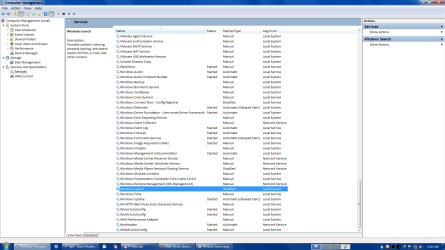
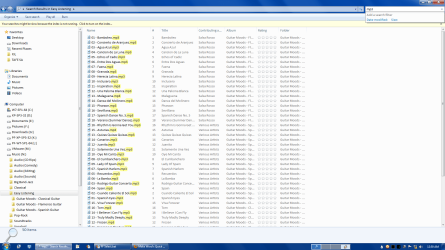
You can see that I have "
Windows Search" set to "
Disabled", but I can still perform searches.
Last edited:
- Computer type
- PC/Desktop
- Computer Manufacturer/Model Number
- n/a
- OS
- W7 Ultimate SP1, LM19.2 MATE, W10 Home 1703, W10 Pro 1703 VM, #All 64 bit
- CPU
- AMD Phenom II x6 1100T, 3.3 GHz
- Motherboard
- ASUS M4A88T-M/USB3 (AM3)
- Memory
- 12GB DDR3 1333 G-Skill (4GB x 2), G-Skill (2GB x 2)
- Graphics Card(s)
- NVIDIA GeForce GTX 660
- Sound Card
- Realtek?
- Monitor(s) Displays
- Samsung S23B350
- Screen Resolution
- 1920x1080
- Hard Drives
- WD Green 2TB (SATA), WD Green 3TB (SATA), WD Blue 4TB (SATA), WD Blue 6TB (SATA)
- PSU
- Cooler Master
- Case
- Antec GX300 Tower
- Cooling
- 3x Antec TRICOOL 120mm Fans
- Mouse
- Wired Optical
- Internet Speed
- DSL
- Antivirus
- Avast
- Browser
- Pale Moon (64 bit)
- Other Info
- 2018-12-27 Upgraded HDDs
2015-12-10 Upgraded case, graphics card, storage
2015-08-15 Upgraded motherboard & RAM
2015-07-15 Upgraded LM17.1 to LM17.2
3 Brain Cells
Guru
Gold Member
VIP
Glad it works for you now. My rule of the thumb is don't fool with Windows 7 Services. If you are happy please mark this thread Solved.
- Computer type
- PC/Desktop
- Computer Manufacturer/Model Number
- Home made Desktop
- OS
- Windows 10 Pro. 64/ version 1709 Windows 7 Pro/64
- CPU
- Intel i7-6800K @ 4.3
- Motherboard
- ASUS X-99 Deluxe II
- Memory
- Corsair Platinum 16 gig @2400
- Graphics Card(s)
- EVGA GTX 1070 OC
- Monitor(s) Displays
- Asus 27" LED LCD/VE278Q
- Screen Resolution
- 1920-1080 or 1280-720 HDMI
- Hard Drives
- INTEL SSD 730-240 Gb Sata 3.0/
- PSU
- EVGA Platium 1200W
- Case
- Phanteks Luxe Tempered Glass 8 fans/ one radiator
- Cooling
- XSPC/ Water Cooled CPU
- Keyboard
- Das 4 Professional
- Mouse
- Logitech M705/MX Anywhere 2-S
- Internet Speed
- 100 mbits
- Antivirus
- Microsoft Security Essentials/ Malwarebytes Premium 3.0/ SAS
- Browser
- I.E. 11 default/Firefox/ ISP Time Warner Cable/Spectrum
- Other Info
- LG BluRay Burner/
Sound system-KLipsch-THX/
Icy Dock ssd Hot Swap bays.


