Search includes subfolder names

meirea

New member
Local time
10:07 AM
Messages
4
Hi,
I am trying to use Windows 7 search engine to find all files containing a specific string on their names, on a specific folder and it's subfolders. Let's say I am trying to find files containing the string "link" on their names.
Having subfolders named "linked" and "netlink", the problem is the results include all the files contained in those 2 subfolders (hundreds), which do not have the string "link" on their names, and therefore I do not want to be shown as results.
Apparently, the Windows 7 search engine compares the file's full-path instead of the unqualified file name.
Is there anything I can do to search only file names instead of full-path names?
I do not have this problem on a Vista machine...
Thanks in advance.
 

My Computer

OS
Windows 7 Home Premium 32bit

My Computer

Computer type
PC/Desktop
Computer Manufacturer/Model Number
home built
OS
Multi-Boot W7_Pro_x64 W8.1_Pro_x64 W10_Pro_x64 +Linux_VMs +Chromium_VM
CPU
AMD Athlon II x4 620
Motherboard
Gigabyte GA-MA785G-UD3H
Memory
6GB GSkill DDR2 800
Graphics Card(s)
AMD 4670 GPU + AMD 4200 IGP
Sound Card
on board Realtek ALC889A
Monitor(s) Displays
RCA 40" LCD TV, Insignia 32" LCD TV, HP 15" LCD monitor
Screen Resolution
1680 x 1050
Hard Drives
OCZ Vertex 3 120GB,
Samsung F3 1TB (3),
Several others - WD, Seagate, Hitachi, ...
PSU
Corsair 500 W
Case
Rosewill mid tower
Cooling
CM 90mm rifle
Keyboard
Gyration wireless, Logitech wireless, Dell USB wired
Mouse
Gyration wireless, Logitech wireless, V7 USB wired
Internet Speed
Spectrum - 100Mbps D / 10Mbps U
Antivirus
Avast, MBAM3, EMET, WinPatrol
Browser
Pale Moon, Firefox, IE
Other Info
2 multi-boot PC's
Mainly HTPC/Office/Gen purpose (no gaming).
Trendnet USB KVM.
LG DVD burner/Blue Ray Player.
Tray system for removable SATA backup drives.

Not currently OCd, under-volted.
I use Hybrid sleep, rarely re-boot or shutdown.

Hauppauge HD-PVR, Avermedia PCIe TV Tuner, Hauppauge PCI TV Tuner.
Thank you David.
I installed Everything and also works well, but before moving to an external search engine I would like to be certain that Win7 doesn't have an option to change the mentioned behavior.
 

My Computer

OS
Windows 7 Home Premium 32bit
You're welcome, and welcome to Seven Forums.

I'm not sure if/how to use Windows search for what you want.
I never cared for Windows Search and found this utility early on.
I've been using it for years because it's much easier for me, and I've never had problems with it.

Many others here know Windows Search a lot better than me.
Perhaps one of them will see this and post an answer on how to use Windows Search the way you need it.
 

My Computer

Computer type
PC/Desktop
Computer Manufacturer/Model Number
home built
OS
Multi-Boot W7_Pro_x64 W8.1_Pro_x64 W10_Pro_x64 +Linux_VMs +Chromium_VM
CPU
AMD Athlon II x4 620
Motherboard
Gigabyte GA-MA785G-UD3H
Memory
6GB GSkill DDR2 800
Graphics Card(s)
AMD 4670 GPU + AMD 4200 IGP
Sound Card
on board Realtek ALC889A
Monitor(s) Displays
RCA 40" LCD TV, Insignia 32" LCD TV, HP 15" LCD monitor
Screen Resolution
1680 x 1050
Hard Drives
OCZ Vertex 3 120GB,
Samsung F3 1TB (3),
Several others - WD, Seagate, Hitachi, ...
PSU
Corsair 500 W
Case
Rosewill mid tower
Cooling
CM 90mm rifle
Keyboard
Gyration wireless, Logitech wireless, Dell USB wired
Mouse
Gyration wireless, Logitech wireless, V7 USB wired
Internet Speed
Spectrum - 100Mbps D / 10Mbps U
Antivirus
Avast, MBAM3, EMET, WinPatrol
Browser
Pale Moon, Firefox, IE
Other Info
2 multi-boot PC's
Mainly HTPC/Office/Gen purpose (no gaming).
Trendnet USB KVM.
LG DVD burner/Blue Ray Player.
Tray system for removable SATA backup drives.

Not currently OCd, under-volted.
I use Hybrid sleep, rarely re-boot or shutdown.

Hauppauge HD-PVR, Avermedia PCIe TV Tuner, Hauppauge PCI TV Tuner.
Thank you David.
I installed Everything and also works well, but before moving to an external search engine I would like to be certain that Win7 doesn't have an option to change the mentioned behavior.

I agree with David's assessment of Agent Ransack and only used the built in search feature for a couple of days. MS search may have search criteria that would to what you are attempting, but I have no idea if it does or not.

HTH
 

My Computer

Computer type
PC/Desktop
Computer Manufacturer/Model Number
Custom Built
OS
Windows 7 Professional x64
CPU
Intel i5 quad processor
Motherboard
DP67BG
Memory
16 GB
Graphics Card(s)
Radeon HD 5770
Sound Card
Realtek High Definition Audio
Monitor(s) Displays
Samsung SyncMaster
Screen Resolution
1920X1080
Hard Drives
WD 2TB (SATA Internal)
WD 1TB (USB External)
PSU
Corsair GS800
Case
Tower (Generic)
Cooling
3 Internal Fans
Keyboard
MS Wireless
Mouse
MS Optical Wired
Internet Speed
54 mbps
Antivirus
Emsisoft
Browser
IE-Version 9, Palemoon-Version 24.2.0
Thanks to both of you.
I need to use Win 7 file explorer because I am searching an icon gallery (a folder with many subfolders) and I need to see the images in the results pane instead of plain file name's, so I can see the images and select the appropiate icon.
Any help with be highly appreciated.
 

My Computer

OS
Windows 7 Home Premium 32bit
Have had similar trouble with w7 search (am using Agent Ransack aka File Locator).

Yes, sometimes w7 search results in 1000's of unwanted hits, were Agent Ransack has no problem whatsoever. For very special searches, Agent Ransack accepts " (like "(1)" ) and always returns exact results. W7 should be able to accept " but...
Windows 7 search exact phrase
I have investigated this issue, and found this is a known issue. I just reported this to our feedback team.
Didn't anyone think this one through during the planning stages ?
I could list many, many occurrences were w7 fails miserably (indexed or not) giving tons of wrong hits, or it may find some of what I search for, after needing some tedious and irritating filter setups to imitate what Agent Ransack (and surely many other dedicated programs) does without any extra work, doubt or hiccups.
 

My Computer

Computer type
Laptop
Computer Manufacturer/Model Number
Dell \ Lenovo\ HP \ Toshiba
OS
W7, W8.1
Antivirus
MSE, Malwarebytes
Browser
FF
I just did a search for .ico files and i see the icon in the results list.
Do you see something different for icon files, or this is not what you need?

SrchSP01.PNG
 

My Computer

Computer type
PC/Desktop
Computer Manufacturer/Model Number
home built
OS
Multi-Boot W7_Pro_x64 W8.1_Pro_x64 W10_Pro_x64 +Linux_VMs +Chromium_VM
CPU
AMD Athlon II x4 620
Motherboard
Gigabyte GA-MA785G-UD3H
Memory
6GB GSkill DDR2 800
Graphics Card(s)
AMD 4670 GPU + AMD 4200 IGP
Sound Card
on board Realtek ALC889A
Monitor(s) Displays
RCA 40" LCD TV, Insignia 32" LCD TV, HP 15" LCD monitor
Screen Resolution
1680 x 1050
Hard Drives
OCZ Vertex 3 120GB,
Samsung F3 1TB (3),
Several others - WD, Seagate, Hitachi, ...
PSU
Corsair 500 W
Case
Rosewill mid tower
Cooling
CM 90mm rifle
Keyboard
Gyration wireless, Logitech wireless, Dell USB wired
Mouse
Gyration wireless, Logitech wireless, V7 USB wired
Internet Speed
Spectrum - 100Mbps D / 10Mbps U
Antivirus
Avast, MBAM3, EMET, WinPatrol
Browser
Pale Moon, Firefox, IE
Other Info
2 multi-boot PC's
Mainly HTPC/Office/Gen purpose (no gaming).
Trendnet USB KVM.
LG DVD burner/Blue Ray Player.
Tray system for removable SATA backup drives.

Not currently OCd, under-volted.
I use Hybrid sleep, rarely re-boot or shutdown.

Hauppauge HD-PVR, Avermedia PCIe TV Tuner, Hauppauge PCI TV Tuner.
Thank you David.
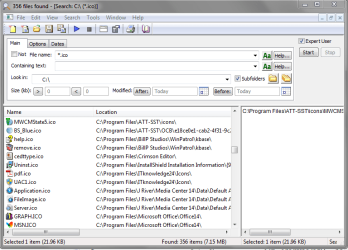
I installed File Locator Lite and works pretty fine, but does not solve my problem.
The icon library I need to search and explore contains images with png and gif formats, and File Locator does no have view options to show the actual images.
File Locator seems to be an excellent tool for other purposes.
 

My Computer

OS
Windows 7 Home Premium 32bit
Back
Top