Search indexed files

cowpoke

New member
Local time
10:18 AM
Messages
22
Word search problem?I'm using Windows 7 I have indexed all my files.
While searching in a particular folder I search for a word and it pulls up nothing?
It should indeed pull up many instances but it doesn't for some reason.


I seems to work for the most part, not sure why it wouldn't work for this particular one ?
These are pdf files, if I open the file and search within it works, so the file is readable....
 

My Computer

Computer type
PC/Desktop
OS
WINDOWS 7
In Windows Explorer, click on Organize. Select File and Search Options. In the Folder tab, is it set to search indexed locations?
 

My Computer

Computer type
Laptop
Computer Manufacturer/Model Number
Dell M6500 Precision Work Station
OS
Windows 7 Pro SP1 64 bit
Memory
8 GB
Screen Resolution
1920x
Internet Speed
30 Mbps
Antivirus
Norton Security
Browser
IE 11
Are you trying to search inside files for text?
 

My Computer

Computer type
Laptop
Computer Manufacturer/Model Number
Dell Precision 15 7550 Workstation
OS
Windows 10 22H2 Pro
CPU
Intel(R) Xeon W-10885M
Motherboard
Dell
Memory
2x 32 GB DDR4 ECC memory (128 GB max)
Graphics Card(s)
Intel onboard GPU 1080p - Quadro RTX 5000 Max-Q GPU 4K
Hard Drives
500 GB Corsair T500 main M2 SSD
1 TB Intel storage M2 SSD (6 TB max)
Mouse
Logitech MX-25 Bluetooth
Internet Speed
slow
Antivirus
MS
Browser
Pale Moon 33.3.x x64 AVX2 build
Guys, Gals, can Windows Explorer really read PDF contents and index same? I'm learning something new to me today. :)
 

My Computer

Computer type
PC/Desktop
Computer Manufacturer/Model Number
Antec desktop; Acer Aspire laptops
OS
Windows 7 Professional 64-bit
CPU
Desktop i5; Acers i5 & i7
Memory
desktop 16GB; 1 Acer 8GB & 1 Acer 16GB
Hard Drives
1TB split into 2 equal partitions [OS and data] usable by RJS
Internet Speed
AT&T DSL
Browser
FF, GChrome, msIE
Other Info
Windows 7 Firewall, Emsisoft AM/AV, MSE [scan-only], SpywareBlaster, Ruiware/BillP combine
W2


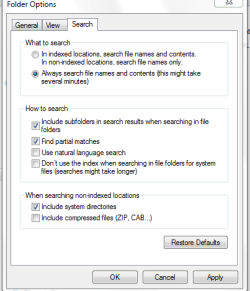
I looked at what you mentioned, see attached for settings. In the options I did click the

top option, which referenced index... that didn't seem to work either.


Yes I can search in other folders for words/text in pdf files.


I even do it under the main Windows (lower left on bottom toolbar) where it says search for programs and names.... it works there too, but I only use that if its a word/term that is rare, since it searches

everywhere.


This time I'm searching a specific folder.
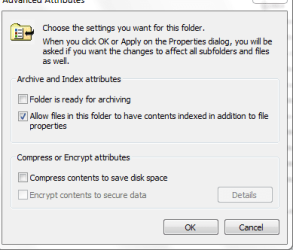
As you can see in the 2nd pic this folder appears to be indexed.


I took the time a while back to index ALL files, took a couple of hrs to run but it did them all.
 

Attachments

  • Capture.PNG
    Capture.PNG
    9.9 KB · Views: 12
  • Capture2.PNG
    Capture2.PNG
    8.7 KB · Views: 11

My Computer

Computer type
PC/Desktop
OS
WINDOWS 7
Do yourself a favor and turn that crap off. Go to services and turn off indexing. You don't even want it on a flash based HDD. Run Everything.exe to find files and FileSeek to find text inside files.

Trust me when I tell you Everything is a lot faster and more complete. And FileSeek has saved my loads of time finding files to make core edits with my website and browser code.

Downloads - voidtools

FileSeek: Lightning Fast File Search by Binary Fortress Software


took a couple of hrs to run but it did them all.


That's really pathetic when Everything will build its database in about five to seven seconds.
 

My Computer

Computer type
PC/Desktop
OS
Windows 7 Ultimate x64
Everything's advanced search also searches inside files.
I also shut off indexing to save resources.
 

My Computer

Computer type
Laptop
Computer Manufacturer/Model Number
Dell Precision 15 7550 Workstation
OS
Windows 10 22H2 Pro
CPU
Intel(R) Xeon W-10885M
Motherboard
Dell
Memory
2x 32 GB DDR4 ECC memory (128 GB max)
Graphics Card(s)
Intel onboard GPU 1080p - Quadro RTX 5000 Max-Q GPU 4K
Hard Drives
500 GB Corsair T500 main M2 SSD
1 TB Intel storage M2 SSD (6 TB max)
Mouse
Logitech MX-25 Bluetooth
Internet Speed
slow
Antivirus
MS
Browser
Pale Moon 33.3.x x64 AVX2 build
enabling the option to Search Locations should should solve his initial problem.
 

My Computer

Computer type
Laptop
Computer Manufacturer/Model Number
Dell M6500 Precision Work Station
OS
Windows 7 Pro SP1 64 bit
Memory
8 GB
Screen Resolution
1920x
Internet Speed
30 Mbps
Antivirus
Norton Security
Browser
IE 11
F22 Simpilot :


Concerning "fileseek" and "everything", my needs/usage are simple, doing word/phrase search
on text/PDF/HTML files.
Which of the 2 would be best for this ?


wither 2 :


Could you clarify "enabling the option to Search Locations should should solve his initial problem"
are you referring to the folder settings /
 

My Computer

Computer type
PC/Desktop
OS
WINDOWS 7
F22 Simpilot :


Concerning "fileseek" and "everything", my needs/usage are simple, doing word/phrase search
on text/PDF/HTML files.
Which of the 2 would be best for this ?


wither 2 :


Could you clarify "enabling the option to Search Locations should should solve his initial problem"
are you referring to the folder settings /

Yes
 

My Computer

Computer type
Laptop
Computer Manufacturer/Model Number
Dell M6500 Precision Work Station
OS
Windows 7 Pro SP1 64 bit
Memory
8 GB
Screen Resolution
1920x
Internet Speed
30 Mbps
Antivirus
Norton Security
Browser
IE 11
Back
Top