Search on Folders Stopped Working

pjd

New member
Power User
Local time
7:00 PM
Messages
115
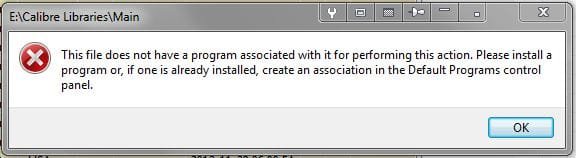
Search has stopped working from the folder right click menu - see attached error message. Works OK from disk drive right click

I'm sure Search was working from folder right click - can't say when it stopped as I don't using often, but I'm sure I would have used in the past month
 

Attachments
  • Capture.JPG
    Capture.JPG
    22.9 KB · Views: 14

My Computer My Computer

Computer type
PC/Desktop
Computer Manufacturer/Model Number
generic - made to spec
OS
Win 7 Professional 64bit
CPU
I5 650 @ 3.2GHz
Motherboard
Gigabyte H55M-UD2H
Memory
6G
Graphics Card(s)
AMD Radeon R7 200 Series
Sound Card
whatever is on mobo
Monitor(s) Displays
1 x 24" Samsung
Screen Resolution
1920x1200
Hard Drives
Internal 1x256GB Toshiba SSD
Internal 1x2TB
External 2 slot USB 3.0 dock (various drives)
External 1 500GB USB 2.0 drive
PSU
850W Antech Modular
Case
Shiny Black Aluminium
Cooling
extra fans - sucker in front, blower at back - noisy & cool
Keyboard
Microsoft USB Dual Receiver Wireless Keyboard
Mouse
Microsoft USB Dual Receiver Wireless Mouse
Internet Speed
20/1Mbps down/up
Antivirus
MSE
Browser
Firefox and Chrome
Other Info
Hitachi USB 3.0 adapter

My Computer My Computer

Computer type
PC/Desktop
Computer Manufacturer/Model Number
Self built custom
OS
64-bit Windows 11 Pro for Workstations
CPU
Intel i7-8700K OC'd to 5 GHz
Motherboard
ASUS ROG Maximus XI Formula Z390
Memory
64 GB (4x16GB) G.SKILL TridentZ RGB DDR4 3600 MHz
Graphics Card(s)
ASUS ROG-STRIX-GTX1080TI-O11G-GAMING
Sound Card
Integrated
Monitor(s) Displays
2 x Samsung Odyssey G7 27"
Screen Resolution
2560x1440
Hard Drives
1TB Samsung 990 PRO M.2,
4TB Samsung 990 PRO PRO M.2,
TerraMaster F8 SSD Plus NAS
PSU
Seasonic Prime Titanium 850W
Case
Thermaltake Core P3
Cooling
Corsair Hydro H115i
Keyboard
Logitech wireless K800
Mouse
Logitech MX Master 4
Internet Speed
2 Gb/s Download and 100 Mb/s Upload
Antivirus
Malwarebyte Anti-Malware Premium
Browser
Google Chrome
Other Info
Logitech Z625 speaker system,
Logitech BRIO 4K Pro webcam,
HP Color LaserJet Pro MFP M477fdn,
APC SMART-UPS RT 1000 XL - SURT1000XLI,
Galaxy S23 Plus phone
Thanks brink - but no luck

I had a look at my settings they were exactly the same as the fix, but I did the merge anyway in case I missed something

I put some folders into Libraries recently to see what it felt like, my understanding is that W7 will index Library contents automatically. I wonder if that's broken something. it would have been indexing things already indexed.

I'm loathe to rebuild the index because a) I don't see why that should fix it, because Drive->Search is OK; b) and I'm "scared" I might also lose Drive->Search.
 

My Computer My Computer

Computer type
PC/Desktop
Computer Manufacturer/Model Number
generic - made to spec
OS
Win 7 Professional 64bit
CPU
I5 650 @ 3.2GHz
Motherboard
Gigabyte H55M-UD2H
Memory
6G
Graphics Card(s)
AMD Radeon R7 200 Series
Sound Card
whatever is on mobo
Monitor(s) Displays
1 x 24" Samsung
Screen Resolution
1920x1200
Hard Drives
Internal 1x256GB Toshiba SSD
Internal 1x2TB
External 2 slot USB 3.0 dock (various drives)
External 1 500GB USB 2.0 drive
PSU
850W Antech Modular
Case
Shiny Black Aluminium
Cooling
extra fans - sucker in front, blower at back - noisy & cool
Keyboard
Microsoft USB Dual Receiver Wireless Keyboard
Mouse
Microsoft USB Dual Receiver Wireless Mouse
Internet Speed
20/1Mbps down/up
Antivirus
MSE
Browser
Firefox and Chrome
Other Info
Hitachi USB 3.0 adapter
That shouldn't have broke this.

Just to be sure, when you say "Search has stopped working from the folder right click menu", exactly what are you doing? There's not a search option in the context menu by default.
 

My Computer My Computer

Computer type
PC/Desktop
Computer Manufacturer/Model Number
Self built custom
OS
64-bit Windows 11 Pro for Workstations
CPU
Intel i7-8700K OC'd to 5 GHz
Motherboard
ASUS ROG Maximus XI Formula Z390
Memory
64 GB (4x16GB) G.SKILL TridentZ RGB DDR4 3600 MHz
Graphics Card(s)
ASUS ROG-STRIX-GTX1080TI-O11G-GAMING
Sound Card
Integrated
Monitor(s) Displays
2 x Samsung Odyssey G7 27"
Screen Resolution
2560x1440
Hard Drives
1TB Samsung 990 PRO M.2,
4TB Samsung 990 PRO PRO M.2,
TerraMaster F8 SSD Plus NAS
PSU
Seasonic Prime Titanium 850W
Case
Thermaltake Core P3
Cooling
Corsair Hydro H115i
Keyboard
Logitech wireless K800
Mouse
Logitech MX Master 4
Internet Speed
2 Gb/s Download and 100 Mb/s Upload
Antivirus
Malwarebyte Anti-Malware Premium
Browser
Google Chrome
Other Info
Logitech Z625 speaker system,
Logitech BRIO 4K Pro webcam,
HP Color LaserJet Pro MFP M477fdn,
APC SMART-UPS RT 1000 XL - SURT1000XLI,
Galaxy S23 Plus phone
I know..... thats what threw me when he first posted. I assumed it had something to do with a third party program so I didn't try to answer. The "Calibre" referenced (picture) has something to do with e-books so I'm GUESSING that ITS search function is messing up. If this is the case then a reinstall of the program might help.
 

My Computer My Computer

Computer type
Laptop
Computer Manufacturer/Model Number
MSI GE72VR Apache Pro-416
OS
Windows 10x64 Build 1709
CPU
Intel i7 7700HQ Kaby Lake
Motherboard
Micro-Star Intl. MS-179B (U3C1)
Memory
16 GB DDR4 @2400
Graphics Card(s)
Nvidia Geforce GTX 1060
Screen Resolution
1920x1080 120Hz
Hard Drives
256 GB Nvme M.2 SSD

1TB HDD@7200
Cooling
Cooler Blast 4
Keyboard
Steel Series
Antivirus
Bit Defender Free
Browser
Edge
Thanks guys - no, I'm definitely talking about Windows 7 Search.

I was searching the Calibre folder because I knew it had some PDFs containing the phrase 'debt buy back'. I found the pdfs I was looking for by doing a search on the e: drive.

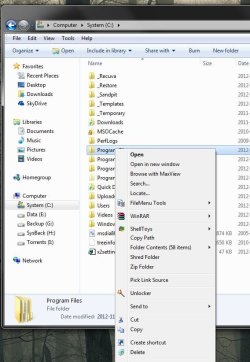
I get the Search... item on all folders, 1st attachment shows it on c:\Program Files

Its quite possible that I installed a 3rd party widget to provide Search... on folders. I drive everything from the 'right click' menu key, so if I saw such a thing I would have grabbed it immediately. I've had windows 7 since the last beta and I sometimes forget what's native and what I've added.

And I've been doing some 'tidying up' recently so its conceivable I tidied it away permanently :o

Which begs the question - do you guys know of anything that will add Search... to folders.

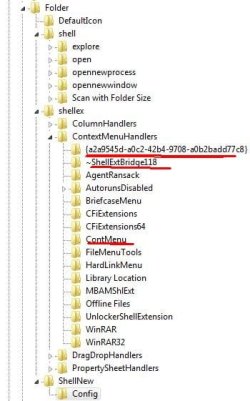
I've attached a shot of the shell extensions I have on folders - the ones I've marked I cant readily explain - perhaps someone else can ?

Thanks pjd
 

Attachments

  • Screenshot - 2012-11-29 , 13_45_25.jpg
    Screenshot - 2012-11-29 , 13_45_25.jpg
    62.5 KB · Views: 6
  • Capture2.JPG
    Capture2.JPG
    29.7 KB · Views: 6

My Computer My Computer

Computer type
PC/Desktop
Computer Manufacturer/Model Number
generic - made to spec
OS
Win 7 Professional 64bit
CPU
I5 650 @ 3.2GHz
Motherboard
Gigabyte H55M-UD2H
Memory
6G
Graphics Card(s)
AMD Radeon R7 200 Series
Sound Card
whatever is on mobo
Monitor(s) Displays
1 x 24" Samsung
Screen Resolution
1920x1200
Hard Drives
Internal 1x256GB Toshiba SSD
Internal 1x2TB
External 2 slot USB 3.0 dock (various drives)
External 1 500GB USB 2.0 drive
PSU
850W Antech Modular
Case
Shiny Black Aluminium
Cooling
extra fans - sucker in front, blower at back - noisy & cool
Keyboard
Microsoft USB Dual Receiver Wireless Keyboard
Mouse
Microsoft USB Dual Receiver Wireless Mouse
Internet Speed
20/1Mbps down/up
Antivirus
MSE
Browser
Firefox and Chrome
Other Info
Hitachi USB 3.0 adapter
Contmenu definitely looks like it might have something to do with it, but I'm not familiar enough to give you any solid advice about that particular thing.

Have you tried a system restore to maybe get whatever program you used to get this search feature on your system back? I've used a few different context menu editors, but don't recall one that added a search.
 

My Computer My Computer

Computer type
Laptop
Computer Manufacturer/Model Number
MSI GE72VR Apache Pro-416
OS
Windows 10x64 Build 1709
CPU
Intel i7 7700HQ Kaby Lake
Motherboard
Micro-Star Intl. MS-179B (U3C1)
Memory
16 GB DDR4 @2400
Graphics Card(s)
Nvidia Geforce GTX 1060
Screen Resolution
1920x1080 120Hz
Hard Drives
256 GB Nvme M.2 SSD

1TB HDD@7200
Cooling
Cooler Blast 4
Keyboard
Steel Series
Antivirus
Bit Defender Free
Browser
Edge
A quick web search just found 2 or 3 hacks/programs that will do it. Most seem to be for Vista but most things that work for Vista seem to apply to 7 too. I'm not going to post a link but if you just search for what you want ..... its there.
 

My Computer My Computer

Computer type
Laptop
Computer Manufacturer/Model Number
MSI GE72VR Apache Pro-416
OS
Windows 10x64 Build 1709
CPU
Intel i7 7700HQ Kaby Lake
Motherboard
Micro-Star Intl. MS-179B (U3C1)
Memory
16 GB DDR4 @2400
Graphics Card(s)
Nvidia Geforce GTX 1060
Screen Resolution
1920x1080 120Hz
Hard Drives
256 GB Nvme M.2 SSD

1TB HDD@7200
Cooling
Cooler Blast 4
Keyboard
Steel Series
Antivirus
Bit Defender Free
Browser
Edge
This looks familiar - it definitely puts Search... into the folder context menu - I undid the patch and there was no Search..., redid the patch and there was Search... back again - didn't work though :lol:

Restore the "Search…" Item to the Folder Context Menu in Windows Vista SP1 - How-To Geek

Maybe an MS update rendered it useless

ContMenu was pointing at something related to ACDSee which went ages ago - so its gone too.

I am pretty sure it was that patch - bummer - why wouldn't MS want Search on folder right click to work - looks like they deliberately crippled it. Surely not to force Library's down our throats - had Library's existed 15 years ago I might have used them - meantime...

thanks guys
 
Last edited:

My Computer My Computer

Computer type
PC/Desktop
Computer Manufacturer/Model Number
generic - made to spec
OS
Win 7 Professional 64bit
CPU
I5 650 @ 3.2GHz
Motherboard
Gigabyte H55M-UD2H
Memory
6G
Graphics Card(s)
AMD Radeon R7 200 Series
Sound Card
whatever is on mobo
Monitor(s) Displays
1 x 24" Samsung
Screen Resolution
1920x1200
Hard Drives
Internal 1x256GB Toshiba SSD
Internal 1x2TB
External 2 slot USB 3.0 dock (various drives)
External 1 500GB USB 2.0 drive
PSU
850W Antech Modular
Case
Shiny Black Aluminium
Cooling
extra fans - sucker in front, blower at back - noisy & cool
Keyboard
Microsoft USB Dual Receiver Wireless Keyboard
Mouse
Microsoft USB Dual Receiver Wireless Mouse
Internet Speed
20/1Mbps down/up
Antivirus
MSE
Browser
Firefox and Chrome
Other Info
Hitachi USB 3.0 adapter
Could be, thats one of the results I found. You're on your own now though.... :). Unless something else goes wrong.Then we're always here to help. Good luck and Happy Holidays!
 

My Computer My Computer

Computer type
Laptop
Computer Manufacturer/Model Number
MSI GE72VR Apache Pro-416
OS
Windows 10x64 Build 1709
CPU
Intel i7 7700HQ Kaby Lake
Motherboard
Micro-Star Intl. MS-179B (U3C1)
Memory
16 GB DDR4 @2400
Graphics Card(s)
Nvidia Geforce GTX 1060
Screen Resolution
1920x1080 120Hz
Hard Drives
256 GB Nvme M.2 SSD

1TB HDD@7200
Cooling
Cooler Blast 4
Keyboard
Steel Series
Antivirus
Bit Defender Free
Browser
Edge
Last edited:

My Computer My Computer

Computer type
PC/Desktop
Computer Manufacturer/Model Number
Self built custom
OS
64-bit Windows 11 Pro for Workstations
CPU
Intel i7-8700K OC'd to 5 GHz
Motherboard
ASUS ROG Maximus XI Formula Z390
Memory
64 GB (4x16GB) G.SKILL TridentZ RGB DDR4 3600 MHz
Graphics Card(s)
ASUS ROG-STRIX-GTX1080TI-O11G-GAMING
Sound Card
Integrated
Monitor(s) Displays
2 x Samsung Odyssey G7 27"
Screen Resolution
2560x1440
Hard Drives
1TB Samsung 990 PRO M.2,
4TB Samsung 990 PRO PRO M.2,
TerraMaster F8 SSD Plus NAS
PSU
Seasonic Prime Titanium 850W
Case
Thermaltake Core P3
Cooling
Corsair Hydro H115i
Keyboard
Logitech wireless K800
Mouse
Logitech MX Master 4
Internet Speed
2 Gb/s Download and 100 Mb/s Upload
Antivirus
Malwarebyte Anti-Malware Premium
Browser
Google Chrome
Other Info
Logitech Z625 speaker system,
Logitech BRIO 4K Pro webcam,
HP Color LaserJet Pro MFP M477fdn,
APC SMART-UPS RT 1000 XL - SURT1000XLI,
Galaxy S23 Plus phone
thanks brink - its more or less the same as the other one - so it's not surprising that it doesn't work either

But now I know I wasn't dreaming that it used to work. There must be something 'blocking' it

I might put it in the - make sure you 'fix' this when you do that long promised fresh install of w7 - list ;)

pjd
 

My Computer My Computer

Computer type
PC/Desktop
Computer Manufacturer/Model Number
generic - made to spec
OS
Win 7 Professional 64bit
CPU
I5 650 @ 3.2GHz
Motherboard
Gigabyte H55M-UD2H
Memory
6G
Graphics Card(s)
AMD Radeon R7 200 Series
Sound Card
whatever is on mobo
Monitor(s) Displays
1 x 24" Samsung
Screen Resolution
1920x1200
Hard Drives
Internal 1x256GB Toshiba SSD
Internal 1x2TB
External 2 slot USB 3.0 dock (various drives)
External 1 500GB USB 2.0 drive
PSU
850W Antech Modular
Case
Shiny Black Aluminium
Cooling
extra fans - sucker in front, blower at back - noisy & cool
Keyboard
Microsoft USB Dual Receiver Wireless Keyboard
Mouse
Microsoft USB Dual Receiver Wireless Mouse
Internet Speed
20/1Mbps down/up
Antivirus
MSE
Browser
Firefox and Chrome
Other Info
Hitachi USB 3.0 adapter
pjd,

I've updated the tutorial in the post above. If you like, please try it instead to see how it works for you. I didn't need to log off/log on afterwards for it to be applied, but you may if it doesn't work right off.
 

My Computer My Computer

Computer type
PC/Desktop
Computer Manufacturer/Model Number
Self built custom
OS
64-bit Windows 11 Pro for Workstations
CPU
Intel i7-8700K OC'd to 5 GHz
Motherboard
ASUS ROG Maximus XI Formula Z390
Memory
64 GB (4x16GB) G.SKILL TridentZ RGB DDR4 3600 MHz
Graphics Card(s)
ASUS ROG-STRIX-GTX1080TI-O11G-GAMING
Sound Card
Integrated
Monitor(s) Displays
2 x Samsung Odyssey G7 27"
Screen Resolution
2560x1440
Hard Drives
1TB Samsung 990 PRO M.2,
4TB Samsung 990 PRO PRO M.2,
TerraMaster F8 SSD Plus NAS
PSU
Seasonic Prime Titanium 850W
Case
Thermaltake Core P3
Cooling
Corsair Hydro H115i
Keyboard
Logitech wireless K800
Mouse
Logitech MX Master 4
Internet Speed
2 Gb/s Download and 100 Mb/s Upload
Antivirus
Malwarebyte Anti-Malware Premium
Browser
Google Chrome
Other Info
Logitech Z625 speaker system,
Logitech BRIO 4K Pro webcam,
HP Color LaserJet Pro MFP M477fdn,
APC SMART-UPS RT 1000 XL - SURT1000XLI,
Galaxy S23 Plus phone
I just installed it on mine. Works perfectly and didn't have to re-boot. Thank you , ever since he started this thread I've been thinking it was a good idea. I do seem to remember doing this before too..... could be mistaken. I have used many different context menu tools.
 

My Computer My Computer

Computer type
Laptop
Computer Manufacturer/Model Number
MSI GE72VR Apache Pro-416
OS
Windows 10x64 Build 1709
CPU
Intel i7 7700HQ Kaby Lake
Motherboard
Micro-Star Intl. MS-179B (U3C1)
Memory
16 GB DDR4 @2400
Graphics Card(s)
Nvidia Geforce GTX 1060
Screen Resolution
1920x1080 120Hz
Hard Drives
256 GB Nvme M.2 SSD

1TB HDD@7200
Cooling
Cooler Blast 4
Keyboard
Steel Series
Antivirus
Bit Defender Free
Browser
Edge
Thanks brink, still doesn't want to work - I have a feeling I know what 'broke' it - no names no pack drill. I can live without it, search of the drive is good enough

I just installed it on mine. Works perfectly and didn't have to re-boot. Thank you , ever since he started this thread I've been thinking it was a good idea. I do seem to remember doing this before too..... could be mistaken. I have used many different context menu tools.

y_rofl.gif
- great first you question whether I'm talking out of my hat - then you say what a good idea. No hard feelings, just amusing... Enjoy all your right click folder searching and thanks for your help :)

pjd
 

My Computer My Computer

Computer type
PC/Desktop
Computer Manufacturer/Model Number
generic - made to spec
OS
Win 7 Professional 64bit
CPU
I5 650 @ 3.2GHz
Motherboard
Gigabyte H55M-UD2H
Memory
6G
Graphics Card(s)
AMD Radeon R7 200 Series
Sound Card
whatever is on mobo
Monitor(s) Displays
1 x 24" Samsung
Screen Resolution
1920x1200
Hard Drives
Internal 1x256GB Toshiba SSD
Internal 1x2TB
External 2 slot USB 3.0 dock (various drives)
External 1 500GB USB 2.0 drive
PSU
850W Antech Modular
Case
Shiny Black Aluminium
Cooling
extra fans - sucker in front, blower at back - noisy & cool
Keyboard
Microsoft USB Dual Receiver Wireless Keyboard
Mouse
Microsoft USB Dual Receiver Wireless Mouse
Internet Speed
20/1Mbps down/up
Antivirus
MSE
Browser
Firefox and Chrome
Other Info
Hitachi USB 3.0 adapter
You could also give File Locator Lite (aka Agent Ransack) a try.
FileLocator Lite - Free File Searching Utility

It's free, easy to use, works well, and has a right click context menu.
I've been using it for years and it has never caused me any problems.
 

My Computer My Computer

Computer type
PC/Desktop
Computer Manufacturer/Model Number
home built
OS
Multi-Boot W7_Pro_x64 W8.1_Pro_x64 W10_Pro_x64 +Linux_VMs +Chromium_VM
CPU
AMD Athlon II x4 620
Motherboard
Gigabyte GA-MA785G-UD3H
Memory
6GB GSkill DDR2 800
Graphics Card(s)
AMD 4670 GPU + AMD 4200 IGP
Sound Card
on board Realtek ALC889A
Monitor(s) Displays
RCA 40" LCD TV, Insignia 32" LCD TV, HP 15" LCD monitor
Screen Resolution
1680 x 1050
Hard Drives
OCZ Vertex 3 120GB,
Samsung F3 1TB (3),
Several others - WD, Seagate, Hitachi, ...
PSU
Corsair 500 W
Case
Rosewill mid tower
Cooling
CM 90mm rifle
Keyboard
Gyration wireless, Logitech wireless, Dell USB wired
Mouse
Gyration wireless, Logitech wireless, V7 USB wired
Internet Speed
Spectrum - 100Mbps D / 10Mbps U
Antivirus
Avast, MBAM3, EMET, WinPatrol
Browser
Pale Moon, Firefox, IE
Other Info
2 multi-boot PC's
Mainly HTPC/Office/Gen purpose (no gaming).
Trendnet USB KVM.
LG DVD burner/Blue Ray Player.
Tray system for removable SATA backup drives.

Not currently OCd, under-volted.
I use Hybrid sleep, rarely re-boot or shutdown.

Hauppauge HD-PVR, Avermedia PCIe TV Tuner, Hauppauge PCI TV Tuner.
Thanks brink, still doesn't want to work - I have a feeling I know what 'broke' it - no names no pack drill. I can live without it, search of the drive is good enough

pjd

Since you know what may have broke it, please post back letting us know, and I'll see if I may be able to work a way to get it fixed if you like. :)
 

My Computer My Computer

Computer type
PC/Desktop
Computer Manufacturer/Model Number
Self built custom
OS
64-bit Windows 11 Pro for Workstations
CPU
Intel i7-8700K OC'd to 5 GHz
Motherboard
ASUS ROG Maximus XI Formula Z390
Memory
64 GB (4x16GB) G.SKILL TridentZ RGB DDR4 3600 MHz
Graphics Card(s)
ASUS ROG-STRIX-GTX1080TI-O11G-GAMING
Sound Card
Integrated
Monitor(s) Displays
2 x Samsung Odyssey G7 27"
Screen Resolution
2560x1440
Hard Drives
1TB Samsung 990 PRO M.2,
4TB Samsung 990 PRO PRO M.2,
TerraMaster F8 SSD Plus NAS
PSU
Seasonic Prime Titanium 850W
Case
Thermaltake Core P3
Cooling
Corsair Hydro H115i
Keyboard
Logitech wireless K800
Mouse
Logitech MX Master 4
Internet Speed
2 Gb/s Download and 100 Mb/s Upload
Antivirus
Malwarebyte Anti-Malware Premium
Browser
Google Chrome
Other Info
Logitech Z625 speaker system,
Logitech BRIO 4K Pro webcam,
HP Color LaserJet Pro MFP M477fdn,
APC SMART-UPS RT 1000 XL - SURT1000XLI,
Galaxy S23 Plus phone
Back
Top