
search on start menu

engkarm

New member
Local time
8:41 AM
Messages
3
hello all ,
i have customized my start menu to disable search for files and programs but when i write in search box for example c:\ all folder appear on the start menu , i need no any search on the search box , please can any one help me ?
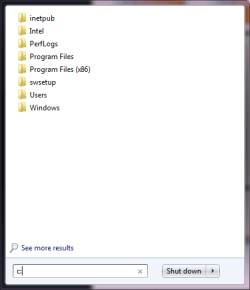
Untitled.png
 
Last edited by a moderator:

My Computer

Computer type
Laptop
Computer Manufacturer/Model Number
hp
OS
windows 7 professional x64
up ,
 

My Computer

Computer type
Laptop
Computer Manufacturer/Model Number
hp
OS
windows 7 professional x64
Please explain how you customized your start menu - what method did you use - what did you change?
That might help members understand what you did.
If you used a tutorial, was it this one?
http://www.sevenforums.com/tutorials/265-start-menu-customize.html
or perhaps this one
http://www.sevenforums.com/tutorials/89800-start-menu-add-remove-search-button.html

If I understand correctly - you are asking how to remove the search box from the start menu
Is that correct?

I've seen this behavior before, but I can't recall the solution. It was a long time ago and I'm afraid I will not be able to recall or find that thread or post.

What you probably want to do is get back to the standard search on start. If you followed a tutorial, many of them have a way to reverse or undo the change.
 

My Computer

Computer type
Laptop
Computer Manufacturer/Model Number
HP Pavilion dv6-6c10us
OS
x64 (6.3.9600) Win8.1 Pro & soon dual boot x64 (6.1.7601) Win7_SP1 HomePrem
CPU
AMD A6-3420M APU with Radeon(tm) HD Graphics
Motherboard
Hewlett-Packard 1805
Memory
6.00 GB
Graphics Card(s)
AMD Radeon(TM) HD 6520G
Sound Card
(1) AMD High Definition Audio Device (2) IDT High Definiti
Monitor(s) Displays
HP W2072a 20" LCD (1600 x 900) @ 60 Hz
Screen Resolution
1366 x 768 x 32 bits (4294967296 colors) @ 60 Hz
Hard Drives
ST640LM0 00 HM641JI SATA Disk Device
Keyboard
Logitech k520 wireless KB
Mouse
Logitech m320 wireless mouse (bundled with KB)
Internet Speed
15/5 | 54 MB Wireless 'n'
Antivirus
Realtime: Defender or Avast | On-demand: Malwarebytes, ESET
Browser
IE 11 on Win8, IE 10 on win 7
Other Info
Media: [Gimp, Audacity, VLC] || Comm: [WEmail 2012, Skype] || Productivity: [OpenOffice,| Textpad] || Utils: [Sysinternals, cCleaner, Speccy, Defraggler]
Please explain how you customized your start menu - what method did you use - what did you change?
That might help members understand what you did.
If you used a tutorial, was it this one?
http://www.sevenforums.com/tutorials/265-start-menu-customize.html
or perhaps this one
http://www.sevenforums.com/tutorials/89800-start-menu-add-remove-search-button.html

If I understand correctly - you are asking how to remove the search box from the start menu
Is that correct?

I've seen this behavior before, but I can't recall the solution. It was a long time ago and I'm afraid I will not be able to recall or find that thread or post.

What you probably want to do is get back to the standard search on start. If you followed a tutorial, many of them have a way to reverse or undo the change.

thanks for your answers, i customized using task bar property customization and unchecked all the search
radio button , and i dont need to remove the search box , i only need to prevent any search on this box
even i write c:\ or d:\ . , thanks in advance .
 

My Computer

Computer type
Laptop
Computer Manufacturer/Model Number
hp
OS
windows 7 professional x64
Thanks,

I misunderstood and mischaracterized what I saw in the image.
This is not the same behavior I recall seeing before.

I'll try to rephrase the issue so that I understand:
You don't want to use the search box on the start menu.
You don't want to remove the search box though
If you type anything in the search box, you don't want to see any results
and while it isn't clear, I'll add that you might not want the results box to cover your start menu (just a guess on my part)​

If I rephrased the issue correctly then I'm not sure it can be done. Someone else might know or there might be a tutorial (I didn't look at all of the Start Menu or Search tutorials)

Look around in the Tutorial section, there might be an answer there. Here are two searches to get you started, at the bottom of the first post in each tutorial (the actual tutorial), there are related tutorials.

http://www.sevenforums.com/tutsearch.php?q=Start Menu

http://www.sevenforums.com/tutsearch.php?q=Search

Poke around and good luck.
 

My Computer

Computer type
Laptop
Computer Manufacturer/Model Number
HP Pavilion dv6-6c10us
OS
x64 (6.3.9600) Win8.1 Pro & soon dual boot x64 (6.1.7601) Win7_SP1 HomePrem
CPU
AMD A6-3420M APU with Radeon(tm) HD Graphics
Motherboard
Hewlett-Packard 1805
Memory
6.00 GB
Graphics Card(s)
AMD Radeon(TM) HD 6520G
Sound Card
(1) AMD High Definition Audio Device (2) IDT High Definiti
Monitor(s) Displays
HP W2072a 20" LCD (1600 x 900) @ 60 Hz
Screen Resolution
1366 x 768 x 32 bits (4294967296 colors) @ 60 Hz
Hard Drives
ST640LM0 00 HM641JI SATA Disk Device
Keyboard
Logitech k520 wireless KB
Mouse
Logitech m320 wireless mouse (bundled with KB)
Internet Speed
15/5 | 54 MB Wireless 'n'
Antivirus
Realtime: Defender or Avast | On-demand: Malwarebytes, ESET
Browser
IE 11 on Win8, IE 10 on win 7
Other Info
Media: [Gimp, Audacity, VLC] || Comm: [WEmail 2012, Skype] || Productivity: [OpenOffice,| Textpad] || Utils: [Sysinternals, cCleaner, Speccy, Defraggler]
Back
Top