Searches Folder in Windows 7

MrTAD

New member
Local time
4:13 AM
Messages
19
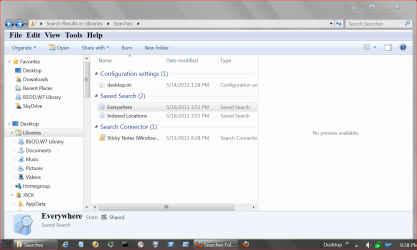
There is a windows folder called Searches that has two subfolders - Everywhere and Indexed Locations which contain literally hundereds of thousands of files. I want to delete these folders, or at least empty them. I found an old forum post which suggested that the files were shortcuts and could be deleted through file manager. Well I tried that. From within the searches folder I picked the first listed file in "Everywhere" and deleted it using the delete key. Well....what happened surprised me - the actual file was deleted. Obviously I must have done something wrong. What I'd like to do is 1) empty the searches folders and 2) turn off the function that saves stuff to this folder. Can anyone help? Thanks Windows 7 Pro with 64 bit OS
 

My Computer My Computer

Computer Manufacturer/Model Number
ibuypower
OS
Windows 7 Pro 64bit
CPU
Intel i7 3.20 ghz
Motherboard
Gigabyte ga-x58a-udr3
Memory
12 gig
Graphics Card(s)
nvidia gtx460 2GB
Monitor(s) Displays
HP2207h
Screen Resolution
1680x1050
Hard Drives
western digital 1TB (two in a raid 1 array)
Cooling
liquid
Keyboard
Logitech K800
Mouse
Logitech
Internet Speed
FIOS
Browser
Firefox
what size is the search folder, mine says 248 bytes. so its hardly a resource hog.
 

My Computer My Computer

Computer Manufacturer/Model Number
Hewlett packard/p6512uk
OS
Microsoft Windows 7 Home Premium 64-bit 7600
CPU
IIx4 amd athelon 635 processor
Motherboard
FOXCONN 2AA9
Memory
2x2gb
Graphics Card(s)
ati radeon HD 5450
Sound Card
(1) Realtek High Definition Audio (2) AMD High Definition
Monitor(s) Displays
samsung lcd tv 32"
Screen Resolution
1360x 768
Hard Drives
(1) WDC WD10 01FAES-60Z2A0 SATA Disk Device (2) Maxtor OneTouch USB Device (3) ST310003 33AS USB Device (4) WD My Book 1111 USB Device
PSU
?
Cooling
air!
Keyboard
wireless hp
Mouse
wireless Hp,optical
Internet Speed
1.10mb/s
Antivirus
MSE
Browser
Firefox
My search folder is 933 bytes.

May I ask why you want to delete this folder. Index locations are quite handy when trying to find things. (Searching)

Could you point us to the old forum that you found this information about deleting so we can understand the circumstances.
 

My Computer My Computer

Computer type
PC/Desktop
Computer Manufacturer/Model Number
Home made Desktop
OS
Windows 10 Pro. 64/ version 1709 Windows 7 Pro/64
CPU
Intel i7-6800K @ 4.3
Motherboard
ASUS X-99 Deluxe II
Memory
Corsair Platinum 16 gig @2400
Graphics Card(s)
EVGA GTX 1070 OC
Monitor(s) Displays
Asus 27" LED LCD/VE278Q
Screen Resolution
1920-1080 or 1280-720 HDMI
Hard Drives
INTEL SSD 730-240 Gb Sata 3.0/
PSU
EVGA Platium 1200W
Case
Phanteks Luxe Tempered Glass 8 fans/ one radiator
Cooling
XSPC/ Water Cooled CPU
Keyboard
Das 4 Professional
Mouse
Logitech M705/MX Anywhere 2-S
Internet Speed
100 mbits
Antivirus
Microsoft Security Essentials/ Malwarebytes Premium 3.0/ SAS
Browser
I.E. 11 default/Firefox/ ISP Time Warner Cable/Spectrum
Other Info
LG BluRay Burner/
Sound system-KLipsch-THX/
Icy Dock ssd Hot Swap bays.
I want to make it a habit to clear any type of activity tracking from my PC - I even go as far as not having my regular applications keep a "recently opened or saved" list. If I want to open a file, I'll find it and open it. So I clear internet and windows "recent" files folders. Just recently I discovered the "Searches" folder, and there are literally over five hundred thousand files listed. I thought these were supposed to be shortcuts....

I found the following link in this forum -
http://www.sevenforums.com/general-discussion/55366-deleting-searches-folder-my-user-folder.html

I didn't try the CCcleaner software (but I have it on my computer). The reason I didn't try using that application is when I manually deleted one of the files from the Searches folder, the actual file got deleted. So I'm skeptical that these are just shortcuts.

For my own peace of mind I want to empty the files/searches from these folders.
 

My Computer My Computer

Computer Manufacturer/Model Number
ibuypower
OS
Windows 7 Pro 64bit
CPU
Intel i7 3.20 ghz
Motherboard
Gigabyte ga-x58a-udr3
Memory
12 gig
Graphics Card(s)
nvidia gtx460 2GB
Monitor(s) Displays
HP2207h
Screen Resolution
1680x1050
Hard Drives
western digital 1TB (two in a raid 1 array)
Cooling
liquid
Keyboard
Logitech K800
Mouse
Logitech
Internet Speed
FIOS
Browser
Firefox
I use Ccleaner all the time set on default.
It is your computer you can remove anything you want to.
The thread to found is a good one. Just do as Brink instructs.

This is what I get when I search (Search)

SEARCH.PNG

I will use Ccleaner and reboot and see if it changes.
Won't be long.
 

My Computer My Computer

Computer type
PC/Desktop
Computer Manufacturer/Model Number
Home made Desktop
OS
Windows 10 Pro. 64/ version 1709 Windows 7 Pro/64
CPU
Intel i7-6800K @ 4.3
Motherboard
ASUS X-99 Deluxe II
Memory
Corsair Platinum 16 gig @2400
Graphics Card(s)
EVGA GTX 1070 OC
Monitor(s) Displays
Asus 27" LED LCD/VE278Q
Screen Resolution
1920-1080 or 1280-720 HDMI
Hard Drives
INTEL SSD 730-240 Gb Sata 3.0/
PSU
EVGA Platium 1200W
Case
Phanteks Luxe Tempered Glass 8 fans/ one radiator
Cooling
XSPC/ Water Cooled CPU
Keyboard
Das 4 Professional
Mouse
Logitech M705/MX Anywhere 2-S
Internet Speed
100 mbits
Antivirus
Microsoft Security Essentials/ Malwarebytes Premium 3.0/ SAS
Browser
I.E. 11 default/Firefox/ ISP Time Warner Cable/Spectrum
Other Info
LG BluRay Burner/
Sound system-KLipsch-THX/
Icy Dock ssd Hot Swap bays.
No change the folder is the same size 933 bytes.
I don't know of any harm will come if you right click on them and delete. I'm not a expert so do it at your own risk.
 

My Computer My Computer

Computer type
PC/Desktop
Computer Manufacturer/Model Number
Home made Desktop
OS
Windows 10 Pro. 64/ version 1709 Windows 7 Pro/64
CPU
Intel i7-6800K @ 4.3
Motherboard
ASUS X-99 Deluxe II
Memory
Corsair Platinum 16 gig @2400
Graphics Card(s)
EVGA GTX 1070 OC
Monitor(s) Displays
Asus 27" LED LCD/VE278Q
Screen Resolution
1920-1080 or 1280-720 HDMI
Hard Drives
INTEL SSD 730-240 Gb Sata 3.0/
PSU
EVGA Platium 1200W
Case
Phanteks Luxe Tempered Glass 8 fans/ one radiator
Cooling
XSPC/ Water Cooled CPU
Keyboard
Das 4 Professional
Mouse
Logitech M705/MX Anywhere 2-S
Internet Speed
100 mbits
Antivirus
Microsoft Security Essentials/ Malwarebytes Premium 3.0/ SAS
Browser
I.E. 11 default/Firefox/ ISP Time Warner Cable/Spectrum
Other Info
LG BluRay Burner/
Sound system-KLipsch-THX/
Icy Dock ssd Hot Swap bays.
Back
Top