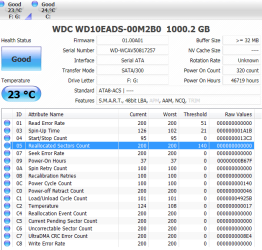
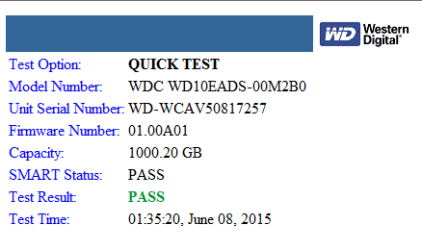
So, today I was using my computer, and all was well. Later on in the day, I had gone off to my cousins house. Well upon arriving back, I noticed that my HDD's light was always on, well that aroused suspicion, so I thought maybe some process was constantly using my main HDD, but nope, that wasn't the case. So I looked in Computer, and noticed that my second drive, being G, was missing from it. This is very alarming because I JUST had my computer looked at, I received it back on Friday and everything appeared to be working alright. I'm afraid to reboot my system because I fear I might not be able to get back on. What should I do? I even looked in disk management, my only drive is C that shows up still.
My Computer
At a glance
Windows 7 Home Premium 64bitIntel Core 2 Quad Q9550 @ 2.83GHz8.0GB Dual-Channel DDR2 @ 333MHz (5-5-5-15)NVIDIA GeForce GTX 660
- Computer type
- PC/Desktop
- Computer Manufacturer/Model Number
- Custom
- OS
- Windows 7 Home Premium 64bit
- CPU
- Intel Core 2 Quad Q9550 @ 2.83GHz
- Motherboard
- Gigabyte Technology Co., Ltd. EP45-UD3L
- Memory
- 8.0GB Dual-Channel DDR2 @ 333MHz (5-5-5-15)
- Graphics Card(s)
- NVIDIA GeForce GTX 660
- Sound Card
- C-Media PCI Audio Device
- Monitor(s) Displays
- 2 - DELL 24 LED Monitor & Samsung SyncMaster 2233
- Screen Resolution
- 1920x1080
- Hard Drives
- 313GB Western Digital WDC WD3200AAJS-00L7A0 ATA Device (SATA)
977GB Western Digital WDC WD10EADS-00M2B0 ATA Device (SATA)
- Keyboard
- Logitech G105 Gaming Keyboard
- Mouse
- ENHANCE GX-M1 High Precision 6-Button Optical Gaming Mouse