Solved Second monitor on Nvidia 7600 GO goes dark after couple minutes

csenger41

New member
Member
Local time
12:30 AM
Messages
49
Location
Hungary
I connect any second monitor via VGA and extend my desktop, it works for a couple minutes fine, after that it just goes dark and says "no signal".
Not reconnecting or reconfiguring helps, only restarting the whole computer. Tried many monitors, problem the same, no problem at all with laptop main monitor.
Please help me, I would like to use extended desktops.
 

My Computer My Computer

At a glance

Windows 7 Ultimate 32bitIntel Pentium Dual Core T3200 2×2GHz2GB DDR2 @ 667MHzNvidia GeForce 7600 GO
Computer Manufacturer/Model Number
Acer Aspire 5720Z
OS
Windows 7 Ultimate 32bit
CPU
Intel Pentium Dual Core T3200 2×2GHz
Motherboard
Intel
Memory
2GB DDR2 @ 667MHz
Graphics Card(s)
Nvidia GeForce 7600 GO
Sound Card
Realtek High Definition Audio
Monitor(s) Displays
15.4"
Screen Resolution
1280×800
Hard Drives
120GB SATA @ 5400rpm Hitachi HTS542512K9SA00
Mouse
Microsoft Comfort Mouse 4500
Internet Speed
10Mb/s
Other Info
Cooler Master Notepal X1
Brother, I had a similar issue with a different setup, and it ended up being the (vga) cable. Other than that, is your VC overheating....or possibly bad?? That's all I got for you. Good luck!
 

My Computer My Computer

At a glance

Windows 7 Professional x64Intel I5 2320 @ 3.0 HHz32 GB DDR3Asus Nvidia 440 GT & Zotac Nvidia 610 GT
Computer type
PC/Desktop
Computer Manufacturer/Model Number
Gateway DX4860
OS
Windows 7 Professional x64
CPU
Intel I5 2320 @ 3.0 HHz
Motherboard
Gateway / Acer
Memory
32 GB DDR3
Graphics Card(s)
Asus Nvidia 440 GT & Zotac Nvidia 610 GT
Sound Card
Realtek HDA
Monitor(s) Displays
(2) Asus VW246H 24" (16:9) & (1) Asus VB198 19" (4:3)
Screen Resolution
5120 Total x 1080
Hard Drives
WD 1.5 TB WD15EARX-22P
PSU
Basiq 650
Case
Gateway Tower
Cooling
(3) Case Fans
Keyboard
1. Saitek Eclipse 2. Focus FK8200
Mouse
Logitech M510
Internet Speed
90 mbps DL / 10 mbps UL (usually 110.5/11.5)
Antivirus
SuperAntiSpyware Pro, MalwareBytes Pro, MSE
Browser
1. Palemoon x64 2. IE 11
Other Info
USB 3.0 Card
The VGA cable works perfectly until the monitor goes dark, the GPU is not overheated, it's around 60°C, the CPU around 40°C.
 

My Computer My Computer

At a glance

Windows 7 Ultimate 32bitIntel Pentium Dual Core T3200 2×2GHz2GB DDR2 @ 667MHzNvidia GeForce 7600 GO
Computer Manufacturer/Model Number
Acer Aspire 5720Z
OS
Windows 7 Ultimate 32bit
CPU
Intel Pentium Dual Core T3200 2×2GHz
Motherboard
Intel
Memory
2GB DDR2 @ 667MHz
Graphics Card(s)
Nvidia GeForce 7600 GO
Sound Card
Realtek High Definition Audio
Monitor(s) Displays
15.4"
Screen Resolution
1280×800
Hard Drives
120GB SATA @ 5400rpm Hitachi HTS542512K9SA00
Mouse
Microsoft Comfort Mouse 4500
Internet Speed
10Mb/s
Other Info
Cooler Master Notepal X1
What resolution is the external monitor being run at for those few mins?

I am guessing that old laptop can't really handle it.
 

My Computer My Computer

At a glance

Windows 7 Ultimate Retail Box (64-bit install...AMD FX-8350 CPU v1.15 (or 1.0F) BIOS was requ...8G CAS-7 G-Skill DDR3 @1333 (2 fours) [mobo n...Radeon HD 7950 [3 gigs of GDDR5] MSI Twin Fro...
Computer type
PC/Desktop
Computer Manufacturer/Model Number
Self Built Custom
OS
Windows 7 Ultimate Retail Box (64-bit installed) + Service Pack 1
CPU
AMD FX-8350 CPU v1.15 (or 1.0F) BIOS was required!
Motherboard
MSI 890FXA-GD70
Memory
8G CAS-7 G-Skill DDR3 @1333 (2 fours) [mobo nonOC max rec'd]
Graphics Card(s)
Radeon HD 7950 [3 gigs of GDDR5] MSI Twin Frozr model
Sound Card
Realtek High Definition Audio (onboard mobo, ALC-889 chip)
Monitor(s) Displays
2 WS LED Monitors: One LG One Viewsonic
Screen Resolution
1920 by 1080
Hard Drives
SSD for OS: Samsung 840 Pro
SSD for VM and utilities: Adata SX900
7200 RPM SATA HDs for the rest: Hitachi and Seagate
PSU
Corsair TX850 - 850W max, in service since August 2010.
Case
Thermaltake Armor A90
Cooling
Thermaltake Spin Q CPU Cooler, in service since August 2010
Keyboard
Logitech G11
Mouse
Logitech M310 Wireless
Internet Speed
100 Megabit broadband supposedly upgraded from 50 (Cable)
Antivirus
Bitdefender Internet Security 2014 suite
Browser
Pale Moon 64-bit main, also IceDragon, Opera, and Maxthon.
Other Info
CompTIA A+ certified (220-800 series) in July 2013.
What resolution is the external monitor being run at for those few mins?

I am guessing that old laptop can't really handle it.

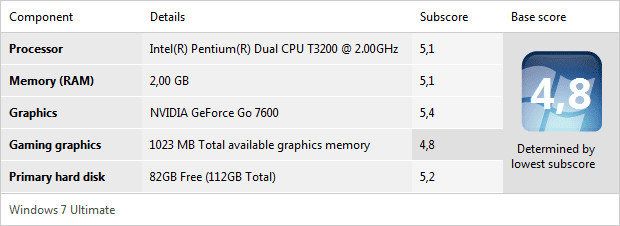
Its resolution is 1024×768 and though it's an old laptop, kinda powerful, I attached the Windows Experience Index window to assure you.
 

Attachments

  • Windows Experience Index.png
    Windows Experience Index.png
    8.1 KB · Views: 3

My Computer My Computer

At a glance

Windows 7 Ultimate 32bitIntel Pentium Dual Core T3200 2×2GHz2GB DDR2 @ 667MHzNvidia GeForce 7600 GO
Computer Manufacturer/Model Number
Acer Aspire 5720Z
OS
Windows 7 Ultimate 32bit
CPU
Intel Pentium Dual Core T3200 2×2GHz
Motherboard
Intel
Memory
2GB DDR2 @ 667MHz
Graphics Card(s)
Nvidia GeForce 7600 GO
Sound Card
Realtek High Definition Audio
Monitor(s) Displays
15.4"
Screen Resolution
1280×800
Hard Drives
120GB SATA @ 5400rpm Hitachi HTS542512K9SA00
Mouse
Microsoft Comfort Mouse 4500
Internet Speed
10Mb/s
Other Info
Cooler Master Notepal X1
As long as that VRAM is separate, OK.

But, 2gigs of RAM with Windows 7 itself results in mediocre performance, are you using ready boost?

Otherwise though, is there anything out of the ordinary performance wise?

And you did swap out the cable from the monitor to this laptop?

After all that I would guess that the video port on the laptop could be bad or the monitor itself.
 

My Computer My Computer

At a glance

Windows 7 Ultimate Retail Box (64-bit install...AMD FX-8350 CPU v1.15 (or 1.0F) BIOS was requ...8G CAS-7 G-Skill DDR3 @1333 (2 fours) [mobo n...Radeon HD 7950 [3 gigs of GDDR5] MSI Twin Fro...
Computer type
PC/Desktop
Computer Manufacturer/Model Number
Self Built Custom
OS
Windows 7 Ultimate Retail Box (64-bit installed) + Service Pack 1
CPU
AMD FX-8350 CPU v1.15 (or 1.0F) BIOS was required!
Motherboard
MSI 890FXA-GD70
Memory
8G CAS-7 G-Skill DDR3 @1333 (2 fours) [mobo nonOC max rec'd]
Graphics Card(s)
Radeon HD 7950 [3 gigs of GDDR5] MSI Twin Frozr model
Sound Card
Realtek High Definition Audio (onboard mobo, ALC-889 chip)
Monitor(s) Displays
2 WS LED Monitors: One LG One Viewsonic
Screen Resolution
1920 by 1080
Hard Drives
SSD for OS: Samsung 840 Pro
SSD for VM and utilities: Adata SX900
7200 RPM SATA HDs for the rest: Hitachi and Seagate
PSU
Corsair TX850 - 850W max, in service since August 2010.
Case
Thermaltake Armor A90
Cooling
Thermaltake Spin Q CPU Cooler, in service since August 2010
Keyboard
Logitech G11
Mouse
Logitech M310 Wireless
Internet Speed
100 Megabit broadband supposedly upgraded from 50 (Cable)
Antivirus
Bitdefender Internet Security 2014 suite
Browser
Pale Moon 64-bit main, also IceDragon, Opera, and Maxthon.
Other Info
CompTIA A+ certified (220-800 series) in July 2013.
As long as that VRAM is separate, OK.
But, 2gigs of RAM with Windows 7 itself results in mediocre performance, are you using ready boost?
Otherwise though, is there anything out of the ordinary performance wise?
And you did swap out the cable from the monitor to this laptop?
After all that I would guess that the video port on the laptop could be bad or the monitor itself.

VRAM is separate, 2GB RAM is enough for me, Windows 7 itself uses about 30-35% of it and I have only Trillian running in the background, using about 20MB more memory.
No performance issue at all, while the external monitor is working, no slowdown can be felt whatsoever.
Yes, tried swapping the cable, nothing changed. The monitor itself has been used for years without problem and works like wonder on other computers.
The strange thing is that the picture comes in and work great for couple minutes and THEN goes away, randomly.
 

My Computer My Computer

At a glance

Windows 7 Ultimate 32bitIntel Pentium Dual Core T3200 2×2GHz2GB DDR2 @ 667MHzNvidia GeForce 7600 GO
Computer Manufacturer/Model Number
Acer Aspire 5720Z
OS
Windows 7 Ultimate 32bit
CPU
Intel Pentium Dual Core T3200 2×2GHz
Motherboard
Intel
Memory
2GB DDR2 @ 667MHz
Graphics Card(s)
Nvidia GeForce 7600 GO
Sound Card
Realtek High Definition Audio
Monitor(s) Displays
15.4"
Screen Resolution
1280×800
Hard Drives
120GB SATA @ 5400rpm Hitachi HTS542512K9SA00
Mouse
Microsoft Comfort Mouse 4500
Internet Speed
10Mb/s
Other Info
Cooler Master Notepal X1
News: now after restarting, the picture doesnt come in, though the monitor is shown in Device Manager as non-pnp monitor. Maybe the VGA output is dead?
 

My Computer My Computer

At a glance

Windows 7 Ultimate 32bitIntel Pentium Dual Core T3200 2×2GHz2GB DDR2 @ 667MHzNvidia GeForce 7600 GO
Computer Manufacturer/Model Number
Acer Aspire 5720Z
OS
Windows 7 Ultimate 32bit
CPU
Intel Pentium Dual Core T3200 2×2GHz
Motherboard
Intel
Memory
2GB DDR2 @ 667MHz
Graphics Card(s)
Nvidia GeForce 7600 GO
Sound Card
Realtek High Definition Audio
Monitor(s) Displays
15.4"
Screen Resolution
1280×800
Hard Drives
120GB SATA @ 5400rpm Hitachi HTS542512K9SA00
Mouse
Microsoft Comfort Mouse 4500
Internet Speed
10Mb/s
Other Info
Cooler Master Notepal X1
Verify that VGA with another monitor or I would boot using a Linux distro LiveCD (burn CD, boot using it, & loads into memory only), and see if no issues, although I am not sure how the Linux distro will handle a 2nd monitor.
 

My Computer My Computer

At a glance

Windows 7 Ultimate Retail Box (64-bit install...AMD FX-8350 CPU v1.15 (or 1.0F) BIOS was requ...8G CAS-7 G-Skill DDR3 @1333 (2 fours) [mobo n...Radeon HD 7950 [3 gigs of GDDR5] MSI Twin Fro...
Computer type
PC/Desktop
Computer Manufacturer/Model Number
Self Built Custom
OS
Windows 7 Ultimate Retail Box (64-bit installed) + Service Pack 1
CPU
AMD FX-8350 CPU v1.15 (or 1.0F) BIOS was required!
Motherboard
MSI 890FXA-GD70
Memory
8G CAS-7 G-Skill DDR3 @1333 (2 fours) [mobo nonOC max rec'd]
Graphics Card(s)
Radeon HD 7950 [3 gigs of GDDR5] MSI Twin Frozr model
Sound Card
Realtek High Definition Audio (onboard mobo, ALC-889 chip)
Monitor(s) Displays
2 WS LED Monitors: One LG One Viewsonic
Screen Resolution
1920 by 1080
Hard Drives
SSD for OS: Samsung 840 Pro
SSD for VM and utilities: Adata SX900
7200 RPM SATA HDs for the rest: Hitachi and Seagate
PSU
Corsair TX850 - 850W max, in service since August 2010.
Case
Thermaltake Armor A90
Cooling
Thermaltake Spin Q CPU Cooler, in service since August 2010
Keyboard
Logitech G11
Mouse
Logitech M310 Wireless
Internet Speed
100 Megabit broadband supposedly upgraded from 50 (Cable)
Antivirus
Bitdefender Internet Security 2014 suite
Browser
Pale Moon 64-bit main, also IceDragon, Opera, and Maxthon.
Other Info
CompTIA A+ certified (220-800 series) in July 2013.
Verify that VGA with another monitor or I would boot using a Linux distro LiveCD (burn CD, boot using it, & loads into memory only), and see if no issues, although I am not sure how the Linux distro will handle a 2nd monitor.

Tried with another monitor, not working with it either.
I'm wondering if the VGA is broken, how does it Device Manager see the monitor? Or maybe one or two pin broke?
 

My Computer My Computer

At a glance

Windows 7 Ultimate 32bitIntel Pentium Dual Core T3200 2×2GHz2GB DDR2 @ 667MHzNvidia GeForce 7600 GO
Computer Manufacturer/Model Number
Acer Aspire 5720Z
OS
Windows 7 Ultimate 32bit
CPU
Intel Pentium Dual Core T3200 2×2GHz
Motherboard
Intel
Memory
2GB DDR2 @ 667MHz
Graphics Card(s)
Nvidia GeForce 7600 GO
Sound Card
Realtek High Definition Audio
Monitor(s) Displays
15.4"
Screen Resolution
1280×800
Hard Drives
120GB SATA @ 5400rpm Hitachi HTS542512K9SA00
Mouse
Microsoft Comfort Mouse 4500
Internet Speed
10Mb/s
Other Info
Cooler Master Notepal X1
Don't waste anymore time until you try another VGA cable.
 

My Computer My Computer

At a glance

Windows 7 Pro x64Intel Core i7 920Corsair XMS3 12GB (3x2GB) DDR3 1333EVGA GTX 470 1280MB GDDR5 DX11
Computer Manufacturer/Model Number
Me
OS
Windows 7 Pro x64
CPU
Intel Core i7 920
Motherboard
ASUS P6T Deluxe V2
Memory
Corsair XMS3 12GB (3x2GB) DDR3 1333
Graphics Card(s)
EVGA GTX 470 1280MB GDDR5 DX11
Monitor(s) Displays
ASUS VW246H | ACER AL2216W
Screen Resolution
3600x1080
Hard Drives
1x Corsair Vertex 3 SSD (120GB)
1x Corsair Vertex 2 SSD (60GB)
2x Western Digital Black (500GB/1TB)
1x External WD Green eSATA (1TB)
PSU
Corsair 850HX
Case
Velocity Micro FullTower
Keyboard
Logitech G110
Mouse
Logitech G500
Internet Speed
http://www.speedtest.net/result/1226664359.png
Antivirus
MSE
Browser
Chrome
Other Info
Logitech Z-5500 5.1 Surround Sound
Logitech C260 Webcam
Creative Fatal1ty Headset
Exactly, cabling is the first thing to swap out (of course if monitor is hard cabled, grrrrrr I still have old CRT with that.)

Go as short as you need for a replacement for best signal, usually sold 3ft, 6ft, 10ft, 12ft, and too long.... :p
 

My Computer My Computer

At a glance

Windows 7 Ultimate Retail Box (64-bit install...AMD FX-8350 CPU v1.15 (or 1.0F) BIOS was requ...8G CAS-7 G-Skill DDR3 @1333 (2 fours) [mobo n...Radeon HD 7950 [3 gigs of GDDR5] MSI Twin Fro...
Computer type
PC/Desktop
Computer Manufacturer/Model Number
Self Built Custom
OS
Windows 7 Ultimate Retail Box (64-bit installed) + Service Pack 1
CPU
AMD FX-8350 CPU v1.15 (or 1.0F) BIOS was required!
Motherboard
MSI 890FXA-GD70
Memory
8G CAS-7 G-Skill DDR3 @1333 (2 fours) [mobo nonOC max rec'd]
Graphics Card(s)
Radeon HD 7950 [3 gigs of GDDR5] MSI Twin Frozr model
Sound Card
Realtek High Definition Audio (onboard mobo, ALC-889 chip)
Monitor(s) Displays
2 WS LED Monitors: One LG One Viewsonic
Screen Resolution
1920 by 1080
Hard Drives
SSD for OS: Samsung 840 Pro
SSD for VM and utilities: Adata SX900
7200 RPM SATA HDs for the rest: Hitachi and Seagate
PSU
Corsair TX850 - 850W max, in service since August 2010.
Case
Thermaltake Armor A90
Cooling
Thermaltake Spin Q CPU Cooler, in service since August 2010
Keyboard
Logitech G11
Mouse
Logitech M310 Wireless
Internet Speed
100 Megabit broadband supposedly upgraded from 50 (Cable)
Antivirus
Bitdefender Internet Security 2014 suite
Browser
Pale Moon 64-bit main, also IceDragon, Opera, and Maxthon.
Other Info
CompTIA A+ certified (220-800 series) in July 2013.
Don't waste anymore time until you try another VGA cable.

I have tried 2 VGA cables so far, going to buy a DVI in a couple days, and give it a try too. I'm hoping for the best.
 

My Computer My Computer

At a glance

Windows 7 Ultimate 32bitIntel Pentium Dual Core T3200 2×2GHz2GB DDR2 @ 667MHzNvidia GeForce 7600 GO
Computer Manufacturer/Model Number
Acer Aspire 5720Z
OS
Windows 7 Ultimate 32bit
CPU
Intel Pentium Dual Core T3200 2×2GHz
Motherboard
Intel
Memory
2GB DDR2 @ 667MHz
Graphics Card(s)
Nvidia GeForce 7600 GO
Sound Card
Realtek High Definition Audio
Monitor(s) Displays
15.4"
Screen Resolution
1280×800
Hard Drives
120GB SATA @ 5400rpm Hitachi HTS542512K9SA00
Mouse
Microsoft Comfort Mouse 4500
Internet Speed
10Mb/s
Other Info
Cooler Master Notepal X1
I bought a DVI cable, it working with that, so I guess the problem is with the VGA port itself on my notebook... :/
Thanks for the tips anyways guys! :)
 

My Computer My Computer

At a glance

Windows 7 Ultimate 32bitIntel Pentium Dual Core T3200 2×2GHz2GB DDR2 @ 667MHzNvidia GeForce 7600 GO
Computer Manufacturer/Model Number
Acer Aspire 5720Z
OS
Windows 7 Ultimate 32bit
CPU
Intel Pentium Dual Core T3200 2×2GHz
Motherboard
Intel
Memory
2GB DDR2 @ 667MHz
Graphics Card(s)
Nvidia GeForce 7600 GO
Sound Card
Realtek High Definition Audio
Monitor(s) Displays
15.4"
Screen Resolution
1280×800
Hard Drives
120GB SATA @ 5400rpm Hitachi HTS542512K9SA00
Mouse
Microsoft Comfort Mouse 4500
Internet Speed
10Mb/s
Other Info
Cooler Master Notepal X1
Troubleshooting complete, almost, if you look really close to the 15 pin (likely blue connector, called DB15) on that notebook, are any of the holes filled? Or is it loose, at all?

Yes, that is not THAT unusual a failure point, especially if it's disconnected/reconnected a lot.
I am glad yours had another port, ours only has a DB15 for external.
 

My Computer My Computer

At a glance

Windows 7 Ultimate Retail Box (64-bit install...AMD FX-8350 CPU v1.15 (or 1.0F) BIOS was requ...8G CAS-7 G-Skill DDR3 @1333 (2 fours) [mobo n...Radeon HD 7950 [3 gigs of GDDR5] MSI Twin Fro...
Computer type
PC/Desktop
Computer Manufacturer/Model Number
Self Built Custom
OS
Windows 7 Ultimate Retail Box (64-bit installed) + Service Pack 1
CPU
AMD FX-8350 CPU v1.15 (or 1.0F) BIOS was required!
Motherboard
MSI 890FXA-GD70
Memory
8G CAS-7 G-Skill DDR3 @1333 (2 fours) [mobo nonOC max rec'd]
Graphics Card(s)
Radeon HD 7950 [3 gigs of GDDR5] MSI Twin Frozr model
Sound Card
Realtek High Definition Audio (onboard mobo, ALC-889 chip)
Monitor(s) Displays
2 WS LED Monitors: One LG One Viewsonic
Screen Resolution
1920 by 1080
Hard Drives
SSD for OS: Samsung 840 Pro
SSD for VM and utilities: Adata SX900
7200 RPM SATA HDs for the rest: Hitachi and Seagate
PSU
Corsair TX850 - 850W max, in service since August 2010.
Case
Thermaltake Armor A90
Cooling
Thermaltake Spin Q CPU Cooler, in service since August 2010
Keyboard
Logitech G11
Mouse
Logitech M310 Wireless
Internet Speed
100 Megabit broadband supposedly upgraded from 50 (Cable)
Antivirus
Bitdefender Internet Security 2014 suite
Browser
Pale Moon 64-bit main, also IceDragon, Opera, and Maxthon.
Other Info
CompTIA A+ certified (220-800 series) in July 2013.
90% of the time the problem is physical. Something to remember.
 

My Computer My Computer

At a glance

Windows 7 Pro x64Intel Core i7 920Corsair XMS3 12GB (3x2GB) DDR3 1333EVGA GTX 470 1280MB GDDR5 DX11
Computer Manufacturer/Model Number
Me
OS
Windows 7 Pro x64
CPU
Intel Core i7 920
Motherboard
ASUS P6T Deluxe V2
Memory
Corsair XMS3 12GB (3x2GB) DDR3 1333
Graphics Card(s)
EVGA GTX 470 1280MB GDDR5 DX11
Monitor(s) Displays
ASUS VW246H | ACER AL2216W
Screen Resolution
3600x1080
Hard Drives
1x Corsair Vertex 3 SSD (120GB)
1x Corsair Vertex 2 SSD (60GB)
2x Western Digital Black (500GB/1TB)
1x External WD Green eSATA (1TB)
PSU
Corsair 850HX
Case
Velocity Micro FullTower
Keyboard
Logitech G110
Mouse
Logitech G500
Internet Speed
http://www.speedtest.net/result/1226664359.png
Antivirus
MSE
Browser
Chrome
Other Info
Logitech Z-5500 5.1 Surround Sound
Logitech C260 Webcam
Creative Fatal1ty Headset
Back
Top