Second Partition Access Denied

mhasanbulli

New member
Member
Local time
5:35 AM
Messages
45
Location
Cyprus
Hi everyone! I hope the post is in the appropriate section of the forum!

You are about to hear the stupidest thing ever done. I recently formatted my laptop and installed 64-Bits version of my Windows 7 Home Premium copy as I am planning to install more RAMs. Before I had 32-Bits version and I had partitioned the HDD into two so that I install Win 7 into C and I keep my personal files such as pictures, movies, work files, etc. in D. Whenever I installed 64-Bits, I had file permission problems in partition D, obviously. However, I solved that problem and I was able to use my old files except a couple of music folders. When I was trying to get permissions for those too, I removed the permissions to the partition D itself. Now, my partition is not accessible. Diskeeper 2010 is able to see the partition D and it is obvious that files are still there.

I would really appreciate if some one could help to gain permissions to partition D so that I can access the partition and use my files. All of my important files are in partition D.

Thank you very much for your quick reply... :)
 

My Computer

Computer Manufacturer/Model Number
ACER TravelMate 5720
OS
Windows 7 (32-Bits)
CPU
Intel Centrino Core 2 Duo T5670
Memory
3 GB
Graphics Card(s)
Mobile Intel 965 Express Chipset Family
Screen Resolution
1280x800
Hard Drives
250 GB
Mouse
A4 Tech
Internet Speed
1024 K/Bit
Diskeeper an cause some weird issues, so I wouldn't use it, but that's not really related to this issue at hand. I don't see a need to install a third party defragger anymore, but that's just my opinion.

Anyway, it sounds like what you would want to do is take ownership of the drive. I can only replicate this issue if I switched usernames and/or passwords (which is one reaosn why I use the same combo on my home systems all the time.) I don't have a copy of Home Premium installed at the moment, so there's a chance you may not have the options to take ownership. If that's the case, I'd use a Linux CD or a BartPE CD to copy off the data to an external drive, delete the D partition, and then recreate it and move your data back.
 

My Computer

OS
Windows 7 Ultimate x64 SP1
CPU
Intel Core i7-2600
Motherboard
Gigabyte GA-P67A-UD3P-B3
Memory
12 GB Patriot Extreme DDR3-1333
Graphics Card(s)
Nvidia GTX 470
Monitor(s) Displays
Dell UltraSharp 2209WA
Hard Drives
OCZ Agility3 240 GB, WD5001AALS, WD7501AALS
PSU
OCZ ModStream 700W
Case
CoolerMaster HAF 912 Advanced
Cooling
CoolerMaster Hyper 212 Plus
I doubt it'll work, but enabling the root Administrative account might let you see and reset the permissions of the drive.

Start > Search "cmd" > Right Click cmd.exe & Run as Admin...
Run Command: net user administrator /active:yes
Log in Using that Account

While you're in there, get a snapshot of your Disk Management window

Start > Run > compmgmt.msc > Disk Management
 

My Computer

Computer Manufacturer/Model Number
Apple Macbook Pro (April 2009)
OS
W7 Ult. x64 | OS X
CPU
Intel Mobile Core 2 Duo 2.93Ghz [T9800 Penryn]
Motherboard
NVIDIA nForce 730i Rev. B1 [Mac-F2268EC8 (U2E1)]
Memory
4096MB Samsung DDR3 Dual Channel [PC3-8500F 1066Mhz]
Graphics Card(s)
NVIDIA GeForce 9600M GT 512MB [G96M Rev. C1]
Sound Card
SB X-Fi Surround 5.1 USB | Onboard Realtek (Disabled)
Monitor(s) Displays
Acer x223wbd 22" | Apple Anti-Glare 17" (Disabled)
Screen Resolution
{Current} 1440x900 {Acer} 1680x1050 {Apple} 1920x1200
Hard Drives
{Internal}
Seagate Momentus 320GB 2.5" 7200RPM [ST9320421AS]

{Externals}
LaCie 320GB USB 2.0 HDD [301284UR]
LaCie 750GB USB 2.0 FW400 eSATA HDD [301314U]
LaCie 1TB USB 2.0 HDD [301304UR]
PSU
Magsafe
Case
Aluminum/Unibody (MBP52)
Cooling
2 x 6000 RPM Fans
Keyboard
Logitech G-15v2 [PN 920-000379]
Mouse
Logitech G-9 [PN 910-000338]
Internet Speed
12Mbps/2.5Mbps w/ 24Mbps Speed Boost [Comcast]
Other Info
Logitech X-540 Speakers [PN 970223-0122]
Sennheiser PC-151 Headset
Thank you very much for the quick replies :)

@DeaconFrost: I understand your point and I guess using a Live Linux CD and getting all the data would be the best solution.

@notsograymatter: I tried what you said but it does not work :(

I wish there is an easier way of doing this...
 

My Computer

Computer Manufacturer/Model Number
ACER TravelMate 5720
OS
Windows 7 (32-Bits)
CPU
Intel Centrino Core 2 Duo T5670
Memory
3 GB
Graphics Card(s)
Mobile Intel 965 Express Chipset Family
Screen Resolution
1280x800
Hard Drives
250 GB
Mouse
A4 Tech
Internet Speed
1024 K/Bit
Do you have any other options?
 

My Computer

Computer Manufacturer/Model Number
ACER TravelMate 5720
OS
Windows 7 (32-Bits)
CPU
Intel Centrino Core 2 Duo T5670
Memory
3 GB
Graphics Card(s)
Mobile Intel 965 Express Chipset Family
Screen Resolution
1280x800
Hard Drives
250 GB
Mouse
A4 Tech
Internet Speed
1024 K/Bit
Nope, you're going to have to find a way into the disk with a live cd.

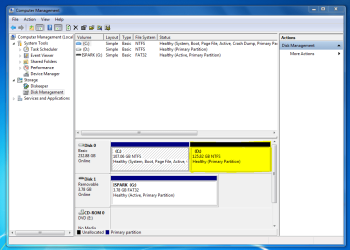
Before you do that, post a screen shot of your disk management screen, highlight that partition if you can see it.
 

My Computer

Computer Manufacturer/Model Number
Apple Macbook Pro (April 2009)
OS
W7 Ult. x64 | OS X
CPU
Intel Mobile Core 2 Duo 2.93Ghz [T9800 Penryn]
Motherboard
NVIDIA nForce 730i Rev. B1 [Mac-F2268EC8 (U2E1)]
Memory
4096MB Samsung DDR3 Dual Channel [PC3-8500F 1066Mhz]
Graphics Card(s)
NVIDIA GeForce 9600M GT 512MB [G96M Rev. C1]
Sound Card
SB X-Fi Surround 5.1 USB | Onboard Realtek (Disabled)
Monitor(s) Displays
Acer x223wbd 22" | Apple Anti-Glare 17" (Disabled)
Screen Resolution
{Current} 1440x900 {Acer} 1680x1050 {Apple} 1920x1200
Hard Drives
{Internal}
Seagate Momentus 320GB 2.5" 7200RPM [ST9320421AS]

{Externals}
LaCie 320GB USB 2.0 HDD [301284UR]
LaCie 750GB USB 2.0 FW400 eSATA HDD [301314U]
LaCie 1TB USB 2.0 HDD [301304UR]
PSU
Magsafe
Case
Aluminum/Unibody (MBP52)
Cooling
2 x 6000 RPM Fans
Keyboard
Logitech G-15v2 [PN 920-000379]
Mouse
Logitech G-9 [PN 910-000338]
Internet Speed
12Mbps/2.5Mbps w/ 24Mbps Speed Boost [Comcast]
Other Info
Logitech X-540 Speakers [PN 970223-0122]
Sennheiser PC-151 Headset
Here is a screen-shot of the the Disk Management screen...
 

Attachments

  • Capture.PNG
    Capture.PNG
    43.7 KB · Views: 199

My Computer

Computer Manufacturer/Model Number
ACER TravelMate 5720
OS
Windows 7 (32-Bits)
CPU
Intel Centrino Core 2 Duo T5670
Memory
3 GB
Graphics Card(s)
Mobile Intel 965 Express Chipset Family
Screen Resolution
1280x800
Hard Drives
250 GB
Mouse
A4 Tech
Internet Speed
1024 K/Bit
I solved the problem with Stellar Phoenix Windows Data Recovery. I recovered all of my files and will delete and create the partition again.

Thank you very much for the help.
 

My Computer

Computer Manufacturer/Model Number
ACER TravelMate 5720
OS
Windows 7 (32-Bits)
CPU
Intel Centrino Core 2 Duo T5670
Memory
3 GB
Graphics Card(s)
Mobile Intel 965 Express Chipset Family
Screen Resolution
1280x800
Hard Drives
250 GB
Mouse
A4 Tech
Internet Speed
1024 K/Bit
Yeah, I was about to say that it looks like your data is still there, you just deleted the roadmap to it. Glad you figured it out.
 

My Computer

Computer Manufacturer/Model Number
Apple Macbook Pro (April 2009)
OS
W7 Ult. x64 | OS X
CPU
Intel Mobile Core 2 Duo 2.93Ghz [T9800 Penryn]
Motherboard
NVIDIA nForce 730i Rev. B1 [Mac-F2268EC8 (U2E1)]
Memory
4096MB Samsung DDR3 Dual Channel [PC3-8500F 1066Mhz]
Graphics Card(s)
NVIDIA GeForce 9600M GT 512MB [G96M Rev. C1]
Sound Card
SB X-Fi Surround 5.1 USB | Onboard Realtek (Disabled)
Monitor(s) Displays
Acer x223wbd 22" | Apple Anti-Glare 17" (Disabled)
Screen Resolution
{Current} 1440x900 {Acer} 1680x1050 {Apple} 1920x1200
Hard Drives
{Internal}
Seagate Momentus 320GB 2.5" 7200RPM [ST9320421AS]

{Externals}
LaCie 320GB USB 2.0 HDD [301284UR]
LaCie 750GB USB 2.0 FW400 eSATA HDD [301314U]
LaCie 1TB USB 2.0 HDD [301304UR]
PSU
Magsafe
Case
Aluminum/Unibody (MBP52)
Cooling
2 x 6000 RPM Fans
Keyboard
Logitech G-15v2 [PN 920-000379]
Mouse
Logitech G-9 [PN 910-000338]
Internet Speed
12Mbps/2.5Mbps w/ 24Mbps Speed Boost [Comcast]
Other Info
Logitech X-540 Speakers [PN 970223-0122]
Sennheiser PC-151 Headset
Back
Top