Solved Secondary drive left plugged in during install

mortalCoil

New member
Local time
2:22 PM
Messages
15
A little background. I had/have a system with Windows installed on an SSD and a spin drive for storage. My SSD crashed so I RMA'd it. In the meanwhile I got another drive to use as my boot drive. Then I got my SSD back.

I installed Win 7 Pro 64 to my SSD. Unfortunately I forgot to unplug my secondary drive. Everything seemed fine until on restart I get two choices to boot to Windows 7. One works, and one doesn't. I looked in the BIOS and my SSD wasn't showing up as a boot option. When I force boot options (F11) on restart my Vertex SSD shows up, which only brings me back to the two Windows 7 options. I tried unplugging my secondary drive and it won't give me the option of booting from the SSD, so Windows doesn't even start up. I get some DOS boot loader talking about raids.

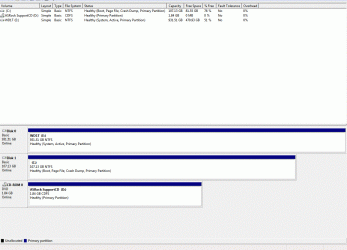
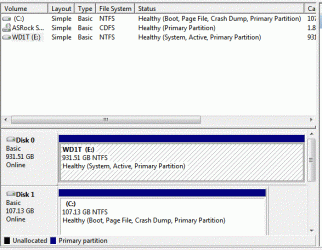
When I checked Disk Manager I got this:
Capture.GIF

I'm pretty new to this whole raid/partioning options thing, so I don't know what to do. It looks like it used BOTH of my drives (isn't that RAID 0?). My secondary drive has a lot of data that I don't want to lose. Windows boots fine (although I have to always pick the valid one to boot up) runs fine, and I can access all my old files on the secondary drive, but I want my SSD to be the ONLY boot and system drive. Re-installing Windows on the SSD is ok with me, but I don't want to lose access to my secondary drive or wipe it somehow. What can I do?

PS. I still have the temp system drive (a little WD notbook drive) with Windows still installed. I was planning on wiping it once everything looked good. Not sure if that helps my options but throwing it out there.
 

My Computer My Computer

At a glance

Windows 7 Professional 64-bitIntel i5 2500k 3.30gHz8gb G.Skill Ripjaw dual-channel 1600AMD Radeon HD 6870
OS
Windows 7 Professional 64-bit
CPU
Intel i5 2500k 3.30gHz
Motherboard
Asus AsRock P67 Extreme4 Gen3
Memory
8gb G.Skill Ripjaw dual-channel 1600
Graphics Card(s)
AMD Radeon HD 6870
Sound Card
On-Board
Hard Drives
OCZ Vertex Sata II 120gb
WD Caviar Black 1tb
WD Scorpio Blue 320gb
PSU
Corsair 650
please post diskmanagemnet screenshot from within win7 with both ssd's connected.

And explain what C,D,E are. So what driveletter is spinning disk, primary ssd, secondary sdd

post 2 screenshots. First one trying to boot from primary ssd, second boot from secondary ssd. I know you can start 1 OS succesfully, but wanna know where the bootmenu is
 

My Computer My Computer

At a glance

Microsoft Windows 7 Home Premium 64-bits 7601...Intel(R) Core(TM) i3 CPU M 370 @ 2.40GHz4,00 GBATI Mobility Radeon HD 5400 Series
Computer type
Laptop
Computer Manufacturer/Model Number
ACER ASPIRE 5742G
OS
Microsoft Windows 7 Home Premium 64-bits 7601 Multiprocessor Free Service Pack 1
CPU
Intel(R) Core(TM) i3 CPU M 370 @ 2.40GHz
Motherboard
Acer Aspire 5742G
Memory
4,00 GB
Graphics Card(s)
ATI Mobility Radeon HD 5400 Series
Sound Card
(1) AMD High Definition Audio Device (2) Realtek High Defi
Screen Resolution
1366 x 768 x 32 bits (4294967296 colors) @ 60 Hz
Hard Drives
WDC WD5000BEVT-22ZAT0
Only have one SSD. I have the SSD, my secondary HDD which has to be attached for Windows 7 to be recognized, and another boot HDD that I was using before I got my SSD back. I don't want to attach that other boot/system drive because it only has a previous Windows install on it, and it wasn't attached during this last install attempt.

I'll post that other stuff you asked for.
 

My Computer My Computer

At a glance

Windows 7 Professional 64-bitIntel i5 2500k 3.30gHz8gb G.Skill Ripjaw dual-channel 1600AMD Radeon HD 6870
OS
Windows 7 Professional 64-bit
CPU
Intel i5 2500k 3.30gHz
Motherboard
Asus AsRock P67 Extreme4 Gen3
Memory
8gb G.Skill Ripjaw dual-channel 1600
Graphics Card(s)
AMD Radeon HD 6870
Sound Card
On-Board
Hard Drives
OCZ Vertex Sata II 120gb
WD Caviar Black 1tb
WD Scorpio Blue 320gb
PSU
Corsair 650
A little background. I had/have a system with Windows installed on an SSD and a spin drive for storage. My SSD crashed so I RMA'd it. In the meanwhile I got another drive to use as my boot drive. Then I got my SSD back.

I installed Win 7 Pro 64 to my SSD. Unfortunately I forgot to unplug my secondary drive. Everything seemed fine until on restart I get two choices to boot to Windows 7. One works, and one doesn't. I looked in the BIOS and my SSD wasn't showing up as a boot option. When I force boot options (F11) on restart my Vertex SSD shows up, which only brings me back to the two Windows 7 options. I tried unplugging my secondary drive and it won't give me the option of booting from the SSD, so Windows doesn't even start up. I get some DOS boot loader talking about raids.

When I checked Disk Manager I got this:

View attachment 202055

I'm pretty new to this whole raid/partioning options thing, so I don't know what to do. It looks like it used BOTH of my drives (isn't that RAID 0?). My secondary drive has a lot of data that I don't want to lose. Windows boots fine (although I have to always pick the valid one to boot up) runs fine, and I can access all my old files on the secondary drive, but I want my SSD to be the ONLY boot and system drive. Re-installing Windows on the SSD is ok with me, but I don't want to lose access to my secondary drive or wipe it somehow. What can I do?

PS. I still have the temp system drive (a little WD notbook drive) with Windows still installed. I was planning on wiping it once everything looked good. Not sure if that helps my options but throwing it out there.
E is a spinnig harddisk isn't it?
C is the ssd which starts succesfully?

You want to remove the not working bootmenu entry?
You want to make SSD boot on it's own even when spinning harddisk will be removed?

So you will all boot-related stuff to be copied from spinning disk to ssd?

I don't know what you want the final result is what you want
 

My Computer My Computer

At a glance

Microsoft Windows 7 Home Premium 64-bits 7601...Intel(R) Core(TM) i3 CPU M 370 @ 2.40GHz4,00 GBATI Mobility Radeon HD 5400 Series
Computer type
Laptop
Computer Manufacturer/Model Number
ACER ASPIRE 5742G
OS
Microsoft Windows 7 Home Premium 64-bits 7601 Multiprocessor Free Service Pack 1
CPU
Intel(R) Core(TM) i3 CPU M 370 @ 2.40GHz
Motherboard
Acer Aspire 5742G
Memory
4,00 GB
Graphics Card(s)
ATI Mobility Radeon HD 5400 Series
Sound Card
(1) AMD High Definition Audio Device (2) Realtek High Defi
Screen Resolution
1366 x 768 x 32 bits (4294967296 colors) @ 60 Hz
Hard Drives
WDC WD5000BEVT-22ZAT0
A little patience. My Windows install is installing 102 updates on restart. I'm posting this from my laptop.

Anyway. Drive C is my SSD, D is my DVD-rom drive, and E is my HDD. Not sure exactly what boot-up snapshots you want me to grab or how. In the BIOS config screen only my HDD and DVD show up in my boot options.

I should also note that on install my Windows disc showed me both my SSD and HDD as installation options, and I made sure to pick my SSD, and in advance settings the only install option I had for my SSD was "New".
 

My Computer My Computer

At a glance

Windows 7 Professional 64-bitIntel i5 2500k 3.30gHz8gb G.Skill Ripjaw dual-channel 1600AMD Radeon HD 6870
OS
Windows 7 Professional 64-bit
CPU
Intel i5 2500k 3.30gHz
Motherboard
Asus AsRock P67 Extreme4 Gen3
Memory
8gb G.Skill Ripjaw dual-channel 1600
Graphics Card(s)
AMD Radeon HD 6870
Sound Card
On-Board
Hard Drives
OCZ Vertex Sata II 120gb
WD Caviar Black 1tb
WD Scorpio Blue 320gb
PSU
Corsair 650
In the BIOS config screen only my HDD and DVD show up in my boot options.
=>sure you can't enable to boot from SSD in bios? as you told me F11 gave you that selection
 

My Computer My Computer

At a glance

Microsoft Windows 7 Home Premium 64-bits 7601...Intel(R) Core(TM) i3 CPU M 370 @ 2.40GHz4,00 GBATI Mobility Radeon HD 5400 Series
Computer type
Laptop
Computer Manufacturer/Model Number
ACER ASPIRE 5742G
OS
Microsoft Windows 7 Home Premium 64-bits 7601 Multiprocessor Free Service Pack 1
CPU
Intel(R) Core(TM) i3 CPU M 370 @ 2.40GHz
Motherboard
Acer Aspire 5742G
Memory
4,00 GB
Graphics Card(s)
ATI Mobility Radeon HD 5400 Series
Sound Card
(1) AMD High Definition Audio Device (2) Realtek High Defi
Screen Resolution
1366 x 768 x 32 bits (4294967296 colors) @ 60 Hz
Hard Drives
WDC WD5000BEVT-22ZAT0
Has E an operating system installed on it?
bootmenu and bootmanager files are on E now. But that bootmenu entry instructs the bootloader to start windows from C. So the computer is actually booting from E now
 

My Computer My Computer

At a glance

Microsoft Windows 7 Home Premium 64-bits 7601...Intel(R) Core(TM) i3 CPU M 370 @ 2.40GHz4,00 GBATI Mobility Radeon HD 5400 Series
Computer type
Laptop
Computer Manufacturer/Model Number
ACER ASPIRE 5742G
OS
Microsoft Windows 7 Home Premium 64-bits 7601 Multiprocessor Free Service Pack 1
CPU
Intel(R) Core(TM) i3 CPU M 370 @ 2.40GHz
Motherboard
Acer Aspire 5742G
Memory
4,00 GB
Graphics Card(s)
ATI Mobility Radeon HD 5400 Series
Sound Card
(1) AMD High Definition Audio Device (2) Realtek High Defi
Screen Resolution
1366 x 768 x 32 bits (4294967296 colors) @ 60 Hz
Hard Drives
WDC WD5000BEVT-22ZAT0
A little background. I had/have a system with Windows installed on an SSD and a spin drive for storage. My SSD crashed so I RMA'd it. In the meanwhile I got another drive to use as my boot drive. Then I got my SSD back.

I installed Win 7 Pro 64 to my SSD. Unfortunately I forgot to unplug my secondary drive. Everything seemed fine until on restart I get two choices to boot to Windows 7. One works, and one doesn't. I looked in the BIOS and my SSD wasn't showing up as a boot option. When I force boot options (F11) on restart my Vertex SSD shows up, which only brings me back to the two Windows 7 options. I tried unplugging my secondary drive and it won't give me the option of booting from the SSD, so Windows doesn't even start up. I get some DOS boot loader talking about raids.

When I checked Disk Manager I got this:

View attachment 202055

I'm pretty new to this whole raid/partioning options thing, so I don't know what to do. It looks like it used BOTH of my drives (isn't that RAID 0?). My secondary drive has a lot of data that I don't want to lose. Windows boots fine (although I have to always pick the valid one to boot up) runs fine, and I can access all my old files on the secondary drive, but I want my SSD to be the ONLY boot and system drive. Re-installing Windows on the SSD is ok with me, but I don't want to lose access to my secondary drive or wipe it somehow. What can I do?

PS. I still have the temp system drive (a little WD notbook drive) with Windows still installed. I was planning on wiping it once everything looked good. Not sure if that helps my options but throwing it out there.
E is a spinnig harddisk isn't it?
C is the ssd which starts succesfully?

You want to remove the not working bootmenu entry?
You want to make SSD boot on it's own even when spinning harddisk will be removed?

So you will all boot-related stuff to be copied from spinning disk to ssd?

I don't know what you want the final result is what you want

yes, I want to remove the non-working bootmenu entry.

Yes, I want to make my SSD bootable on it's own.

I'm not sure about the third question. I don't care how it gets done, but what I am trying to do is separate these two drives without losing my data on E, the HDD. If need be, I can backup most of that drive and just wipe it, but this will be the most time-consuming option. I have networked storage on a MyBookLive, and I still have that other 320gb drive but backing up all that data will be a pain.

It seems, due to my lack of experience in this area, that I might be missing something simple. Is it possible to somehow separate these two drives in Disk Manager? It doesn't seem so due to the boot-dependance I seem to have created.
 

My Computer My Computer

At a glance

Windows 7 Professional 64-bitIntel i5 2500k 3.30gHz8gb G.Skill Ripjaw dual-channel 1600AMD Radeon HD 6870
OS
Windows 7 Professional 64-bit
CPU
Intel i5 2500k 3.30gHz
Motherboard
Asus AsRock P67 Extreme4 Gen3
Memory
8gb G.Skill Ripjaw dual-channel 1600
Graphics Card(s)
AMD Radeon HD 6870
Sound Card
On-Board
Hard Drives
OCZ Vertex Sata II 120gb
WD Caviar Black 1tb
WD Scorpio Blue 320gb
PSU
Corsair 650
Has E an operating system installed on it?
bootmenu and bootmanager files are on E now. But that bootmenu entry instructs the bootloader to start windows from C. So the computer is actually booting from E now

No. It never has. It's always just been a storage drive. Yes, I see what you're saying
about the boot files now on E. Can I just move or remove these and start over with C or repair it?
 
Last edited:

My Computer My Computer

At a glance

Windows 7 Professional 64-bitIntel i5 2500k 3.30gHz8gb G.Skill Ripjaw dual-channel 1600AMD Radeon HD 6870
OS
Windows 7 Professional 64-bit
CPU
Intel i5 2500k 3.30gHz
Motherboard
Asus AsRock P67 Extreme4 Gen3
Memory
8gb G.Skill Ripjaw dual-channel 1600
Graphics Card(s)
AMD Radeon HD 6870
Sound Card
On-Board
Hard Drives
OCZ Vertex Sata II 120gb
WD Caviar Black 1tb
WD Scorpio Blue 320gb
PSU
Corsair 650
Capture2.GIF
 

My Computer My Computer

At a glance

Windows 7 Professional 64-bitIntel i5 2500k 3.30gHz8gb G.Skill Ripjaw dual-channel 1600AMD Radeon HD 6870
OS
Windows 7 Professional 64-bit
CPU
Intel i5 2500k 3.30gHz
Motherboard
Asus AsRock P67 Extreme4 Gen3
Memory
8gb G.Skill Ripjaw dual-channel 1600
Graphics Card(s)
AMD Radeon HD 6870
Sound Card
On-Board
Hard Drives
OCZ Vertex Sata II 120gb
WD Caviar Black 1tb
WD Scorpio Blue 320gb
PSU
Corsair 650

My Computer My Computer

At a glance

Microsoft Windows 7 Home Premium 64-bits 7601...Intel(R) Core(TM) i3 CPU M 370 @ 2.40GHz4,00 GBATI Mobility Radeon HD 5400 Series
Computer type
Laptop
Computer Manufacturer/Model Number
ACER ASPIRE 5742G
OS
Microsoft Windows 7 Home Premium 64-bits 7601 Multiprocessor Free Service Pack 1
CPU
Intel(R) Core(TM) i3 CPU M 370 @ 2.40GHz
Motherboard
Acer Aspire 5742G
Memory
4,00 GB
Graphics Card(s)
ATI Mobility Radeon HD 5400 Series
Sound Card
(1) AMD High Definition Audio Device (2) Realtek High Defi
Screen Resolution
1366 x 768 x 32 bits (4294967296 colors) @ 60 Hz
Hard Drives
WDC WD5000BEVT-22ZAT0
OK so an update. I tried getting screen shots from within the BIOS and couldn't do it. But I can tell you that now in the configuration for my UEFI/BIOS my SSD comes up as a boot option and well as the boot menu (how or why these are two separate things is beyond me). I still can't boot into Windows without the HDD plugged in.

Also, when I do try without the HDD, Nero Boot Loader 6.0 comes up with a DOS kernal, which then loads this program in console:

Driver Disk Preparer
Model Name: P67 Extreme 4 <--my mother board
Select Source
1 Generate the RAID/AHCI driver diskette for Intel P67 chipset.
2 Generate the AHCI driver diskette for Marvell SATA 3.0
3 Exit

I haven't tried options 1 or 2. I don't even know what this is for.

Maybe I can unplug my HDD and just try to repair or re-install Windows on my SSD? If I do that, then when I plug in my HDD, won't I have a problem with those boot loading files still on it?
 

My Computer My Computer

At a glance

Windows 7 Professional 64-bitIntel i5 2500k 3.30gHz8gb G.Skill Ripjaw dual-channel 1600AMD Radeon HD 6870
OS
Windows 7 Professional 64-bit
CPU
Intel i5 2500k 3.30gHz
Motherboard
Asus AsRock P67 Extreme4 Gen3
Memory
8gb G.Skill Ripjaw dual-channel 1600
Graphics Card(s)
AMD Radeon HD 6870
Sound Card
On-Board
Hard Drives
OCZ Vertex Sata II 120gb
WD Caviar Black 1tb
WD Scorpio Blue 320gb
PSU
Corsair 650
OK so an update. I tried getting screen shots from within the BIOS and couldn't do it. But I can tell you that now in the configuration for my UEFI/BIOS my SSD comes up as a boot option and well as the boot menu (how or why these are two separate things is beyond me). I still can't boot into Windows without the HDD plugged in.

Also, when I do try without the HDD, Nero Boot Loader 6.0 comes up with a DOS kernal, which then loads this program in console:

Driver Disk Preparer
Model Name: P67 Extreme 4 <--my mother board
Select Source
1 Generate the RAID/AHCI driver diskette for Intel P67 chipset.
2 Generate the AHCI driver diskette for Marvell SATA 3.0
3 Exit

I haven't tried options 1 or 2. I don't even know what this is for.

Maybe I can unplug my HDD and just try to repair or re-install Windows on my SSD? If I do that, then when I plug in my HDD, won't I have a problem with those boot loading files still on it?
forget nero boot loader now!! So bios has ssd as boot option... nice
 

My Computer My Computer

At a glance

Microsoft Windows 7 Home Premium 64-bits 7601...Intel(R) Core(TM) i3 CPU M 370 @ 2.40GHz4,00 GBATI Mobility Radeon HD 5400 Series
Computer type
Laptop
Computer Manufacturer/Model Number
ACER ASPIRE 5742G
OS
Microsoft Windows 7 Home Premium 64-bits 7601 Multiprocessor Free Service Pack 1
CPU
Intel(R) Core(TM) i3 CPU M 370 @ 2.40GHz
Motherboard
Acer Aspire 5742G
Memory
4,00 GB
Graphics Card(s)
ATI Mobility Radeon HD 5400 Series
Sound Card
(1) AMD High Definition Audio Device (2) Realtek High Defi
Screen Resolution
1366 x 768 x 32 bits (4294967296 colors) @ 60 Hz
Hard Drives
WDC WD5000BEVT-22ZAT0
Microsoft Windows [Version 6.1.7600]
Copyright (c) 2009 Microsoft Corporation. All rights reserved.
C:\Windows\system32>bcdedit /enum all
Windows Boot Manager
--------------------
identifier {bootmgr}
device partition=E:
description Windows Boot Manager
locale en-US
inherit {globalsettings}
default {current}
resumeobject {214fcf45-51fd-11e1-984e-fd8647f7836a}
displayorder {current}
{214fcf42-51fd-11e1-984e-fd8647f7836a}
toolsdisplayorder {memdiag}
timeout 30
Windows Boot Loader
-------------------
identifier {214fcf42-51fd-11e1-984e-fd8647f7836a}
device unknown
path \Windows\system32\winload.exe
description Windows 7
locale en-US
inherit {bootloadersettings}
recoverysequence {214fcf43-51fd-11e1-984e-fd8647f7836a}
recoveryenabled Yes
osdevice unknown
systemroot \Windows
resumeobject {214fcf41-51fd-11e1-984e-fd8647f7836a}
nx OptIn
Windows Boot Loader
-------------------
identifier {214fcf43-51fd-11e1-984e-fd8647f7836a}
Windows Boot Loader
-------------------
identifier {current}
device partition=C:
path \Windows\system32\winload.exe
description Windows 7
locale en-US
inherit {bootloadersettings}
recoverysequence {214fcf47-51fd-11e1-984e-fd8647f7836a}
recoveryenabled Yes
osdevice partition=C:
systemroot \Windows
resumeobject {214fcf45-51fd-11e1-984e-fd8647f7836a}
nx OptIn
Windows Boot Loader
-------------------
identifier {214fcf47-51fd-11e1-984e-fd8647f7836a}
device ramdisk=[C:]\Recovery\214fcf47-51fd-11e1-984e-fd8647f783
6a\Winre.wim,{214fcf48-51fd-11e1-984e-fd8647f7836a}
path \windows\system32\winload.exe
description Windows Recovery Environment
inherit {bootloadersettings}
osdevice ramdisk=[C:]\Recovery\214fcf47-51fd-11e1-984e-fd8647f783
6a\Winre.wim,{214fcf48-51fd-11e1-984e-fd8647f7836a}
systemroot \windows
nx OptIn
winpe Yes
Resume from Hibernate
---------------------
identifier {214fcf41-51fd-11e1-984e-fd8647f7836a}
device unknown
path \Windows\system32\winresume.exe
description Windows Resume Application
locale en-US
inherit {resumeloadersettings}
filedevice unknown
filepath \hiberfil.sys
debugoptionenabled No
Resume from Hibernate
---------------------
identifier {214fcf45-51fd-11e1-984e-fd8647f7836a}
device partition=C:
path \Windows\system32\winresume.exe
description Windows Resume Application
locale en-US
inherit {resumeloadersettings}
filedevice partition=C:
filepath \hiberfil.sys
debugoptionenabled No
Windows Memory Tester
---------------------
identifier {memdiag}
device partition=E:
path \boot\memtest.exe
description Windows Memory Diagnostic
locale en-US
inherit {globalsettings}
badmemoryaccess Yes
EMS Settings
------------
identifier {emssettings}
bootems Yes
Debugger Settings
-----------------
identifier {dbgsettings}
debugtype Serial
debugport 1
baudrate 115200
RAM Defects
-----------
identifier {badmemory}
Global Settings
---------------
identifier {globalsettings}
inherit {dbgsettings}
{emssettings}
{badmemory}
Boot Loader Settings
--------------------
identifier {bootloadersettings}
inherit {globalsettings}
{hypervisorsettings}
Hypervisor Settings
-------------------
identifier {hypervisorsettings}
hypervisordebugtype Serial
hypervisordebugport 1
hypervisorbaudrate 115200
Resume Loader Settings
----------------------
identifier {resumeloadersettings}
inherit {globalsettings}
Device options
--------------
identifier {214fcf44-51fd-11e1-984e-fd8647f7836a}
description Ramdisk Options
ramdisksdidevice unknown
ramdisksdipath \Recovery\214fcf43-51fd-11e1-984e-fd8647f7836a\boot.sdi
Device options
--------------
identifier {214fcf48-51fd-11e1-984e-fd8647f7836a}
description Ramdisk Options
ramdisksdidevice partition=C:
ramdisksdipath \Recovery\214fcf47-51fd-11e1-984e-fd8647f7836a\boot.sdi
C:\Windows\system32>
 

My Computer My Computer

At a glance

Windows 7 Professional 64-bitIntel i5 2500k 3.30gHz8gb G.Skill Ripjaw dual-channel 1600AMD Radeon HD 6870
OS
Windows 7 Professional 64-bit
CPU
Intel i5 2500k 3.30gHz
Motherboard
Asus AsRock P67 Extreme4 Gen3
Memory
8gb G.Skill Ripjaw dual-channel 1600
Graphics Card(s)
AMD Radeon HD 6870
Sound Card
On-Board
Hard Drives
OCZ Vertex Sata II 120gb
WD Caviar Black 1tb
WD Scorpio Blue 320gb
PSU
Corsair 650
of course you have to set ssd as first boot device btw
 

My Computer My Computer

At a glance

Microsoft Windows 7 Home Premium 64-bits 7601...Intel(R) Core(TM) i3 CPU M 370 @ 2.40GHz4,00 GBATI Mobility Radeon HD 5400 Series
Computer type
Laptop
Computer Manufacturer/Model Number
ACER ASPIRE 5742G
OS
Microsoft Windows 7 Home Premium 64-bits 7601 Multiprocessor Free Service Pack 1
CPU
Intel(R) Core(TM) i3 CPU M 370 @ 2.40GHz
Motherboard
Acer Aspire 5742G
Memory
4,00 GB
Graphics Card(s)
ATI Mobility Radeon HD 5400 Series
Sound Card
(1) AMD High Definition Audio Device (2) Realtek High Defi
Screen Resolution
1366 x 768 x 32 bits (4294967296 colors) @ 60 Hz
Hard Drives
WDC WD5000BEVT-22ZAT0
of course you have to set ssd as first boot device btw
In the BIOS? It is. In fact my HDD isn't even showing up now as a boot device. It's like it got replaced by the SSD, but still has the boot files.

Man this is a mess.

To everyone reading this post: If you want Windows to exist on one drive and use another for data, do NOT leave it plugged in on install.
 

My Computer My Computer

At a glance

Windows 7 Professional 64-bitIntel i5 2500k 3.30gHz8gb G.Skill Ripjaw dual-channel 1600AMD Radeon HD 6870
OS
Windows 7 Professional 64-bit
CPU
Intel i5 2500k 3.30gHz
Motherboard
Asus AsRock P67 Extreme4 Gen3
Memory
8gb G.Skill Ripjaw dual-channel 1600
Graphics Card(s)
AMD Radeon HD 6870
Sound Card
On-Board
Hard Drives
OCZ Vertex Sata II 120gb
WD Caviar Black 1tb
WD Scorpio Blue 320gb
PSU
Corsair 650
bcdedit /displayorder {current}
bcdedit /default {current}
bcdedit /delete {214fcf43-51fd-11e1-984e-fd8647f7836a}
bcdedit /delete {214fcf42-51fd-11e1-984e-fd8647f7836a}
bcdedit /delete {214fcf41-51fd-11e1-984e-fd8647f7836a}

so only display the current active OS in bootmenu
make it the default
delete all ID's in BCD-store pointing to unknown device (old SSD)
Post bcdedit/enum all afterwards
dir c:\boot
dir c:\boot\memtest.exe

Does memtest.exe exists? (hidden system file)
 

My Computer My Computer

At a glance

Microsoft Windows 7 Home Premium 64-bits 7601...Intel(R) Core(TM) i3 CPU M 370 @ 2.40GHz4,00 GBATI Mobility Radeon HD 5400 Series
Computer type
Laptop
Computer Manufacturer/Model Number
ACER ASPIRE 5742G
OS
Microsoft Windows 7 Home Premium 64-bits 7601 Multiprocessor Free Service Pack 1
CPU
Intel(R) Core(TM) i3 CPU M 370 @ 2.40GHz
Motherboard
Acer Aspire 5742G
Memory
4,00 GB
Graphics Card(s)
ATI Mobility Radeon HD 5400 Series
Sound Card
(1) AMD High Definition Audio Device (2) Realtek High Defi
Screen Resolution
1366 x 768 x 32 bits (4294967296 colors) @ 60 Hz
Hard Drives
WDC WD5000BEVT-22ZAT0
Microsoft Windows [Version 6.1.7600]
Copyright (c) 2009 Microsoft Corporation. All rights reserved.
C:\Windows\system32>bcdedit /displayorder {current}
The operation completed successfully.
C:\Windows\system32>bcdedit /default {current}
The operation completed successfully.
C:\Windows\system32>bcdedit /delete {214fcf43-51fd-11e1-984e-fd8647f7836a}
The operation completed successfully.
C:\Windows\system32>bcdedit /delete {214fcf42-51fd-11e1-984e-fd8647f7836a}
The operation completed successfully.
C:\Windows\system32>bcdedit /delete {214fcf41-51fd-11e1-984e-fd8647f7836a}
An error occurred while attempting to delete the specified entry.
The system cannot find the file specified.
C:\Windows\system32>bcdedit/enum
Windows Boot Manager
--------------------
identifier {bootmgr}
device partition=E:
description Windows Boot Manager
locale en-US
inherit {globalsettings}
default {current}
resumeobject {214fcf45-51fd-11e1-984e-fd8647f7836a}
displayorder {current}
toolsdisplayorder {memdiag}
timeout 30
Windows Boot Loader
-------------------
identifier {current}
device partition=C:
path \Windows\system32\winload.exe
description Windows 7
locale en-US
inherit {bootloadersettings}
recoverysequence {214fcf47-51fd-11e1-984e-fd8647f7836a}
recoveryenabled Yes
osdevice partition=C:
systemroot \Windows
resumeobject {214fcf45-51fd-11e1-984e-fd8647f7836a}
nx OptIn
C:\Windows\system32>
 

My Computer My Computer

At a glance

Windows 7 Professional 64-bitIntel i5 2500k 3.30gHz8gb G.Skill Ripjaw dual-channel 1600AMD Radeon HD 6870
OS
Windows 7 Professional 64-bit
CPU
Intel i5 2500k 3.30gHz
Motherboard
Asus AsRock P67 Extreme4 Gen3
Memory
8gb G.Skill Ripjaw dual-channel 1600
Graphics Card(s)
AMD Radeon HD 6870
Sound Card
On-Board
Hard Drives
OCZ Vertex Sata II 120gb
WD Caviar Black 1tb
WD Scorpio Blue 320gb
PSU
Corsair 650
C:\Windows\system32>dir c:\boot
Volume in drive C has no label.
Volume Serial Number is 0A62-9711
Directory of c:\
File Not Found
C:\Windows\system32>dir c:\boot\memtest.exe
The system cannot find the file specified.
C:\Windows\system32>

Doesn't look like it.
 
Last edited:

My Computer My Computer

At a glance

Windows 7 Professional 64-bitIntel i5 2500k 3.30gHz8gb G.Skill Ripjaw dual-channel 1600AMD Radeon HD 6870
OS
Windows 7 Professional 64-bit
CPU
Intel i5 2500k 3.30gHz
Motherboard
Asus AsRock P67 Extreme4 Gen3
Memory
8gb G.Skill Ripjaw dual-channel 1600
Graphics Card(s)
AMD Radeon HD 6870
Sound Card
On-Board
Hard Drives
OCZ Vertex Sata II 120gb
WD Caviar Black 1tb
WD Scorpio Blue 320gb
PSU
Corsair 650
bcdedit/enum all
instead of bcdedit/enum
 

My Computer My Computer

At a glance

Microsoft Windows 7 Home Premium 64-bits 7601...Intel(R) Core(TM) i3 CPU M 370 @ 2.40GHz4,00 GBATI Mobility Radeon HD 5400 Series
Computer type
Laptop
Computer Manufacturer/Model Number
ACER ASPIRE 5742G
OS
Microsoft Windows 7 Home Premium 64-bits 7601 Multiprocessor Free Service Pack 1
CPU
Intel(R) Core(TM) i3 CPU M 370 @ 2.40GHz
Motherboard
Acer Aspire 5742G
Memory
4,00 GB
Graphics Card(s)
ATI Mobility Radeon HD 5400 Series
Sound Card
(1) AMD High Definition Audio Device (2) Realtek High Defi
Screen Resolution
1366 x 768 x 32 bits (4294967296 colors) @ 60 Hz
Hard Drives
WDC WD5000BEVT-22ZAT0
Back
Top