

Secunia has released Beta 2 and given us the option to turn off auto updates. Download here:
PSI 3.0 Beta Launch
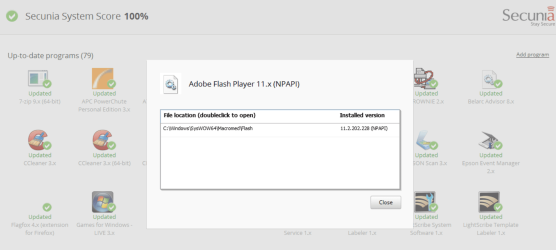
Here is a screen shot.
Jim
PSI 3.0 Beta Launch
As of Today we are releasing the Secunia PSI 3 Beta 2, now ready for your testing. The new Beta 2 (re)introduces the following features:
* Result view now shows all detected programs
* Detailed view of detected programs (versions, installation paths, and ability to open its folder)
* Setting to enable/disable "Auto Updates"
* Setting to enable/disable "Start on Boot"
* Suggest software
* Slightly tweaked design
* Secunia System Score
* Various bug fixes
Here is a screen shot.
Jim
My Computer
- Computer type
- PC/Desktop
- Computer Manufacturer/Model Number
- Home Built
- OS
- Windows 8.1 Pro w/Media Center 64bit, Windows 7 HP 64bit
- CPU
- Phenom II X6 1100T
- Motherboard
- ASUS M5A99X EVO
- Memory
- Crucial Balistic 8gb DDR3-1866 CL9
- Graphics Card(s)
- MSI R6850 Cyclone IGD5 PE
- Sound Card
- On Board
- Monitor(s) Displays
- ASUS VE258Q 25" LED with DVI-HDMI-DisplayPort
- Screen Resolution
- 1920 x 1080
- Hard Drives
- Two WD Cavier Black 2TB Sata III, WD My Book Essential 2TB USB 3.0
- PSU
- Seasonic X650 80 Plus GOLD Modular
- Case
- Corsair 400R
- Cooling
- Antec Kuhler H2O 620, Two 120mm and four 140mm
- Keyboard
- Logitech K120
- Mouse
- Logitech Marble Mouse USB, Logitech Precision Game Pad
- Internet Speed
- 15MB
- Antivirus
- Norton IS 2013, Malwarebytes Pro Beta 2
- Browser
- IE-11, FF-27
- Other Info
- APC UPS ES 750, Netgear WNR3500L Gigabit & Wireless N Router with SamKnows Test Program, Motorola SB6120 Gigabit Cable Modem. Brother HL-2170W Laser Printer, Epson V300 Scanner


