Secure a Storage HDD?

Nevakonaza

New member
Local time
3:22 AM
Messages
64
Location
England
Hey guys,

I have a 500Gb Hard drive in my system which i use purely for storage,Like my films,music,,and information id rather keep private.

My parents and my sister and sometimes some friends all use this pc,and even on their limited user account they can still access my 500Gb drive,How can i stop them,Its not like the info is so very private that none one should see!,but id prefer it if they were not just able to view whats on the drive.

Is there a way i can make the drive only viewable to an admin or somehow password protect it?...i cant see anyway within windows to do it :eek:

Appreciate any help.

Thanks :D
 

My Computer

Computer Manufacturer/Model Number
Home Build System
OS
7 Home Premium X64
CPU
Intel Q6600 @ 3.5Ghz
Motherboard
Asus P5Q SE (Intel P45)
Memory
4GB OCZ Gold Series DDR2 @932Mhz
Graphics Card(s)
HD4890 1GB GDDR5
Sound Card
Asus Xonar D1
Monitor(s) Displays
Belinea 0.Display 22" Widescreen
Screen Resolution
1680 x 1050
Hard Drives
60Gb OCZ Vertex 2E Solid State Drive
250Gb Seagate Barracuda (Storage)
500Gb Western Digital Green (Storage)

Both 7200Rpm Sata2.
PSU
OCZ StealthXstream 600W Modular.
Case
Coolermaster 690 (Windows + Interior modded)
Cooling
Tuniq Tower 120 Extreme + 4 120mm case fans.
Keyboard
Microsoft Digital Media Keyboard 3000
Mouse
Logitech G5
Internet Speed
20Mb Virgin Media Unlimited.
Hey guys,

I have a 500Gb Hard drive in my system which i use purely for storage,Like my films,music,,and information id rather keep private.

My parents and my sister and sometimes some friends all use this pc,and even on their limited user account they can still access my 500Gb drive,How can i stop them,Its not like the info is so very private that none one should see!,but id prefer it if they were not just able to view whats on the drive.

Is there a way i can make the drive only viewable to an admin or somehow password protect it?...i cant see anyway within windows to do it :eek:

Appreciate any help.

Thanks :D


You can take all the other users and edit the drives properties so they cant even see it if you like.

Take ownership of the drive as admin. go into t he advanced properties and uncheck the regular users including read and open if avail

Let us know if you need more help.

Ken J
 

My Computer

Computer Manufacturer/Model Number
HP Pavillion dv-7 1005 Tx
OS
Win 8 Release candidate 8400
CPU
[email protected]
Memory
4 gigs
Graphics Card(s)
Nvidia 9600M
Sound Card
HD built-in
Monitor(s) Displays
17" Wxga
Screen Resolution
1440x900
Cooling
none
Internet Speed
45Mb down 5Mb up

My Computer

Computer Manufacturer/Model Number
Custom
OS
Win7 HP (x64)/Win7 Ultimate (x64)
CPU
Core i7 920
Motherboard
Intel X58
Memory
6 x 2GB Corsair XMS3
Graphics Card(s)
CF HD4890
Sound Card
Asus Xonar
Monitor(s) Displays
Dell 2408WFP
Screen Resolution
1920 x 1200
Hard Drives
2 x 150GB WDC Velociraptors (Raid 0)
1 x 1TB Seagate
1 x 1.5TB Seagate
PSU
Corsair HX1000W
Case
Antec 1200
Keyboard
Razer Lycosa/N52te
Mouse
Razer Lachesis
You can take all the other users and edit the drives properties so they cant even see it if you like.

Take ownership of the drive as admin. go into t he advanced properties and uncheck the regular users including read and open if avail

Let us know if you need more help.

Ken J

Hi thanks for replying :)

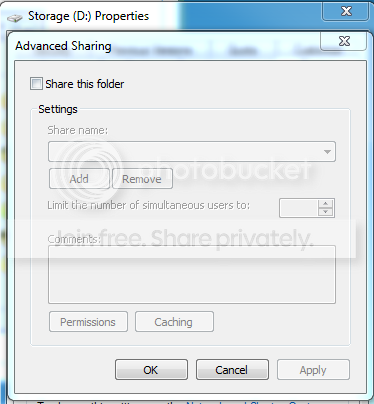
i right clicked on the drive in "My computer" selected "properties" and then "Sharing"...then choose the "Advanced Sharing" option but all the options i are these?

share.png


Thing is i dont want to share it!..when i select that box all it asks it what i want to name the drive to share it as...nothing to select any permissions :huh:
Appreciate any further help :)

May seem extreme but TrueCrypt could work :)

Yeah i heard of that,But i dont know if i could trust it...what happens if i have to re-install windows and when i try to access that drive again it wont accept my password? or if the password gets screwed up?...dont really trust it :confused:
 

My Computer

Computer Manufacturer/Model Number
Home Build System
OS
7 Home Premium X64
CPU
Intel Q6600 @ 3.5Ghz
Motherboard
Asus P5Q SE (Intel P45)
Memory
4GB OCZ Gold Series DDR2 @932Mhz
Graphics Card(s)
HD4890 1GB GDDR5
Sound Card
Asus Xonar D1
Monitor(s) Displays
Belinea 0.Display 22" Widescreen
Screen Resolution
1680 x 1050
Hard Drives
60Gb OCZ Vertex 2E Solid State Drive
250Gb Seagate Barracuda (Storage)
500Gb Western Digital Green (Storage)

Both 7200Rpm Sata2.
PSU
OCZ StealthXstream 600W Modular.
Case
Coolermaster 690 (Windows + Interior modded)
Cooling
Tuniq Tower 120 Extreme + 4 120mm case fans.
Keyboard
Microsoft Digital Media Keyboard 3000
Mouse
Logitech G5
Internet Speed
20Mb Virgin Media Unlimited.
Go to properties window of the concerned drive (right click on the drive letter in windows explorer, select "properties") -> Security tab. Then, add your name (Admin) and give yourself full control from the checkboxes below. Now, add the user accounts you wish to restrict access to (unless they are already there) and either deny access or limit permissions (whatever you wish).
 

My Computer

Computer Manufacturer/Model Number
Too many to describe...
OS
Windows 7 x64 pro/ Windows 7 x86 Pro/ XP SP3 x86
Back
Top