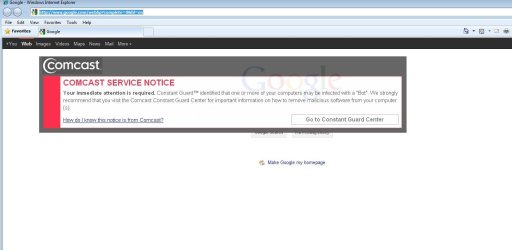
Security certificate (I think) help, please

jasong1968

New member
VIP
Local time
2:40 PM
Messages
107
Hi all,

I keep getting these security certificates - at least that's what I think they are - pop up in my browser from my ISP. They warn me of bot detection, but there are no bots; I have even had a sup from tech support give me a whole list of things that might cause a 'false positive'.

So, they started with emails only, which are kind of annoying, but not all that bad. Now, they have added these security certificate looking things that pop up in your browser, IMHO, these are way too obtrusive, especially being that you don't have the option of closing them. So, I am trying to figure out how to stop them from popping up.

These are not pop-ups in the traditional sense; turning on IE8's pop-up blocker does nothing.

I have tried two things:

In Tools > Sec., I have located the setting "Don't prompt for client certificate selection when no certificates or only one certificate exists", and clicked the Enable radio button.

I have also unchecked "check for publisher's certificate revocation" and "check for server certificate revocation".

Neither of these things stops the certificate from popping up. i was hoping someone had an idea here?

Thank you in advance.
 

My Computer

OS
Windows7 64
look for anything they might have installed in control panel and under manage add-ons. update your browser to IE9 if you can. They could have something enabled under tracking protection:
Capture.PNG
 

My Computer

Computer type
PC/Desktop
Computer Manufacturer/Model Number
Custom Asus Build
OS
Microsoft Windows 8.1 Pro 64-bit
CPU
Intel(R) Core(TM) i3-4130 CPU @ 3.40GHz
Motherboard
B85M-E
Memory
8.00 GB
Graphics Card(s)
None
Sound Card
Realtek High Definition Audio
Monitor(s) Displays
Asus 23.6" Monitor
Screen Resolution
1920 x 1080 x 32 bits (4294967296 colors) @ 60 Hz
Hard Drives
INTEL SSDSC2BW180A4
Samsung SSD 840 PRO Series
PSU
Seasonic S12II-380Bronze
Case
Lian Li
Cooling
Fan, Passive
Keyboard
Logitech K120
Mouse
Microsoft Touch Mouse
Internet Speed
4ms Ping, 19.0 Mbps Download, 19.0 Mbps Upload
Antivirus
Eset Endpoint
Browser
Internet Explorer, Chrome

My Computer

Computer type
PC/Desktop
Computer Manufacturer/Model Number
OQO 2+
OS
Windows 8 Pro w/MC 32-bit
CPU
Intel Atom 1.86 GHz
Motherboard
OQO 2+
Memory
2 GB
Graphics Card(s)
Intel GMA 500
Sound Card
IDT
Monitor(s) Displays
LCD
Screen Resolution
800 x 480 (portable) 1280 x 1024 (docked)
Hard Drives
64 GB SSD
PSU
9 Ah Battery (portable) or OQO Brick (docked)
Case
Shirt Pocket Sized
Cooling
Tiny Fan
Keyboard
Slide out (portable) DiNovo Edge (docked)
Mouse
Eraser head (portable) Logitech Bluetooth (docked)
Internet Speed
WWAN or 802.11G (portable) T1 (docked)
Browser
IE 10
Other Info
DVD-RW OQO Docking Station
Thanks for the replies.

Dust > I have nothing in the CtrPanel that I see to uninstall here. In manage add-ons, the onoy thing I have enabled is shockwave.

Ron > umm, I already have Malwarebytes, Besides, those apps are not going to stop those security certificates from popping up.

Anything else I can do here?

Thanks.
 

My Computer

OS
Windows7 64
Ron > umm, I already have Malwarebytes, Besides, those apps are not going to stop those security certificates from popping up.

Anything else I can do here?

Thanks.
Maybe they will.
Unless you are paying for malwarebytes, you will need an antivirus on top of it (run together, as they are not both antiviruses). I've never heard someone paying for malwarebytes and only running it without an AV either. Microsoft security essentials is recommended as a free antivirus, but you really need one, it may help you out.

If it is a virus, naturally you'll need an antivirus. And they can keep you safer in the future anyway (besides malwarebytes, never run two av's together)
 

My Computer

Computer type
PC/Desktop
Computer Manufacturer/Model Number
Custom Asus Build
OS
Microsoft Windows 8.1 Pro 64-bit
CPU
Intel(R) Core(TM) i3-4130 CPU @ 3.40GHz
Motherboard
B85M-E
Memory
8.00 GB
Graphics Card(s)
None
Sound Card
Realtek High Definition Audio
Monitor(s) Displays
Asus 23.6" Monitor
Screen Resolution
1920 x 1080 x 32 bits (4294967296 colors) @ 60 Hz
Hard Drives
INTEL SSDSC2BW180A4
Samsung SSD 840 PRO Series
PSU
Seasonic S12II-380Bronze
Case
Lian Li
Cooling
Fan, Passive
Keyboard
Logitech K120
Mouse
Microsoft Touch Mouse
Internet Speed
4ms Ping, 19.0 Mbps Download, 19.0 Mbps Upload
Antivirus
Eset Endpoint
Browser
Internet Explorer, Chrome
I am sorry - maybe you are misunderstanding.

I am not asking for help with bot removal. I do not need halp there; I do not have any bots.

I am asking for assistance with stopping that security certificate from popping up.

Thank you.
 

My Computer

OS
Windows7 64
Good idea.
 

Attachments

  • comcast2.jpg
    comcast2.jpg
    58.9 KB · Views: 24

My Computer

OS
Windows7 64
did you visit the website? You don't know what started these things off? You don't have a program named constant guard installed?

You could call comcast and ask whats up. IE9 is an update to IE8 and may help

That looks pretty suspicious to me. Why would you have something that claims to want to help you while obstructing your view?
 

My Computer

Computer type
PC/Desktop
Computer Manufacturer/Model Number
Custom Asus Build
OS
Microsoft Windows 8.1 Pro 64-bit
CPU
Intel(R) Core(TM) i3-4130 CPU @ 3.40GHz
Motherboard
B85M-E
Memory
8.00 GB
Graphics Card(s)
None
Sound Card
Realtek High Definition Audio
Monitor(s) Displays
Asus 23.6" Monitor
Screen Resolution
1920 x 1080 x 32 bits (4294967296 colors) @ 60 Hz
Hard Drives
INTEL SSDSC2BW180A4
Samsung SSD 840 PRO Series
PSU
Seasonic S12II-380Bronze
Case
Lian Li
Cooling
Fan, Passive
Keyboard
Logitech K120
Mouse
Microsoft Touch Mouse
Internet Speed
4ms Ping, 19.0 Mbps Download, 19.0 Mbps Upload
Antivirus
Eset Endpoint
Browser
Internet Explorer, Chrome
...Ron > umm, I already have Malwarebytes, Besides, those apps are not going to stop those security certificates from popping up...
The Comcast window you are seeing is either true or false...

If true...you have a "Bot" as defined by "Comcast" so perhaps you should ask them why they sent you a popup. Did you install software from Comcast that might allow them to create popups on your PC?

If false...you have malware causing the popup which can't be believed. That's why I suggested running MSS (or your antivirus) and also MalwareBytes.
 

My Computer

Computer type
PC/Desktop
Computer Manufacturer/Model Number
OQO 2+
OS
Windows 8 Pro w/MC 32-bit
CPU
Intel Atom 1.86 GHz
Motherboard
OQO 2+
Memory
2 GB
Graphics Card(s)
Intel GMA 500
Sound Card
IDT
Monitor(s) Displays
LCD
Screen Resolution
800 x 480 (portable) 1280 x 1024 (docked)
Hard Drives
64 GB SSD
PSU
9 Ah Battery (portable) or OQO Brick (docked)
Case
Shirt Pocket Sized
Cooling
Tiny Fan
Keyboard
Slide out (portable) DiNovo Edge (docked)
Mouse
Eraser head (portable) Logitech Bluetooth (docked)
Internet Speed
WWAN or 802.11G (portable) T1 (docked)
Browser
IE 10
Other Info
DVD-RW OQO Docking Station
Thanks again for the replies.

"did you visit the website?"

Yes - but oddly enough, there is nothing there for me to do. It's just filled with suggestions on how to get rid of a bot. Install antivirus sw, scan for malware, etc. But seeing as I dont have a bot, that's not going to help.

"You don't know what started these things off?"

I am trying to figure that out, but they pop up randomly, so I really have no idea.

"You don't have a program named constant guard installed? "

No I dont.

"You could call comcast and ask whats up."

I did. They told me that this is normal behaviour when their server identifies what it thinks is a bot. But as I stated earlier, they also told me that many things can give a false positive.

"Why would you have something that claims to want to help you while obstructing your view? "

That's partly my point.

" IE9 is an update to IE8 and may help"

No, it wont. 1) Comcast told me it wont, and 2) If the Comcast server is sending those out when it thinks it is necessary, it's not going to send those things out to customers who have IE8, but not those who have IE9. Those pop ups are going to happen in every browser - IE 8, IE 9, FFox, Chrome, Safari, etc.

"If true...you have a "Bot" as defined by "Comcast" so perhaps you should ask them why they sent you a popup.

I did ask. They cant tell me what sets it off. Which really pisses me off, BTW.

"Did you install software from Comcast that might allow them to create popups on your PC?"

I have even gotten confirmation from Comcast that the pop ups will occur with no sw installed.

"If false...you have malware causing the popup which can't be believed. That's why I suggested running MSS (or your antivirus) and also MalwareBytes. "

I do NOT have any malware. So I amnot understanding what MSS is going to do here. I have no malware, and those pop-ups are not malware. What is MSS going to do?

There HAS to be a way to disable these things from popping up.

Thanks again.
 

My Computer

OS
Windows7 64
...I have even gotten confirmation from Comcast that the pop ups will occur with no sw installed...

Here is a recent post indicating that "Constant Guard" may (or may not) be software from Comcast that can be uninstalled and also includes browser extensions: CONSTANT GUARD BOT WARNING - Comcast Help and Support Forums. Most of the advice given involves uninstalling the software and the browser extensions. Here is a Cnet article about the 2009 trial of the Comcast software: Comcast pop-ups alert customers to PC infections | InSecurity Complex - CNET News . It's possible the warnings are "false positives" if indeed you have verified that you have no malware. The only thing I can imagine that Comcast expects to accomplish with this is to get their customers to install and use some sort of malware removal tools. Just telling people they have a bot, without telling them what to do about it isn't very helpful. Note that the Cnet article also says "The "Service Notice" will include a link to a Comcast security Web site where customers can follow a set of instructions to remove the malware from their computer." I found these instructions: http://xfinity.comcast.net/constantguard/botassistance/
 
Last edited:

My Computer

Computer type
PC/Desktop
Computer Manufacturer/Model Number
OQO 2+
OS
Windows 8 Pro w/MC 32-bit
CPU
Intel Atom 1.86 GHz
Motherboard
OQO 2+
Memory
2 GB
Graphics Card(s)
Intel GMA 500
Sound Card
IDT
Monitor(s) Displays
LCD
Screen Resolution
800 x 480 (portable) 1280 x 1024 (docked)
Hard Drives
64 GB SSD
PSU
9 Ah Battery (portable) or OQO Brick (docked)
Case
Shirt Pocket Sized
Cooling
Tiny Fan
Keyboard
Slide out (portable) DiNovo Edge (docked)
Mouse
Eraser head (portable) Logitech Bluetooth (docked)
Internet Speed
WWAN or 802.11G (portable) T1 (docked)
Browser
IE 10
Other Info
DVD-RW OQO Docking Station
But seeing as I dont have a bot, that's not going to help.
...
I do NOT have any malware. So I amnot understanding what MSS is going to do here. I have no malware, and those pop-ups are not malware. What is MSS going to do?
Wait, how come you are so certain you do not have malware? We are only trying to help, and if (even temporarily) installing MSE, updating, then full scanning COULD even in a remote sense help, why not? If you do it, it will give us all peace of mind that it isn't malware. Tell me why you think so strongly that it isn't? I just don't understand...

I am assuming you meant MSE instead of MSS, yes?

We aren't making you do anything, and if you don't want to, that is up to you. But it may help solve your problem a lot faster (i.e., we wouldn't be having this conversation if you had only run it in the first place)

"You don't have a program named constant guard installed? "

No I dont.
I appologize for the redudancy, but in looking through control panel, there is absolutely nothing to do with comcast, no publisher that you do not recognize, no program you have not expressly put on your computer (to which you know is clean)? Although without an AV, there is no virus scanner when you download programs off the internet, making it harder to fully be aware if you have a bot or not...


"IE9 is an update to IE8 and may help"

No, it wont. 1) Comcast told me it wont, and 2) If the Comcast server is sending those out when it thinks it is necessary, it's not going to send those things out to customers who have IE8, but not those who have IE9. Those pop ups are going to happen in every browser - IE 8, IE 9, FFox, Chrome, Safari, etc.
Very true. However, IE9 is a lot better (reportedly) at blocking Viruses and other malware than IE8. If you prefer IE8, it is not a bad thing and shouldn't really matter wether you update it or not. Here is a microsoft Browser to browser or ie8 to ie9 comparison chart, for the "reportedly" reference. However, I do still recommend installing all important windows updates. They fix a great many things in windows and make it a whole lot more secure in the process. I don't believe you mentioned if you have all updates or not?...
 
Last edited:

My Computer

Computer type
PC/Desktop
Computer Manufacturer/Model Number
Custom Asus Build
OS
Microsoft Windows 8.1 Pro 64-bit
CPU
Intel(R) Core(TM) i3-4130 CPU @ 3.40GHz
Motherboard
B85M-E
Memory
8.00 GB
Graphics Card(s)
None
Sound Card
Realtek High Definition Audio
Monitor(s) Displays
Asus 23.6" Monitor
Screen Resolution
1920 x 1080 x 32 bits (4294967296 colors) @ 60 Hz
Hard Drives
INTEL SSDSC2BW180A4
Samsung SSD 840 PRO Series
PSU
Seasonic S12II-380Bronze
Case
Lian Li
Cooling
Fan, Passive
Keyboard
Logitech K120
Mouse
Microsoft Touch Mouse
Internet Speed
4ms Ping, 19.0 Mbps Download, 19.0 Mbps Upload
Antivirus
Eset Endpoint
Browser
Internet Explorer, Chrome
ron - thanks for the link. Apparently I am not the only one.

"Wait, how come you are so certain you do not have malware? "

Because Malwarebytes, Spybot, Adaware and SuperAntiSpyware, ALL with the latest updates, can't find anything, and Comcast cant tell me what it's finding, only that it may have found something on one of my many computers. That's why I am sure my computer is clean.

"I appologize for the redudancy, but in looking through control panel, there is absolutely nothing to do with comcast, no publisher that you do not recognize, no program you have not expressly put on your computer (to which you know is clean)?"

Absolutely not. Again, I have been told by Comcast that these messages come WITH NO SOFTWARE INSTALLED. So, again, if you do NOT HAVE ANY SW INSTALLED, you will still get these messages.

Ok, again, I appreciate the attempts at helping, but AGAIN, this is not me saying, "help, I have spyware, what do I do". This is about getting my browser to stop or block these security certificates.

This is NOT about spyware, or malware, or apps to get rid of them. It is about what I can do, if anything, to block these security certificates in IE does anyone have any idea on how to do that?

Thank you.
 

My Computer

OS
Windows7 64
If it's legit and some of the Comcast Forum posters are wrong about removing Constant Guard software, then it really is Comcast injecting something into your received web pages. All I can think of is looking into another service provider for Internet since false positives will drive a lot of people crazy. Just to be as safe as possible, don't install anything offered by Comcast, even if free and appears to be a bargain, whether software, toolbars, browser helpers, etc. But do use one and only one low weight bacground malware program like Microsoft Security Essentials or if you insist on paying then try ESET's NOD 32.
 

My Computer

Computer type
PC/Desktop
Computer Manufacturer/Model Number
OQO 2+
OS
Windows 8 Pro w/MC 32-bit
CPU
Intel Atom 1.86 GHz
Motherboard
OQO 2+
Memory
2 GB
Graphics Card(s)
Intel GMA 500
Sound Card
IDT
Monitor(s) Displays
LCD
Screen Resolution
800 x 480 (portable) 1280 x 1024 (docked)
Hard Drives
64 GB SSD
PSU
9 Ah Battery (portable) or OQO Brick (docked)
Case
Shirt Pocket Sized
Cooling
Tiny Fan
Keyboard
Slide out (portable) DiNovo Edge (docked)
Mouse
Eraser head (portable) Logitech Bluetooth (docked)
Internet Speed
WWAN or 802.11G (portable) T1 (docked)
Browser
IE 10
Other Info
DVD-RW OQO Docking Station
Back
Top