Security Essentials and iTunes

HDRoadKing

New member
Local time
2:57 PM
Messages
58
Location
Graham, NC
Let me start by saying that I finally know what the problem is, I just don't know how to fix it

About a 2-3 weeks ago, when connecting my iTouch (1st gen) to sync with iTunes it would freeze the app (but all other windows and programs worked fine). You could hear Windows "recognize" the device and if you left it attached, after about 3 minutes iTunes would then start responding again. However my iTouch wouldn't show up. It was recognized in device manager with no errors, just not showing in iTunes. I could attach it to my Netbook or any other PC I had and it would be recognized and work perfectly, just not with my main system.

After spending hours online trying to find a solution and going through the normal stuff (i.e. Re-install of iTunes, update of drivers, reset iTouch to defaults etc.) I finally came to the conclusion that perhaps it was possible that something was just amiss with that particular PC. Since it had been awhile anyway, I decided to just wipe and reload Windows just to ensure everything was working correctly.

To my surprise, the exact same issue returned! At this point I knew it had to be some type of issue or conflict with another piece of software I had installed. So once again I formatted and began a reload of my system, only this time I noted and tested at each step of the re-install (installation of Windows updates, drivers and software). I finally found what was causing the issue! And the culprit is........(drumroll please).........

Microsoft Security Essentials

No way you say! Yes way and I proved it....

By stepping through the re-install process and testing iTunes after every change, it stopped working and gave me the same issue listed above right after I installed Microsoft Security Essentials. Just to put my mind at ease, I uninstalled Microsoft Security Essentials, and immediately the issue went away and iTunes was able to see my iTouch again.

At this point, I'm not sure if it's a iTunes or a Microsoft Security Essentials issue, so I'm posting this in both forums.

System:
Win7 Ultimate x64 SP1
i7 920
12GB RAM
128GB Corsair SSD
Asus P6T Deluxe
eVGA GeForce 465SC
iTunes & Microsoft Security Essentials (latest versions)

Anybody have an idea of how to resovle this (other than the obvious one of removing Microsoft Security Essentials)? I actually like Microsoft Security Essentials as my AV client so I'd like to find an answer that allows me to continue using it.

Thanks in advance for any help,
Mike
 

My Computer

Computer Manufacturer/Model Number
Custom PC
OS
Windows 7 Ultimate x64
CPU
Core i5 2500K @ 4.6Ghz
Motherboard
ASRock P67 Extreme4 Gen3
Memory
G.SKILL 16GB DDR3
Graphics Card(s)
eVGA GeForce 465GTX
Sound Card
Creative X-Fi Fatality
Monitor(s) Displays
Dual Acer 22" Widescreens
Screen Resolution
3360 X 1050
Hard Drives
1 x Corsair 120GB SSD
2 x 320GB Seagate 7200rpm
RAID 0
PSU
Thermaltake 850 TruPower
Case
Corsair 600T
Cooling
Corsair Hydro Series H70
Mouse
Logitech MX518 Gaming mouse
Internet Speed
Road Runner Turbo 30Mbs
I have both iTunes and Microsoft Security Essentials co-existing peacefully on my machine.

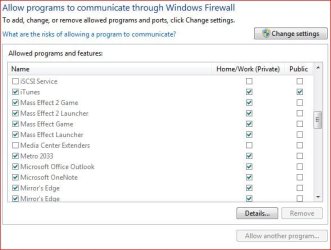
Have you looked to see that Windows Firewall isn't somehow blocking iTunes....

Capture.JPG

BTW I use iTunes for my iPod.
 

My Computer

Computer type
PC/Desktop
Computer Manufacturer/Model Number
Custom built by me.
OS
Windows 10 Pro
CPU
Intel Core i7-4770K (3.5Ghz)
Motherboard
Gigabyte G1 Sniper 5 (F10 Bios)
Memory
32 gig Corsair Dominator Platinum (4x8Gig)
Graphics Card(s)
Sapphire Tri-X R9 Fury
Sound Card
Soundblaster ZXR
Monitor(s) Displays
NEC PA242W 24" LCD Monitor
Screen Resolution
1920 x 1200
Hard Drives
Primary - Samsung 850 Pro (512gig), Samsung 840 Pro (256gig), 2TB WD Caviar Black.
PSU
EVGA Supernova 1000 G2
Case
Cooler Master HAF X
Cooling
Corsair H100i with Corsair Air Series SP120 Quiet Fans
Keyboard
Logitech Wireless Wave
Mouse
Logitech Performance MX
Internet Speed
High Speed Cable
Antivirus
Norton Security
Browser
IE11
Other Info
Memory Timings - 1866MHz @ 9-9-9-27-1T @ 1.5 volts
Actually on that machine, Windows firewall is turned off. And I have a netbook and another pc that are running iTunes and MSE and they have no problems recognizing the ipod.....that's what has made this issue so frustrating.


Hmm....I just had another thought. All the machines are running Win7 SP1, BUT the 2 that can sync with MSE installed are 32bit versions, however the one that can't is 64bit. Not sure if that makes any difference though. All are clean installs with Win7SP1 media, not SP1 installed later.
 

My Computer

Computer Manufacturer/Model Number
Custom PC
OS
Windows 7 Ultimate x64
CPU
Core i5 2500K @ 4.6Ghz
Motherboard
ASRock P67 Extreme4 Gen3
Memory
G.SKILL 16GB DDR3
Graphics Card(s)
eVGA GeForce 465GTX
Sound Card
Creative X-Fi Fatality
Monitor(s) Displays
Dual Acer 22" Widescreens
Screen Resolution
3360 X 1050
Hard Drives
1 x Corsair 120GB SSD
2 x 320GB Seagate 7200rpm
RAID 0
PSU
Thermaltake 850 TruPower
Case
Corsair 600T
Cooling
Corsair Hydro Series H70
Mouse
Logitech MX518 Gaming mouse
Internet Speed
Road Runner Turbo 30Mbs
If you look at my system specs I am running a 64-bit version of Windows 7. And iTunes and MSE co-existed nicely together with or without service pack 1 installed.

I don't have an answer to your solution but 64-bit compatibility isn't the issue.

One thing I will say is to make sure you get iTunes from Apple's site, and make sure you get the 64-bit version if you're running a 64-bit OS. I'm sure you've done this since I'm not even sure the 32-bit version of iTunes will even install on the 64-bit version of Windows, but....
 

My Computer

Computer type
PC/Desktop
Computer Manufacturer/Model Number
Custom built by me.
OS
Windows 10 Pro
CPU
Intel Core i7-4770K (3.5Ghz)
Motherboard
Gigabyte G1 Sniper 5 (F10 Bios)
Memory
32 gig Corsair Dominator Platinum (4x8Gig)
Graphics Card(s)
Sapphire Tri-X R9 Fury
Sound Card
Soundblaster ZXR
Monitor(s) Displays
NEC PA242W 24" LCD Monitor
Screen Resolution
1920 x 1200
Hard Drives
Primary - Samsung 850 Pro (512gig), Samsung 840 Pro (256gig), 2TB WD Caviar Black.
PSU
EVGA Supernova 1000 G2
Case
Cooler Master HAF X
Cooling
Corsair H100i with Corsair Air Series SP120 Quiet Fans
Keyboard
Logitech Wireless Wave
Mouse
Logitech Performance MX
Internet Speed
High Speed Cable
Antivirus
Norton Security
Browser
IE11
Other Info
Memory Timings - 1866MHz @ 9-9-9-27-1T @ 1.5 volts
I'd just like to confirm this issue, in case others find this via a search engine. I have the exact same problem. I'm running Windows 7 SP1 64bit, and when MSE is installed, I cannot sync my iPad or iPhone. When I plug them in, Windows sees them and I can access them via Explorer. But iTunes freezes for a few minutes and then fails to show them. Uninstalling MSE immediately fixes the problem.

Other things to note:
  • Sometimes unplugging and plugging back in enough times eventually causes it to work. (A lot of retries, though, on the order of dozens. I did this before I discovered that uninstalling MSE fixes it.) The iTunes hang is still there even on the extremely rare occasion that it works.
  • I tried uninstalling and then reinstalling both iTunes and MSE multiple times. Only leaving MSE uninstalled completely seems to fix the issue.
  • The iTunes binary is 32bit, as are the associated programs such as iTunesHelper. Only the installer is 64bit. I don't know if this is related to the problem or not.

I haven't determined what the root cause is or how to resolve it short of uninstalling MSE.
 

My Computer

OS
Windows 7 Home Premium 64bit
Glad to see I'm not the only one with this issue. :D Apple just released a new version of iTunes (10.3.1.55) and I'm still having the issue. Once again, I can only get my iPod to be recognized by iTunes by completely removing MSE.

One other piece of information I have found though is that I have tried to recreate the issue on my work pc (i7, Win7 x64) and a second PC at my home (Q6600, Win7 x64) and both of those work perfectly.

I'm running basically all the same applications on all 3 computers so I don't think the issue could be a conflicting piece of software. The only thing that comes to mind is that it might be some type of hardware driver issue since the problem is specific to just my main PC. (i7, 12GB RAM, 128GB SSD, GeForce 465, X-Fi).

I guess I'll have to stick with AVG Free until someone finds a resolution for this.

Mike
 

My Computer

Computer Manufacturer/Model Number
Custom PC
OS
Windows 7 Ultimate x64
CPU
Core i5 2500K @ 4.6Ghz
Motherboard
ASRock P67 Extreme4 Gen3
Memory
G.SKILL 16GB DDR3
Graphics Card(s)
eVGA GeForce 465GTX
Sound Card
Creative X-Fi Fatality
Monitor(s) Displays
Dual Acer 22" Widescreens
Screen Resolution
3360 X 1050
Hard Drives
1 x Corsair 120GB SSD
2 x 320GB Seagate 7200rpm
RAID 0
PSU
Thermaltake 850 TruPower
Case
Corsair 600T
Cooling
Corsair Hydro Series H70
Mouse
Logitech MX518 Gaming mouse
Internet Speed
Road Runner Turbo 30Mbs
Have you actually tried to just add iTunes, and any other iTunes/iPod/iTouch executables into MSE's exclude list?
 

My Computer

Computer type
PC/Desktop
Computer Manufacturer/Model Number
Airbot 2.0
OS
Windows 7 Ultimate x64 SP1
CPU
Core i7 920 (D0) @ 4Ghz, *26c idle *65c full load on air
Motherboard
Asus P6X58D Premium - Sata 6Gb/s - USB 3.0
Memory
12GB DDR3 Corsair Dominator -CMD12GX3M6A1600C8 at 1600MHz
Graphics Card(s)
Zotac Geforce GTX 770
Sound Card
ASUS Xonar D2X
Monitor(s) Displays
1 LG 24" Flatron W2453V-PF 1 Samsung 24" P2450H both 2ms RT
Screen Resolution
1920x1080@60hz
Hard Drives
1 Samsung 250GB 840 Evo SSD
1 OCZ Vertex2 180GB SSD
1 TB Samsung Spinpoint F1 7200RPM 32MB cache
2 500GB WD Caviar Blacks 7200RPM 32MB cache (WD5001AALS)

Pioneer DVD Burner DVR-S18M
PSU
Corsair HX1000W
Case
Cooler Master HAF 932
Cooling
Case Fans *3 230mm, *1 140mm/CPU - *Tuniq Tower 120 Extreme
Keyboard
Logitech Wireless MK700
Mouse
Logitech Wireless MK700
Internet Speed
DL 15 Mbps UL 0.98 Mbps
Antivirus
None
Browser
Firefox Nightly
Other Info
Processor-7.7 *RAM- 7.9 *Graphics-7.9 *Gaming Graphics- 7.9 *SSD- 7.8 W.E.I final score= 7.7
*Phone- LG Nexus 5
Mike, I'm definitely still having this issue as well. The iTunes upgrade made no difference. I agree that it seems at this point must be hardware/driver-related. Otherwise it should be affecting more users. By any chance are you using a Ralink RT61 (mine was sold as a Rosewill G300LX) wireless card? Everything else on my computer is pretty basic (i7 920, X58 extreme, HD4670, 6GB RAM). The only thing is the crappy wireless card, but even that was a pretty big seller.

Airbot, yes, I tried adding all the running Apple processes to the exclude list. I also disabled realtime protection. Neither had any effect.
 

My Computer

OS
Windows 7 Home Premium 64bit
No sorry, no wireless card. The only add-in card I'm running with the exception of my X-Fi and GeForce 965 is an Asus 2 port SATA III controller for my SSD drive. The motherboard I have is an Asus P6T Deluxe and I'm running a i7 920 as well. I do have it overclocked to 3.6ghz, but I'm put it back at stock an still have the issue.
 

My Computer

Computer Manufacturer/Model Number
Custom PC
OS
Windows 7 Ultimate x64
CPU
Core i5 2500K @ 4.6Ghz
Motherboard
ASRock P67 Extreme4 Gen3
Memory
G.SKILL 16GB DDR3
Graphics Card(s)
eVGA GeForce 465GTX
Sound Card
Creative X-Fi Fatality
Monitor(s) Displays
Dual Acer 22" Widescreens
Screen Resolution
3360 X 1050
Hard Drives
1 x Corsair 120GB SSD
2 x 320GB Seagate 7200rpm
RAID 0
PSU
Thermaltake 850 TruPower
Case
Corsair 600T
Cooling
Corsair Hydro Series H70
Mouse
Logitech MX518 Gaming mouse
Internet Speed
Road Runner Turbo 30Mbs
I am having this exact same issue (Windows 7 Ultimate 64-Bit). I think it may be a windows firewall issue. Try disabling Windows Firewall.

I disabled both real-time protection in MSE and my Windows Firewall and my iPod showed up within milliseconds within iTunes. Disconnected the iPod, turned firewall back on, but not real-time protection and plugged the iPod back in and it did not work. Does anyone know what settings I would have to change in Windows Firewall to get this back working? Also, what has happened in the last month or so to Windows Firewall or iTunes to screw this up? Thanks for any input.

BTW, First time poster, long time lurker!
 

My Computer

OS
Windows 7 Ultimate x64
Unfortunately none of these help with my problem. To date I have done the following:

  • Disabled all windows firewalls
  • Disabled real-time protection in MSE
  • Added all iTunes folders to the exception list in MSE
  • Added all .exe files for iTunes to the exception file list in MSE
  • Manually stopped the Microsoft Anit-Malware service

Still no luck :( The only way I can get my iTouch to sync is to remove MSE. I don't have this issue on any of my other pc's that I sync the same ipod to, just my main system.
 

My Computer

Computer Manufacturer/Model Number
Custom PC
OS
Windows 7 Ultimate x64
CPU
Core i5 2500K @ 4.6Ghz
Motherboard
ASRock P67 Extreme4 Gen3
Memory
G.SKILL 16GB DDR3
Graphics Card(s)
eVGA GeForce 465GTX
Sound Card
Creative X-Fi Fatality
Monitor(s) Displays
Dual Acer 22" Widescreens
Screen Resolution
3360 X 1050
Hard Drives
1 x Corsair 120GB SSD
2 x 320GB Seagate 7200rpm
RAID 0
PSU
Thermaltake 850 TruPower
Case
Corsair 600T
Cooling
Corsair Hydro Series H70
Mouse
Logitech MX518 Gaming mouse
Internet Speed
Road Runner Turbo 30Mbs
Just wanted to confirm that HDRoadKing's experience with MSE matches my own almost exactly. I tried almost everything in your list above, but nothing would fix the inability to sync my iPhone 3GS. It was only after completely uninstalling MSE that the problem went away. I'm currently running Norton AV 2011 with no problems.

I encountered this problem several months ago so it's sad to see it hasn't been resolved yet.
 

My Computer

Computer Manufacturer/Model Number
Custom build
OS
Windows 7 Ultimate x64
CPU
Intel Core i5 2500K
Motherboard
Asus P8Z68-V
Memory
8GB
Graphics Card(s)
MSI HD6950
Sound Card
Realtek ALC892
Monitor(s) Displays
2 x HPLP2475w
Screen Resolution
1920x1200
Hard Drives
Intel X-25M 80GB Gen 2
WD1002FAEX 1TB
PSU
Corsair 750HX
Case
Antec P182
Cooling
TRUE120 w/ Scythe Slipstream PWM
Keyboard
Unicomp SpaceSaver
Mouse
Logitech MX1100
Internet Speed
16Mbps
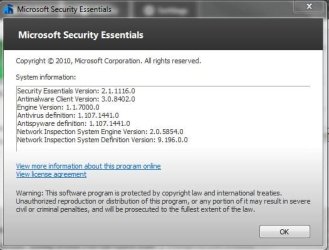
Just an update. I saw where MS had released a new version of MSE, so I figured I'd give it a try. The new version is 2.1.1116.0 and so far seems to have resolved the issue. I'm now able to successfully sync my iTouch with my main system again. Hope this helps someone else.

Mike
 

Attachments

  • Capture.JPG
    Capture.JPG
    37 KB · Views: 29

My Computer

Computer Manufacturer/Model Number
Custom PC
OS
Windows 7 Ultimate x64
CPU
Core i5 2500K @ 4.6Ghz
Motherboard
ASRock P67 Extreme4 Gen3
Memory
G.SKILL 16GB DDR3
Graphics Card(s)
eVGA GeForce 465GTX
Sound Card
Creative X-Fi Fatality
Monitor(s) Displays
Dual Acer 22" Widescreens
Screen Resolution
3360 X 1050
Hard Drives
1 x Corsair 120GB SSD
2 x 320GB Seagate 7200rpm
RAID 0
PSU
Thermaltake 850 TruPower
Case
Corsair 600T
Cooling
Corsair Hydro Series H70
Mouse
Logitech MX518 Gaming mouse
Internet Speed
Road Runner Turbo 30Mbs
Just wanted to confirm that the update seems to have fixed the issue for myself as well. I installed MSE by downloading from here:

Anti-Malware, Virus, Spyware Protection | Microsoft Security Essentials

The version available through Windows Update was not as recent (though undoubtedly MSFT will push the recent version to Windows Update soon).

I'll add another reply if the previous behavior returns.
 

My Computer

OS
Windows 7 Home Premium 64bit
Back
Top