security key

pablo70

New member
I have a Buffalo Router WHR-G54S It was installed about 16 months ago professionally. The router works fine with as i have 2 pc's in the home. I have just purchased a new laptop for my child and need connect this to the router as well. windows vista is asking for the 'security key' or 'passphrase' in order to complete the wireless connection. I don't have this, as this was professionally installed for me, and I do not recall getting this info for future use. If I did, it's long gone. iam not to good with routers so any help would be good thanks ( is this the right forum :o? )
 

My Computer

OS
windows 7
There should be a reset button somewhere on the router. Usually involves holding it down for some period of time. If you want you could reset the router and set it up to how you want it through the web interface. I would just do a quik Bing search on your model router and how to reset it.

just an option
 

My Computer

Computer Manufacturer/Model Number
Self Build
OS
Vista Business x64
CPU
AMD Phenom II x3 720be @3.15ghz
Motherboard
Asus M4A77D
Memory
2x2GB A-Data DDR2 pc6400
Graphics Card(s)
Nvidia EVGA 8800gts (640MB,320bit)
Sound Card
Creative Sound Blaster
Monitor(s) Displays
Samsung 226bw
Screen Resolution
1680x1050
Hard Drives
Seagate 320gig, WD 80gig
PSU
Rosewill 500watt
Case
Dynex
Cooling
Thermaltake V1
Keyboard
G15
Mouse
Razor DeathAdder
Internet Speed
10.0Mb/896Kb
1. I would call the shop or professional installer for help in getting laptop setup.
2. Go on the web to Buffalo Router and search for WHR-G54S for help or instructions on how to set it up.

Be back in a minute to see what I find...
 

My Computer

Computer Manufacturer/Model Number
HP M9077c
OS
Windows 7 Home Premium 64bit
CPU
Intel(R)Core(TM)2 quad [email protected] 2.39GHz
Motherboard
ASUSeK
Memory
6GB DDR2 6400
Graphics Card(s)
GeForce 8500/512MB
Sound Card
Realtek High Def Audio
Monitor(s) Displays
HP w2408 LCD 24" widescreen
Screen Resolution
1920x1200
Cooling
6 pack of Bud
Keyboard
MS wireless Inteli
Mouse
MS wireless Inteli

My Computer

Computer Manufacturer/Model Number
HP M9077c
OS
Windows 7 Home Premium 64bit
CPU
Intel(R)Core(TM)2 quad [email protected] 2.39GHz
Motherboard
ASUSeK
Memory
6GB DDR2 6400
Graphics Card(s)
GeForce 8500/512MB
Sound Card
Realtek High Def Audio
Monitor(s) Displays
HP w2408 LCD 24" widescreen
Screen Resolution
1920x1200
Cooling
6 pack of Bud
Keyboard
MS wireless Inteli
Mouse
MS wireless Inteli
thanks for the very quick responses , i will download the manual and have a look , thanks again
 

My Computer

OS
windows 7
pablo7,

You are more than welcome. Post back if you need more help.
 

My Computer

Computer Manufacturer/Model Number
HP M9077c
OS
Windows 7 Home Premium 64bit
CPU
Intel(R)Core(TM)2 quad [email protected] 2.39GHz
Motherboard
ASUSeK
Memory
6GB DDR2 6400
Graphics Card(s)
GeForce 8500/512MB
Sound Card
Realtek High Def Audio
Monitor(s) Displays
HP w2408 LCD 24" widescreen
Screen Resolution
1920x1200
Cooling
6 pack of Bud
Keyboard
MS wireless Inteli
Mouse
MS wireless Inteli
I have a Buffalo Router WHR-G54S It was installed about 16 months ago professionally. The router works fine with as i have 2 pc's in the home. I have just purchased a new laptop for my child and need connect this to the router as well. windows vista is asking for the 'security key' or 'passphrase' in order to complete the wireless connection. I don't have this, as this was professionally installed for me, and I do not recall getting this info for future use. If I did, it's long gone. iam not to good with routers so any help would be good thanks ( is this the right forum :o? )

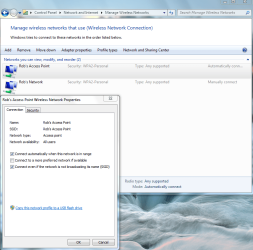
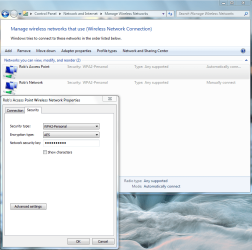
If you just need the security key just get it from one of your other machines by going to the "Network and Sharing center" then look to the left and choose "manage wireless connections".

Open your connection profile from your wireless network and then retrive the wireless password which you will be able to use to access the network from the new machine, just put a check mark where it says "show charactors".

You will also be able to copy the SSID "name of network" from there like in the first windows where it says "Rob's Access Point".


It's best to set this up as a new connection and then manually type in the routers security settings. Go with WPA-2 and AES encryption "Only" and if you are using only wireless N capible adaptors then using the "N" only wireless band will give you the best possible wireless speeds.
 

Attachments

  • Manger wireless connections Robs access point.PNG
    Manger wireless connections Robs access point.PNG
    341.4 KB · Views: 10
  • manage wireless connections show characters check box.PNG
    manage wireless connections show characters check box.PNG
    351.4 KB · Views: 9
Last edited:

My Computer

Computer type
PC/Desktop
Computer Manufacturer/Model Number
Home built
OS
Windows 7 Ult, Windows 8.1 Pro,
CPU
Q9650-4.275GHz, E8600 4.5GHz, E6750-3.8GHz
Motherboard
Evga 780i FTW
Memory
G.Skill PC2 9600 1200Mhz 5 5 5 15 2T
Graphics Card(s)
GTX480
Sound Card
Asus Xonar D2
Monitor(s) Displays
HannsG
Screen Resolution
1680X1050
Hard Drives
GSkill Phoenix Pro 120GB SSD
PSU
ThermalTake Toughpower 1000Watt modular
Case
ThermalTake XaserV
Cooling
Xigmatek S1283
Keyboard
Logitech G15
Mouse
Logitech G9
Internet Speed
T1
i just reset the router and it was sorted , i have another slight problem now my connection will die for a few seconds and then either come right back, or come back when i right click the network icon next to the clock and re-connect to my network , is there something i should be doing to make the signal stable , my 2 other desktop pc's are fine via the router , any idea to make it more stable ,thanks
 

My Computer

OS
windows 7
i just reset the router and it was sorted , i have another slight problem now my connection will die for a few seconds and then either come right back, or come back when i right click the network icon next to the clock and re-connect to my network , is there something i should be doing to make the signal stable , my 2 other desktop pc's are fine via the router , any idea to make it more stable ,thanks

This problem is usually caused by having two wireless connection managers installed and it then conflicts with the Win 7 wireless connection manager, they are both trying to connect you and so fight each other causing disconnects and reconnects.

The solution is to go to add-remove programs and uninstall the third party wireless connection manager leaving the Win 7 one to handle the connection.

You might also be seeing a channel crosover problem which can be fixed by changing the channel in your routers settings. You can use the Xirrus wifi inspector to determine which channels aren't being used in your area. Link for this is below.

http://www.xirrus.com/library/wifitools.php
 
Last edited:

My Computer

Computer type
PC/Desktop
Computer Manufacturer/Model Number
Home built
OS
Windows 7 Ult, Windows 8.1 Pro,
CPU
Q9650-4.275GHz, E8600 4.5GHz, E6750-3.8GHz
Motherboard
Evga 780i FTW
Memory
G.Skill PC2 9600 1200Mhz 5 5 5 15 2T
Graphics Card(s)
GTX480
Sound Card
Asus Xonar D2
Monitor(s) Displays
HannsG
Screen Resolution
1680X1050
Hard Drives
GSkill Phoenix Pro 120GB SSD
PSU
ThermalTake Toughpower 1000Watt modular
Case
ThermalTake XaserV
Cooling
Xigmatek S1283
Keyboard
Logitech G15
Mouse
Logitech G9
Internet Speed
T1
Back
Top