security policy? locked folders

CosmicJest

New member
Member
VIP
Local time
12:53 PM
Messages
152
Hello,

About six weeks ago, we got a Win 7 Home laptop (Dell Inspiron). I've also been using Win 7 Pro at work (Dell Optiplex) for about a year & a half.

I like to customize my Win 7 themes by downloading a theme, then browsing to the folder where the pictures are contained and putting the pictures I like into the folders. This has worked well for me on the Win 7 Pro machine since I got it, and I manipulate the content of these folders on a regular basis.

The first time I did this on the Win 7 Home laptop, right after we got it, I had no problem browsing to the folders and putting the pictures I wanted into them. Yesterday, when I went in to modify the theme folders for the 2nd time, I noticed one of the folders in the path was now locked (User\AppData). I looked at its properties, and changed the security settings to allow access.

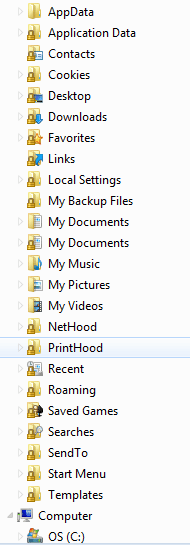
When the folder opened up, I noticed that some of the sub-folders were also locked. None of these folders were locked the first time I browsed into them, and none of them have ever been locked on the Win 7 Pro machine.

What has caused these folders to become locked? And how can I uniformly unlock them for access?
 

My Computer

Computer type
PC/Desktop
Computer Manufacturer/Model Number
Lenovo ThinkPad E545 / Dell Optiplex 980
OS
Windows 7 Pro 64-bit
CPU
AMD 2.9GHz / Intel 3.2GHz
Memory
8GB / 4GB
Antivirus
AVG / Norton 360
Browser
Firefox & Chrome
Are you sure you were going to C:\Users\User-Name\AppData\Local\Microsoft\Windows\Themes instead of a separate shortcut?
 

My Computer

OS
XP / Win7 x64 Pro
CPU
Intel Quad-Core Q9450 @ 3.2GHz
Motherboard
Asus P5-E
Memory
2x2GB GSkill DDR2
Graphics Card(s)
NVIDIA GeForce 8600 GTS (EVGA)
Monitor(s) Displays
Dell 2408WFP
Screen Resolution
1920x1200
It's funny that you should ask, because when I unlocked the AppData folder - it became a shortcut. I've never seen anything like that before!
 

My Computer

Computer type
PC/Desktop
Computer Manufacturer/Model Number
Lenovo ThinkPad E545 / Dell Optiplex 980
OS
Windows 7 Pro 64-bit
CPU
AMD 2.9GHz / Intel 3.2GHz
Memory
8GB / 4GB
Antivirus
AVG / Norton 360
Browser
Firefox & Chrome
Update:

I've attached two screen clips: one shows (under C: ) the Documents and Settings folder as a shortcut, with All Users and Default Users as locked - this is something I've never seen before (and I've been poking into system files for over 10 years). The second clip shows (under 'username', not under C: ) multiple locked folders.

Can anyone explain to me how these folders got locked? They weren't when we got the computer.

Oh, I did manage to access the themes folders and make the desired changes to contents - not sure what happened there, as when I went back the following day to take another look, I just got access with no trouble, so understanding why these folders are locked and figuring out how to unlock them is all I need to do now.
 

Attachments

  • C shortcut & locked folders.PNG
    C shortcut & locked folders.PNG
    2.1 KB · Views: 522
  • username & locked folders.PNG
    username & locked folders.PNG
    7.2 KB · Views: 9

My Computer

Computer type
PC/Desktop
Computer Manufacturer/Model Number
Lenovo ThinkPad E545 / Dell Optiplex 980
OS
Windows 7 Pro 64-bit
CPU
AMD 2.9GHz / Intel 3.2GHz
Memory
8GB / 4GB
Antivirus
AVG / Norton 360
Browser
Firefox & Chrome
Some locked folders are simply junctions (shortcuts) to another location and some locked folders are actually folders. Unlocking a junction will replace the lock with the shortcut arrow. I delete these as I do not like or use the "library" system. I unlocked every folder on my computer a long time ago and they have remained that way. Could be a MS update making the changes as I have had some weird happenings with updates over the last few months. This is the procedure that I use to unlock a folder:
Right click the folder
Select properties
Click Security Tab
Click Advanced Button
Click Change permissions Button
Click on Administrators to highlight it
√ Include inheritable permissions from this object's parent
Click Apply Button
Click OK 3 times to close all dialogue boxes
Lock is now gone.

Ron Burnes
 

My Computer

Computer type
PC/Desktop
Computer Manufacturer/Model Number
Computer by ME
OS
Windows 7 Pro 64 bit & Windows Pro 64 bit
CPU
Intel i7-2600k 3.06 GHz
Motherboard
Gigabyte H67A-UD3H-B3
Memory
16 GB GSkill F3-10666CL7Q
Graphics Card(s)
EVGA GeForce GT 1030
Sound Card
onboard for now
Monitor(s) Displays
Dual AOC 2770VH1
Screen Resolution
1920x1080
Hard Drives
3 - Samsung 850 Pro Series 256 GB SSD
2 - Samsung 840 Pro Series 128 GB SSD
2 - Muskin Chronos Deluxe 120 GB SSD
PSU
Antec EarthWatts EA750
Case
Antec Sonata Elite
Cooling
120 mm Antec System Fan & 120 Antec rear exhaust fan
Keyboard
Keys U See
Mouse
Logitech Trackball T-BC21
Internet Speed
18 mbps down / 4 mbps up
Antivirus
MSE
Browser
Firefox
Other Info
Icy Dock 4 bay x 2.5 ssd to 5.25 exterior hot swap
4-LaCie Rugged USB3 Thunderbolt Series 120GB SSD
2-Mushkin Enhanced Ventura Pro 32GB USB 3.0 Flash Drive
3-Sandisk Extreme Pro 128gb Flash Drive
Netgear Nighthawk X6 AC 3200 R8000 - WZR-1 D1800H
US Robotics USr5610C modem
Ron,

I was able to unlock everything except for one folder: The >Recent folder under [username]. That folder had absolutely no options to choose from.

Other than that, it went swimmingly! Thanks for your help!
 

My Computer

Computer type
PC/Desktop
Computer Manufacturer/Model Number
Lenovo ThinkPad E545 / Dell Optiplex 980
OS
Windows 7 Pro 64-bit
CPU
AMD 2.9GHz / Intel 3.2GHz
Memory
8GB / 4GB
Antivirus
AVG / Norton 360
Browser
Firefox & Chrome
Your welcome. As to the Username>Recent folder, it is kind of a strange bird. It is a junction pointing to username>AppData>Roaming>Micrcosoft>Windows>Recent Items. Can't do anything with this system folder or the junction other than clear the contents.

Ron Burnes
 

My Computer

Computer type
PC/Desktop
Computer Manufacturer/Model Number
Computer by ME
OS
Windows 7 Pro 64 bit & Windows Pro 64 bit
CPU
Intel i7-2600k 3.06 GHz
Motherboard
Gigabyte H67A-UD3H-B3
Memory
16 GB GSkill F3-10666CL7Q
Graphics Card(s)
EVGA GeForce GT 1030
Sound Card
onboard for now
Monitor(s) Displays
Dual AOC 2770VH1
Screen Resolution
1920x1080
Hard Drives
3 - Samsung 850 Pro Series 256 GB SSD
2 - Samsung 840 Pro Series 128 GB SSD
2 - Muskin Chronos Deluxe 120 GB SSD
PSU
Antec EarthWatts EA750
Case
Antec Sonata Elite
Cooling
120 mm Antec System Fan & 120 Antec rear exhaust fan
Keyboard
Keys U See
Mouse
Logitech Trackball T-BC21
Internet Speed
18 mbps down / 4 mbps up
Antivirus
MSE
Browser
Firefox
Other Info
Icy Dock 4 bay x 2.5 ssd to 5.25 exterior hot swap
4-LaCie Rugged USB3 Thunderbolt Series 120GB SSD
2-Mushkin Enhanced Ventura Pro 32GB USB 3.0 Flash Drive
3-Sandisk Extreme Pro 128gb Flash Drive
Netgear Nighthawk X6 AC 3200 R8000 - WZR-1 D1800H
US Robotics USr5610C modem
Back
Top